Key takeaways
- The best incident management software for reducing alert noise is the one that groups related alerts before anyone is paged, and the real differences between vendors sit in which tier includes that grouping.
- AlertOps Enterprise includes OpsIQ, with a Smart Correlation Engine that groups related alerts in real time and cuts alert noise by roughly 68% (AlertOps platform data).
- PagerDuty, xMatters, Rootly, incident.io, Jira Service Management, Grafana Cloud IRM and Datadog Incident Response each fit a different team, and they package grouping differently, from a separate purchase to a higher tier to a separate on-call product.
- Run any shortlist against your own alert history: replay your three noisiest incidents and count the pages each tool would have sent.
One buyer replacing Opsgenie told us what they wanted in a line: “alerting, grouping the alerts, and filtering the noise.” That is harder to price than it sounds, because every vendor here puts grouping somewhere different.
Pick the platform that correlates related alerts into one incident before it pages a human, and check which tier holds that capability before you compare prices. For enterprise teams that want correlation, on-call and ITSM sync in one bundle, AlertOps Enterprise is built for that, with OpsIQ correlation, Maintenance Windows, Heartbeat Monitoring and ITSM sync in one plan. Slack-centric engineering teams also find a fit in Rootly or incident.io. Large engineering orgs fit PagerDuty, Atlassian shops Jira Service Management, Grafana shops Grafana Cloud IRM and Datadog shops Datadog Incident Response. For the human cost of pager overload, see our guide on alert fatigue and AI incident management; this piece is about buying.
The shortlist at a glance
We read each vendor’s own pricing page on October 30, 2026. Datadog’s was read on November 1, 2026. Prices are list prices.
| # | Platform | Best fit | Noise reduction approach | Where it is gated | Free plan | Tier that includes grouping |
|---|---|---|---|---|---|---|
| 1 | AlertOps | Enterprises with many teams, on-call and phone-first response, including teams leaving Opsgenie | OpsIQ Smart Correlation Engine, Maintenance Windows, Heartbeat Monitoring | OpsIQ included in Enterprise | 5 users | Enterprise $28/user/mo billed annually |
| 2 | PagerDuty | Large engineering orgs wanting event-based AIOps | Event-based AIOps | AIOps bought separately on Professional | 5 users | Professional $21/user/mo annual plus AIOps |
| 3 | xMatters (Everbridge) | Everbridge and ServiceNow shops with notification depth needs | Similar-incident grouping, root cause detection | Grouping on Base and above | 5 users | Base $39/user/mo |
| 4 | Rootly | Slack-centric engineering teams | Alert grouping and suggested coverage | Needs the On-Call product | Not listed | Incident Response $20/user/mo plus On-Call $20/user/mo |
| 5 | incident.io | Product engineering teams in Slack | Alert routing and grouping; AI investigations | Grouping listed on every plan; on-call is an add-on on Team and Pro; AI in higher tiers | Basic | Listed on every plan; Team is $15/user/mo annual plus $10/user/mo on-call |
| 6 | Jira Service Management | Teams already on Jira | AI-driven alert grouping; Rovo AI credits | Grouping on Premium; credits by tier | 3 agents | Premium $55.28 per agent/mo at 75 agents |
| 7 | Grafana Cloud IRM | Teams already running Grafana | Not detailed on the pricing page; ask Grafana | Not listed by tier; ask Grafana | 3 active users | Not listed by tier; ask Grafana |
| 8 | Datadog Incident Response | Teams already standardised on Datadog | Not confirmed; ask Datadog | Bits Investigation is a separate AI product priced in AI Credits | Not confirmed | Not confirmed; Incident Response bundle is $40/seat/mo annual |

How to judge alert noise reduction software
Grouping gets the attention, but a tool that only groups still pages you through every patch window and says nothing when a monitor dies.
Duplicates and related alerts
One failing host or a dead network switch produces dozens of alerts across monitoring tools. Correlation groups them into one incident, and the quality of that grouping decides most of what you will feel day to day. Ask how the grouping is configured, whether you can tune thresholds, and whether it works on alerts from tools you already run.
Planned work
Patching and migrations create alerts nobody needs to see. Ask for a scoped pause, one that silences the maintained system and nothing else, and ask whether suppressed messages stay visible for the post-incident review.
Silent failures
The opposite problem is a monitoring tool that stops sending anything, which looks like a quiet night. A heartbeat check that alerts when a source goes dark belongs in the evaluation.
Packaging
Several vendors in this category sell on-call, AI grouping and support as separate line items. A low per-seat headline price grows once the noise layer is added, so price the configuration you will run, not the one on the front page. Keep that price in proportion to what a bad outage costs. Fifty-seven percent of respondents to the Uptime Institute’s 2026 outage analysis say their most recent major outage cost more than $100,000, and one in five say it cost more than $1 million (Uptime Institute, 2026).
1. AlertOps: Best for enterprise teams that want correlation, on-call and ITSM sync together
AlertOps is incident orchestration for IT, DevOps, SRE, NOC and MSP teams that want correlation, on-call and ITSM sync in one plan. It is free for 5 users, and Enterprise, which includes OpsIQ, is $28 per user per month billed annually. The OpsIQ Smart Correlation Engine groups related alerts in real time using similarity modeling, NLP and customizable thresholds, and cuts alert noise by roughly 68% (AlertOps platform data). Enterprise also includes Agent Chronicle, which automates postmortems and cuts postmortem prep time by up to 80% (AlertOps platform data), and native phone, SMS, email and mobile app notification. More than 200 pre-built integrations bring in alerts from the monitoring tools you already run, a two-way ServiceNow integration needs no coding, and Slack and Microsoft Teams connect as integrations. It is our lead pick for this list because Enterprise puts correlation, on-call, planned-work controls and ITSM sync in one price. AlertOps publishes its per-user pricing, and Enterprise includes OpsIQ, Agent Chronicle and support, so you avoid complex billing and costly add-on modules.
What the noise layer includes
OpsIQ is a family of features rather than one switch. Smart Correlation groups alerts, Historical Alert Insights shows how similar alerts were resolved before, and AI-Powered Resolution Suggestion proposes a fix while the incident is open.

Around that sit controls that work without AI: each Maintenance Window pauses new alerts from the integration source you pick, once or on a daily, weekly or monthly schedule, and Heartbeat Monitoring alerts you when a monitoring tool stops sending alerts.

Who it fits
AlertOps fits IT, DevOps, SRE, NOC and MSP teams with several monitoring sources, whatever ITSM tool they run, and a need for people to be reached by phone when an alert is real.
For teams leaving Opsgenie, Atlassian ends support on April 5, 2027, and any data not migrated by then is deleted (Atlassian). Migration support is included with AlertOps Enterprise and run by our Solution Engineering team, so this is not a DIY transition. See our AlertOps vs Opsgenie comparison for the detail, or book a demo to see how OpsIQ would group one of your noisy incidents.
2. PagerDuty: Best for large engineering organizations
PagerDuty is the incumbent for large engineering organizations, with a mature integration ecosystem and event-based AIOps for grouping. On-call is included in every plan, which saves a second purchase.
Professional is $21 per user per month billed annually, or $25 monthly. The catch for noise reduction is that AIOps is not in the Free plan and must be bought separately on Professional; it is included from the Starter platform tier up, which is sold by platform fee at $2,800 a year for 10 seats. Runbook Automation is an add-on on every tier. Support is email and chat on Professional and up, with Gold Services as an add-on.
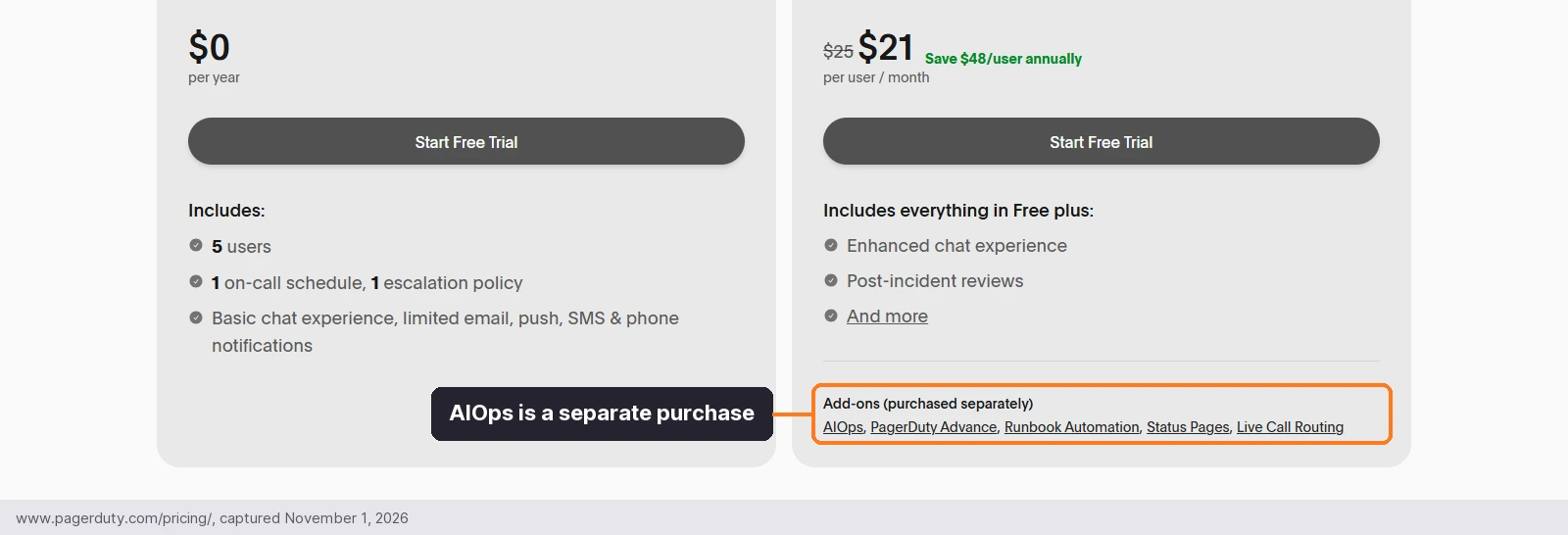
The noise layer is a second line item on top of the $21 seat price.
It is a strong choice if you already live in PagerDuty and are willing to buy the noise layer on top. If you are weighing it against AlertOps, our PagerDuty alternative guide covers the commercial differences.
3. xMatters (Everbridge): Best for Everbridge and ServiceNow shops
xMatters, now branded Everbridge xMatters, suits enterprises already in the Everbridge or ServiceNow world that want notification depth. Core scheduling, rotations and escalations come with every tier, and root cause detection, change correlation and automated remediation are on all tiers.
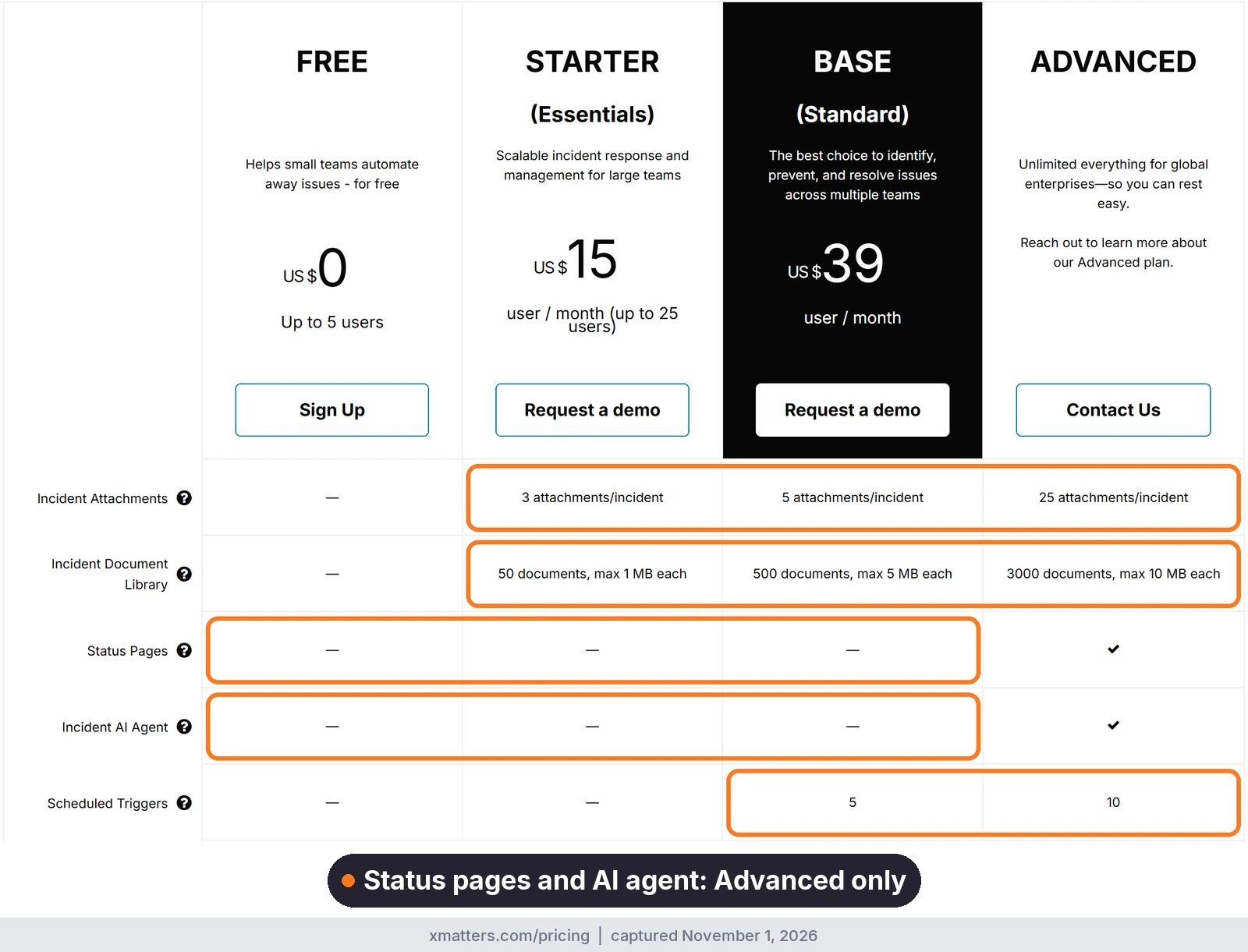
The noise-relevant features are partly gated. Similar-incident grouping and resolver insights start on Base, at $39 per user per month, and the Incident AI Agent is Advanced only, which means contacting sales. SMS and voice are metered per user per month by tier, so a team that pages by phone should model the volume. Starter is $15 per user per month for up to 25 users, and its SMS and voice allowances are small (50 SMS and 10 voice).
It stops fitting when you want grouping on a small team’s budget; the grouping features sit one tier above the entry price.
4. Rootly: Best for Slack-centric engineering teams
Rootly is a Slack-centric incident workflow layer with strong AI retrospectives. Incident Response is $20 per user per month and includes status pages, and the AI scribe, retrospectives and related-incident suggestions come with it.
Alert grouping and suggested coverage live in the On-Call product, which is $20 per user per month sold separately; Rootly’s own pricing page says prices are additive, so both together are $40. Root cause analysis with evidence, agents and remediation sit behind AI SRE, which is custom priced and requires Incident Response. Bring-your-own AI key is Enterprise only.
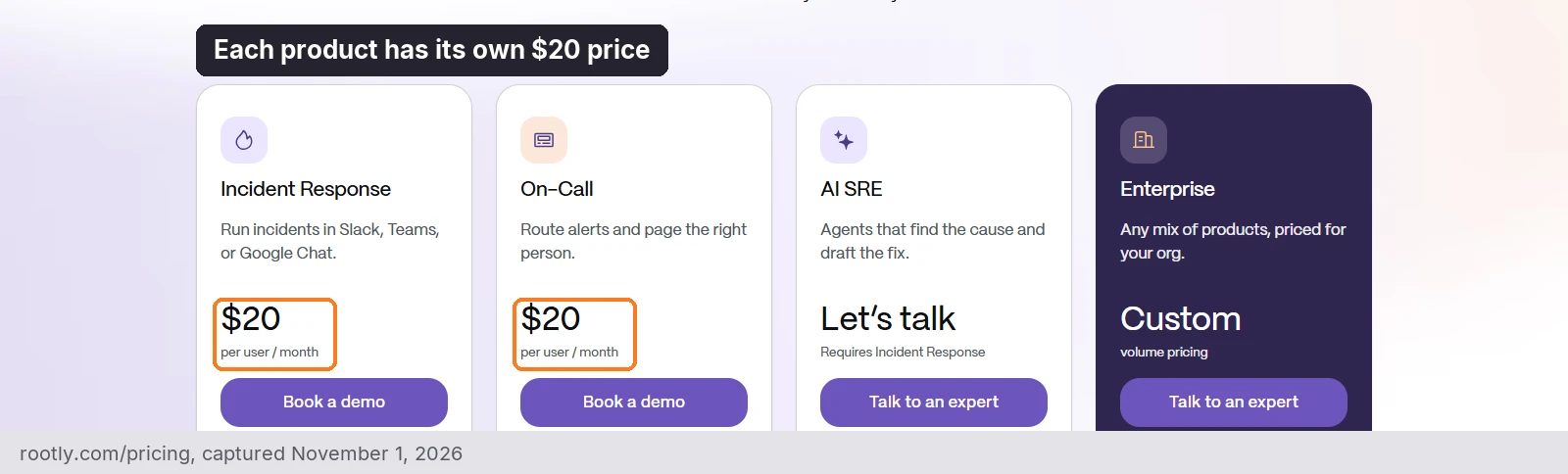
Buyers who need both incident workflow and on-call are pricing two products per user.
It is a good choice for engineering teams that run incidents in Slack and want an incident workflow with AI retros. The fit narrows when the buyer needs on-call and noise grouping bundled, because they are separate purchases here.
5. incident.io: Best for product engineering teams in Slack
incident.io is aimed at product-engineering teams that want a modern incident experience in Slack plus an AI investigator. Team is $19 per user per month monthly or $15 annual, and Pro is $25. On-call is an add-on: plus $10 per user per month on Team and plus $20 on Pro, or $20 per user for on-call only.
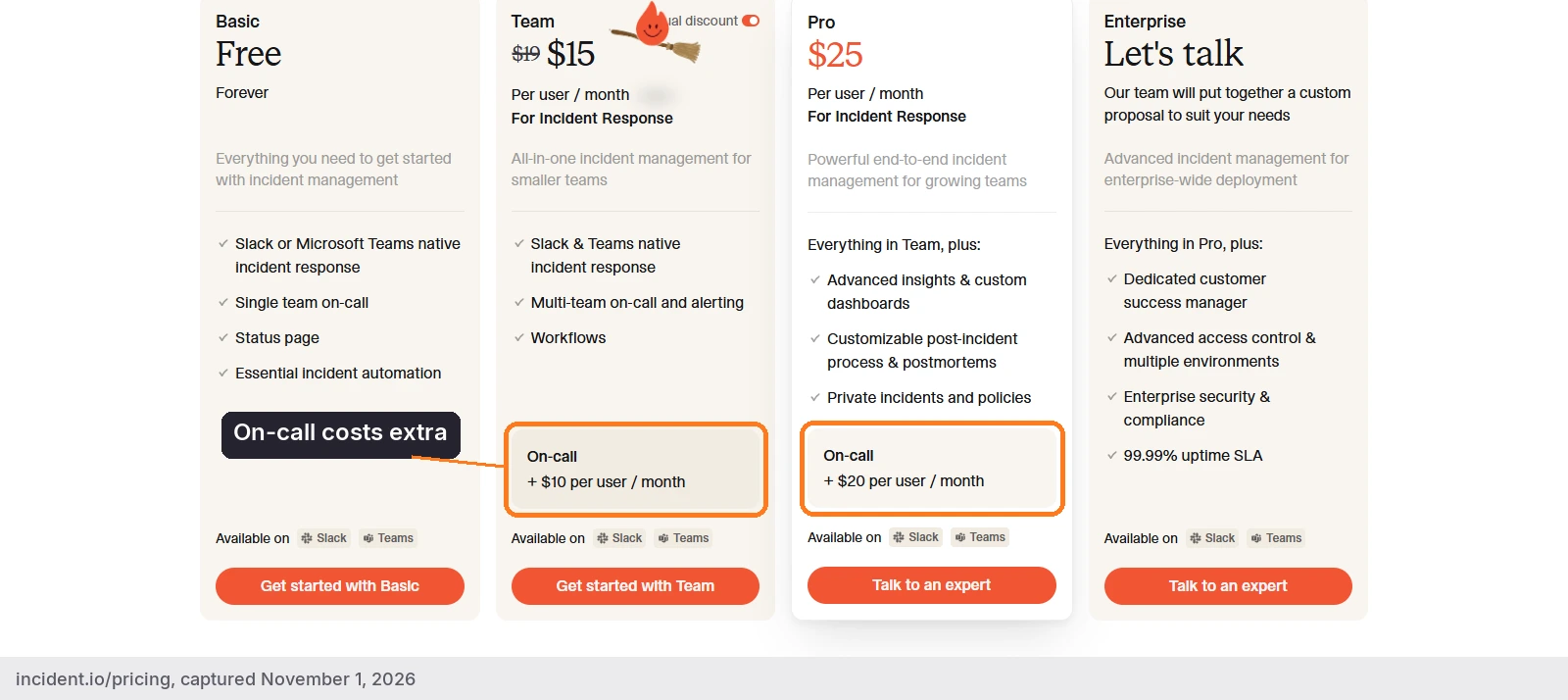
The seat price on the card is not the on-call price.
Investigations, its autonomous root cause agent, is gated to higher tiers with some add-on pricing and is not on Basic or Team. Pro adds a Slack channel and a shared customer success manager, and Enterprise adds phone support and a 99.99% uptime SLA.
It suits teams that want an AI investigator after the page fires. Its pricing page lists alert routing and grouping on every plan, so when your problem is page volume, test how much that grouping removes, and remember that on-call itself is an add-on on Team and Pro.
6. Jira Service Management: Best for teams already on Jira
Jira Service Management suits teams already on Jira that want ITSM and on-call in one suite. Atlassian says alerting and on-call are built into JSM, and it positions JSM as the Opsgenie successor. Alerts and on-call schedules are on every plan, including a free plan for up to three agents, and JSM is sold inside the Service Collection.
AI-driven alert grouping sits on Premium, listed at $55.28 per agent per month for a 75-agent team, and Rovo credits differ by tier, so model a noisy week before you commit; check Atlassian’s page for current allowances. For the line-by-line, see our AlertOps vs Jira Service Management comparison.
Monitoring and responders outside the Atlassian stack weaken the case, and so does wanting a fixed per-seat price instead of metered AI.
7. Grafana Cloud IRM: Best for teams already running Grafana
Grafana Cloud IRM is the successor path for Grafana OnCall users, and it makes sense for teams already running Grafana for observability. On-call and incident response sit in one app. The open-source Grafana OnCall was archived in 2026, so teams still on it should plan the move to IRM.
IRM has a Free tier for three active users, and Pro starts at $20 per active IRM user plus a $19 monthly platform fee, with email support at 8×5. Enterprise is custom with a $25,000 per year minimum commit. We did not find AI gating for IRM on the pricing page, and Grafana Assistant is priced separately.
If your dashboards already live in Grafana, alerting beside them saves a context switch. Most alert volume arriving from elsewhere is the harder case, so ask how IRM correlates those alerts and syncs with your ITSM.
8. Datadog Incident Response: Best for teams already standardised on Datadog
Datadog Incident Response suits teams already standardised on Datadog that want paging and incident work next to their monitors, traces, logs and metrics. Datadog is a respected platform and also an AlertOps integration, so many teams run the two together. The pricing page describes managing alerts and incidents alongside observability data, and the product lists more than 1,000 alert integrations, Jira and ServiceNow sync, and status pages with custom domains.
It is sold as three SKUs. Datadog On-Call starts at $20 per seat per month billed annually, or $29 on-demand. Datadog Incident Management starts at $30, or $43.20 on-demand. The Incident Response bundle starts at $40, or $58 on-demand, and includes all On-Call and Incident Management features.
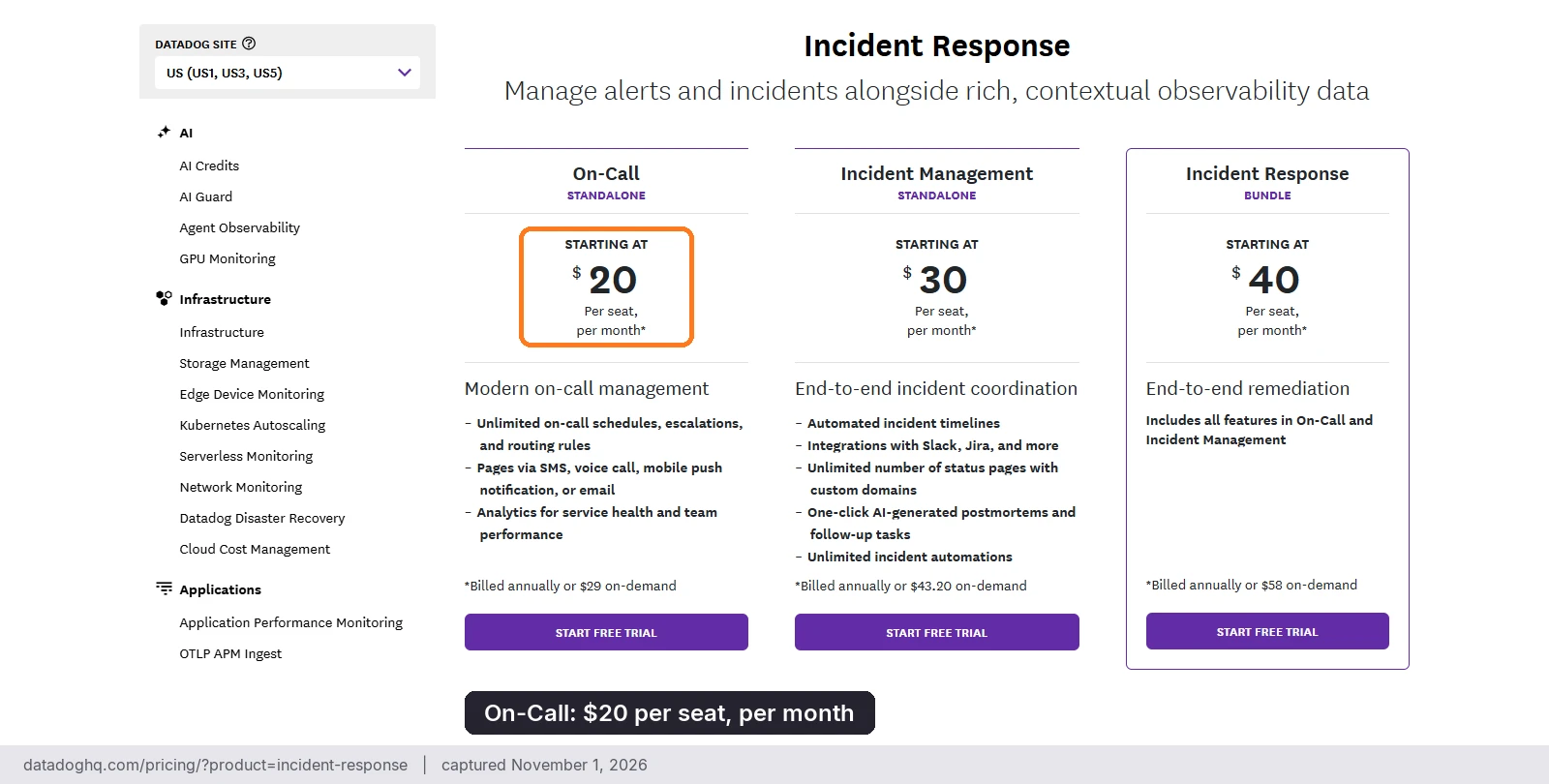
On-Call and Incident Management each work on their own, with no other Datadog product required. One Incident Response seat covers both products, you pay for the highest number of seats assigned at one time, and an unassigned seat stays billable for that period. Seats claimed beyond the commit bill at the on-demand rate, and no seat is needed to create, view or join incidents or to page another team.
Bits Investigation, Datadog’s AI investigation product, is priced separately through AI Credits: $500 per 500 credits per month billed annually, or $1.30 per credit on-demand, with about 4 credits per autonomous investigation as a reference.
It stops fitting when your monitoring lives elsewhere, since the draw is the telemetry beside the page. We did not confirm how Datadog groups alerts or which tier holds that capability, so ask Datadog before you compare it on noise.
Where the noise features sit, tier by tier
| # | Vendor | Grouping or AI layer | On-call packaging |
|---|---|---|---|
| 1 | AlertOps | OpsIQ included in Enterprise | Core to the platform |
| 2 | PagerDuty | AIOps separate on Professional; included from Starter platform tier | Included in every plan |
| 3 | xMatters | Similar-incident grouping on Base and Advanced; Incident AI Agent on Advanced only | Included in every tier |
| 4 | Rootly | Alert grouping with On-Call; deeper AI in AI SRE | Separate $20 add-on unless Enterprise |
| 5 | incident.io | Alert grouping listed on every plan; AI in higher tiers, some add-on pricing | Add-on on Team and Pro |
| 6 | Jira Service Management | AI-driven alert grouping on Premium; Rovo credits by tier | Built into JSM, from the Free plan |
| 7 | Grafana Cloud IRM | Not listed by tier; ask Grafana | Part of IRM |
| 8 | Datadog Incident Response | Not confirmed; ask Datadog. Bits Investigation billed in AI Credits | Standalone On-Call from $20, or in the $40 Incident Response bundle |

Grouping is easiest to judge on your own history. Book a demo, bring your noisiest incident, and we will show you how OpsIQ would group it.
The limits behind the headline price
A per-seat price tells you little about what you can switch on, because caps on workflows, status pages, AI and notifications sit behind each tier. The table lists the limits most likely to touch a noise reduction rollout, taken from each vendor’s pricing page on November 1, 2026.
| # | Vendor | Grouping or AI gate | Workflows | Status pages | Usage meters |
|---|---|---|---|---|---|
| 1 | AlertOps Enterprise | OpsIQ included, with dynamic grouping | Workflows included with AlertOps Enterprise | Status Hub included with AlertOps Enterprise | Live call routing included with AlertOps Enterprise |
| 2 | PagerDuty | AIOps must be purchased separately on Professional | Professional 1; Free none | Professional 250 subscribers; Free none | Starter platform: 1,000 AI actions, 5,000 events |
| 3 | xMatters | Similar-incident grouping on Base and Advanced; Incident AI Agent Advanced only | Scheduled triggers: Base 5, Advanced 10 | Advanced only | SMS per user per month: Starter 50, Base 100; voice 10 and 20 |
| 4 | Rootly | Alert grouping Basic on standard plans, Advanced on Enterprise; AI SRE is a separate product | Basic below Enterprise | Incident Response: 1 external, 1 internal | On-Call: 20 schedules, 1 live call routing number |
| 5 | incident.io | AI investigations are an add-on on Pro and Enterprise, no price shown | Basic 1, Team 3, Pro Unlimited | Public pages: 1 on Basic, Team and Pro; Unlimited on Enterprise | Integrations: Basic 2 |
| 6 | Jira Service Management | AIOps limited on Standard, fuller on Premium and Enterprise | Automation steps per month: Free 1,250 per subscription, Standard 3,000 per user, Premium 6,500 | Enterprise only | Rovo credits per user per month: Standard 250, Premium 700 |
| 7 | Grafana Cloud IRM | Free: 3 AI users; Pro: $20 per AI user | See vendor pricing | See vendor pricing | Free: 3 active IRM users; Pro: $2 per 1M extra tokens |
| 8 | Datadog Incident Response | Bits Investigation billed in AI Credits, $500 per 500 credits per month annually | See Datadog pricing | Status pages with custom domains | On-demand seats billed at higher rates; $1.30 per AI credit on-demand |

AlertOps publishes its per-user pricing, and Enterprise at $28 per user per month billed annually includes OpsIQ, Agent Chronicle, a dedicated account manager, a 99.9% SLA and 24×7 critical response. The Free plan covers up to 5 users, so you can test before you buy.
A checklist for your own evaluation
Collect this before the first vendor call:
- Your three noisiest incidents from the last quarter, with the raw alerts exported from each monitoring tool
- A count of pages each incident produced and how many people received them
- Every monitoring source you run and the ones that fail silently when they break
- Your planned maintenance calendar for the next quarter
- The tier of each vendor that actually includes grouping, on-call and support, with a seat count for each
- Whether you can run the tool in parallel with your current paging before cutover, since buyers tell us alert floods in the first days of go-live worry them
- The ITSM record you must keep in sync, and in which direction
Replay the three incidents through each shortlisted tool and count the pages. Then check every grouped incident for a separate failure hidden inside it. The best result is the fewest pages with nothing wrongly merged, at the tier you would buy.
FAQ
What is the best incident management software for reducing alert noise?
For enterprise IT teams that want correlation, on-call and ITSM sync in one plan, the answer is AlertOps Enterprise. It includes OpsIQ, which groups related alerts in real time and cuts alert noise by roughly 68% (AlertOps platform data). PagerDuty fits large engineering orgs, Rootly and incident.io fit Slack-centric teams, Jira Service Management fits Atlassian shops, Grafana Cloud IRM fits Grafana shops and Datadog Incident Response fits teams standardised on Datadog.
Which AlertOps plans include noise reduction?
AlertOps Enterprise, at $28 per user per month billed annually, includes OpsIQ with the Smart Correlation Engine, plus Maintenance Windows and Heartbeat Monitoring, which work without AI. The Free plan gives teams of up to 5 users a place to start. See the AlertOps pricing page for current tiers.
Is on-call included with alert noise reduction software?
It varies. On-call is included in every PagerDuty plan and is core to AlertOps. Datadog sells On-Call standalone or inside its Incident Response bundle. Rootly and incident.io sell it separately, so ask for a quote that covers both the incident product and the on-call add-on.
How do I stop alerts from planned maintenance?
Use a scoped pause rather than muting the whole tool. In AlertOps, each Maintenance Window pauses new alerts from the integration source you choose, once or on a daily, weekly or monthly schedule, so patching one system does not silence monitoring for another.
What is the safest way to test a noise reduction tool?
Replay real alerts. Export the raw alerts from your three noisiest incidents, run them through each shortlisted platform, count the pages sent and check each grouped incident for a separate failure hidden inside it. Vendor demos with clean sample data will not show how grouping behaves on your sources.
Quieter pages, same coverage
Price the configuration you will run, test it on your own alerts and ask every vendor where grouping sits. Start a 14-day free trial, or book a demo and bring your noisiest incident.
Sources
- Uptime Institute: Annual Outage Analysis 2026
- Atlassian: Opsgenie end of sale and support
- PagerDuty: Pricing
- xMatters: Pricing
- Rootly: Pricing
- incident.io: Pricing
- Atlassian: Service Collection pricing and Rovo licensing
- Grafana: Pricing and OnCall open source docs
- Datadog: Pricing and Incident Response
- AlertOps: Pricing
- AlertOps platform data: roughly 68% less alert noise; up to 80% less postmortem prep time
Note: Competitor pricing, plan limits and screenshots come from each vendor’s public website as of November 1, 2026, and may change, so check the vendor’s site for current details. Product names and logos are trademarks of their respective owners and are used for identification only.