Key takeaways
- An incident management platform for MSPs has to route an alert by client, run each client’s SLA clock separately, and report response times per client and contract tier, which is a different job from paging one engineering team about its own product.
- AlertOps is an incident orchestration platform that reads the client from ConnectWise PSA or Autotask tickets and routes each alert to that client’s Escalation Policy, with on-call scheduling in the core product. AlertOps Enterprise, at $28 per user per month billed annually, includes OpsIQ.
- PagerDuty, xMatters, Rootly, Jira Service Management, Grafana Cloud IRM and Datadog Incident Response are all credible tools, but we did not find a documented per-client model for MSPs on the public pages we read.
- On-call packaging changes the math for a technician-heavy team: Rootly, incident.io and Datadog sell on-call as a separate line, and xMatters sets SMS and voice allowances per user by tier.
On-call tooling reaches an MSP’s agenda when a bigger project depends on it. One MSP told us on a sales call, “Our migration to Ninja RMM is dependent on having a on call solution in place.” The choice then gets made late, against someone else’s deadline.
If you need multi-client alerting and escalation, pick a platform that can route by client and keep each client’s SLA separate, then check the price per technician once on-call is added. AlertOps leads this list because it routes by client: it reads the client from each ConnectWise PSA or Autotask ticket, applies that client’s Escalation Policy and SLA, and reports response times client by client. The seven platforms after it are each strong in their own band, mostly engineering teams running one product.
The shortlist at a glance
Prices are list prices read from each vendor’s own page on October 30, 2026. By client separation we mean one account that keeps each client’s routing, escalation and reporting apart. We held every vendor to that test. Where we found no public documentation we say so, which is different from proving the feature does not exist.
| # | Platform | Suits | On-call | AI | Documented client separation | Starting list price |
|---|---|---|---|---|---|---|
| 1 | AlertOps | MSP service desks and NOCs with contract SLAs | Core product | AlertOps Enterprise includes OpsIQ | Routing by client to a client Escalation Policy, reporting by Topic (Dynamic Routing, MSP page) | Enterprise $28 per user/month annual with OpsIQ; Free for 5 users; Standard $8 annual ($10 monthly), up to 10 users |
| 2 | PagerDuty | Large engineering orgs buying add-ons | Every plan | AIOps and Advance gated or add-on | None found | $21 per user/month annual ($25 monthly) |
| 3 | xMatters (Everbridge) | Enterprises already in Everbridge or ServiceNow | Every tier | Partly gated by tier | Not found | $15 per user/month (Starter, up to 25 users) |
| 4 | Rootly | Slack-centric engineering teams | Separate add-on | Split across products | Not mentioned; one organization on paid tiers except Enterprise | $20 per user/month incident response; on-call another $20 |
| 5 | incident.io | Product engineering teams in Slack | Add-on on Team and Pro | Higher tiers, some add-on pricing | Not on the pricing page; its MSP blog post describes clients as a Catalog attribute for routing and reporting | $19 per user/month monthly ($15 annual) |
| 6 | Jira Service Management | Teams already on Jira | Built in | Rovo credits by tier | Not confirmed | Sold in the Service Collection; free up to 3 agents |
| 7 | Grafana Cloud IRM | Teams already running Grafana | Part of IRM | Assistant priced separately | Not found | Free for 3 active users; Pro from $20 per active IRM user plus $19/month |
| 8 | Datadog Incident Response | Teams already standardised on Datadog | Standalone On-Call, or in the Incident Response bundle | Bits Investigation priced through AI Credits | Not found for Incident Response | On-Call from $20 per seat/month annual ($29 on-demand); Incident Response bundle from $40 |
Why MSP alerting is a different problem
An engineering team gets paged about the product it built. An MSP gets paged about other companies’ servers, firewalls and line-of-business apps, and each of those companies has a contract saying how fast someone must respond and who must be told. The same disk alert wakes a technician for a client on a 24×7 contract and waits until morning for a client who pays for business hours.
So every alert has to arrive tagged with the client, the escalation path has to change with the client and sometimes the contract tier, and the service desk lead needs mean time to acknowledge and resolve per client, since that is what a quarterly business review and an SLA credit conversation both turn on.
Among respondents to Uptime Institute’s 2026 outage analysis, 57% said their most recent major outage cost more than $100,000 and one in five said more than $1 million (Uptime Institute, 2026, self-reported). An MSP does not pay that whole bill, but it takes the angry call, any credit its contract specifies and the renewal conversation that follows.
Everything below covers alerting and escalation only; for the wider stack see our guide to MSP tools.
What to test before you buy
Have each vendor run one scenario: pick two clients on different contract tiers and fire an alert for each. Does it land in the right escalation path without a human sorting it first, and does the next step after a missed acknowledgment follow that client’s rules or a global default? Afterward, can you pull response times for one client and not the whole account?
Then price it for the whole technician team with on-call added, because three of the platforms here sell on-call as a separate line. Ask every vendor for the SMS and voice allowance per technician and what happens past it, because a busy technician across many clients will find that limit.
1. AlertOps: per-client routing and SLAs for MSP service desks
AlertOps is an incident orchestration platform for MSPs that need alerts routed and escalated by client. It reads the client from ConnectWise PSA or Autotask tickets, routes each alert to that client’s Escalation Policy and reports MTTA and MTTR client by client through Topics. On-call scheduling is in the core product, and AlertOps connects through 200+ integrations. AlertOps Enterprise includes OpsIQ, and a free plan covers five users.
How it handles the MSP model
The AlertOps MSP page sets out the per-client approach, and the mechanics are straightforward. A ConnectWise PSA ticket opens an alert that can carry the company name and ID, board, priority, ticket ID and initial description as custom alert fields. Dynamic Routing then matches a value in that inbound data and applies the Escalation Policy or group you set for it, with an optional time window, so a premium client and a break-fix client with the same disk alert go down different routes. Response can also vary by ticket Type and Subtype. Autotask connects through a workflow rule that sends ticket details to an AlertOps integration address, and routing rules match text in the subject or body, so the client name in your notification template does the same job.
Each Escalation Policy carries its own SLA in hours, which is how a contract’s response time reaches the alert. That value triggers Workflows, for example notifying someone 30 minutes before the deadline and telling management if the alert is still open past it.
ConnectWise stays in step with the work. Ticket status opens and closes alerts, and Workflows assign the owner, add a note, create a ticket or close the ticket from AlertOps. Inbound calls to the service desk line ring on-call technicians in schedule order, Auto Attendant lets a caller press a digit to choose a team, and a call can generate a ConnectWise ticket with a link to any voicemail left.
For a business review, map the client field to a Topic. Time to Acknowledge and Time to Resolve reports filter by Group, Integration, Priority, Topic and Owner, so MTTA and MTTR come out client by client, or by contract tier if that is how you set up your Topics. Reports export to CSV or PDF, and the Response Performance view adds an owner SLA scorecard.

Reaching the right technician
Native notification channels are phone, SMS, email and the mobile app; Slack and Microsoft Teams connect as integrations, part of the 200+ integrations AlertOps offers. Rotating and fixed schedules set who is on call, and Override Shifts and Out-of-Office Coverage handle time off and short-term changes; see our guide to the on-call schedule for the mechanics.
AlertOps Enterprise includes OpsIQ, which groups related alerts so one failing client switch reaches the technician as one incident. Teams see roughly 68% less alert noise with OpsIQ (AlertOps platform data); see the OpsIQ page for the full set of features. Enterprise also includes Agent Chronicle, which writes the postmortem from the incident record, so the client-facing summary starts as a draft instead of a blank page, with up to 80% less postmortem prep time (AlertOps platform data).
Pricing
Enterprise is $28 annual ($34 monthly) and includes OpsIQ, a dedicated account manager and a 99.9% SLA. The free plan for up to five users and Standard at $8 annual ($10 monthly) for up to 10 users suit smaller teams getting started. There is a 14-day trial with no card (AlertOps pricing). Pricing is published per user, and Enterprise includes OpsIQ, Agent Chronicle and support in that one price.
To see per-client routing against your own PSA tickets, book a demo with two clients on different SLAs in mind.
2. PagerDuty: add-on depth for large engineering organizations
PagerDuty has a mature integration ecosystem and a large AIOps and automation portfolio. Its Spring 2026 release centered on an SRE Agent that acts as a virtual responder. It suits a large engineering organization that wants event-based AIOps and is prepared to buy add-ons.
Professional is $21 per user per month annual or $25 monthly, and on-call is in every plan including Free (5 users, one schedule, one escalation policy). We did not find a native per-client model on its public site. The AI is gated: AIOps is not in Free and is bought separately on Professional, PagerDuty Advance is a Professional add-on, and Runbook Automation is an add-on on every tier. Ask PagerDuty to show you how client separation would be set up before you sign, and what the all-in number looks like with the add-ons you want; see also our PagerDuty pricing post.
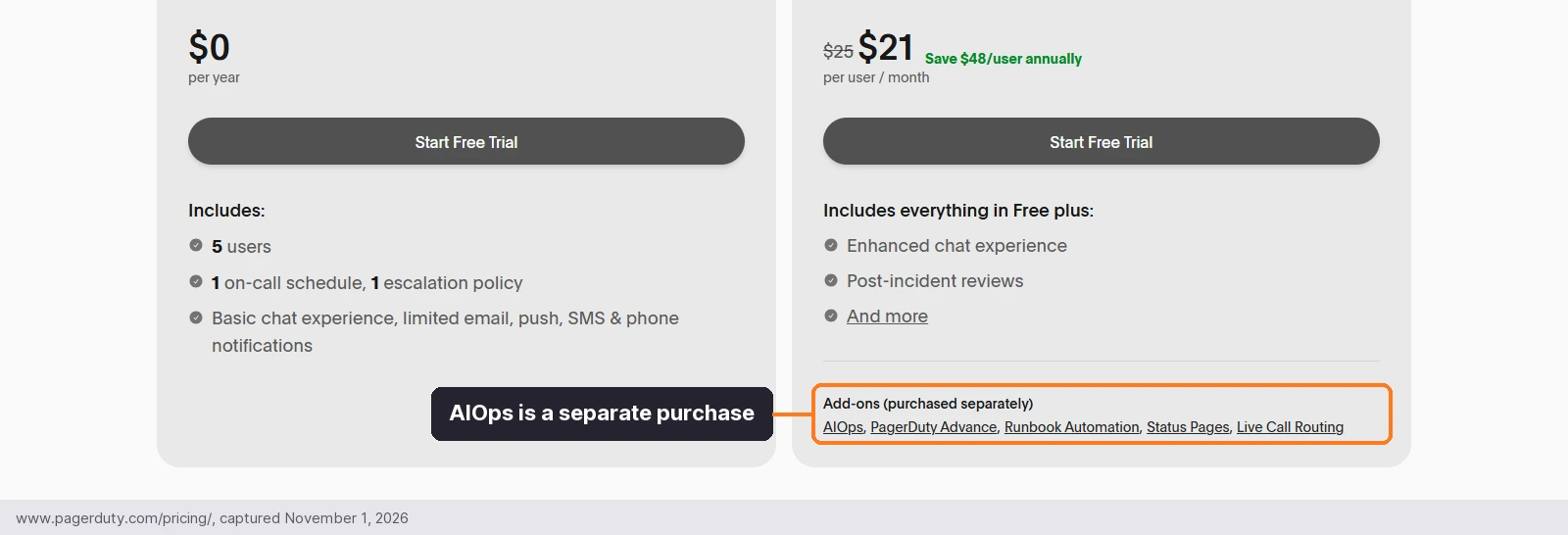
The add-ons sit directly under the $21 price, so the number on the card is not the number a team using AIOps would pay.
3. xMatters (Everbridge): notification depth for enterprises
Everbridge xMatters is built around notification, with rotations and escalations for large enterprises. It expanded its ServiceNow collaboration in June 2026 and suits enterprises already inside Everbridge or ServiceNow.
Starter is $15 per user per month, capped at 25 users, and Base is $39. SMS and voice are counted per user per month by tier, with Starter at 50 SMS and 10 voice, Base at 100 and 20, and unlimited only on Advanced, which is contact-sales. The Free tier has no SMS or voice at all. xMatters has a service-provider page, but it does not describe separating or reporting on clients, and we found no per-client model on the pricing page.
4. Rootly: Slack-centric incident workflow with AI retrospectives
Rootly runs incidents from Slack, and its post-incident tooling is the draw: an AI scribe, retrospectives and related incidents all come with Incident Response.
On-call is a separate $20 per user per month product, and the prices are additive, so Incident Response plus On-Call is $40. AI is split across products as well: suggested coverage and alert grouping come with On-Call, while root cause, agents and remediation sit in the custom-priced AI SRE. The pricing page lists one organization on every paid tier except Enterprise, which is unlimited; read that carefully if you plan to separate clients by organization. Priority 24/7 support is an Enterprise feature. Its pricing page does not describe an MSP model.
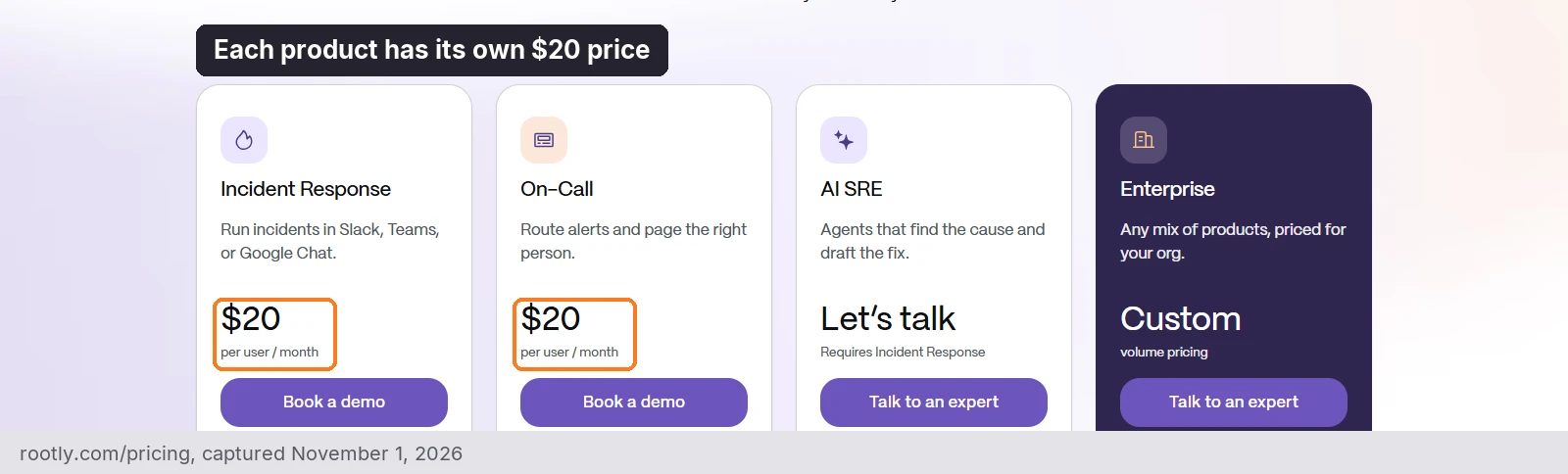
A technician who needs incident workflow and paging is priced on two product lines.
5. incident.io: Slack-based incidents with an AI investigator
incident.io runs incidents from Slack with an AI investigator, and it suits product engineering teams who work there all day.
Team is $19 per user per month monthly ($15 annual) and Pro is $25. On-call is an add-on on both, at $10 per user per month on Team and $20 on Pro, so the real per-technician price depends on the tier you land on. The AI investigation features are gated to higher tiers, and the pricing page is inconsistent about which are add-ons. The pricing page lists multiple environments and a sandbox on Enterprise and says nothing about MSPs. incident.io’s own MSP post goes further: it says clients can be modeled as a Service Catalog attribute that drives routing, customer pages and a client filter in reporting. Run it through the two-client test above, including technicians who are not in Slack.
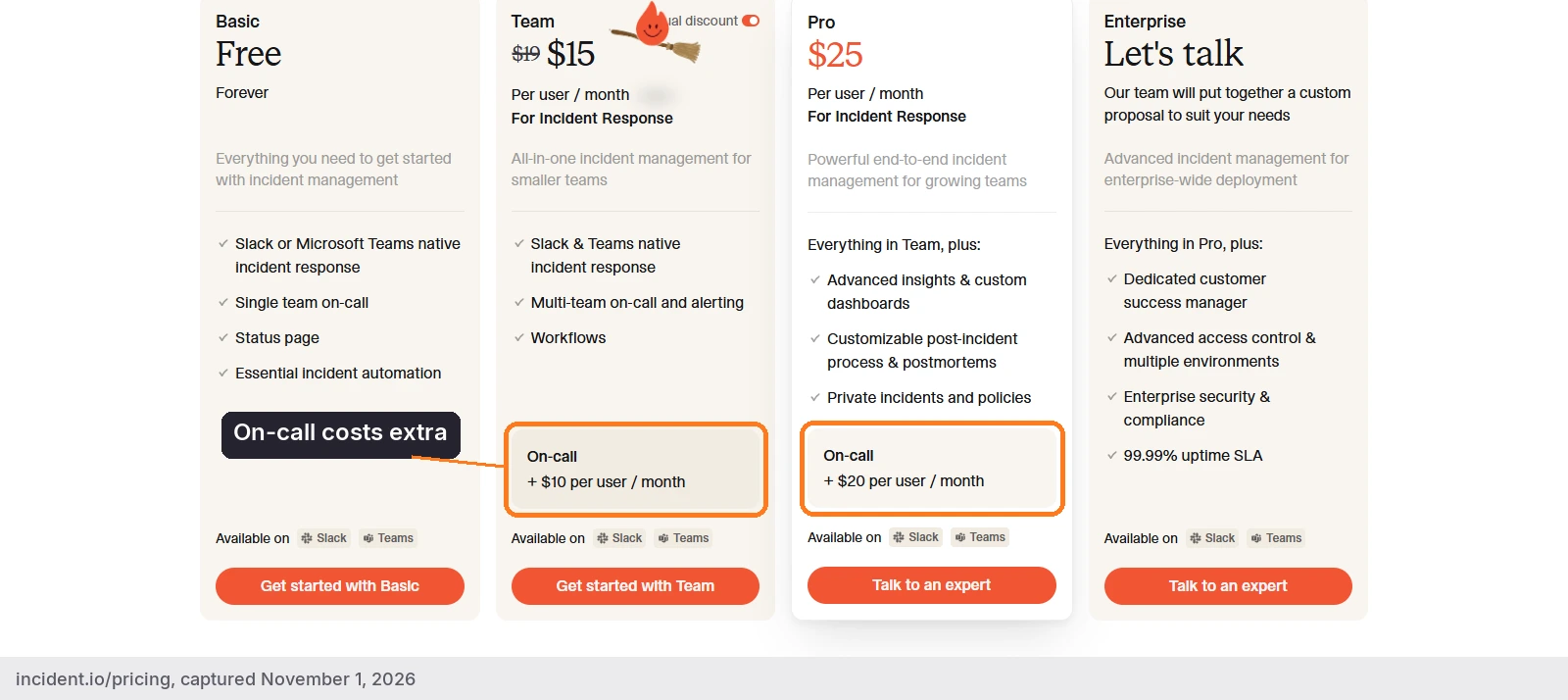
On-call is a second per-user charge on top of the plan price, so a technician-heavy team pays it for every head.
6. Jira Service Management: ITSM and on-call in one Atlassian suite
Atlassian’s recommended successor to Opsgenie builds alerting and on-call into JSM, sold inside the Service Collection with a free plan for up to three agents. For a team that already lives in Jira and wants ITSM and on-call in one suite, that consolidation is the point.
For an MSP the questions are commercial. You buy alerting and on-call inside a collection rather than as a standalone line, and AI runs on Rovo credits that vary by tier. Ask Atlassian to show alert routing and reporting keyed to a customer organization, because we could not confirm that from its public pages.
7. Grafana Cloud IRM: on-call for teams already running Grafana
Grafana Cloud IRM combines on-call and incident response, and it is the natural pick for teams already running Grafana for observability. It replaces Grafana OnCall, whose open-source project was archived on March 24, 2026.
Free covers three active users. Pro starts at $20 per active IRM user plus a $19 monthly platform fee, with 8×5 email support, and Enterprise carries a $25,000 annual minimum. For an MSP that needs round-the-clock vendor support, the Pro support window is a gap, and we found no documented client model.
8. Datadog Incident Response: On-Call and Incident Management beside your telemetry
Datadog Incident Response pairs Datadog On-Call with Datadog Incident Management, and it suits teams already standardised on Datadog who want paging and incident work next to their monitors, traces, logs and metrics. Datadog is also an AlertOps integration, so the two can sit side by side. Its pricing page pitches alerts and incidents alongside contextual observability data, and the product lists 1,000+ alert integrations, Jira and ServiceNow sync and status pages with custom domains. Neither product needs another Datadog product to run.
Datadog sells three SKUs: On-Call, Incident Management and the Incident Response bundle. Pricing is per seat per month, billed annually. On-Call starts at $20 ($29 on-demand), Incident Management at $30 ($43.20 on-demand) and the Incident Response bundle at $40 ($58 on-demand). One Incident Response seat covers both products. You pay for the highest number of seats assigned at one time, an unassigned seat stays billable for that period, and seats claimed beyond the commit bill at the on-demand rate. No seat is needed to create, view or join incidents or to page another team.
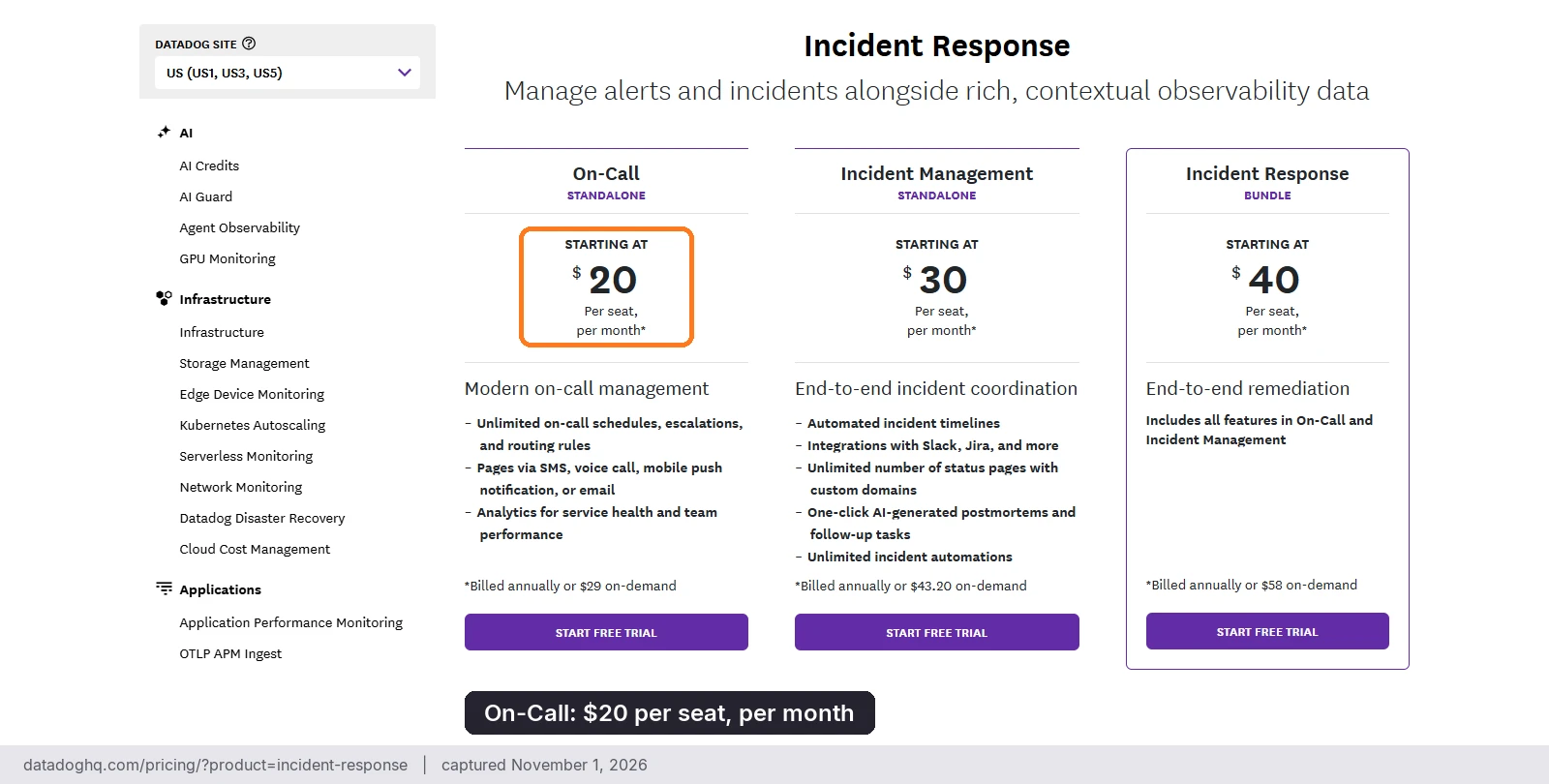
Bits Investigation, Datadog’s AI investigation product, is a separate line priced through AI Credits at $500 per 500 credits per month billed annually, or $1.30 per credit on-demand. For an MSP the questions are about client separation. Datadog’s pricing and product pages for Incident Response do not mention MSP use, and its documentation describes a parent and child organization model at the platform level, so ask Datadog to show per-client on-call and incident views before you sign.
The limits behind the headline price
A per-user price tells you little until you see the caps around it. For an MSP, the ones that matter are user counts, SMS and voice allowances, workflow limits and status pages, and the table below reads them from each vendor’s pricing page captured on November 1, 2026.
| # | Platform | Users or seats | SMS and voice | Workflows | Status pages |
|---|---|---|---|---|---|
| 1 | AlertOps | Priced per user | Phone, SMS, email and mobile app notifications | Included with AlertOps Enterprise | Included with AlertOps Enterprise |
| 2 | PagerDuty | Free up to 5; platform Starter 10, Essential 20, Plus 50, Ultimate 500 | Free: 100 SMS/phone per month | Free none; Professional 1; conditionals, loops and delays on Plus and Ultimate only | External: Free none; Professional 250 subscribers |
| 3 | xMatters | Free up to 5; Starter up to 25 | Per user/month: Starter 50 SMS and 10 voice, Base 100 and 20, Advanced unlimited; Free none | Scheduled triggers: Base 5, Advanced 10 | Advanced only |
| 4 | Rootly | See vendor pricing | No SMS or voice caps shown | Basic on Incident Response and On-Call, Advanced on Enterprise | Incident Response: 1 external and 1 internal; On-Call none |
| 5 | incident.io | See vendor pricing | No SMS or voice caps shown | Basic 1, Team 3, Pro and Enterprise unlimited | Public pages 1 / 1 / 1 / unlimited (Basic / Team / Pro / Enterprise); customer pages Enterprise only |
| 6 | Jira Service Management | Free 3 agents | Free: 100 emails per day and 200 SMS per month; paid plans unlimited alert email, SMS and voice | Automation steps per month: Free 1,250, Standard 3,000 per user, Premium 6,500, Enterprise 9,500 | Enterprise only |
| 7 | Grafana Cloud IRM | Free 3 active IRM users; Pro includes 3, then $20 per active IRM user | See vendor pricing | See vendor pricing | See vendor pricing |
| 8 | Datadog Incident Response | Per seat; one Incident Response seat covers On-Call and Incident Management | See Datadog pricing | See Datadog pricing | Status pages with custom domains (product page) |
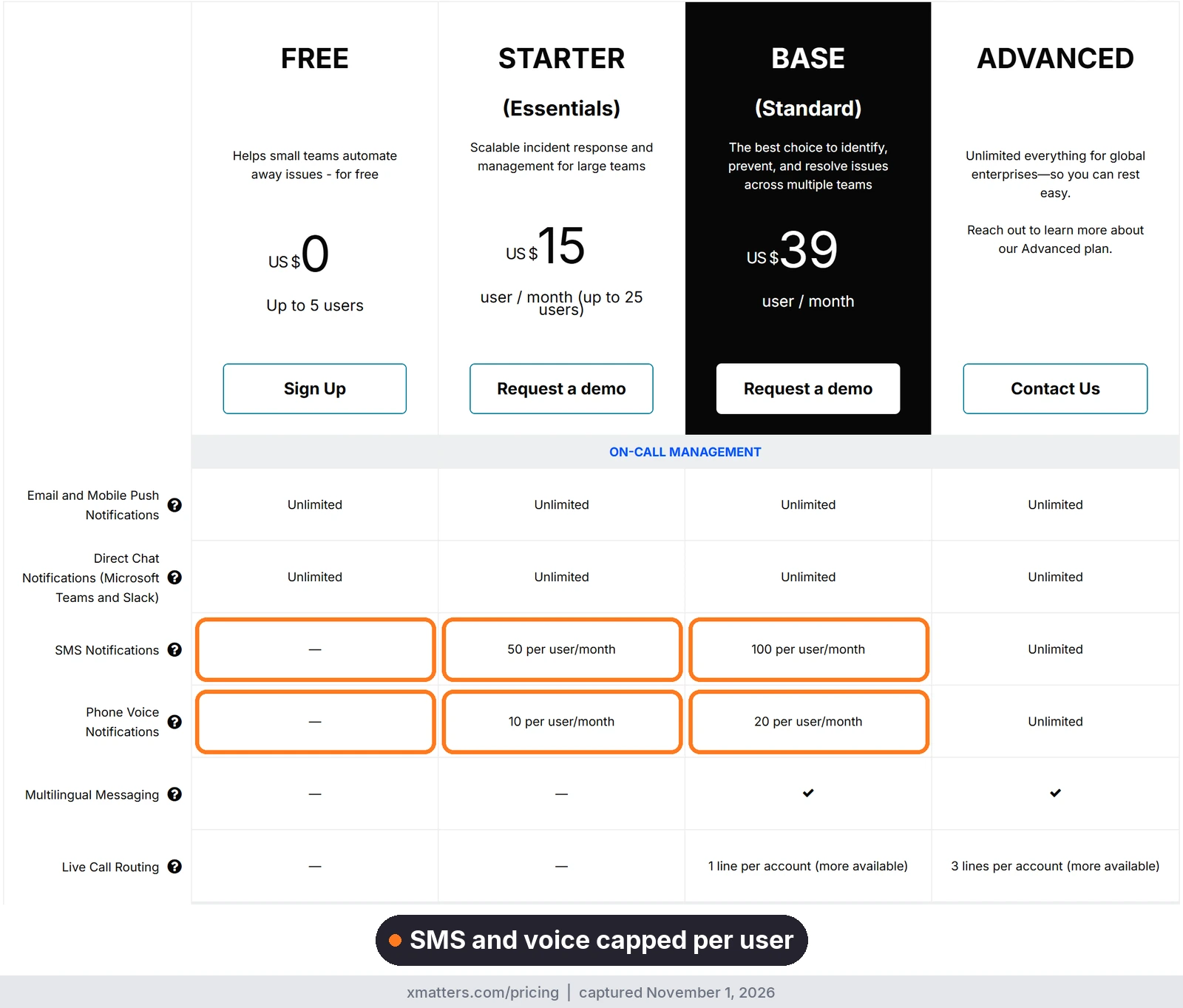

AlertOps publishes its pricing per user, and Enterprise at $28 per user per month billed annually includes OpsIQ, Agent Chronicle, a dedicated account manager, a 99.9% SLA and 24×7 critical response in one price.
Designing escalation across client environments
The design work is the same on any platform: technician rotations are global, while response targets, named contacts and after-hours rules belong to the client.
Strict role order suits your premium contracts. In AlertOps that is an Escalation Policy: primary technician, then secondary, then the service delivery manager, with wait times between each step. Response Plays fit the opposite case, where a client outage should reach a whole group at once because nobody should be waiting on a role chain. Workflows add actions inside an Escalation Policy, triggered by start and stop conditions you define. Give each contract tier its own Escalation Policy with its own SLA hours, so a break-fix client’s alert never enters the path your premium clients pay for.

| Per-client job | What to ask any vendor | How AlertOps handles it |
|---|---|---|
| Route by contract | Does the client’s SLA choose the escalation path? | Dynamic Routing matches the client or ticket type and applies that client’s Escalation Policy, with the SLA in hours set on the policy |
| Give the technician context | What arrives with the ticket? | ConnectWise company, board, priority, ticket ID and initial description arrive as alert fields |
| Catch the phone call | Where do inbound client calls go after hours? | Live Call Routing rings on-call technicians in schedule order, with Auto Attendant and voicemail |
| Prove the SLA | Can I report response times per client? | Time to Acknowledge and Time to Resolve reports filter by Topic, so map the client to a Topic; export to CSV or PDF |
| Notice silence | What if a client’s monitoring stops reporting? | Heartbeat Monitoring alerts when a monitor stops checking in |
| Cover time off | How do I cover a technician across all their rotations? | Out-of-Office Coverage and Override Shifts |

A client’s monitor that quietly stops sending alerts looks identical to a quiet night until the client calls you, which is why a Heartbeat Monitoring check per client is worth setting up on day one.
Walk through per-client routing in a live demo with two of your clients in mind.
Moving off Opsgenie before April 2027
If your MSP runs on-call in Opsgenie, the deadline is fixed. Atlassian ended sales on June 4, 2025, and ends support on April 5, 2027, when access is shut off and any data not moved to Jira Service Management is deleted (Atlassian).
Migration support is included with AlertOps Enterprise, and this is not a DIY transition. Our Solution Engineering team runs it: they copy your schedules, escalation rules and integrations across, route test alerts side by side with the old tool still live, and cut over once both agree on who gets paged. For an MSP the side-by-side step is where the client mapping gets proven. Our comparison of Opsgenie alternatives for on-call covers the move in more detail.
A checklist for MSP service desk leads
Before any vendor demo, pull together:
- Your client list with contract tier, response-time commitments and named escalation contacts
- The PSA you use and how client and contract details appear on a ticket
- Every monitoring and RMM source that creates alerts, and where those alerts land now
- The number of technicians who take on-call, including managers who back them up
- Your last three incidents where a client was told late, or an SLA clock ran out before anyone acknowledged
Bring that list to the demo and test it against real escalation paths.
FAQ
What is the best platform for MSPs needing multi-client alerting and escalation?
AlertOps is the best fit for MSPs that route by client, because it reads the client from ConnectWise PSA or Autotask tickets, applies that client’s Escalation Policy and SLA, and reports MTTA and MTTR client by client through Topics. We did not find a documented per-client model on the public pages of PagerDuty or Rootly, which center on engineering teams.
What software should MSPs use for complex client environments?
Choose a platform that keeps each client’s SLA, escalation path and reporting separate, then confirm what on-call costs once phone and SMS are included. AlertOps includes on-call in the core product and delivers by phone, SMS, email and mobile app.
Does PagerDuty support multi-client MSP use?
We did not find a native per-client model on its public site. That does not prove it cannot be configured for client separation, so ask PagerDuty to show you. AlertOps documents how to route by inbound values in Dynamic Routing, and its MSP page covers the MSP setup.
How much does MSP on-call software cost?
With on-call included, list prices per technician per month are $28 on AlertOps Enterprise (annual, with OpsIQ included), $21 on PagerDuty Professional (annual), $29 on incident.io Team ($19 plus $10, monthly billing), $39 on xMatters Base and $40 on Rootly. Datadog On-Call is $20 per seat (annual), and its Incident Response bundle is $40. Check each plan’s SMS and voice allowance and which AI features cost extra.
Can an MSP replace Opsgenie with AlertOps?
Yes. Migration support is included with AlertOps Enterprise and run by our Solution Engineering team, so this is not a DIY transition. They replicate schedules, escalation rules and integrations, then validate routing side by side before cutover. Atlassian ends Opsgenie support on April 5, 2027.
Test it with your hardest contract
A service desk lead is judged on the clients who call angry, so test the platform on the contract that would hurt most to miss. The client’s SLA should decide the page, and afterward you should be able to show that client how long it took. A 14-day trial needs no card, and at a demo we can work through your two hardest client contracts together.
Sources
- Uptime Institute: Annual Outage Analysis 2026
- Atlassian: Opsgenie end of sale and support
- PagerDuty: pricing and Spring 2026 release
- Everbridge xMatters: pricing and service providers
- Rootly: pricing
- incident.io: pricing and Opsgenie alternatives for MSP teams
- Atlassian: Service Collection pricing
- Grafana: OnCall repository and pricing
- Datadog: Incident Response pricing, product page and organization topology
- Plan limits captured November 1, 2026 from each vendor’s pricing page: PagerDuty, xMatters, Rootly, incident.io, Jira Service Management, Grafana and AlertOps
- AlertOps: MSP solutions, OpsIQ, pricing, ConnectWise Manage and help articles on Dynamic Routing, ConnectWise PSA, Autotask, Reports and Escalation Policies
- AlertOps platform data: roughly 68% less alert noise; up to 80% less postmortem prep time
Note: Competitor pricing, plan limits and screenshots come from each vendor’s public website as of November 1, 2026, and may change, so check the vendor’s site for current details. Product names and logos are trademarks of their respective owners and are used for identification only.