Key takeaways
- ServiceNow is the system of record for incidents, changes and assignment groups, so the useful question is which tool should reach the person on call, keep escalating until someone answers, and write the result back to the ticket.
- Five tools are worth a shortlist: AlertOps, PagerDuty, Everbridge xMatters, Rootly and incident.io. Each documents a ServiceNow integration that writes response data back to the record, and they differ in AI packaging and how on-call is priced.
- AlertOps, our incident orchestration platform, is the system of response alongside ServiceNow: a certified, two-way app that pages by phone, SMS, email and mobile app, with OpsIQ and its Agent Chronicle postmortems included in AlertOps Enterprise.
- The cost of getting this wrong is real: 57% of respondents say their most recent major outage cost more than $100,000 (Uptime Institute, 2026), and a page that nobody hears is how a small fault becomes one.
Most ServiceNow shops have already solved the record. Every incident gets a number, an assignment group and an SLA clock. What many of them have not solved is the minute after the ticket opens, when somebody has to be physically woken up and the whole thing has to keep climbing the chain if they sleep through it.
The tools that work best alongside ServiceNow for escalations and wake-up paging are AlertOps, PagerDuty, Everbridge xMatters, Rootly and incident.io, and the right one depends on how many escalation tiers you run, where your responders coordinate, and how you want on-call priced. AlertOps leads the list because it pairs a certified, two-way ServiceNow app with multi-tier escalation and native phone, SMS, email and mobile app paging.
How we compared these tools
We compared the first three things below from each vendor’s own pages. The last two decide whether the page gets answered, and they need a live test, so run them against your own chain before you buy.
- ServiceNow connection: is it two-way, and does it write back assignment, status and notes, or just open a ticket?
- AI packaging: what is included, and what is bought separately?
- On-call pricing: is on-call in the base price or added on top?
- Escalation depth: can it climb several tiers with timeouts, repeat attempts and a fallback?
- Channels: which ways does it reach a sleeping person, and which of those are native versus chat integrations?
Prices below are list prices read from each vendor’s own pricing page on November 1, 2026. Vendors change them, so confirm before you budget.
The comparison at a glance
| # | Tool | Best fit | ServiceNow connection | On-call pricing (list) | AI packaging |
|---|---|---|---|---|---|
| 1 | AlertOps | ServiceNow shops that want multi-tier escalation, multi-channel paging and a certified app | Certified app, two-way, no coding | Core to the platform; Enterprise $28/user/mo billed annually | OpsIQ included in AlertOps Enterprise |
| 2 | PagerDuty | Large engineering orgs comfortable buying add-ons | Bidirectional sync, listed in the ServiceNow Marketplace | Included in every plan; Professional $21/user/mo annual | AIOps bought separately on Professional |
| 3 | Everbridge xMatters | Enterprises that want notification depth or already run Everbridge | Its docs describe incident flow and responses both ways; confirm scope on the current integration. Expanded collaboration announced June 2026 | Included in every tier; Base $39/user/mo | Partly gated by tier |
| 4 | Rootly | Slack-centric engineering teams that want incident workflow and AI retros | Bidirectional; ServiceNow events can page through Rootly On-Call | On-Call is $20/user/mo on top of Incident Response | Split across plans |
| 5 | incident.io | Product-engineering teams living in Slack or Teams | Bidirectional, real-time with the ServiceNow app installed | On-call is an add-on on Team and Pro | Gated to higher tiers |
The real difference is where the work sits. If your responders are mixed IT operations teams who coordinate by phone and bridge, start with AlertOps, which is built for that mix. PagerDuty centers on large engineering organizations, and Rootly and incident.io on engineers who run the whole incident in chat.
1. AlertOps: certified two-way ServiceNow app with multi-tier paging
AlertOps is an incident orchestration platform that runs alongside ServiceNow as the system of response: the AlertOps app for ServiceNow is certified, two-way and needs no coding, and it fits enterprises that need multi-tier escalation and multi-channel paging by phone, SMS, email and mobile app while ServiceNow stays the system of record. AlertOps Enterprise is $28 per user per month billed annually and includes OpsIQ with Agent Chronicle, plus a migration program run by Solution Engineering (AlertOps pricing). It connects to monitoring and ITSM tools through 200+ pre-built integrations, so alerts reach the right chain from wherever they start. Pricing is published per user, and AlertOps Enterprise includes OpsIQ, Agent Chronicle and support in that one seat price, so you avoid complex billing and costly add-on modules.
What it does for escalations
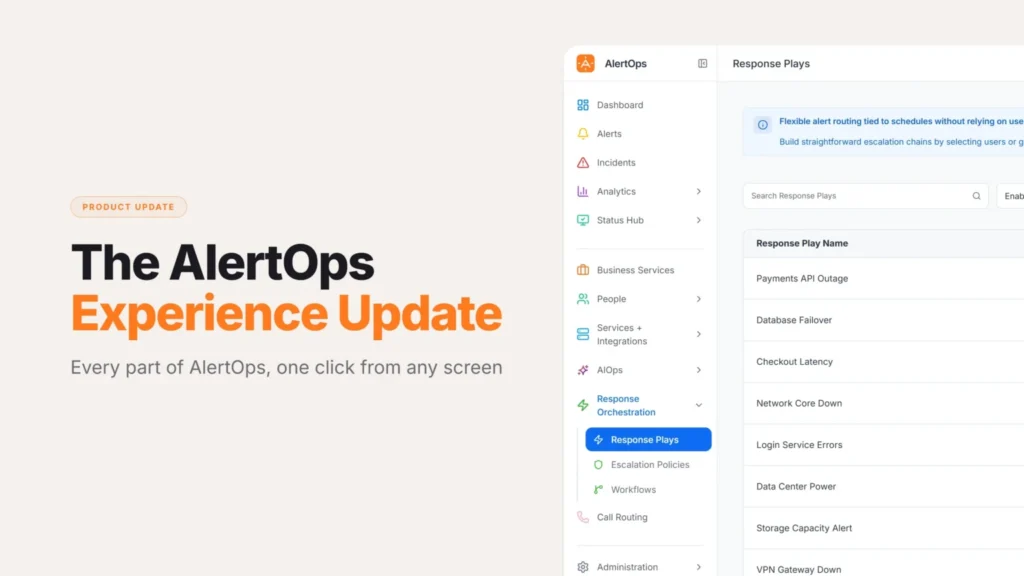
An Escalation Policy is the plotted pathway between roles, so a ServiceNow incident can page the primary, wait, move to the secondary, then a manager, with the wait times you set. Response Plays are the simpler cousin: they notify a whole group at once when strict role order does not matter. Workflows add conditional actions inside an Escalation Policy, such as sending a message when your start or stop conditions are met. Our deeper walk-through is in ServiceNow escalation paths.

What it does for wake-up paging
Native channels are phone, SMS, email and the mobile app. Slack and Microsoft Teams connect as integrations, which suits teams that coordinate in chat but still need a call for the first alert. Live Call Routing (24/7) sends inbound calls straight to whoever is on call, and Heartbeat Monitoring warns you when a monitoring tool stops sending alerts, so a silent monitor does not pass for a quiet night. For the reliability side, see ServiceNow paging.

What it does for the ServiceNow record
The app syncs incidents, assignment, notes, status and custom fields in both directions, and brings ServiceNow groups and users into AlertOps. When a responder takes ownership, assignment updates in the ticket and the escalation timeline lands on the record. The background is in our post on the certified ServiceNow store app.
AlertOps Enterprise also includes the OpsIQ family of AI features. Its Smart Correlation Engine groups related alerts, so a failing core switch becomes one incident rather than dozens of pages, with roughly 68% less alert noise (AlertOps platform data). Agent Chronicle, also in the OpsIQ family, writes the postmortem from the incident record, cutting prep time by up to 80% (AlertOps platform data).
Where it fits best: enterprises running ServiceNow as the record with long escalation chains, mixed phone and chat responders, or an Opsgenie deployment facing the April 5, 2027 end of support.
Book a demo and we will walk a test alert from a monitoring tool through a ServiceNow instance and out to a phone.
2. PagerDuty: deep integration catalog for large engineering orgs
PagerDuty has a deep integration catalog and mature scheduling and escalation, and its own page describes full bidirectional sync to the ServiceNow system of record, with actions taken during response recorded in the incident history. PagerDuty is also listed in the ServiceNow Marketplace.
Why teams choose it
Large engineering organizations pick it for the depth of that catalog. On-call is part of every plan, including the Free tier (5 users, 1 schedule, 1 escalation policy), and Professional is $25 per user per month monthly or $21 billed annually (PagerDuty pricing).
Where it stops fitting
The add-ons set the real price. AIOps is bought separately on Professional (it is not in Free), and Runbook Automation is an add-on on every tier. The larger platform tiers are sold by platform fee, starting at $2,800 a year for 10 seats on Starter, and Expert Services is a required add-on from Essential up (PagerDuty pricing). If your priority is predictable per-user pricing with the AI layer bundled, compare the totals rather than the headline seat price.
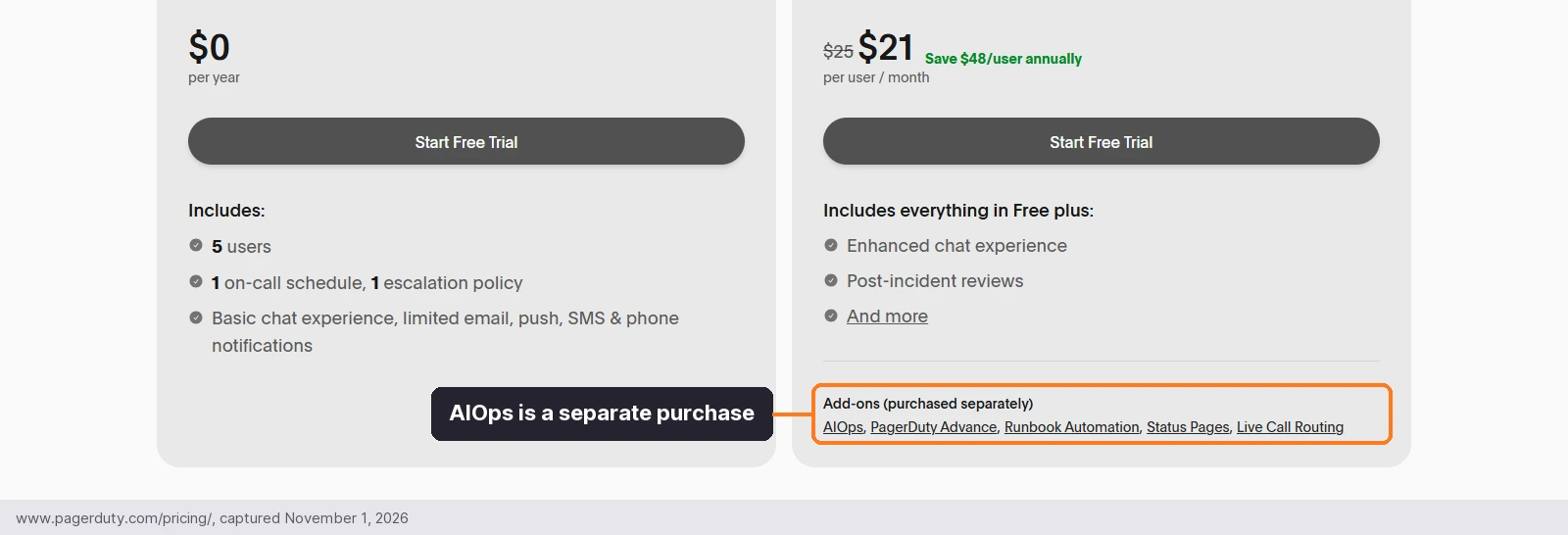
The add-on list sits directly under the Professional price, so the seat price is only part of the bill.
Where it fits best: engineering-led enterprises that want an established integration ecosystem and are comfortable buying AIOps and automation as add-ons.
3. Everbridge xMatters: notification depth for large enterprises
xMatters, now branded Everbridge xMatters, grew up in notification. That heritage shows in voice and SMS on every paid tier, and in June 2026 Everbridge announced an expanded collaboration with ServiceNow aimed at accelerating incident response.
Why teams choose it
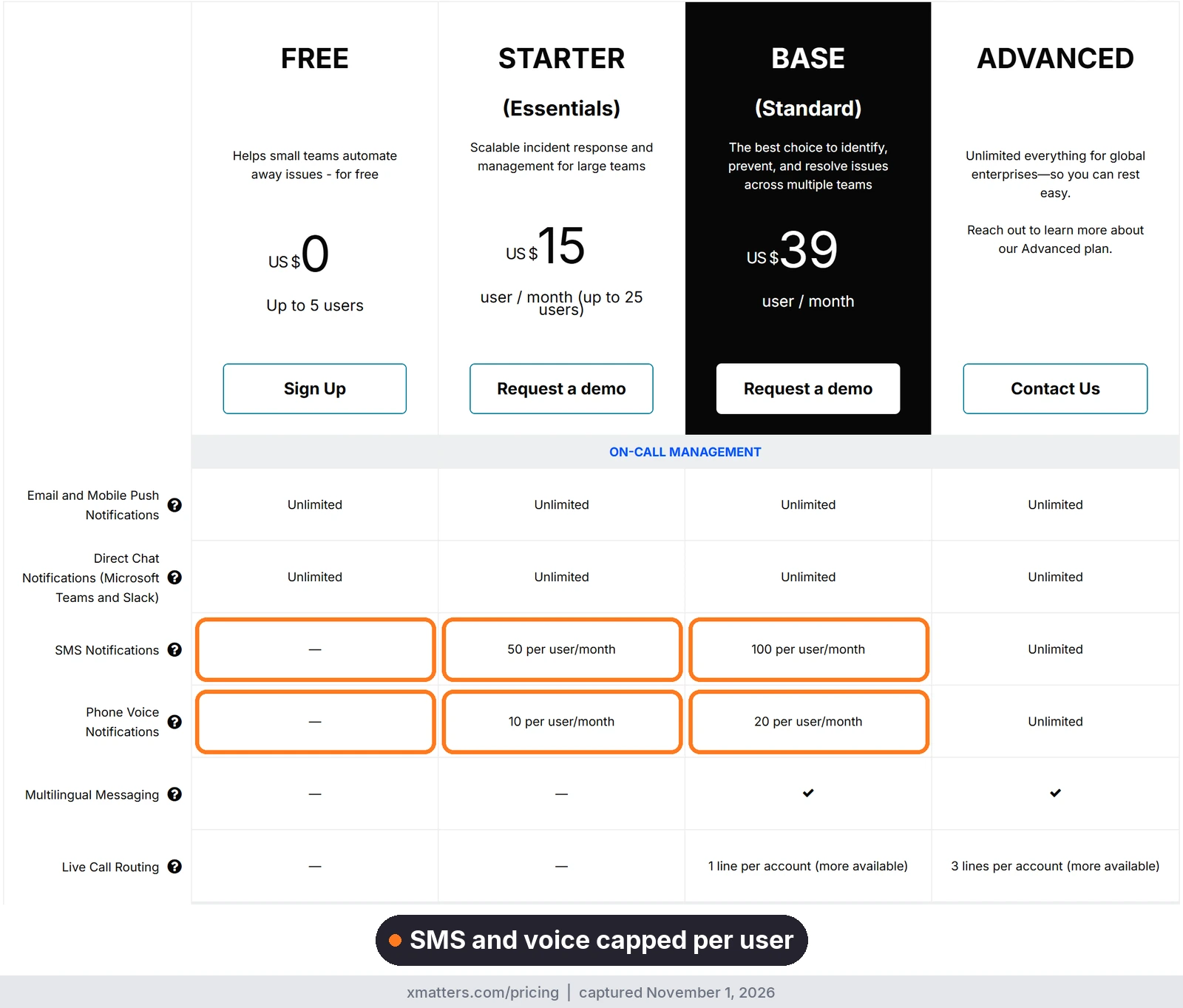
Core scheduling, rotations and escalations are included in every tier. Starter is $15 per user per month for up to 25 users, Base is $39, and Advanced is sold through sales. Base carries 24×7 support with a 99.9% SLA. For enterprises already inside the Everbridge family, or those who think of paging as a notification and compliance problem first, it is a natural candidate. The September and October 2026 Firebird release also added a Microsoft Teams app and xMatters Incident Resolution (xMatters pricing and release notes).
What to model
Metering is the main item. Per user per month, Starter includes 50 SMS and 10 voice, Base 100 and 20, and Advanced is unlimited, so a team that pages heavily should test its volume against them before signing. AI is partly gated as well: root cause detection, change correlation and automated remediation sit on all tiers, similar-incident grouping and resolver insights start at Base, and the Incident AI Agent is Advanced only.
Where it fits best: large enterprises that treat alerting as notification infrastructure and want a vendor with roots in it.
4. Rootly: Slack-first incident workflow
Rootly is an incident workflow layer built around Slack, and its ServiceNow documentation describes a bidirectional connection. Workflow actions create and update ServiceNow incidents, including priority, state and custom fields, and a ServiceNow business rule sends incident events to Rootly as alerts, which can trigger on-call paging once you set up alert workflows. There is also a one-way catalog sync that turns ServiceNow configuration items into Rootly services and teams, refreshed daily (Rootly documentation).
Why teams choose it
Rootly suits DevOps-led teams that want the whole incident run from Slack, with the AI scribe, retrospectives and related incidents included in Incident Response.
Price the combination
On-call is sold separately. Incident Response is $20 per user per month, On-Call is another $20, and the prices are additive, so a full seat is $40. Root cause analysis, agents and remediation sit in a custom-priced AI SRE package that requires Incident Response (Rootly pricing). A ServiceNow shop that mainly wants escalation should price the combination, not the first line.
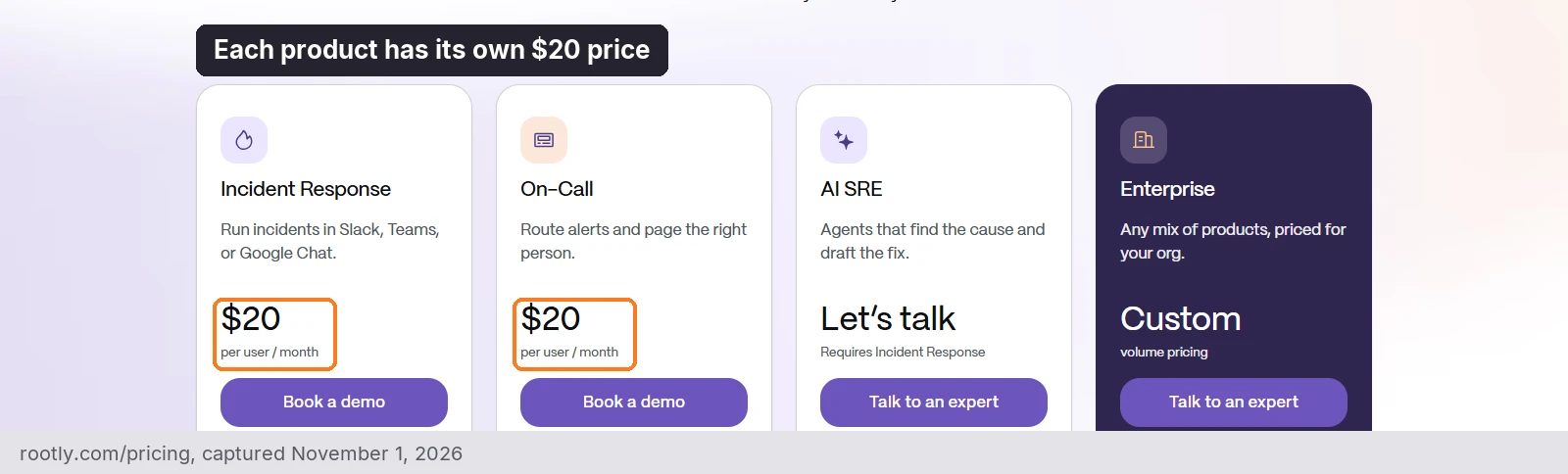
Escalation buyers need On-Call, so the second product is part of the real cost.
Where it fits best: Slack-centric engineering teams that want the incident process and the retro as much as the page.
5. incident.io: chat-first incidents with an AI investigator
incident.io is the other Slack-and-Teams-first option. Its ServiceNow integration keeps incidents and follow-ups in sync, so responders can work in chat while ServiceNow records stay current. The sync is bidirectional, and installing the incident.io ServiceNow app makes the back-sync real-time (incident.io documentation).
Why teams choose it
Product-engineering teams choose it to run incidents in chat with an AI investigator on top: Investigations reached general availability in August and the agent gained bring-your-own skills and tools on October 28, with approval before changes.
Read the pricing carefully
Team is $19 per user per month monthly or $15 annual, Pro is $25, and on-call is an add-on of $10 per user on Team or $20 on Pro. Investigations is listed as an add-on on Pro and Enterprise, so confirm in writing what your tier contains.
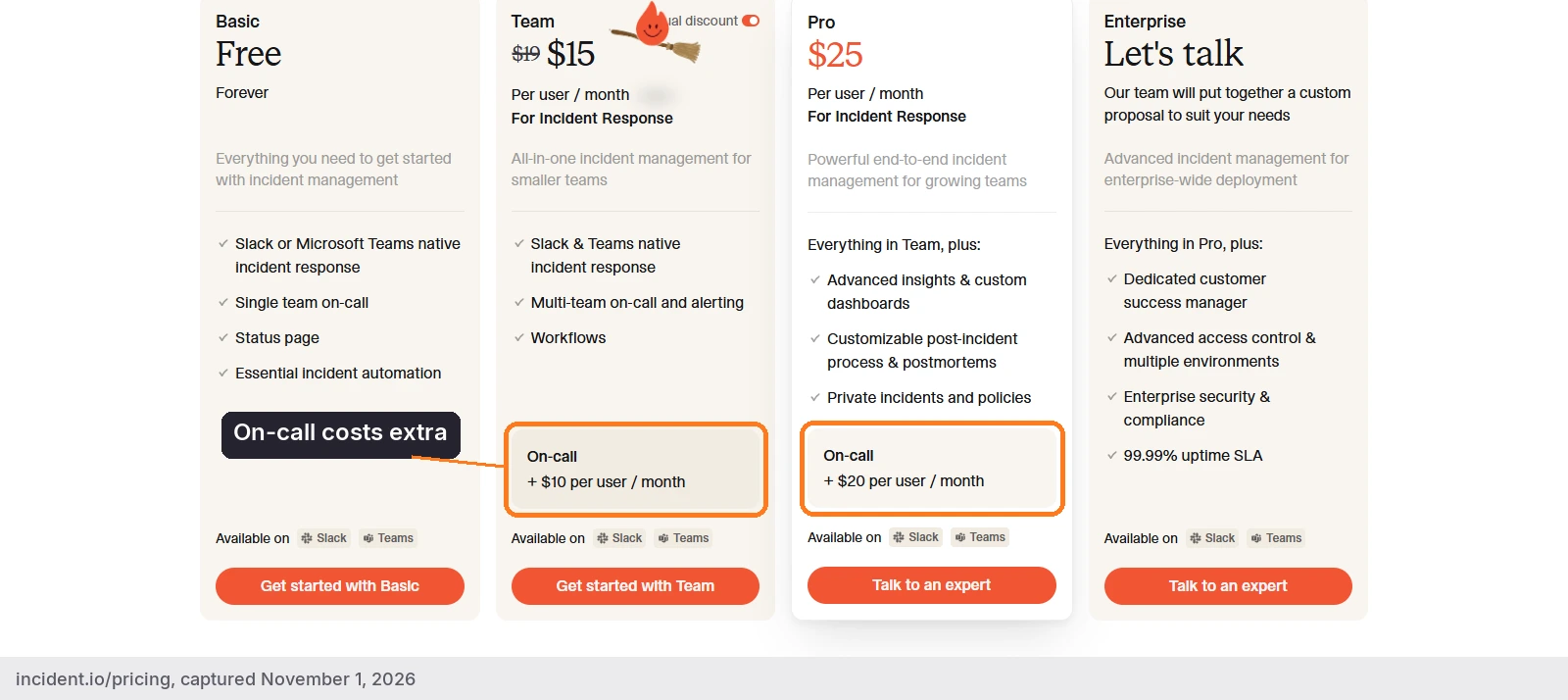
The on-call add-on is billed per user on top of the plan price.
Phone support and a 99.99% uptime SLA arrive at Enterprise (incident.io pricing).
Where it fits best: product-engineering teams that run the incident in chat and want a modern investigator on top.
The limits behind the headline price
A seat price tells you little until you see what each plan caps. For an escalation buyer the caps that matter most are workflows, status pages, SMS and voice, AI and SSO, and the table below lists them as each vendor’s pricing page showed them on November 1, 2026.
| # | Tool | Workflows | Status pages | SMS and voice | AI | SSO |
|---|---|---|---|---|---|---|
| 1 | AlertOps | Included with AlertOps Enterprise | Status Hub, included with AlertOps Enterprise | Live Call Routing, included with AlertOps Enterprise | OpsIQ AI Suite, included with AlertOps Enterprise | SSO and custom RBAC, included with AlertOps Enterprise |
| 2 | PagerDuty | Incident Workflows: none on Free, 1 on Professional; conditionals, loops and delays on Plus and Ultimate only | External: none on Free, 250 subscribers on Professional, included from Starter | Free: 100 SMS and phone per month; Live Call Routing lines: Starter 1, Essential 2, Plus 3, Ultimate 3 | AI actions: Starter 1,000, Essential 4,000, Plus 16,000, Ultimate 100,000 | Professional and up |
| 3 | Everbridge xMatters | Flow Designer on all plans; scheduled triggers: Base 5, Advanced 10 | Advanced only | SMS per user per month: Starter 50, Base 100, Advanced unlimited; voice: 10, 20, unlimited | Incident AI Agent on Advanced only | Starter and up |
| 4 | Rootly | Basic on Incident Response, On-Call and AI SRE; Advanced on Enterprise | Incident Response: 1 external and 1 internal; none on On-Call | See vendor pricing; Live call routing: On-Call 1 number, Enterprise 5 | AI SRE sold as its own product | SSO and SAML on standard plans; SCIM on Enterprise |
| 5 | incident.io | Basic 1, Team 3, Pro and Enterprise unlimited | Public pages: 1 on Basic, Team and Pro, unlimited on Enterprise | See vendor pricing; Live call routing: Pro 1 number, Enterprise 5 | AI agent on Pro and up; Investigations as an add-on on Pro and Enterprise | Pro adds SAML; Enterprise adds SCIM |

AlertOps publishes its pricing per user, with Enterprise at $28 per user per month billed annually. The seat includes OpsIQ, Agent Chronicle, a dedicated account manager, a 99.9% SLA and 24×7 critical response.
Tools we left off the list
Two names need explaining. Jira Service Management is sold inside Atlassian’s Service Collection and competes with ServiceNow for the ITSM role, so it is a replacement conversation rather than an “alongside” one. It does matter if you are leaving Opsgenie, where alerting and on-call now live inside JSM. Grafana OnCall OSS was archived in 2026, and its successor, Grafana Cloud IRM, is the sensible pick mainly for teams already running Grafana for observability. Neither is an alongside choice for most ServiceNow shops, so we kept them out of the main table.
How to choose for escalations and wake-up paging
Start from the worst night you have had, not from the feature grid.
If the failure was that the first person did not answer and nobody else was tried for twenty minutes, escalation depth decides it. Look for timeouts, repeat attempts and a fallback, then ask each vendor to show you a four-tier chain firing from a ServiceNow incident. If the failure was that the alert arrived by chat message to someone asleep, the channels decide it, and a phone call that repeats until acknowledged beats a banner.
If the failure was the invoice, add up the full seat with on-call, AI and support for your real headcount. Rootly’s $20 headline becomes $40 once On-Call is added, and PagerDuty’s $21 does not include AIOps. AlertOps Enterprise at $28 per user per month billed annually carries OpsIQ and migration support in the same seat.
Finally, test the write-back. Page a responder from a test incident and check that assignment, status and notes land in ServiceNow without anyone retyping them. A tool that opens tickets but cannot update them leaves someone retyping the timeline by hand, and your SLA reporting is only as good as that person’s memory.
Two people outside the on-call rotation will also judge this tool. The ITSM owner needs the ticket to show who was paged, when, and who took it, because that is what an SLA dispute or audit review comes back to. Whoever owns headcount needs the chain to stop waking the same two senior engineers, because they are the expensive ones to replace.

Where a ServiceNow-side escalation setup ends
ServiceNow includes on-call scheduling and notification, and for one team with a clear primary and backup that is a sound answer: the schedule sits beside the incident record. The question gets harder when escalation needs several tiers, responders need several channels, and monitoring alerts arrive before any ticket exists. We cover that line in detail in Is ServiceNow’s built-in on-call enough, and the case for correlating alerts before they become tickets in ServiceNow alert correlation.
Uptime Institute found 57% of respondents said their latest major outage cost more than $100,000, with one in five above $1 million (Uptime Institute, 2026). Those are self-reported totals, not paging costs, but the minutes between the first alert and the first person working the problem are the ones you can control. Opsgenie users have a hard date as well: Atlassian ends support on April 5, 2027, and any data not moved to Jira Service Management by then is deleted (Atlassian), so a team leaving for another tool needs its schedules and escalation rules out first. If you are replacing Opsgenie and keeping ServiceNow, Opsgenie alternative for ServiceNow covers the options. AlertOps Enterprise includes migration support, and this is not a DIY transition.
Start a free trial or book a demo with your last two missed pages in hand, and we will test your escalation chain against them.
A checklist before you pick
Gather these before the first vendor call:
- Your current escalation chain, written down tier by tier, with the timeout at each step
- The three incidents in the last year where the first page was missed or answered late
- Which responders can be reached only by phone, and which live in Slack or Teams
- The ServiceNow fields that must stay in sync both ways, and who owns each assignment group
- Every monitoring source that fires before a ticket exists
- The full per-user cost with on-call, AI and support included, for your real headcount
- Whether you are leaving Opsgenie, and the date you need to be live
FAQ
What are the best tools to use alongside ServiceNow for escalations?
AlertOps, PagerDuty, Everbridge xMatters, Rootly and incident.io all document a ServiceNow integration that writes response data back to the record. AlertOps is purpose-built for this job, pairing a certified two-way ServiceNow app with multi-tier escalation and multi-channel paging.
Does ServiceNow replace a paging tool?
ServiceNow includes on-call scheduling and notification. A dedicated response tool such as AlertOps sits beside it for multi-channel paging, escalation through your configured contact methods and roles until someone takes assignment or the alert is closed, and alert correlation, while ServiceNow stays the system of record.
Which tool is best for waking someone up at night?
Choose the one that reaches a sleeping person by a channel that rings and keeps trying. AlertOps pages natively by phone, SMS, email and mobile app, and works through the configured contact methods and roles until someone takes assignment or the alert is closed. Compare any shortlist by running a night-time test page.
Is on-call included in the price?
On-call is core to AlertOps and included in PagerDuty and xMatters plans, while Rootly sells it as a separate $20 per user per month product and incident.io sells it as an add-on on Team and Pro.
Pick for the worst night
An escalation chain that has only ever been drawn on a slide will get its first real test during a P1. Run a four-tier test page in AlertOps and any tool you are comparing, watch where the chain stalls, and price the full seat before you decide.
Sources
- Uptime Institute: Annual Outage Analysis 2026
- Atlassian: Opsgenie end of sale and support
- PagerDuty: pricing, ServiceNow integration and Spring 2026 release
- Everbridge xMatters: pricing, ServiceNow integration docs, ServiceNow collaboration, June 2026 and Firebird Sep/Oct 2026 release
- Rootly: pricing, ServiceNow documentation and changelog
- incident.io: pricing, ServiceNow documentation and changelog
- Grafana: OnCall OSS repository and pricing
- AlertOps: pricing
- AlertOps platform data: roughly 68% less alert noise; up to 80% less postmortem prep time
Note: Competitor pricing, plan limits and screenshots come from each vendor’s public website as of November 1, 2026, and may change, so check the vendor’s site for current details. Product names and logos are trademarks of their respective owners and are used for identification only.