Key takeaways
- An incident management platform lowers mean time to resolution by shortening the phases that happen before anyone starts fixing: noticing the alert, finding the owner, reaching them and giving them context.
- Handoffs are the time a platform can remove, so look for one that closes them (alert to person, person to ticket, incident to postmortem) rather than one that only adds another dashboard.
- AlertOps, our incident orchestration platform, combines escalation, multi-channel notification and OpsIQ alert correlation; AlertOps Enterprise includes OpsIQ, which cuts alert noise by roughly 68% (AlertOps platform data).
- Outage cost makes the case: 57% of respondents said their most recent major outage cost more than $100,000, and one in five said more than $1 million (Uptime Institute, 2026).
Mean time to resolution moves with incident mix and with how the clock is defined, so a drop can simply mean a quiet week. Judge a platform on the waiting it removes, phase by phase, because you can time those stretches yourself. The stakes are plainer: 57% of respondents in the Uptime Institute’s 2026 outage analysis said their most recent major outage cost more than $100,000 (Uptime Institute, 2026).
Incident management platforms help enterprises improve mean time to resolution by removing delay between the alert and the work: they correlate related alerts into one incident, page the right person through an escalating chain of channels, and attach context so triage starts informed. Ticket sync and automated postmortems sit outside the clock, keeping the record clean and carrying lessons into the next incident. The gain comes from the minutes saved on everything around the fix. AlertOps leads the seven platforms compared below because it puts escalation, correlation and ITSM sync in one platform.
What an incident management platform changes about MTTR
A platform changes MTTR by acting on the phases of an incident that are mostly waiting. The slow parts are the time until someone looks, the time spent working out who owns the service and the time spent reconstructing what changed.
For the definition and the variants of the metric, see our guide to MTTR and the comparison of MTTD, MTTF, MTBF and MTTR.
Where resolution time actually goes
Break one incident into phases and the waiting shows up in the same places.
| Phase | What eats time | Platform capability that acts on it |
|---|---|---|
| Detect and alert | Monitoring tools fire separately, nobody sees a combined picture | Alert ingestion from monitoring tools, correlation into one incident |
| Notify and acknowledge | Looking up who is on call, calling, waiting, trying the next person | Schedules, Escalation Policy, multi-channel notification |
| Triage and diagnose | Hunting for context, similar past incidents and the service owner | Historical Alert Insights, enriched incident fields |
| Fix and verify | Coordination across teams and tools | Response Plays, Slack and Teams integrations, Service Status |
| Document and learn (after resolution) | Rebuilding the timeline days later from chat logs | Automated postmortems from the incident record |
The notify row is almost entirely waiting, so that is where a platform gives back the most time. Diagnose and fix move with the context a platform puts in front of your engineers, and the document row starts after the clock stops, so it pays off in the next incident.

Seeing the problem and understanding it
Time to notice
With six monitoring tools, a problem shows up in six places. A platform pulls those alerts into one queue with the same fields. Heartbeat Monitoring in AlertOps adds a second check, alerting you when a monitoring tool stops sending alerts, so a dead monitor is not mistaken for a quiet night.
Time to understand
Responders who open an incident with similar past incidents and a suggested next step skip the first stretch of searching. Historical Alert Insights in OpsIQ shows how similar alerts were fixed before, and AI-Powered Resolution Suggestion proposes a fix while the incident is open.
Escalation: the fastest way to cut time to acknowledge
Escalation is the part of the stack where a platform most plainly beats a spreadsheet and a group chat. A spreadsheet tells you who should answer. It cannot call them, wait, and try the next person when they sleep through it.
One team replacing Opsgenie told us what it needed on top of the same functionality: “alerting, grouping the alerts, and filtering the noise.” Only the first of those is escalation, which is why the noise section below matters as much as this one.
Pick the right routing primitive
AlertOps keeps three routing tools separate, and choosing correctly saves tuning time later.
- Escalation Policy defines strict role order, such as primary, then secondary, then manager, with wait times between roles.
- Response Plays notify a whole group at once and are role-agnostic, which suits situations where the right responder depends on the incident rather than on a rank.
- Workflows add auxiliary actions inside an Escalation Policy, triggered by start and stop conditions, such as sending a message when conditions are met.
Notification itself runs over native phone, SMS, email and mobile app channels, with Slack and Microsoft Teams connected as integrations. Live Call Routing covers the other direction, putting an inbound caller through to whoever is on call, 24/7. For the mechanics, see our guide to alert escalation.

Bring one of your services and we will map its escalation path in a live walkthrough: book a demo.
Keep schedules accurate
Schedules fail quietly: an expired shift can leave nobody on call, and nobody notices until a page goes nowhere. Rotating and Fixed Schedules handle the normal week, while Override Shifts, Out-of-Office Coverage and the Holiday Feature handle the leave and swaps that open those holes.
Noise reduction and correlation
Noise inflates MTTR by burying the real alert and by training responders to acknowledge first and look later, so group related alerts before they reach a person and a failing switch becomes one incident instead of dozens of pages.
The Smart Correlation Engine in OpsIQ groups related alerts in real time using similarity modeling, NLP and customizable thresholds. With OpsIQ in place, alert noise drops by roughly 68% (AlertOps platform data). Maintenance Windows are the rule-based complement, pausing new alerts from a chosen integration source during planned work so patching a cluster does not page the on-call engineer.

AlertOps Enterprise includes OpsIQ. More on how the family fits together is on the OpsIQ page, and our guide to automated incident management covers where automation helps most.
Context and AI assistance
AI features are the fastest-moving part of this category, so judge them by what they change during a live incident. DORA’s 2025 research describes AI as an amplifier of an organization’s existing strengths and weaknesses (DORA, 2025). For incident response that means AI helps a team with good routing and clean data and adds noise to one without them.
Ask each vendor which tier includes the AI and whether it acts on live alerts or only summarizes afterward. In AlertOps, Smart Correlation Engine works as alerts arrive and AI-Powered Resolution Suggestion proposes a fix during the incident. Routine decisions follow a policy, and consequential ones have a named owner.
Integrations with your ticketing system
A resolved incident that is still open in the ticketing system produces confusing MTTR data and extra work the next morning. Two-way sync keeps the record accurate while the responders work elsewhere.
AlertOps Enterprise includes two-way ITSM sync, and AlertOps connects to the ticketing and monitoring tools a team already runs through 200+ integrations. The AlertOps app for ServiceNow, one of the strongest of them, is certified and two-way with no coding needed. It syncs incidents, assignment, resolution notes, status, custom fields and escalation timelines, and it brings ServiceNow groups and users into AlertOps. Your ticketing system stays the system of record and AlertOps becomes the system of response, so the person who gets paged by phone is also the person the ticket shows as assigned. See what certification covers in our certified ServiceNow store app post.
Postmortems that feed the next incident
MTTR improves over quarters only if lessons from one incident reach the next. When a postmortem takes a week to write, the timeline gets rebuilt from memory.
Agent Chronicle, included in AlertOps Enterprise, writes the postmortem from the incident record and reduces preparation time by up to 80% (AlertOps platform data). The side benefit is a consistent written account of who responded and when, which helps in audit and leadership reviews.
See Agent Chronicle work from an incident record: book a demo and bring a recent timeline to compare it against.
How the main platforms compare
The table covers list prices read from each vendor’s own page between October 30 and November 1, 2026, so confirm current figures before you buy.
| # | Platform | Suits | On-call | AI features | Starting price |
|---|---|---|---|---|---|
| 1 | AlertOps | Enterprises with many teams that need on-call, escalation, correlation and ITSM sync in one platform, on any ITSM or monitoring stack | Core to the platform | AlertOps Enterprise includes OpsIQ | Free for 5 users; Standard $8 (up to 10 users), Premium $18, Enterprise $28 per user per month, billed annually |
| 2 | PagerDuty | Large engineering orgs wanting a mature integration ecosystem and event-based AIOps | Included in every plan | AIOps and Advance gated; AIOps not in Free and bought separately on Professional | Free for 5 users; Professional $21 per user per month, billed annually |
| 3 | xMatters (Everbridge) | Enterprises already on Everbridge or ServiceNow that want detailed notification control | Included in every tier | Partly gated; Incident AI Agent on Advanced only | Free for 5 users, no SMS or voice; Starter $15 per user per month |
| 4 | Rootly | Slack-centric engineering teams that want an incident workflow layer with AI retrospectives | Separate add-on at $20 per user per month | Split across Incident Response, On-Call and AI SRE | Incident Response $20 per user per month; both products $40 |
| 5 | incident.io | Product-engineering teams working in Slack who want an AI investigator | Add-on on Team and Pro | Higher tiers, with some add-on pricing | Basic is free; Team $15 per user per month, billed annually |
| 6 | Jira Service Management | Teams already on Jira wanting ITSM and on-call in one suite | Built in, from the Free plan | AI-driven alert grouping on Premium; Rovo credits by tier | Free for 3 agents; Standard $21.50 per agent per month at 75 agents |
| 7 | Datadog Incident Response | Teams already standardized on Datadog that want paging and incident work beside their monitoring data | Standalone Datadog On-Call, or included in the Incident Response bundle | Bits AI for Slack and AI postmortems in the bundle; Bits Investigation is priced separately through AI credits | On-Call $20, Incident Management $30, Incident Response bundle $40 per seat per month, billed annually |
Where each platform fits
1. AlertOps: escalation, correlation and ITSM sync in one platform
AlertOps is the lead pick for enterprise IT, DevOps, SRE, NOC and MSP teams that want one platform covering the whole path from alert to postmortem, whatever ITSM and monitoring tools they run. AlertOps Enterprise includes OpsIQ, with roughly 68% less alert noise (AlertOps platform data), and Agent Chronicle, with up to 80% less postmortem prep time (AlertOps platform data). It connects through 200+ integrations, including the certified two-way AlertOps app for ServiceNow. Pricing starts free for 5 users, with Standard at $8, Premium at $18 and Enterprise at $28 per user per month, billed annually. Per-user pricing is published, and AlertOps Enterprise includes OpsIQ, Agent Chronicle and support, so you can avoid complex billing and costly add-on modules.
2. PagerDuty: depth for large engineering orgs
PagerDuty fits large engineering teams that want a mature integration ecosystem. Budget for the add-ons: AIOps is bought separately on Professional and runbook automation is an add-on on every tier.
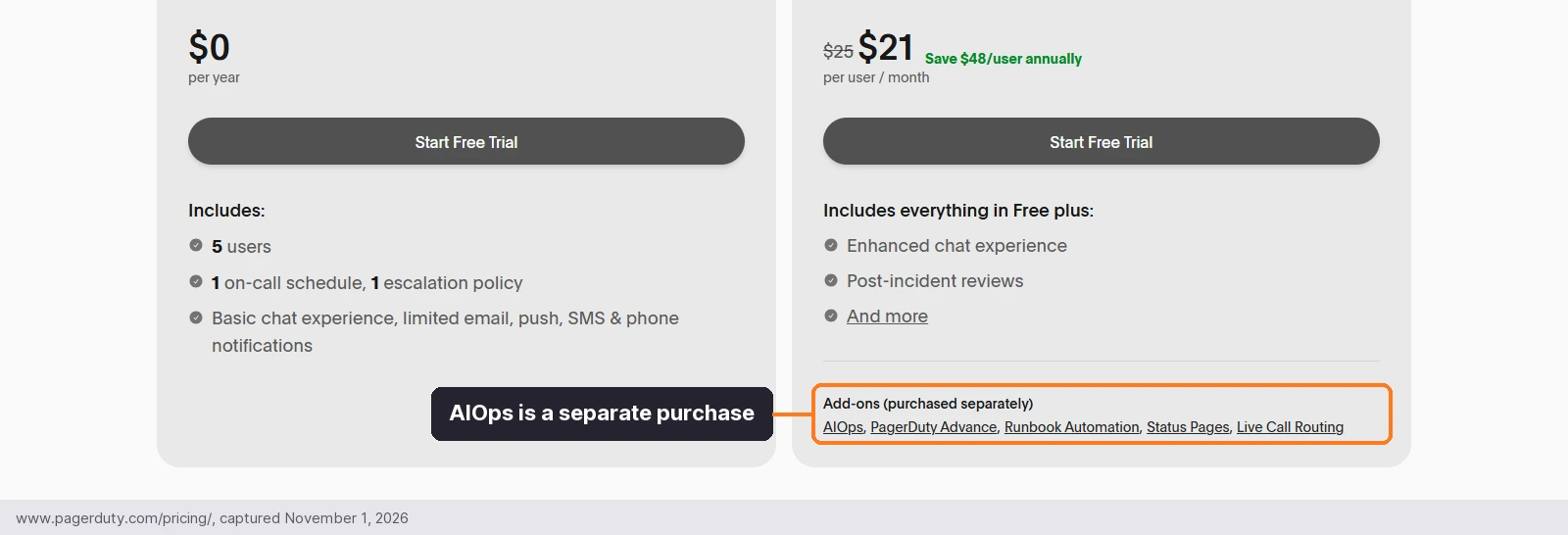
Each add-on listed there is a separate line on the bill.
3. xMatters (Everbridge): notification control
xMatters has strong notification control, and its Advanced tier adds the Incident AI Agent. Teams that page heavily should compare included SMS and voice across every platform here.
4. Rootly: incidents inside Slack
Rootly runs incidents inside chat and suits Slack-centric engineering teams. On-call is priced as an addition at $20 per user per month, so budget for the combined cost.
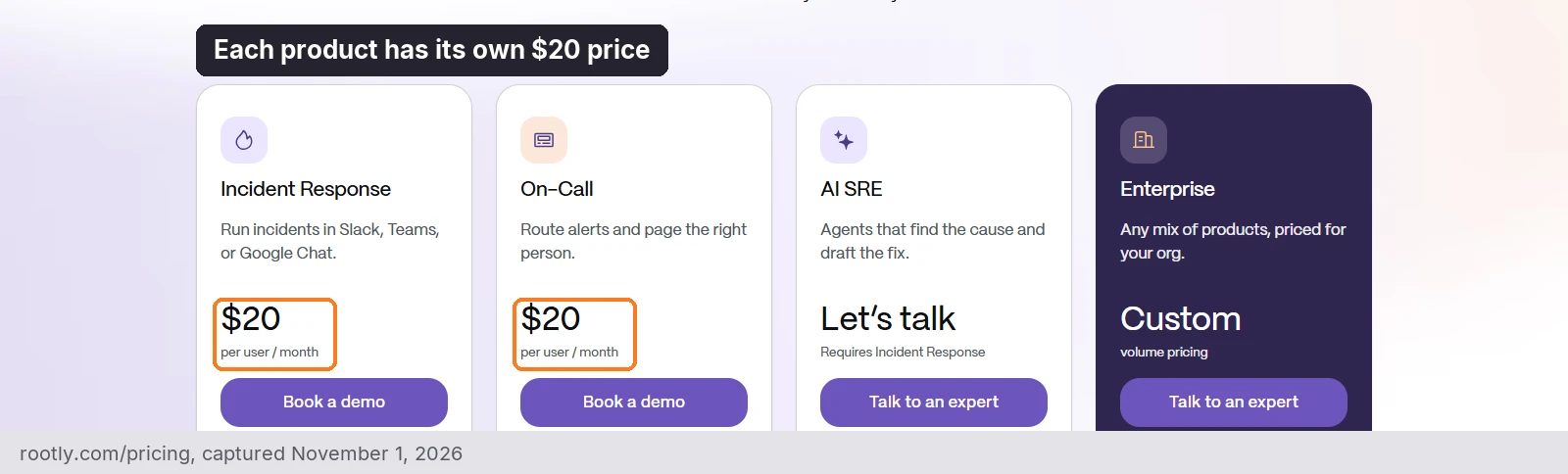
Teams that need both products pay for each per user.
5. incident.io: an AI investigator in Slack
incident.io suits product-engineering teams working in chat. On Team and Pro, on-call is priced as an addition, so budget for the combined cost.
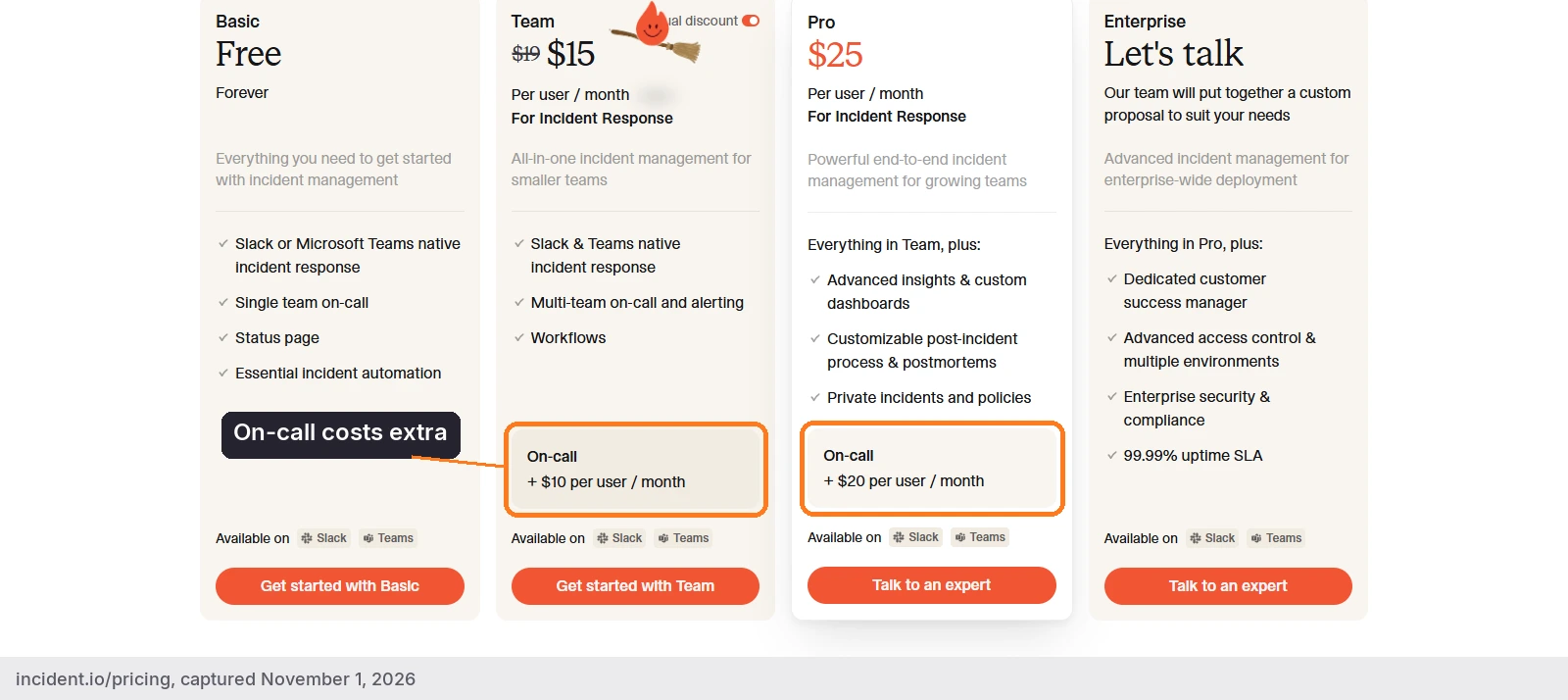
The add-on is billed per user on top of the plan price.
6. Jira Service Management: ITSM for Jira shops
Jira Service Management suits teams already on Jira, though you buy it inside the Service Collection, and AI-driven alert grouping starts on Premium at $55.28 per agent per month (list price at 75 agents).
If you run Opsgenie, the timeline matters for whichever platform you choose: Atlassian ends Opsgenie support on April 5, 2027, after which access shuts off and data not migrated is deleted (Atlassian). Migration support is included with AlertOps Enterprise and is run by our Solution Engineering team. This is not a DIY transition.
7. Datadog Incident Response: paging next to your telemetry
Datadog Incident Response suits teams already standardized on Datadog that want paging and incident work next to their monitors, traces, logs and metrics. It is sold as Datadog On-Call at $20 per seat per month, Datadog Incident Management at $30, or the Incident Response bundle at $40, all billed annually, with higher on-demand rates. Neither product needs another Datadog product, and one bundle seat covers both. Datadog is also an AlertOps integration.
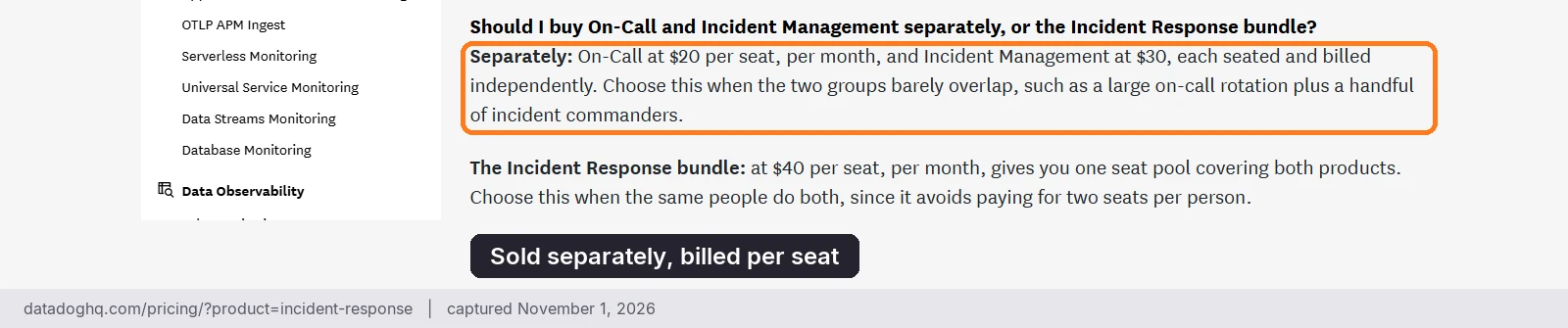
Seats are billed for the highest number assigned at one time, and AI investigation through Bits Investigation is priced separately in AI credits.
See the platform pricing on the AlertOps pricing page.
The limits behind the headline price
A starting price says little about what you can use during an incident, because workflow counts, status pages, AI allowances and SMS or voice limits often change by plan. The table lists the figures each vendor shows on its own pricing page, read on November 1, 2026, for the limits that matter most to MTTR.
| # | Platform | Workflows | Status pages | AI | Call and SMS limits |
|---|---|---|---|---|---|
| 1 | AlertOps | Workflows, included with AlertOps Enterprise | Status Hub, included with AlertOps Enterprise | OpsIQ AI Suite, included with AlertOps Enterprise | Live Call Routing and multi-channel notifications, included with AlertOps Enterprise |
| 2 | PagerDuty | Incident Workflows: Free none, Professional 1, Starter and up included | External: Free none, Professional 250 subscribers, Starter and up included | AI actions: Starter 1,000, Essential 4,000, Plus 16,000, Ultimate 100,000 | Free: 100 SMS or phone per month; Live Call Routing lines: Starter 1, Essential 2, Plus 3, Ultimate 3 |
| 3 | xMatters (Everbridge) | Scheduled triggers: Base 5, Advanced 10 | Advanced only | Incident AI Agent: Advanced only | SMS per user per month: Starter 50, Base 100, Advanced Unlimited; voice: 10, 20, Unlimited |
| 4 | Rootly | Basic on Incident Response, On-Call and AI SRE; Advanced on Enterprise | Incident Response: 1 external, 1 internal; On-Call none | AI SRE is a separate product with custom pricing | On-Call: 20 schedules, 1 call routing number; Enterprise: Unlimited schedules, 5 numbers |
| 5 | incident.io | Basic 1, Team 3, Pro and Enterprise Unlimited | Public pages: 1 on Basic, Team and Pro; Unlimited on Enterprise | AI agent on Pro and up; Investigations available as an add-on on Pro and Enterprise | Live call routing: none on Basic and Team, 1 number on Pro, 5 on Enterprise |
| 6 | Jira Service Management | Automation steps per month: Free 1,250, Standard 3,000, Premium 6,500, Enterprise 9,500 | Enterprise only | Rovo credits per user per month: Standard 250, Premium 700, Enterprise 1,500 | Free: 100 emails per day, 200 SMS per month; paid plans unlimited alert email, SMS and voice |
| 7 | Datadog Incident Response | See Datadog pricing | Status pages with custom domains, per the product page | Bits AI for Slack and AI postmortems in the bundle; Bits Investigation priced separately in AI credits ($500 per 500 credits per month) | See Datadog pricing |
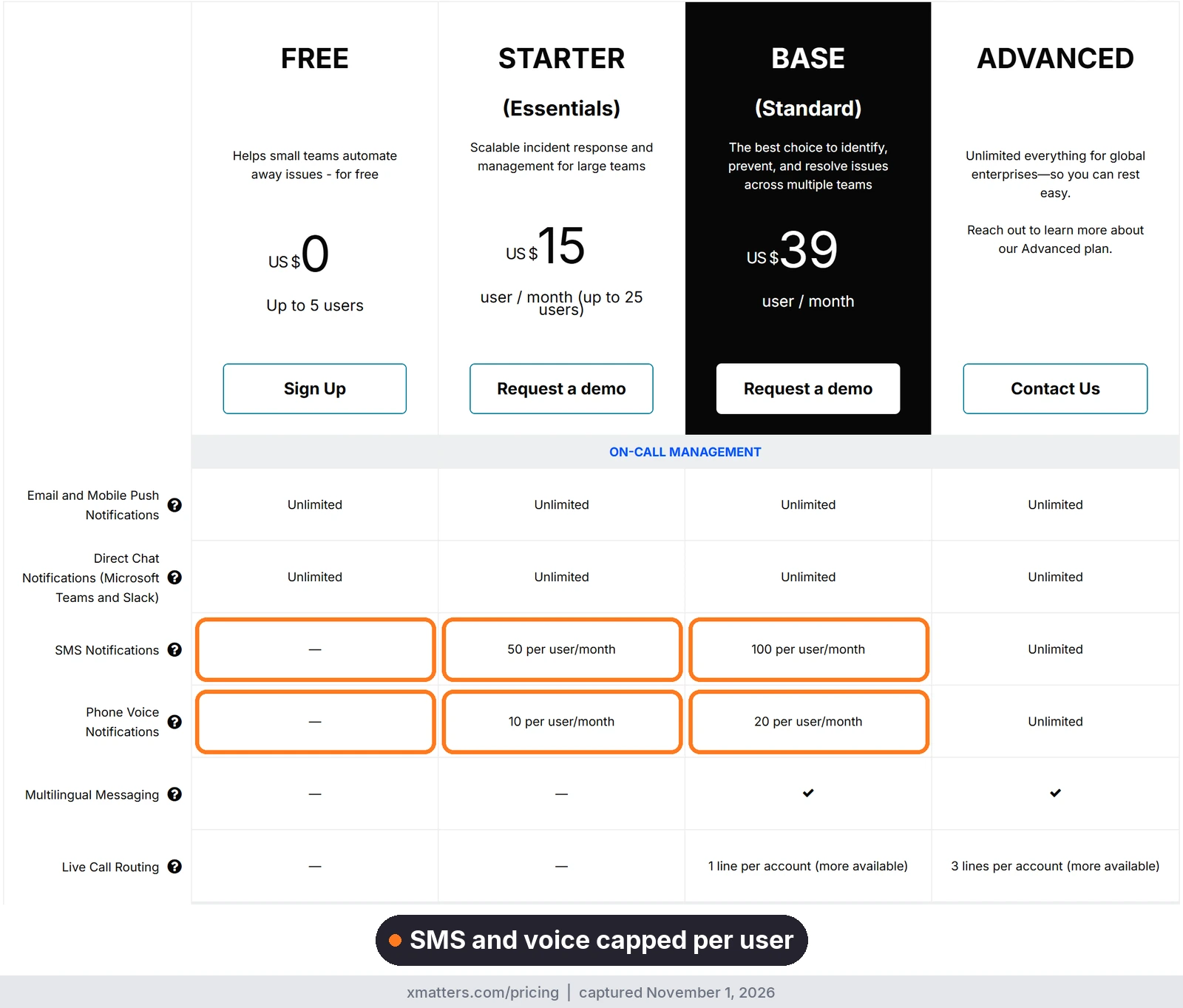
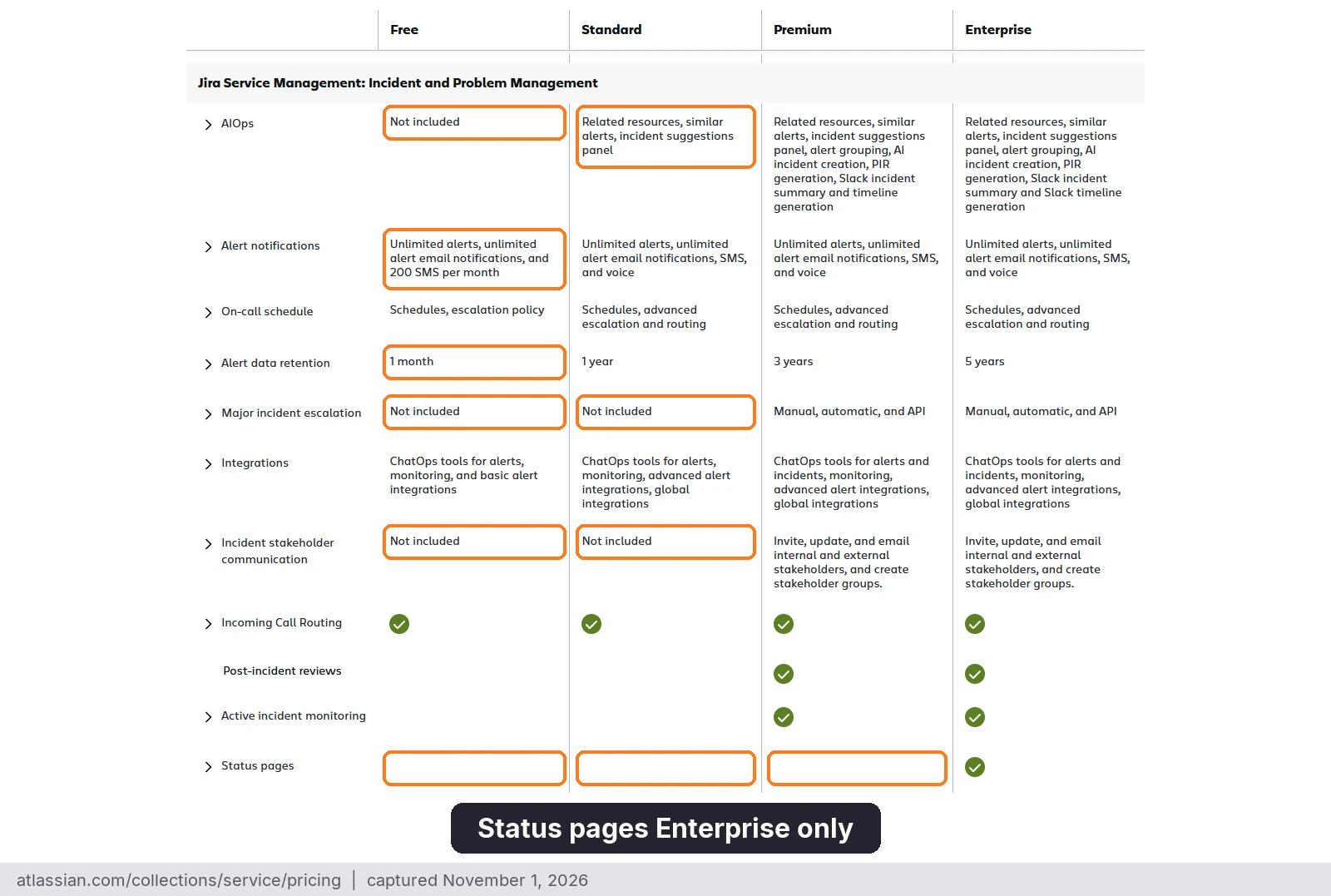
AlertOps publishes per-user pricing on its pricing page: Enterprise is $28 per user per month, billed annually, and includes the OpsIQ AI Suite, Agent Chronicle, a dedicated account manager, a 99.9% SLA and 24×7 critical response.
A checklist for choosing a platform
Gather these before you run trials:
- Your last five major incidents, with timestamps for alert, acknowledgment, first action and resolution
- The longest gap in each one and which phase it fell in
- Every monitoring tool whose alerts should land in the platform
- The ticketing fields that must stay in sync both ways
- The SLA credits or penalties attached to your top services
- Who is on call today, how the schedule is maintained and where it has gone stale
- Which AI features you want, and which tier includes them
- A realistic user count, since per-user pricing and add-ons change the total
- Your renewal and migration deadlines, including Opsgenie’s April 5, 2027 end of support
Take the list into a demo and we will go through it against schedules, escalation and correlation.
FAQ
How do incident management platforms reduce mean time to resolution?
They cut the waiting that surrounds the fix: correlating alerts into one incident, escalating by phone, SMS, email and mobile app through the configured contact methods and roles until someone takes assignment or the alert is closed, and adding context for triage. AlertOps does this through Escalation Policy, Response Plays and OpsIQ.
Which part of MTTR improves first after adopting a platform?
Time to acknowledge usually moves first, because automated escalation replaces manual lookups and phone trees. Noise follows once correlation is tuned, and AlertOps Enterprise includes OpsIQ, with roughly 68% less alert noise (AlertOps platform data).
Does AI in an incident management platform lower MTTR?
Yes, when it works on clean, routed data; DORA’s 2025 research describes AI as an amplifier of existing strengths and weaknesses. AlertOps Enterprise includes OpsIQ, with Smart Correlation Engine, Historical Alert Insights and AI-Powered Resolution Suggestion.
Do I need to replace ServiceNow to improve MTTR?
No. ServiceNow can remain the system of record, as can whichever ticketing tool you run, since AlertOps connects through 200+ integrations. The AlertOps app for ServiceNow is certified, two-way and needs no coding, so incident, assignment, notes and status stay in step while AlertOps handles the response.
What should Opsgenie teams do about MTTR during a migration?
Run the new platform alongside Opsgenie and compare who gets paged before you cut over. AlertOps Enterprise includes migration support run by Solution Engineering, which replicates schedules, escalation rules and integrations, then validates routing in parallel.
Start with the longest gap
Pick your slowest recent incident, find the longest stretch where nobody was working on the fix, and ask which platform capability would have shortened it. That one answer tells you what to weigh most in the evaluation. When you are ready, book a demo and we will walk through how AlertOps would have routed it.
Sources
- Uptime Institute: Annual Outage Analysis 2026
- DORA: 2025 State of AI-assisted Software Development
- Atlassian: Opsgenie end of sale and support
- Vendor pricing pages read October 30, 2026: PagerDuty, xMatters, Rootly, incident.io, Atlassian Service Collection, Datadog (read November 1, 2026)
- AlertOps pricing
- AlertOps platform data: roughly 68% less alert noise; up to 80% less postmortem prep time
Note: Competitor pricing, plan limits and screenshots come from each vendor’s public website as of November 1, 2026, and may change, so check the vendor’s site for current details. Product names and logos are trademarks of their respective owners and are used for identification only.