
In a large IT organization, an outage loses its first minutes to one question: who owns this? AlertOps is the incident orchestration platform for enterprise IT, DevOps, SRE and NOC teams, whatever ITSM and monitoring tools they run. It groups related alerts, escalates until a responder takes ownership, keeps your ITSM record, such as ServiceNow, in step and generates the postmortem. Book a demo or start a 14-day trial with no card.
The enterprise incident problem
A monitoring tool fires, a ticket opens in one system, a chat thread opens in another, and somebody has to work out who owns the service this week. Multiply that by dozens of teams on different rotations and you get a page that lands on the wrong person, then waits.
In Uptime Institute’s 2026 outage analysis, 57% of respondents said their most recent major outage cost more than $100,000, and one in five put it above $1M. Those are self-reported figures, and they sit alongside the SLA credits, audit questions and on-call fatigue that follow a badly handled incident.
Alerts arrive faster than people can read them
One failing database host can generate dozens of alerts from several tools, each paging someone. People learn to swipe pages away, and that is how the real one gets missed.
Ownership lives in people’s heads
Who is on call for payments this week? Who backs them up? When the answer sits in a spreadsheet or in one engineer’s memory, escalation turns into a round of phone calls.
The record and the work drift apart
The ticket says “assigned” while the actual work happened on a bridge call. The next morning, nobody can reconstruct what happened without piecing together chat logs.
How AlertOps resolves enterprise incidents
AlertOps sits between your monitoring tools and your responders. It connects through 200+ integrations, groups related alerts, routes them by the policies you set, and keeps your ITSM record in step. Your tools of record stay where they are.
Group the noise into one incident
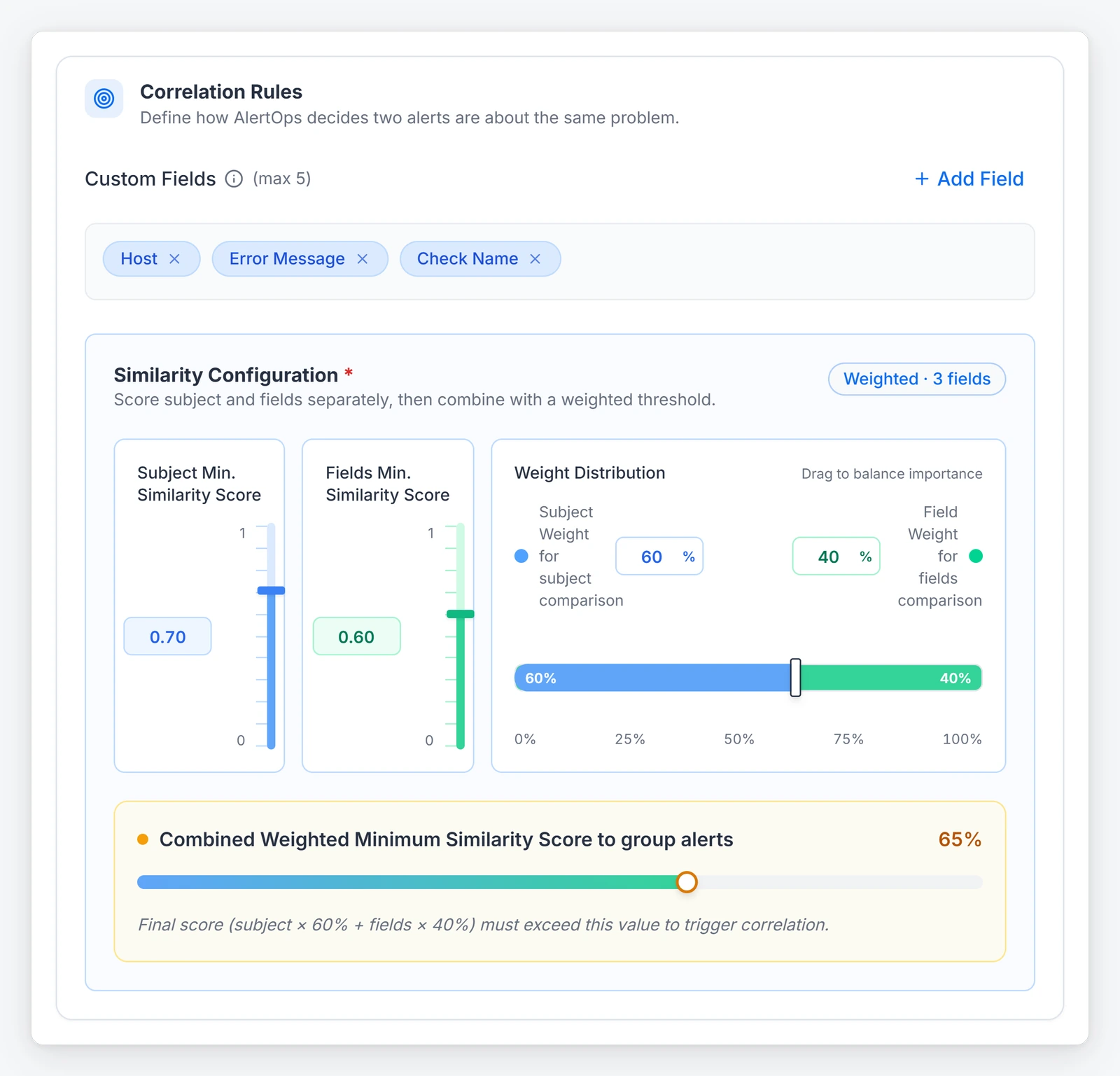
AlertOps Enterprise includes OpsIQ, a family of AI features. The Smart Correlation Engine groups related alerts in real time using similarity modeling, NLP and thresholds you set, so a core switch failure reaches your team as one incident instead of a wall of pages. OpsIQ cuts alert noise by roughly 68% (AlertOps platform data). You set the similarity weights and thresholds in the correlation rules.
While the incident is open, Historical Alert Insights shows how similar alerts were fixed and AI-Powered Resolution Suggestion proposes a fix. See how OpsIQ works.
Reach the right person and keep escalating
An Escalation Policy moves through roles in the order you set, for example primary, secondary, then the application manager, and moves on when the wait time you define runs out. When roles don’t matter, a Response Play notifies everyone on the active shift in a group at once. Native notification covers phone, SMS, email and mobile app, with Slack and Microsoft Teams connected as integrations. Workflows add conditional actions inside an Escalation Policy, such as sending a message when your start conditions match.

Rotating and Fixed Schedules set the pattern, while Override Shifts, Out-of-Office Coverage and the Holiday Feature cover the weeks that break it. Live Call Routing sends inbound calls to whoever is on call, around the clock. Heartbeat Monitoring tells you when a monitoring tool stops checking in, so a silent tool shows up as an alert.
Keep ServiceNow in step
If ServiceNow is your ITSM, one of the 200+ integrations is the AlertOps app for ServiceNow, a certified two-way integration from the ServiceNow Store with no coding. Incidents flow in both directions. Assignment, status, resolution notes, work notes and custom fields stay in sync, and ServiceNow groups and users come into AlertOps. When a responder takes ownership in AlertOps, the ServiceNow record updates and the escalation timeline posts to it. ServiceNow stays the system of record; AlertOps is the system of response. The certified app write-up covers the details.
Want to see ownership land on your ITSM record? Book a demo.
Write the postmortem from the record
Agent Chronicle generates the postmortem from the incident, with the summary, root cause, timeline, impact, recovery and recommendations ready to export as a PDF. Teams cut postmortem prep time by up to 80% (AlertOps platform data). That timeline gives audit and leadership one account of who responded and when.
Ask Ada, then let her build the setup
Ada, the AI agent in AlertOps, answers questions such as who is on call and which schedule is active, and she can act on alerts, incidents, escalation policies, schedules, users and groups. She respects the permissions each person already holds, proposes every change, and applies it only once it is approved. She also helps you build: describe an integration or workflow in plain English, she asks follow-up questions, and you review the full setup before anything is created. Ada works inside the AlertOps platform and comes with OpsIQ, which Enterprise includes.
Built for how large teams run
Role-based access with Google and Azure AD single sign-on controls who can change which groups, schedules and escalation settings. Enterprise adds a dedicated account manager and a 99.9% SLA.
Proof from teams running AlertOps
Honeywell and Activision sit under “Trusted by Leading Enterprises” on the OpsIQ page, and these published customer stories show the work in production.
- A U.S. investor-owned utility: This electricity provider serves millions of customers and moved 30+ teams off Opsgenie without rebuilding a workflow. Its published story, with identifying details changed, records “300+ active users across teams” and “77 escalation policies preserved from OpsGenie” alongside “37 automated workflows spanning ServiceNow, Splunk, and custom integrations” after cutover.
- Delta Dental of New Jersey: Its Platform Operations team says AlertOps “eliminated alert fatigue and gave our engineers their nights back” in a story that also reports “going live in under 24 hours and cutting false-positive alerts in half within the first month.”
- Penumbra: Physicians and hospital staff dial one dedicated number, and AlertOps routes the call to the on-call specialist, then to the backup if the primary does not respond. In Penumbra’s story, Jason Greer, Vascular Medical Device Professional, says “not one call has been missed.”
- WCAtech: This managed IT services provider’s story reports “~90% Noise Reduction” with “60K monthly signals filtered down to ~4K actionable alerts” for a 15-person on-call team.
What AlertOps Enterprise costs
AlertOps Enterprise is $28 per user per month billed annually, or $34 billed monthly. All plans are on the pricing page.
Moving off Opsgenie
If your on-call runs on Opsgenie, the deadline is fixed: Atlassian ends support on April 5, 2027, when access shuts off and any data not migrated is deleted (Atlassian). Migration support is included with AlertOps Enterprise. This is not a DIY transition. Our Solution Engineering team copies your schedules, rules and integrations into AlertOps, tests routing side by side while your current setup stays live, and cuts over once both agree on who gets paged. Our comparison of AlertOps, PagerDuty and Opsgenie covers how the three differ for enterprise teams.
Book a demo to scope your move with Solution Engineering.
FAQ
What is enterprise incident resolution?
Enterprise incident resolution covers everything between an alert firing and a closed, documented incident: grouping alerts, finding the on-call owner, working through the configured contact methods and roles until someone takes assignment or the alert is closed, fixing the problem and recording what happened. AlertOps handles the response layer of that chain and syncs with your ITSM tool.
How does AlertOps work with ServiceNow?
AlertOps works with whatever ITSM and monitoring tools you run, through 200+ integrations. If ServiceNow is your system of record for tickets, changes and knowledge, AlertOps runs the response around it. The AlertOps app for ServiceNow is a certified two-way integration, with no coding, that keeps incident, assignment, notes and status in step.
Which AI features does AlertOps Enterprise include?
AlertOps Enterprise includes OpsIQ, whose features include the Smart Correlation Engine, Historical Alert Insights, AI-Powered Resolution Suggestion, Agent Chronicle and Ada.
How long does moving from Opsgenie take?
Timing depends on how many schedules, rules and integrations you carry over, and our Solution Engineering team scopes it with you. Atlassian ends Opsgenie support on April 5, 2027, so starting early leaves room for the side-by-side test.
Can different teams run their own schedules?
Yes. Each team can have its own group, schedule and escalation, and role-based access with Google or Azure AD single sign-on controls who can change what.
See it with your own services
Bring one service that pages too often and one that nobody owns clearly. We’ll walk through how an alert from each one would move through correlation, escalation and your ITSM record. Book a demo, or start a 14-day trial from the pricing page.
Sources
- Uptime Institute: Annual Outage Analysis 2026
- Atlassian: Opsgenie end of sale and support
- AlertOps: Pricing
- AlertOps: OpsIQ
- AlertOps customer stories: U.S. energy provider, Delta Dental, Penumbra, WCAtech
- AlertOps platform data: roughly 68% less alert noise; up to 80% less postmortem prep time