The risk in an Opsgenie migration isn’t the destination platform – it’s what happens to the source platform during the handoff window. Live integrations firing into both systems, stale rotations on the platform being deprecated, unrevoked API keys triggering phantom escalations, and the old Opsgenie tenant sitting in an indeterminate state for three months after the cutover, generating alerts nobody is watching.
Enterprise operations leads who have run this migration before worry about the deprovisioning, not the import. That is the right thing to worry about, because the import problem has tooling and the deprovisioning problem does not. This guide is the playbook for both: six phases, end to end, from the initial audit of the existing Opsgenie environment through the post-migration audit that confirms the old platform is actually offline. It is written for the operations lead who has to land this migration on time and without producing the incident that defines the project in retrospect.

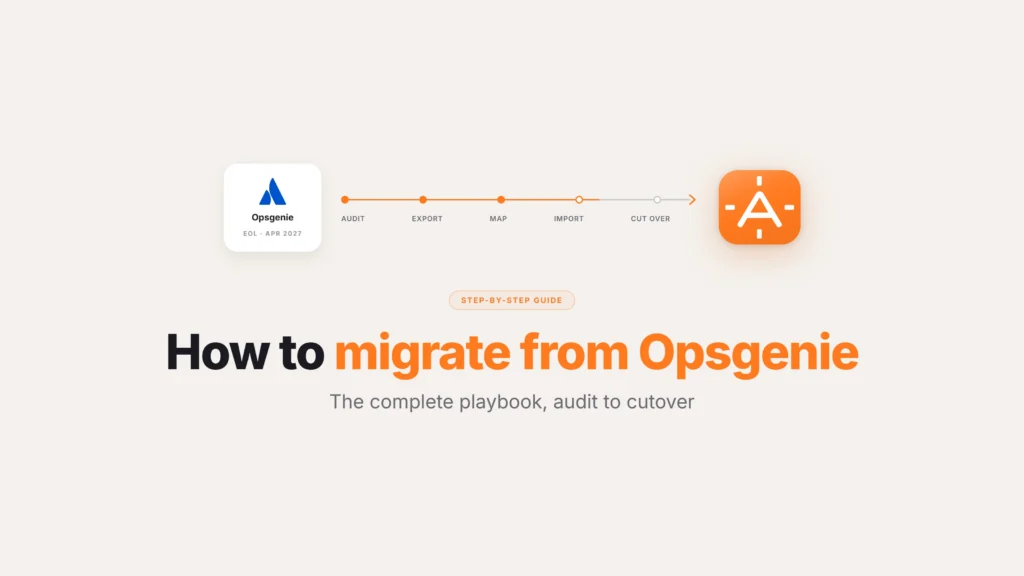
Six-phase Opsgenie migration arc from audit through deprovisioning. Phase 1 audit Opsgenie environment, Phase 2 export configuration via API, Phase 3 map primitives to AlertOps, Phase 4 import and configure, Phase 5 parallel-run cutover (the critical safety net phase), Phase 6 clean Opsgenie deprovisioning. Total elapsed time 6-12 weeks for enterprise environments.
What does it actually take to migrate from Opsgenie?
A clean enterprise Opsgenie migration runs through six phases: audit current state, export configuration, map Opsgenie primitives to the destination platform, import and configure, cut over with a parallel-run window, and execute a post-migration audit that includes clean Opsgenie deprovisioning. Each phase has specific deliverables and specific failure modes. Skipping phases produces migrations that look complete on day one and fail in the first major incident a quarter later.
Total elapsed time for an enterprise migration runs six to twelve weeks; smaller environments can complete in two to six weeks. The variance doesn’t come from the destination platform – it comes from the complexity of the Opsgenie configuration being migrated. Environments with a few dozen integrations, a handful of teams, and standard escalation policies move quickly. Environments with hundreds of integrations, scores of teams, custom routing logic, and years of operational tuning take longer because there is more to capture, map, and validate.
Clean migrations follow an incremental pattern. Pick a single team, migrate it, validate under real load for a week, then expand. Messy migrations follow a big-bang pattern: migrate everything in a weekend, discover the gaps on Monday, spend the next quarter rebuilding what should have been right the first time. Both patterns finish. Only one of them finishes cleanly.
Phase 1: Audit your current Opsgenie environment
Inventory comes first. Before exporting anything, the migration team needs a complete account of what is in the Opsgenie environment today. This is the phase teams rush. It is also the phase that determines whether the rest of the migration is built on a complete picture or on a partial one.
The audit covers five categories.
Teams and users. Every team configured in Opsgenie, with membership, roles, and contact methods. Every user with active permissions, including users who have not logged in for six months but still hold escalation responsibility on paper. For larger deployments (the Footlocker-scale environment running roughly seven hundred users across one hundred fifty teams), this list is often longer than the operations team realizes, because Opsgenie’s per-user pricing produced an incentive to leave inactive users provisioned. The audit is the moment to identify what is actually in use versus what is on the bill.
On-call schedules. Every rotation, every override, every layered schedule. The temporary override someone configured during a holiday two years ago is still active. The follow-the-sun rotation built across three regions has overrides that no longer apply. The audit captures the current state, including the cruft, so the destination platform receives a clean configuration rather than a reproduction of operational debt.
Escalation policies. Every policy, with rules, timeouts, channels, and the team and integration mappings each one serves. Enterprise environments accumulate policies that were built for projects that no longer exist, services that were retired, or scenarios that never materialized. The audit identifies which policies are actively routing alerts and which are dormant.
Integrations. Every inbound integration with its source system, its routing rules, and its volume profile. Every outbound integration with its destination and its payload format. For environments with hundreds of integrations, this inventory is the longest part of the audit and the one most consequential for cutover planning. An integration that nobody documented two years ago is still firing alerts, and if it does not move to the new platform on cutover, the alerts will fire into a deprecated environment with nobody watching.
API keys, webhooks, and external dependencies. Every API key issued from Opsgenie, every webhook configured against Opsgenie endpoints, and every external system that depends on Opsgenie remaining at its current URL. These are the dependencies that produce the longest tail of post-cutover issues, because they live outside Opsgenie itself and are easy to miss in a configuration-only audit.
The deliverable from Phase 1 is a complete environment map. Without it, the rest of the migration is guesswork.
Phase 2: Export and document your Opsgenie configuration
Phase 2 converts the audit into an exportable artifact. The Opsgenie API supports configuration export for most primitives (teams, schedules, escalation policies, integrations), and the export is the input to the destination platform’s import process.
Versioning matters. The export should carry a timestamp. Configuration changes in the live Opsgenie environment between export and import will produce drift, and drift produces the misconfigured rotations and missed escalations that surface in the first week of cutover. The cleanest pattern is to freeze configuration changes in Opsgenie at the moment of export, executing any required changes in both environments through the migration window.
Custom integrations need explicit documentation alongside the API export. The Opsgenie API exposes the integration definition, but the receiving system’s expectations of payload format and endpoint URL are not in the export. A complete documentation pass identifies every internal system that talks to Opsgenie and what it expects, so the migration team can plan the cutover for those dependencies as a deliberate step.
The Phase 2 deliverable is a versioned export plus a complete integration dependency document. With both in hand, the destination platform has the inputs it needs to receive a faithful reproduction of the Opsgenie environment.
Phase 3: Map Opsgenie primitives to the destination platform
Phase 3 is where the migration meets the architectural difference between platforms. Opsgenie primitives (teams, schedules, escalation policies, integrations) have analogs in destination platforms, but the analogs are not always 1:1. The mapping phase identifies where the destination platform’s model maps cleanly and where it requires translation.
Migrations into AlertOps follow a consistent pattern. Opsgenie teams map to AlertOps teams with member, role, and contact-method preservation. Opsgenie schedules map to AlertOps on-call schedules, including layered rotations and overrides. Opsgenie escalation policies map to AlertOps escalation rules and response policies. Opsgenie integrations map to AlertOps inbound and outbound integrations, with the source-system payload preserved.
Translation work appears in three places. AlertOps’s routing engine is multi-dimensional, evaluating service ownership, severity, time of day, vendor handoff conditions, and channel preference in parallel. An Opsgenie escalation policy that encoded these dimensions through stacked rules can collapse into a single, simpler AlertOps policy that expresses the same logic more cleanly. AlertOps’s OpsIQ correlation engine also handles upstream alert correlation that Opsgenie does not, and the mapping is an opportunity to identify which integrations were generating noise that escalation policies were filtering downstream and move that filtering upstream into correlation rules where it belongs. Agent Chronicle’s compliance-grade audit trail has no direct Opsgenie analog, so the mapping documents which incident types will benefit from the audit trail and how the receiving compliance or audit function will consume it.
The Phase 3 deliverable is a mapping document that pairs every Opsgenie primitive with its destination-platform analog and notes the translations. This document becomes the script for Phase 4.
Phase 4: Import and configure in AlertOps
Phase 4 executes the import. Migrations into AlertOps run on the free migration tool, which handles the bulk of the work. Escalation policies, on-call schedules, integrations, and user mappings reproduce in AlertOps from the Opsgenie export. The manual work is in the translation areas identified in Phase 3.
The discipline that produces clean Phase 4 work is incremental validation. As each primitive is imported, validate it against the source. Teams should match the Opsgenie team roster. Schedules should produce the same on-call assignment for the same date and time. Escalation policies should route the same test alert to the same destination. Integrations should fire the same inbound webhook into AlertOps that they were firing into Opsgenie and produce equivalent alerts.
A mid-market food distribution operations lead described the validation discipline during a Phase 4 review: “From what we saw, were you thinking we wanna just kinda build it out from scratch or do we wanna leverage the conversion and import?” For enterprise environments the right answer is to leverage the conversion and import for the bulk of the configuration, then validate every imported primitive before relying on it. Build-from-scratch sounds cleaner but produces migrations that take three times as long and lose the operational investment in tuned escalation logic that the existing Opsgenie configuration represents.
The Phase 4 deliverable is an AlertOps environment that mirrors the validated Opsgenie configuration, with each primitive checked against its source. With this in place, the cutover phase can begin.
Phase 5: Cut over with a parallel-run window
Phase 5 is the cutover. Two patterns exist: parallel-run and hard cutover. For enterprise migrations, parallel-run is almost always the right answer.
A parallel-run cutover keeps both Opsgenie and AlertOps live for a defined window, with all inbound integrations firing into both platforms. The new platform handles primary response. The old platform serves as a safety net, with alerts still flowing through it, on-call still tracking, and any gap in the new platform’s configuration caught before it produces a missed incident. The parallel window runs two to four weeks for mid-market environments and four to eight weeks for enterprise environments.
A hard cutover switches all integrations from Opsgenie to AlertOps at a single moment, deprecates Opsgenie immediately, and runs without a safety net. This pattern works only for the simplest environments (a handful of integrations, a small team, low-severity production traffic) where the cost of a missed incident in the cutover window is acceptable. For enterprise environments, hard cutover is the pattern that produces the incident nobody on the new platform can see.
Within the parallel-run window, the migration team validates four things. Every inbound integration is firing into AlertOps at the expected volume, with discrepancies between Opsgenie volume and AlertOps volume indicating integrations that did not migrate cleanly. On-call assignments match Opsgenie’s assignments for the same date and time, with discrepancies indicating schedule mapping errors. Escalation policies route test alerts to the expected destinations, with discrepancies indicating policy translation errors. Outbound integrations to internal systems fire with the expected payload format, with discrepancies indicating downstream consumers need configuration updates.
At the end of the parallel-run window, with all four validations clean, the cutover formally completes: inbound integrations move off Opsgenie, API keys are rotated to revoke external dependencies, and the platform is deprecated to read-only, ready for Phase 6 deprovisioning.
See how AlertOps handles enterprise migration with the free Opsgenie migration team at alertops.com/demo.
Phase 6: Post-migration audit and clean Opsgenie deprovisioning
Phase 6 is the phase teams skip. Cutover feels like the end of the migration. The post-migration audit and clean Opsgenie deprovisioning is what determines whether the migration was actually successful.
The post-migration audit covers three categories.
Integration completeness. Every integration documented in the Phase 1 audit needs to be confirmed as either migrated to AlertOps or deliberately deprecated. The integrations most teams miss are the long-tail webhooks from internal systems that were configured years ago by engineers who have since moved on. These integrations continue to fire into the deprecated Opsgenie environment and produce alerts nobody sees. The post-migration audit identifies them, redirects them, or deprovisions them with intent.
Stakeholder validation. Every team that depended on Opsgenie alerts needs to confirm that they are receiving the equivalent alerts from AlertOps. A vendor on-call team that was paged via Opsgenie SMS should confirm that the AlertOps SMS path is working. A NOC tier that was receiving escalations on a Teams channel should confirm that the Teams channel is now receiving from AlertOps. Stakeholder validation surfaces the gaps that the technical validation in Phase 5 missed because they were downstream of the alert path itself.
Clean Opsgenie deprovisioning. This is the phase operations leads worry about for the right reasons. An enterprise transportation operations lead framed the concern directly during a Phase 5 review: “the other thing we need to do is make sure we kill OpsGenie correctly. Remember that time when I think Safala closed a whole lot of acknowledged alerts and it recent notifications.” An Opsgenie environment left in an indeterminate state, with API keys still valid, with rotations still active, with integrations still configured but no longer monitored, produces exactly that kind of phantom escalation and false acknowledgment. The deprovisioning checklist includes rotating or revoking every API key, deactivating every active integration, freezing every on-call schedule, and finally taking the Opsgenie tenant offline at the Atlassian admin console. The Spinnaker-style question, “What happens to the opsGenie instance that is still there?”, has a clean answer only when the deprovisioning has actually completed.
The Phase 6 deliverable is a documented, validated, and clean migration. With this in hand, the team can shift focus from migration execution to optimization.
What are the most common Opsgenie migration mistakes?
Five failure modes appear consistently in post-migration retrospectives.
Skipping the audit. Teams that move directly from “we are migrating” to “we are exporting” without completing a full audit miss integrations, miss users, and miss escalation policies. The migration looks complete and produces a missed incident in the first month.
Big-bang cutover at enterprise scale. Hard cutover without a parallel-run window produces the gap nobody sees. Enterprise environments need the safety net.
Migrating operational debt as-is. Teams that copy the Opsgenie configuration faithfully end up with the same dormant rotations, dead escalation policies, and noisy integrations on the new platform. The migration is the moment to clean operational debt, not preserve it.
Underestimating integration complexity. The inventory of integrations is always longer than the team estimates at the start. Enterprise environments surface integrations during the cutover that nobody documented during the audit.
Skipping clean deprovisioning. An Opsgenie environment left in an indeterminate state produces the phantom escalations and stale acknowledgments operations leads correctly worry about. Clean deprovisioning is the last phase, not an optional one.
Teams that avoid all five failure modes follow the six-phase playbook with discipline. Teams that don’t usually execute the same migration twice.
How does the AlertOps free Opsgenie migration team work?
For enterprise teams moving off Opsgenie, AlertOps provides a free migration team and automated tool that handle the operational on-ramp.
The automated tool handles Phase 2 export, Phase 3 mapping, and the bulk of Phase 4 import. Escalation policies, on-call schedules, integrations, and user mappings are captured from the Opsgenie API and reproduced in AlertOps with the translation work for AlertOps’s multi-dimensional routing model handled by the tool. The output is an AlertOps environment that mirrors the source Opsgenie configuration, ready for validation.
The migration team supports Phase 1 audit, Phase 3 translation decisions, Phase 5 cutover planning, and Phase 6 deprovisioning. The team has run hundreds of enterprise Opsgenie migrations and brings the playbook for the failure modes that derail unsupported migrations. For environments with custom integrations, complex routing logic, or industry-specific compliance requirements, the migration team handles the translation work an automated tool alone cannot.
A mid-market financial services team summarized the value of the automated tool with the question that mattered: “if we were to go with this product, like I would assume you guys are going to export what we have set up in OpsGenie and bring it over. Like that was my understanding.” The answer is yes, and the free migration team is what makes that answer hold at enterprise scale, not just for the simplest environments.
Book a demo at alertops.com/demo to see how the free Opsgenie migration team handles your specific environment and what the cutover timeline looks like.
A clean migration is the foundation for the next five years
A clean Opsgenie migration isn’t a configuration copy; it’s the moment to validate the architectural fit of the destination platform, clean out the operational debt that piled up on the source platform, and build the foundation for the next five years of incident response.
The six-phase playbook produces clean migrations because it forces the discipline that prevents the failure modes. The audit catches what nobody remembered was configured. The mapping surfaces the architectural differences before they become production surprises. The parallel-run cutover provides the safety net enterprise environments require. The post-migration audit confirms that the deprovisioning is clean and the new platform is the only one handling production response.
For enterprise teams whose migration timeline is real and whose risk tolerance for a botched cutover is appropriately low, the playbook is the difference between a six-week migration done right and a six-month migration done twice.
Frequently asked questions about migrating from Opsgenie
How do I migrate from Opsgenie to another incident management platform?
A clean enterprise migration runs through six phases: audit your current Opsgenie environment, export and document the configuration, map Opsgenie primitives to the destination platform, import and configure in the new platform, cut over with a parallel-run window, and execute a post-migration audit with clean Opsgenie deprovisioning. Total elapsed time runs six to twelve weeks for enterprise environments and two to six weeks for smaller ones.
How do I export my Opsgenie configuration?
The Opsgenie API supports configuration export for teams, on-call schedules, escalation policies, and integrations. Export should be versioned and time-stamped, with a configuration freeze on the live Opsgenie environment between export and import to prevent drift. Custom integrations need explicit documentation of payload format and endpoint URLs alongside the API export.
Can I migrate Opsgenie escalation policies to AlertOps?
Yes. AlertOps’s free assisted migration program replicates Opsgenie escalation policies in AlertOps’s escalation rules and response policies, with translation into AlertOps’s multi-dimensional routing model. Custom policies with conditional logic or service-ownership dimensions may benefit from manual review by the AlertOps migration team during the mapping phase.
Should I use parallel-run or hard cutover for an Opsgenie migration?
For enterprise environments, parallel-run is almost always the right answer. The parallel window (two to four weeks mid-market, four to eight weeks enterprise) keeps Opsgenie live as a safety net while AlertOps handles primary response. Hard cutover works only for the simplest environments where the cost of a missed incident in the cutover window is acceptable.
What happens to my Opsgenie instance after the migration?
After cutover, the Opsgenie environment moves to read-only for the post-migration audit window. Once stakeholder validation confirms the new platform is handling all alerts cleanly, deprovisioning completes: every API key is rotated or revoked, every active integration is deactivated, every on-call schedule is frozen, and the Opsgenie tenant is taken offline at the Atlassian admin console.
How long does an Opsgenie migration take?
Smaller environments (a handful of integrations, a small team, standard escalation policies) migrate in two to six weeks. Enterprise environments with hundreds of integrations, scores of teams, and custom routing logic take six to twelve weeks. Variance is in the source Opsgenie configuration complexity, not in the destination platform.
Does AlertOps offer a free Opsgenie migration tool?
Yes. AlertOps includes both a free automated migration tool and a free migration team. The tool handles Opsgenie API export, primitive mapping, and bulk import into AlertOps. The team supports the audit, translation decisions, cutover planning, and clean deprovisioning. The combination has handled hundreds of enterprise Opsgenie migrations.
What are the biggest mistakes teams make migrating from Opsgenie?
Five failure modes recur: skipping the initial audit, attempting big-bang cutover at enterprise scale without a parallel-run window, migrating operational debt as-is rather than cleaning it during the migration, underestimating integration complexity, and skipping clean Opsgenie deprovisioning. Each one produces a missed incident or a second migration in the months after cutover.