The on-call schedule that runs in your environment right now has years of operational tuning behind it. Rotations across teams. Layered overrides for vacations and conferences. Time-zone-aware handoffs for follow-the-sun coverage. A primary that rings for forty seconds before escalating to secondary because someone learned the hard way that twenty seconds wasn’t enough. None of that lives in a wiki. It lives in Opsgenie. And when Atlassian shuts Opsgenie down on April 5, 2027, every minute of that tuning either migrates cleanly to the destination platform or has to be rebuilt from scratch.
The on-call dimension is also where the post-Opsgenie alternatives market splits most clearly. Some platforms include on-call as a core capability in the base plan. Others charge for it as a separate paid module. At enterprise responder counts, the difference is measured in five-figure annual contract variance. This guide is the verified May 2026 comparison of which Opsgenie alternatives handle on-call scheduling well, which handle it on paper but charge separately, and which fit specific operating models versus enterprise scale.
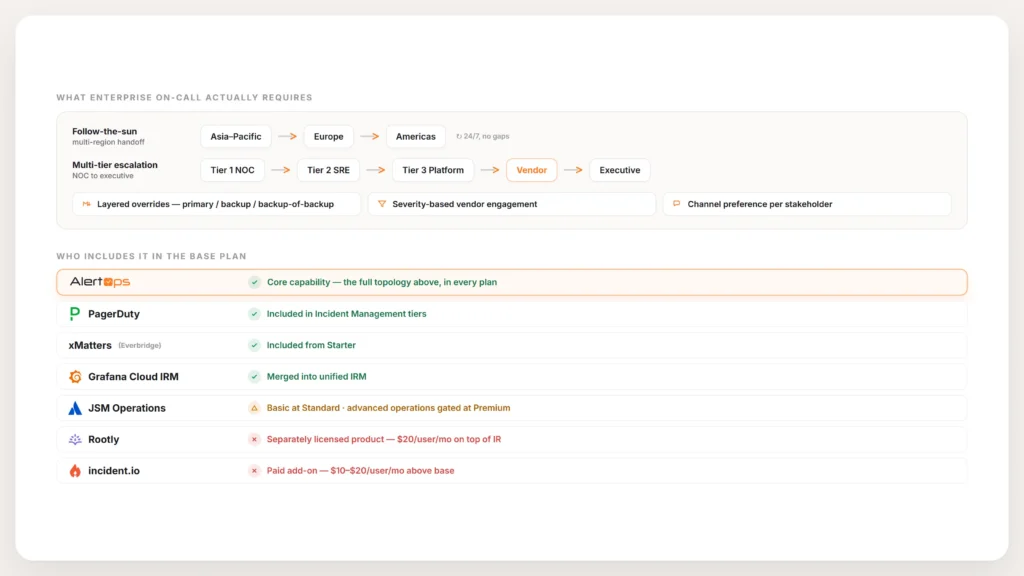
Enterprise on-call topology diagram showing five dimensions (multi-region follow-the-sun, multi-tier NOC, layered overrides, vendor handoffs, channel preference per stakeholder), paired with a 7-platform comparison matrix showing which Opsgenie alternatives include on-call in their base plan versus sell it separately. Rootly sells On-Call as a separately licensed $20/user/mo product. Incident.io sells on-call as a $10-20/user/mo paid add-on. AlertOps, PagerDuty, xMatters, JSM (at higher tiers), and Grafana Cloud IRM include on-call in base plans.
What does enterprise on-call scheduling actually require?
The on-call rotation that small-team incident management platforms ship is necessary but not sufficient for enterprise on-call. Five dimensions distinguish platforms at scale.
Multi-region follow-the-sun coverage. A single service may be on-call to one team in Asia from 0000 to 0800 UTC, another team in Europe from 0800 to 1600, and a third in the Americas from 1600 to 0000. The scheduling model needs to express this natively with time-zone-aware handoffs and consistent escalation behavior across regional boundaries.
Multi-tier NOC structure. An incident may escalate from Tier 1 NOC operators to Tier 2 SREs to Tier 3 platform engineers to a vendor support contract to executive notification, in a defined sequence with defined timeouts at each tier. The escalation model needs to encode this topology rather than approximate it through stacked rules.
Layered overrides. A senior engineer takes vacation, the backup picks up primary, and the backup’s backup picks up secondary. Three weeks later the senior engineer returns and the layered overrides need to unwind cleanly. The override model needs to handle this without producing the “I thought you were on-call” gaps that small-team scheduling produces.
Vendor handoffs. Many enterprise incidents involve third-party vendors (managed cloud providers, network carriers, SaaS vendors, hardware support contracts). The escalation policy needs to know when to engage the vendor, through which contract, with what severity classification, and how to track the vendor’s response separately from the internal response.
Channel preference per stakeholder. The on-call SRE works in Slack, the vendor contact responds to SMS, the director takes a voice call, and the NOC operator monitors Teams. Routing has to honor each stakeholder’s channel preference within the same policy.
A platform that handles three of the five is fine for mid-market engineering teams. A platform that handles all five is the architectural fit for enterprise NOC environments.
On-call comparison across the six Opsgenie alternatives
| Platform | On-call in base plan? | Multi-tier NOC | Follow-the-sun | Vendor handoff | Channel-per-stakeholder |
|---|---|---|---|---|---|
| AlertOps | Yes – core capability | Yes | Yes | Yes (first-class) | Yes |
| PagerDuty | Yes – included in IM tiers | Yes | Yes | Standard | Yes |
| xMatters (Everbridge) | Yes – included from Starter | Yes | Yes | Standard | Yes |
| Rootly | No – separate $20/user/mo product | Standard | Yes | Limited | Limited |
| incident.io | No – $10-20/user/mo add-on per tier | Limited | Yes | Limited | Limited (chat-primary) |
| JSM Operations | Partial (Standard basics, Premium for advanced) | Limited | Yes | Limited | Standard |
| Grafana Cloud IRM | Yes – OnCall + Incident merged into IRM | Limited | Yes | Limited | Limited |
Two patterns deserve calling out before any deeper read.
On-call is not free at Rootly or incident.io. Rootly On-Call Essentials is a separately licensed $20/user/mo product, distinct from Rootly Incident Response Essentials at $20/user/mo. A team using both pays for two products. incident.io’s on-call is a paid add-on: $10/user/mo on the Team tier or $20/user/mo on the Pro tier, or $20/user/mo as a standalone On-call only plan. Only incident.io’s free Basic tier includes single-team on-call. For Opsgenie migrants whose existing per-responder pricing scaled across the responder population, this packaging change can flip the TCO comparison significantly.
Enterprise topology breaks the Slack-native scheduling assumption. Multi-tier NOC with vendor handoffs and channel preferences per stakeholder is the operating reality for enterprise environments. Slack-native incident response tools were designed around the assumption that the responding team is an engineering team working in chat. That assumption produces a scheduling model that handles team rotations cleanly and struggles with NOC topology.
How each platform handles the on-call dimension
AlertOps treats on-call as a core capability with the full enterprise topology supported natively. Rotations, layered overrides, follow-the-sun handoffs across time zones, multi-tier NOC structures with defined escalation between tiers, vendor handoff conditions, and channel preference per stakeholder evaluate through one policy engine. The Opsgenie schedule import via the free migration tool reproduces existing rotation logic so years of operational tuning carry forward. On-call ships in AlertOps Enterprise, not as a separately licensed module.
PagerDuty has the longest-running on-call scheduling engine in the dedicated incident response category. The primitives are mature and battle-tested. On-call is included in the Incident Management tiers ($21/user/mo Professional, $41/user/mo Business). For mid-market to enterprise engineering teams that match PagerDuty’s design assumptions, the on-call engine is competitive with anything in the category. The trade-off is the per-user pricing at enterprise responder counts and the AIOps separate SKU.
xMatters (Everbridge) handles enterprise on-call well with mature flow-based communication workflows. On-call ships in paid tiers from Starter ($9/user/mo) upward. The strongest fit is for organizations with existing Everbridge CEM relationships pairing IT incident response with mass notification. Post-acquisition product velocity is slower than independent peers.
Rootly’s on-call product is well-designed for mid-market Slack-native engineering teams. Terraform-managed configuration resonates with platform engineering. The structural caveat is that On-Call Essentials is a separately licensed product at $20/user/mo on top of IR Essentials at $20/user/mo. For environments where on-call is the primary use case, the two-product packaging changes the math against single-product alternatives.
incident.io’s on-call capability is built into the same Slack-native incident workflow as the rest of the product. Strong design, fast adoption, AI investigation agents are genuinely differentiated. The same packaging caveat applies. On-call is a paid add-on on top of the Team or Pro tier, or sold standalone. For Opsgenie migrants whose on-call is the primary purchase reason, the add-on math at enterprise responder counts changes the comparison.
JSM Operations handles basic on-call at Standard tier (~$20/agent/mo) and advanced operations at Premium (~$48/agent/mo). The architectural caveat is that on-call sits inside a service management platform with a JSM ticket data model. For Atlassian-standardized teams whose responder population overlaps with Jira users, this can work. For enterprise environments whose responder population extends beyond Jira, the per-agent pricing and the data model both create friction.
Grafana Cloud IRM merged Grafana OnCall and Grafana Incident into a unified IRM application. Strong fit for observability-led teams already in the Grafana stack. Cloud-only after the OSS version archived on March 24, 2026. ITSM integration depth, MSP multi-tenancy, and the deeper enterprise on-call topology features are thinner than purpose-built incident orchestration platforms.
What enterprise Opsgenie migrants actually need
A mid-market financial services lead described the on-call requirements during her Opsgenie evaluation: “we use it primarily to handle on call and alerting, right, so… multiple teams that have on call rotations and so you know you’ve you’ve got, you know, any given week a particular person is on call.” The capabilities her team relied on were the standard primitives – rotations across teams, overrides, escalation timeouts. For her organization those primitives need to migrate cleanly without rebuild.
A mid-market food distribution lead described the rotation behavior more specifically: “in Opsgenie, if a call came in, it would ring the primary for maybe 20 to 25 seconds or something and then move on to secondary. And we wanted to give the primary person a little bit longer.” That kind of tuning (specific timeouts per rotation, per service, per severity) is operational debt that lives in the source platform configuration. Migration tools that reproduce this configuration faithfully preserve the tuning. Build-from-scratch migrations lose it.
The same multi-layer rotation complexity is the most common architectural complaint from teams still using Opsgenie. An AlertOps SE described the contrast during an enterprise insurance demo: “One of the key differentiators compared to OpsGenie is that you don’t need multiple layers for standard rotation. Within OpsGenie, you have the option to escalate to next on call. The problem is if your team has flexible scheduling – say one person is primary, then they get a week off and then they’re secondary – configuring that in OpsGenie becomes substantially more complex.” The flexibility that small teams can ignore becomes the daily friction enterprise teams design around.
The mobile dimension matters too. A ski resort operations team described a workaround for Opsgenie’s notification behavior: “It can call from several different numbers when it triggers the on call. So we had to whitelist certain contacts, but there’s like 20 different phone numbers under it just so that it will get through DND.” The capability the team needed – reliably wake the on-call engineer through Do-Not-Disturb – required them to maintain 20 phone numbers in their contacts. The platform that handles DND override as a first-class scheduling concern eliminates the maintenance burden.
For larger enterprise environments running at Footlocker scale (roughly seven hundred users across one hundred fifty teams), the on-call topology has additional dimensions. Multi-region coverage, multi-tier NOC, vendor handoffs, layered overrides, channel preference per stakeholder. The destination platform’s scheduling model has to express this topology natively, not through workarounds.
See how AlertOps handles enterprise on-call topology at alertops.com/demo.
The decision converges on three questions
For teams evaluating Opsgenie alternatives primarily on the on-call dimension, three questions decide the right answer.
Is on-call a core capability or a separate module in the destination platform? If on-call is the primary use case, the platforms that bundle it (AlertOps, PagerDuty, xMatters, JSM, Grafana IRM) produce different TCO than the platforms that charge for it separately (Rootly, incident.io). At enterprise responder counts, the math frequently flips by tens of thousands of dollars annually.
Does the scheduling model fit your topology? Single-team engineering rotations fit any platform on the list. Multi-tier NOC with vendor handoffs and channel preferences per stakeholder narrows the list to AlertOps, PagerDuty, and xMatters. The Slack-native incident response tools were not designed for that topology and the gaps show up at scale.
Does the migration tool preserve your existing tuning? Years of Opsgenie schedule configuration represents operational investment. The free Opsgenie migration tool included with AlertOps captures escalation policies, on-call schedules, integrations, and user mappings from the Opsgenie API and reproduces them in AlertOps. Other platforms vary in migration tooling depth. For environments whose tuning is substantial, the migration capability is a meaningful evaluation dimension.
For enterprise teams whose answers point toward orchestration-layer architecture with bundled commercial structure and a free migration team, AlertOps is the platform built for that profile. For other profiles, the right answer differs and the comparison framework above narrows the choice cleanly.
Book a demo at alertops.com/demo to see how AlertOps handles your specific on-call topology and what the migration from your current Opsgenie schedules looks like.
Frequently asked questions about Opsgenie alternatives for on-call
Which Opsgenie alternative has the best on-call scheduling?
For enterprise on-call topology (multi-tier NOC, vendor handoffs, follow-the-sun coverage, layered overrides, channel preference per stakeholder), AlertOps is the architectural fit with on-call as a core capability in AlertOps Enterprise. For mid-market engineering teams in Slack-native operating models, incident.io and Rootly are strong choices with the caveat that on-call is a separately priced add-on or product. PagerDuty handles enterprise on-call with mature primitives at per-user pricing.
Which Opsgenie alternatives include on-call in the base plan?
AlertOps (Enterprise tier), PagerDuty (IM tiers), xMatters (Starter and above), JSM Operations (basics at Standard, advanced at Premium), and Grafana Cloud IRM all include on-call without a separate purchase. Rootly sells On-Call as a separately licensed product at $20/user/mo. incident.io sells on-call as a paid add-on at $10-20/user/mo per tier or as a standalone plan.
How much does Rootly On-Call cost?
Rootly On-Call Essentials is $20 per user per month, sold as a separately licensed product distinct from Rootly Incident Response Essentials at $20 per user per month. A team using both pays for two products.
How much does incident.io on-call cost?
incident.io on-call is $10 per user per month on the Team tier, $20 per user per month on the Pro tier, or $20 per user per month as a standalone On-call only plan. Only the free Basic tier includes single-team on-call.
Can I migrate my Opsgenie on-call schedules to AlertOps?
Yes. The AlertOps free migration tool captures Opsgenie on-call schedules from the API and reproduces them in AlertOps, including rotations, overrides, layered schedules, and time-zone-aware handoffs. Years of operational tuning carry forward without rebuild.
What is multi-tier NOC scheduling?
Multi-tier NOC scheduling expresses the escalation topology where an incident moves from Tier 1 NOC operators to Tier 2 SREs to Tier 3 platform engineers to vendor support contracts to executive notification, in a defined sequence with defined timeouts at each tier. Enterprise environments require this natively rather than through stacked rules. Purpose-built incident orchestration platforms like AlertOps handle this as a core scheduling capability.
Does follow-the-sun on-call coverage work in all platforms?
All seven platforms in this comparison support some form of follow-the-sun coverage. Implementation depth varies. Platforms with mature time-zone-aware handoffs and consistent escalation behavior across regional boundaries (AlertOps, PagerDuty, xMatters) handle the enterprise case. Other platforms handle the basic case but produce gaps at multi-region scale.