The most common question on Opsgenie migration evaluation calls is the same one a mid-market financial services lead asked his AlertOps SE in April 2026: “If we were to go with this product, I would assume you guys are going to export what we have set up in OpsGenie and bring it over. Like that was my understanding. Is that?” The answer is yes, and the migration is included with AlertOps Enterprise plans rather than sold as a separate professional services line item. This guide is the honest breakdown of how it actually works: what the automated tool handles, what the Solution Engineering team handles hands-on, the real timelines from 100+ enterprise migrations, and what the boundary between “free” and “paid” actually looks like.
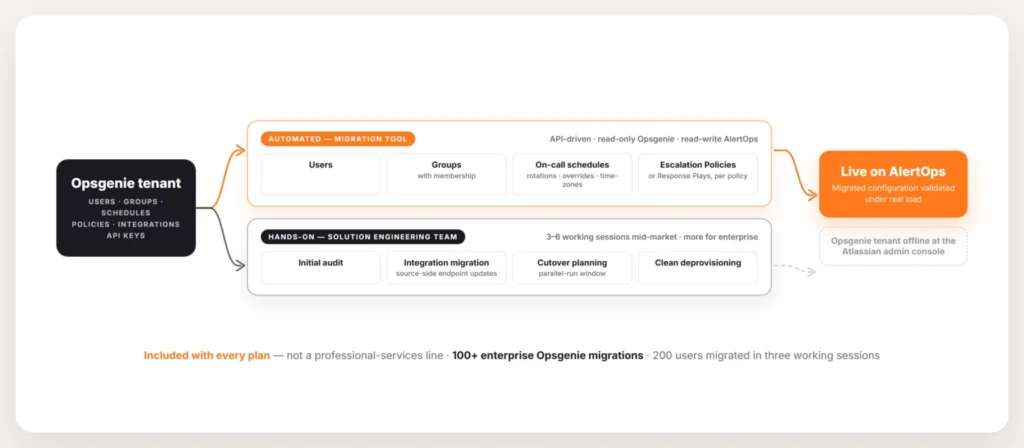
Diagram showing the AlertOps free Opsgenie migration split into two parallel tracks. Automated migration tool handles users, groups with membership, on-call schedules including rotations and overrides and time-zones, and escalation policies (or Response Plays per per-policy decision) via API with read-only Opsgenie access. Solution Engineering team engagement handles initial audit, integration migration with source-side endpoint updates, cutover planning with parallel-run window, and clean Opsgenie deprovisioning across 3-6 working sessions for mid-market or more for enterprise environments. The full program is included in AlertOps Enterprise with 100+ enterprise Opsgenie migrations completed.
What is the AlertOps free Opsgenie migration?
The migration has two components that work together.
The automated tool uses an Opsgenie API key with read-only access to pull configuration from the source environment and an AlertOps API key with read-write access to reproduce it in the destination. An AlertOps SE walked a mid-market customer through the mechanics: “We just take an API key out of AlertOps which has that read-write configure access. So we can take that stuff and replicate it within AlertOps.” The tool handles the structural primitives: users, groups, schedules, and escalation policies. Another SE confirmed the safety boundary: “It’s only giving us read access. So we’re not going to be able to make any changes in your environment.” The source Opsgenie tenant stays untouched during the import.
The Solution Engineering engagement handles everything the automated tool does not: initial audit, translation decisions (Response Play vs Escalation Policy per migrated configuration), integration migration (which is hands-on rather than automated, see below), cutover planning, stakeholder validation, and clean deprovisioning. The same team has run hundreds of enterprise Opsgenie migrations and brings the playbook for the failure modes that derail unsupported migrations.
The two components together produce migrations that complete in two to twelve weeks depending on environment complexity. The cost is included in the AlertOps plan.
What the tool actually migrates
Four categories migrate through the automated tool.
Users and groups. Every user with active permissions in the Opsgenie environment imports into AlertOps with role assignments preserved. Group membership preserves. The migration is the moment to identify and retire inactive users (a recurring observation in enterprise audits, where one operations lead noted: “You’d be surprised at the organizations that have 1500 users on OpsGenie, but actually we started looking at it and we’re not even using 300 of them.”).
On-call schedules. Rotations, layered overrides, and time-zone-aware shift handoffs reproduce in AlertOps. The specific timeouts per rotation (the “ring primary 40 seconds before secondary” pattern customers tuned over time) preserve through the migration. Complex multi-layer rotations get flagged for the SE team to walk through during validation.
Escalation policies. Simple group-to-group escalations import as AlertOps Escalation Policies. Dynamic routing (time of day, severity, service ownership) imports as Response Plays. The per-policy decision gets made during the import calls based on what each Opsgenie policy actually does.
User mappings. Channel preferences, contact methods, and role assignments per user preserve through the migration. The migration is also the moment to clean inherited assignments that no longer match operational reality.
What the tool doesn’t migrate (and what the SE team handles instead)
The integration layer does not auto-migrate. An AlertOps SE was direct with a New York MSP during the migration kickoff: “The only thing that it cannot bring over is your integration.” The reason is structural: integrations are configurations with external dependencies (monitoring tools, ticketing systems, custom webhooks) and the destination side of each integration needs to be configured manually to match what the source system expects. The Opsgenie webhook URL has to be replaced with the AlertOps webhook URL in every source monitoring tool; the receiving side has to be configured to handle the payload format the source sends.
The Solution Engineering team handles the integration migration as part of the engagement. For environments with hundreds of integrations, this is the longest portion of the engagement. The team walks through every active integration, builds the AlertOps inbound or outbound configuration, coordinates the source-system endpoint updates, and validates the round-trip during the parallel-run cutover window. For source systems not on the 200+ pre-built marketplace, the team builds custom webhook adapters as part of the engagement.
The principle behind the boundary is operational. Structural primitives (users, groups, schedules, escalation policies) can be reliably automated. External system integrations cannot, because the source-side configuration lives outside Opsgenie itself.
The real timelines from 100+ enterprise migrations
The published migration timeline ranges from two to twelve weeks depending on environment complexity. The dossier of completed migrations gives sharper data points.
An AlertOps SE summarized the credentials directly during a 2026 demo: “Due to the phase out of OpsGenie, I’ve worked on over 100 cases now with migrating customers away from OpsGenie to alert Ops.” Another SE noted the demand: “Nearly like half our customers at this point are trying to come from OpsGenie.”
Specific timeline reference points from completed migrations:
- Small environment, half-hour technical import: “We have basically set up an internal tool so we can just kick a button from our end using our API keys and we can have like 90% of the stuff migrated into AlertOps and we can just configure the edge cases and be good to go within like half an hour to 45-minute calls.” (Ishaan to Gant Systems, 2026-02-09). The technical import itself is fast; the audit and validation around it take longer.
- Mid-enterprise, 200 users in three sessions: “I actually have just wrapped up 200 users and we only required three working sessions.” (Ishaan to CarminFogarty / FCS America, 2026-04-21). Three working sessions covering audit, import, validation. Cutover and deprovisioning ran additional time outside the sessions.
- Enterprise complexity, longer engagement: Environments at Footlocker scale (700 users, 150 teams, ~200 integrations) run six to twelve weeks total elapsed time. The bottleneck is integration migration and parallel-run validation, not the schedule and policy import.
How the engagement actually runs
The engagement follows a consistent pattern across migrations. An SE described the process during a mid-market enterprise software customer migration: “We hold a couple of sessions. The first session, which is today’s session, is always to kind of like navigate through the instance. Then what we do is we review your OpsGenie instance and just go through one or two teams that you want to surely see in the migration, in the POC.”
Session 1: Navigate the AlertOps instance and review the Opsgenie source. The Solution Engineer walks through the AlertOps environment and reviews the Opsgenie configuration to scope the migration. Output: a shared understanding of what’s in the source and what the destination will look like.
Session 2: Pilot migration of one or two teams. The team picks a representative pilot team (usually one with moderate complexity) and the CS engineer migrates it end-to-end. Users, groups, schedules, escalation policies for the pilot team. The team validates the result under real load for a week.
Session 3+: Roll out remaining teams. With the pilot validated, the remaining teams migrate in sequence. Enterprise environments with many teams run multiple sessions to work through the full set.
Cutover sessions. Source-system integrations update to point at AlertOps endpoints. Parallel-run window begins. The team validates inbound integration volume, on-call assignments, escalation routing, and outbound integration payloads.
Deprovisioning session. After parallel-run validation completes, Opsgenie deprovisioning runs: API keys rotate, active integrations deactivate, schedules freeze, and the Opsgenie tenant is taken offline.
The empathy principle behind the engagement: “Our goal is to not have much hassle for you, especially when it comes to the admins. If they’re already adjusted to do things in one way, we don’t want to reinvent the wheel just for the sake of claiming best practice. If it works, it works.” (Ishaan to ChristopherSnedeker, 2026-04-13). The migration team preserves the operational patterns the source team has invested in rather than imposing uniform architectural purity.
What costs extra (the honest answer)
The migration team and the automated tool are included in AlertOps Enterprise. The plan itself is paid (Premium and Enterprise tiers). The migration does not add a professional services line item on top of the plan cost.
What costs extra:
- Custom integrations beyond what the 200+ marketplace covers. The team builds these as part of the engagement, but very heavy custom-integration workloads (dozens of bespoke adapters) may scope into a separate engagement.
- The Premium-to-Enterprise tier upgrade if the environment needs unlimited outbound integrations (Premium caps at three per incident).
- The $500/month OpsIQ add-on if the AlertOps plan does not include the AI capability the team needs (most enterprise environments use it).
Onboarding fee is typically $3,000, often waived during contract negotiation for new partners or for enterprise responder counts.
See how the AlertOps free Opsgenie migration handles your specific environment at alertops.com/demo.
The bottom line
Yes, AlertOps does the Opsgenie migration. The automated tool handles users, groups, schedules, and escalation policies, while the Solution Engineering team handles audit, integration migration, cutover, and deprovisioning. The engagement runs two to twelve weeks depending on environment complexity, and the cost is included in the AlertOps plan.
The combination has handled 100+ enterprise Opsgenie migrations. The team preserves the operational patterns the source admins have invested in rather than rebuilding from scratch. For Opsgenie migrants whose existing configuration represents years of operational tuning, the free migration is the structural reason cutover takes weeks rather than months.
Book a demo at alertops.com/demo to see how the migration team handles your specific environment and timeline.
Frequently asked questions
Does AlertOps actually do the Opsgenie migration for us?
Yes. The migration is included with AlertOps Enterprise plans rather than sold as a separate professional services line. The automated tool handles users, groups, schedules, and escalation policies. The Solution Engineering team handles audit, integration migration, cutover planning, and clean deprovisioning. The combination has handled 100+ enterprise Opsgenie migrations.
What does the AlertOps Opsgenie migration tool migrate?
Users with role assignments. Groups with membership. On-call schedules including rotations, layered overrides, and time-zone-aware shift handoffs with specific timeouts preserved. Escalation policies (simple group-to-group escalations as Escalation Policies; dynamic routing as Response Plays). User channel preferences and contact methods.
What does the AlertOps migration NOT auto-migrate?
Integrations. The integration layer requires source-side endpoint updates (every monitoring tool needs to be updated to point at the new AlertOps webhook URL) plus destination-side configuration. The SE team handles integration migration as part of the engagement.
How long does the Opsgenie migration to AlertOps take?
Smaller environments complete in two to six weeks. Enterprise environments with hundreds of integrations and dozens of teams run six to twelve weeks. The bottleneck is integration migration and parallel-run validation, not the structural import.
Is the API key access secure?
Yes. The Opsgenie API key provided to the migration tool has read-only access. No changes happen in the source environment during the import. The AlertOps API key has read-write access to the destination environment only.
How much does the AlertOps Opsgenie migration cost?
The migration team and automated tool are included in AlertOps Enterprise. There is no separate professional services line item. Onboarding fee is typically $3,000, often waived during contract negotiation.
How many sessions does the engagement run?
A typical mid-market migration runs three to six working sessions. Enterprise environments with many teams and integrations run more sessions to work through the full configuration. The pattern is: navigate the AlertOps instance, pilot one or two teams, roll out remaining teams, run cutover, deprovision.
What happens to my Opsgenie tenant after the migration?
After parallel-run cutover validation completes, Opsgenie deprovisioning runs: every API key rotates, every active integration deactivates, every on-call schedule freezes, and the Opsgenie tenant is taken offline at the Atlassian admin console. The team walks through the deprovisioning checklist as part of the engagement.