Key takeaways
- Alert fatigue reduction in 2026 starts before any AI purchase. DORA’s 2025 research found that AI acts as an amplifier of an organization’s existing strengths and weaknesses, and a noisy alert stream is a weakness every agent reading it inherits.
- Work in a fixed order: count the pages, fix the sources, group related alerts, schedule quiet for planned work, then route what is left by consequence. Each step removes alerts the next step would otherwise have to handle.
- AlertOps, our incident orchestration platform, covers each step. AlertOps Enterprise includes OpsIQ, whose Smart Correlation Engine cuts alert noise by roughly 68% (AlertOps platform data), while Maintenance Windows and Heartbeat Monitoring work without AI.
- Teams leaving Opsgenie before Atlassian ends support on April 5, 2027 will rewrite their routing rules anyway, which makes the migration the cheapest moment to delete the alerts nobody acts on.
DORA’s 2025 State of AI-assisted Software Development found that AI’s primary role is as an amplifier of an organization’s existing strengths and weaknesses (DORA, 2025). We count a flooded alert stream among the weaknesses. When forty pages arrive for one failing service, an AI agent that reads the stream reads forty pages too, and any summary it writes starts from that mess.
If you want to reduce alert fatigue in 2026, count what pages your team today, fix or delete the sources that never needed a person, group related alerts into one incident, schedule quiet for planned work, and page by consequence, in that order and before you layer AI on top. This guide turns that order into a 90-day plan for IT teams. AlertOps carries every step in one platform, so we use it for the examples. For the human cost of pager overload, see our piece on alert fatigue and AI incident management; this one is the cleanup.
What is different about alert fatigue in 2026
More software reads your alerts
An alert used to have an on-call engineer and perhaps a ticket queue as its audience. The same stream can now feed correlation engines, chat assistants and AI agents that summarize or route, and each of them inherits the noise, so one cleanup improves all of them at once.
Outages still cost real money
The Uptime Institute’s 2026 outage analysis reports that in its 2025 survey, 57% of respondents said their most recent major outage cost more than $100,000, and one in five reported costs above $1 million (Uptime Institute, 2026; the figures are self-reported). The pager exists for the incident that matters, and every false page makes the next real one a little easier to ignore.
Opsgenie teams are rebuilding routing anyway
Atlassian ends Opsgenie support on April 5, 2027. On that date access shuts off and any data not migrated is deleted (Atlassian). Anyone moving has to re-create schedules, escalation rules and integrations, and nobody should copy years of accumulated rules across unexamined. One team on a trial walkthrough described the replacement they wanted as “the same functionalities plus alerting, grouping the alerts, and filtering the noise.” Migration support is included with AlertOps Enterprise and run by our Solution Engineering team; it is not a DIY transition. Routing and incident grouping are validated in parallel with your current tool, which is the right time to leave the dead alerts behind. Our Opsgenie end-of-life guide covers the timeline.
Start with a 30-day count
You cannot judge an improvement without a baseline. Spend the first month collecting these, using exports from your monitoring tools and a shared sheet where responders note what each page turned out to be:
- Pages per person per on-call week, and how many of them landed outside business hours
- The ten alert rules or sources that produce the most pages
- Pages acknowledged with no action taken, as a share of all pages
- Repeats of the same alert inside an hour
- Monitors that have sent nothing at all for weeks
Your own first month is the baseline, because it reflects your sources and your team.
Book a demo if you want to bring that export and see how the same alerts would group in AlertOps.
Sort every recurring alert into one of four bins
Take the top ten rules from your count and give each one a bin.
| Bin | Test | Fix | Where it lives in AlertOps |
|---|---|---|---|
| Fix at the source | Nobody has ever acted on it | Delete the rule or change the threshold in the monitoring tool | Your monitoring tool; the count gives each owner a cleanup list |
| Group | It fires many times for one cause | Collapse the burst into one incident | OpsIQ Smart Correlation Engine |
| Schedule quiet | It fires during known work | Pause the source for the maintenance period | Maintenance Windows |
| Keep paging | Someone must act, and soon | Route to a named owner with escalation | Escalation Policy, Response Plays, Workflows |
The first bin matters most because every rule deleted at the source is one less alert for grouping, scheduling and routing to handle.
Group related alerts before anyone is paged
One failing database host can raise a latency alert, a connection alert, a replication alert and a dozen application errors across three monitoring tools. Without grouping, each lands as its own page.
What grouping looks like in AlertOps
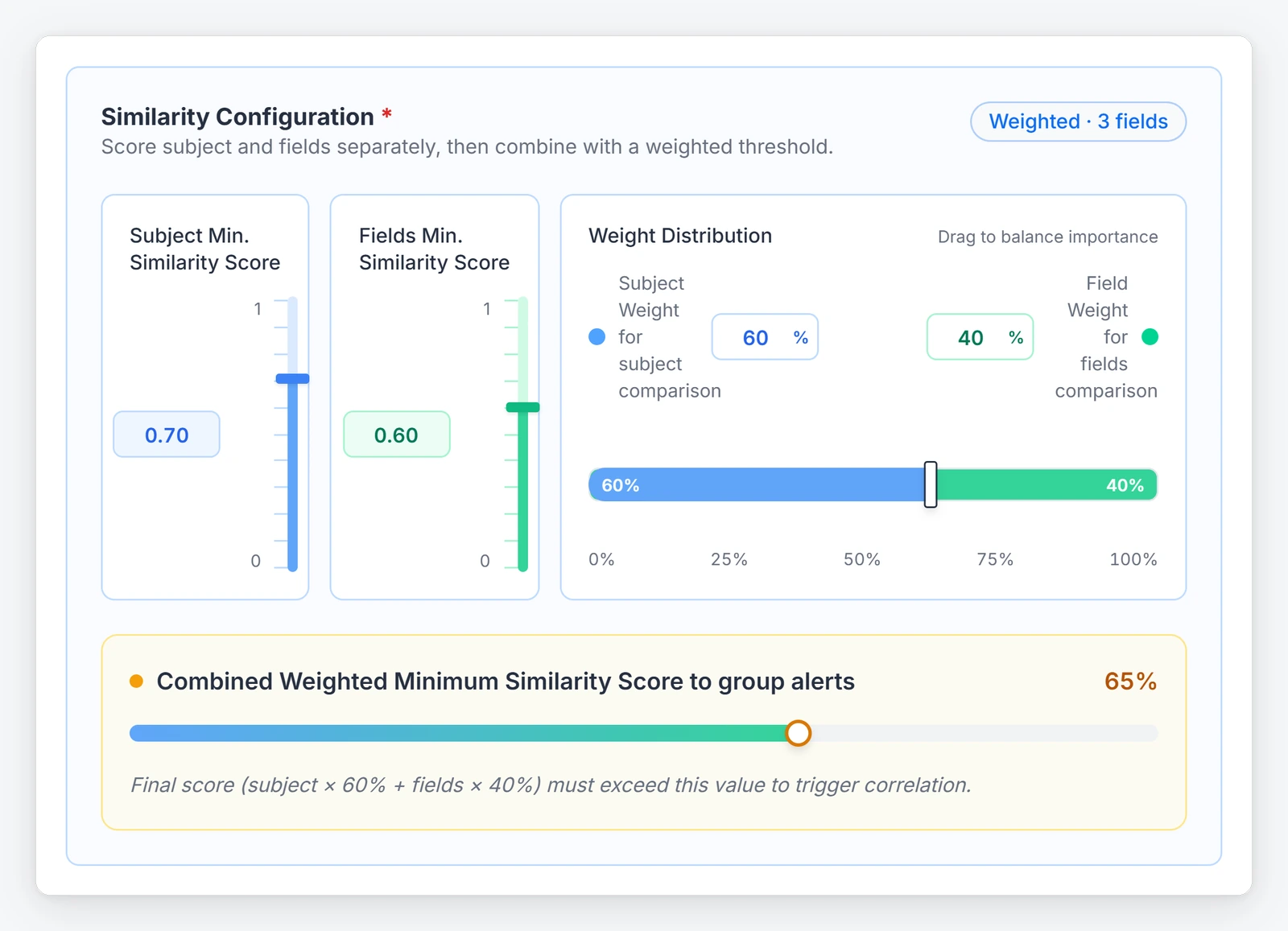
AlertOps Enterprise includes OpsIQ, and its Smart Correlation Engine groups related alerts in real time using similarity modeling, NLP and customizable thresholds. You can tune field weights, grouping windows and mandatory match criteria, which are the knobs that decide whether two alerts count as the same story. OpsIQ cuts alert noise by roughly 68% (AlertOps platform data), and 200+ pre-built integrations bring alerts from every tool in your count into one place to be grouped.
Tune it on your own alerts
Start with the service behind the noisiest incident from your 30-day count. Check which of its alerts grouped and which stayed separate, then adjust the grouping window and match criteria until one incident reads as one incident. After that, move to the second noisiest.
Validate routing and grouping in parallel with your current tool before you cut over, so the first days after go-live are already proven, and use the Preview button on an Escalation Policy to test it against an actual group.
See how a NOC cut its alert noise with AlertOps, or book a demo to watch your own incident group in OpsIQ.
Schedule quiet for planned work and watch for silent sources
Maintenance Windows
Patch weekends and migrations create alerts everyone expects. Each Maintenance Window in AlertOps pauses new alerts from the integration source you choose, once or on a daily, weekly or monthly schedule, so patching the database cluster does not silence network monitoring. Put the recurring ones in once, because a muted channel and a reminder in someone’s head will fail eventually.
Heartbeat Monitoring
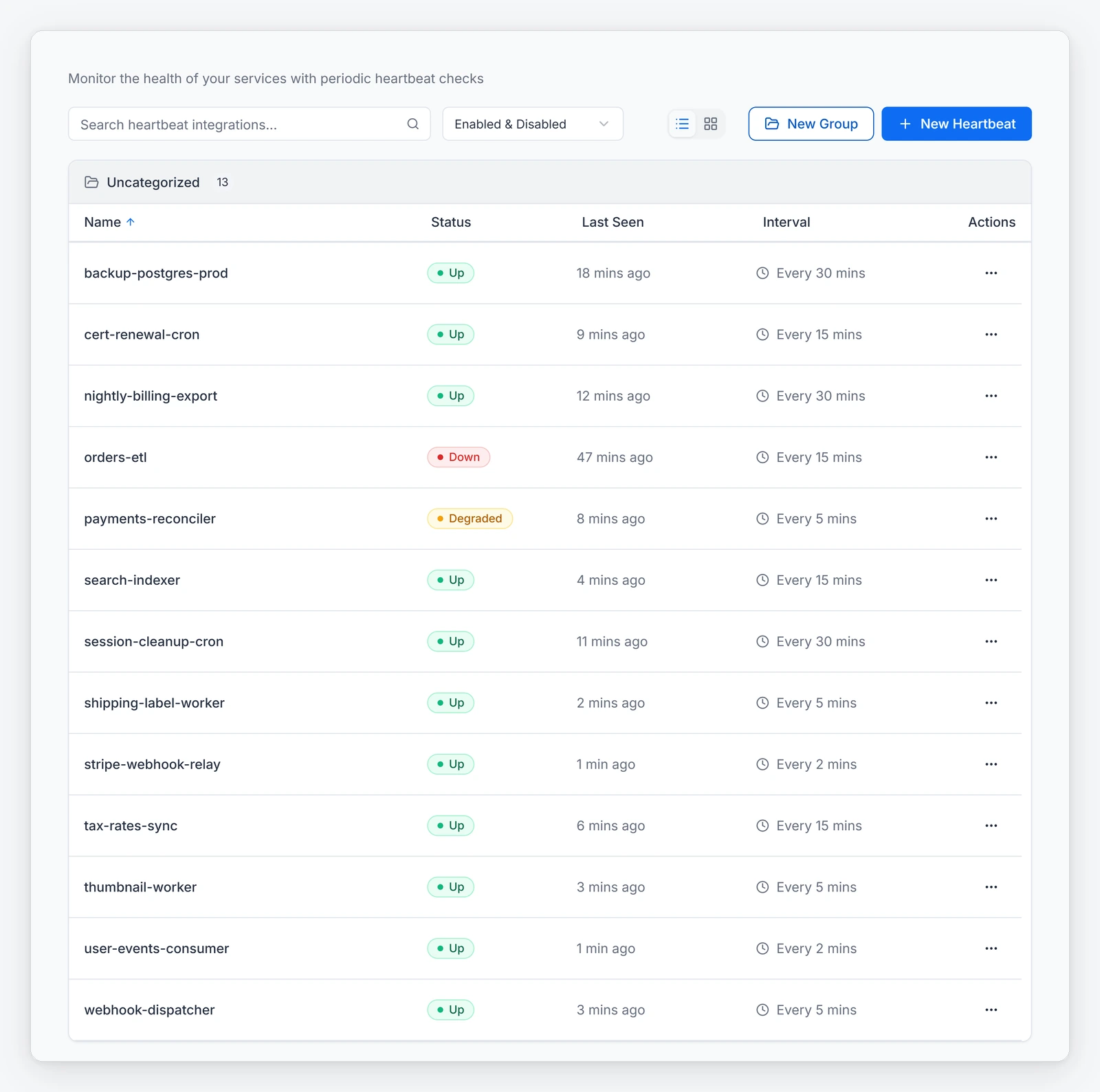
Cutting noise carries a risk: a monitoring tool that stops sending alerts can look like a calm shift. With Heartbeat Monitoring, a source sends AlertOps a regular heartbeat, and a missed one opens an incident that escalates through your on-call rules. List every source in your count with the date of its last alert, and put the ones that fail silently under a heartbeat first.
Page by consequence
Once the noise is out, decide who hears about what remains and how hard the system tries. Not everything that survives deserves a phone call at 3 a.m.
Match the routing to the service
AlertOps gives you two ways to route, plus Workflows for extra actions:
- Escalation Policy for strict role order. A payments alert goes to the primary owner, then the secondary, then the manager, with wait times between each step.
- Response Plays to notify everyone on an active shift in a group at once, when the work needs several people and role order does not matter.
- Workflows for auxiliary actions inside an Escalation Policy, triggered by start and stop conditions, such as sending a message when a condition is met.
Native notification goes out by phone, SMS, email and mobile app, and an Escalation Policy can sequence contact methods, so an email can go first and a phone call can follow after the interval you set. Slack and Microsoft Teams connect as integrations for the conversation around the incident.
Reserve the phone call
Keep phone escalation for services where a missed alert costs money or customers, and let the rest wait in a queue or ticket. If nobody could do anything useful at 3 a.m., the alert should not wake anyone. Ask each service owner to name that line during the first month.
Whatever ITSM or monitoring tools your team runs, 200+ pre-built integrations keep the incident and the ticket in step, and the certified AlertOps app for ServiceNow is one strong example, two-way with no coding needed.
Add AI where a policy can check it
Buyers on our calls who want noise handled ask for deterministic suppression first, and AlertOps starts there. Maintenance Windows, Heartbeat Monitoring and routing rules do what you configured; OpsIQ adds grouping and suggestions on top once the floor is clean.
Where OpsIQ helps once the stream is cleaner
OpsIQ is a family of features. Smart Correlation groups alerts. Historical Alert Insights shows how similar alerts were fixed before, which helps when the person on call is not the system’s usual owner. AI-Powered Resolution Suggestion proposes a fix while the incident is open. AlertOps Enterprise, at $28 per user per month billed annually, includes all of it (AlertOps pricing).
Ada for the setup work
Ada, the AI agent in AlertOps, comes with OpsIQ in AlertOps Enterprise. It works inside the platform and helps you build the cleanup itself: describe an integration or workflow in plain English, answer its follow-up questions, and review the full setup before anything is created. Every action it proposes waits for your approval.
A rule for how much autonomy to give
Consequential decisions should have a named owner, and routine ones should follow a policy that someone wrote down. A grouping threshold, a maintenance schedule and an escalation order are all policies, and you can review each one. Before an agent closes or reroutes anything, write the policy it works under and name who owns that policy.
Review the noise every month
A cleanup decays because new services and monitors add new alerts. Hold a short review each month against the same list from your 30-day count and ask which rules grew.
Agent Chronicle, included in AlertOps Enterprise, automates postmortem creation and cuts postmortem prep by up to 80% (AlertOps platform data). The postmortem is also where the noise question belongs, so add one line to your template: which alerts in this incident needed a person, and which did not. The answers feed straight back into the four bins.

The 90-day plan
| Days | Goal | Output |
|---|---|---|
| 1 to 30 | Measure | The count: pages per person, top ten rules, silent monitors, a note on each acknowledged page |
| 31 to 60 | Remove and group | Dead rules deleted at the source, recurring maintenance in Maintenance Windows, grouping tuned on the three noisiest incidents |
| 61 to 90 | Route and review | Phone escalation limited to named services, Heartbeat Monitoring on silent sources, the first monthly review held |
At day 90, compare the new count with the baseline; if pages per person did not fall, the answer is in the top ten rules.
A checklist for your first week
- Export 30 days of alerts from every monitoring tool
- Name an owner for each of the top ten noisy rules
- List the monitors that have been silent for weeks
- Write down your recurring maintenance calendar for the next quarter
- Ask each service owner which alerts justify a phone call
- Check how each ITSM record should sync, and in which direction
- Book the parallel run before you change any live routing
Bring the export to a demo and we will walk through it with you.
FAQ
What is alert fatigue reduction?
Alert fatigue reduction is the work of cutting the pages that do not need a person so responders trust the ones that do. In AlertOps, that means grouping related alerts with OpsIQ, pausing planned work with Maintenance Windows and routing what remains through Escalation Policies or Response Plays.
How do I reduce alert fatigue without missing a real incident?
Remove noise in layers that you can check: delete rules nobody acts on, group duplicates, pause planned work on a schedule and put silent sources under a heartbeat. AlertOps Heartbeat Monitoring opens an incident when a source stops reporting in, so a quiet shift does not hide a dead integration.
How much noise can correlation remove?
AlertOps Enterprise includes OpsIQ, which cuts alert noise by roughly 68% (AlertOps platform data) with grouping tuned to your own sources, and you can book a demo to see it run against your own alerts.
Should we add AI agents before we clean up our alerts?
Clean first. DORA’s 2025 research describes AI as an amplifier of existing strengths and weaknesses, and a flooded stream gives an agent a worse starting point. In AlertOps, OpsIQ and Ada come with Enterprise, so grouping and setup help are available once the stream is clean.
Which AlertOps plans include OpsIQ?
AlertOps Enterprise includes OpsIQ, with Smart Correlation, Historical Alert Insights, AI-Powered Resolution Suggestion, Agent Chronicle and Ada. See the AlertOps pricing page for current tiers.
Fewer pages, same coverage
Teams that reduce alert fatigue do it with a count, a short list of deleted rules and a monthly habit, and the platform’s job is to make each step cheap. Start with the 30-day count, then run your noisiest incident through OpsIQ. Start a free trial or book a demo and we will help you set the baseline.
Sources
- DORA: 2025 State of AI-assisted Software Development
- Uptime Institute: Annual Outage Analysis 2026
- Atlassian: Opsgenie end of sale and support
- AlertOps: Pricing
- AlertOps platform data: roughly 68% less alert noise; up to 80% less postmortem prep time