Table of contents
- The question everyone asks, and nobody answers fast
- What Ada – AI Assistant actually is
- Why “who’s on call” needs an AI assistant at all
- She handles messy questions just fine
- What she can actually do
- She’s not boxed into one corner of the platform
- What she can see, and who controls that
- What she doesn’t do
- Why she’s named Ada
- Where she fits inside OpsIQ
- How to start using her
- Frequently Asked Questions
The question everyone asks, and nobody answers fast
Ask any operations team what question comes up most, and it isn’t about alert routing or escalation logic. It’s the one typed into a channel a dozen times a day: who’s on call for this right now?
It’s also one of the slowest questions to answer. The schedule is set up correctly, the overrides are in place, and the group’s ownership is right. Getting the actual answer still means opening the scheduling view, finding the right rotation, checking whether an override is active, and confirming the person it points to is free.
That’s the question everyone notices. It’s not the only one costing teams time mid-incident. Has this alert fired before, and what fixed it last time. Which recent deploy touched this service. Why did this page never escalate past tier one. Those questions sit in the same blind spot, just quieter, because nobody’s paging a channel to ask them. They’re the questions someone answers by digging through three tools and a Slack history while the incident clock keeps running.
Starting today, Ada – AI Assistant is live inside OpsIQ, AlertOps’ AI layer. Ask any of those questions in plain English and she answers them from live data. Tell her you’re out Friday and need cover, or that a new service needs an integration and an escalation path, and she goes further. She works out the change, shows it to you, and makes it only once you approve.
What Ada – AI Assistant actually is
Ada is the AI assistant built into OpsIQ. She isn’t scoped to the on-call calendar. She reads and acts across the configuration that makes incident response work: alerts, integrations, services, escalation policies, users, groups, and schedules, all from live AlertOps data. Every change she proposes gets shown to a person first and made only after that person signs off.
She’s part of the platform already, not something you buy separately, and she doesn’t need an integration project. She reads what you’ve already set up, and support works the same way it does everywhere else in AlertOps.
Ask who is on call right now and you get the name, the schedule it came from, and any override already applied. But ask her something harder mid-incident, like “has this alert fired before, and what happened last time,” and she pulls the history: prior occurrences, how long they took to resolve, and what closed them out. Ask why a page never reached anyone last Tuesday and she traces it, which escalation policy it hit, where it stalled, and who it should have reached. Same assistant, same approval model, much wider reach.
Why “who’s on call” needs an AI assistant at all
The question is deceptively simple. Underneath it are a few smaller ones: which team someone meant, which rotation is actually live tonight rather than last week, whether an override is running, and whether the person it lands on is free. A colleague on your team answers all of that without even noticing they’re doing it. Software has to get it right every time, because the one night it’s wrong is the night someone was counting on it.
That’s what makes the question expensive when the path to an answer is too long. People stop checking the schedule themselves and message the one engineer who has the rotation memorized. That engineer is almost always the person already deepest in whatever incident is happening, so a single incident quietly turns into two jobs for one person: solving the problem, and fielding questions about who’s covering what.
It gets worse under scale. As teams ship new services faster than they can document them, the gaps aren’t just “who’s on call.” A service goes live Thursday, nobody remembers to wire up an integration for it, and the first alert it ever throws has nowhere to go. An escalation policy gets built with a placeholder group that was never actually staffed, and it sits invisible until the night it matters. None of that was ever truly missing information. It was a configuration step that got skipped weeks ago and nobody noticed until an incident found it.
She handles messy questions just fine
Nobody types carefully during an incident. A message like “whos covering tonite,” typed one-handed with a coffee in the other, still gets Ada to the right person. “why didnt anyone get paged for the payments alert” gets her tracing an escalation chain, not asking you to rephrase. “has this happened before” gets her pulling the incident’s history instead of a blank stare. You’re asking her the same way you’d ask a coworker, not learning a syntax.
When something’s missing, like which group or which service you meant, she asks instead of guessing. When a question falls outside what she covers, she says so rather than handing you a name that merely sounds plausible. A wrong answer delivered confidently at three in the morning does more damage than no answer at all, since someone will act on it, page the wrong person, and the incident falls further behind than if Ada had said nothing.
What she can actually do
Ada goes beyond answering questions. She takes on the configuration and coordination work that usually eats an afternoon, and the context-gathering work that usually eats the first ten minutes of an incident, spread across the whole platform:
- Mark you out of office and line up cover, creating the shift and notifying who’s affected
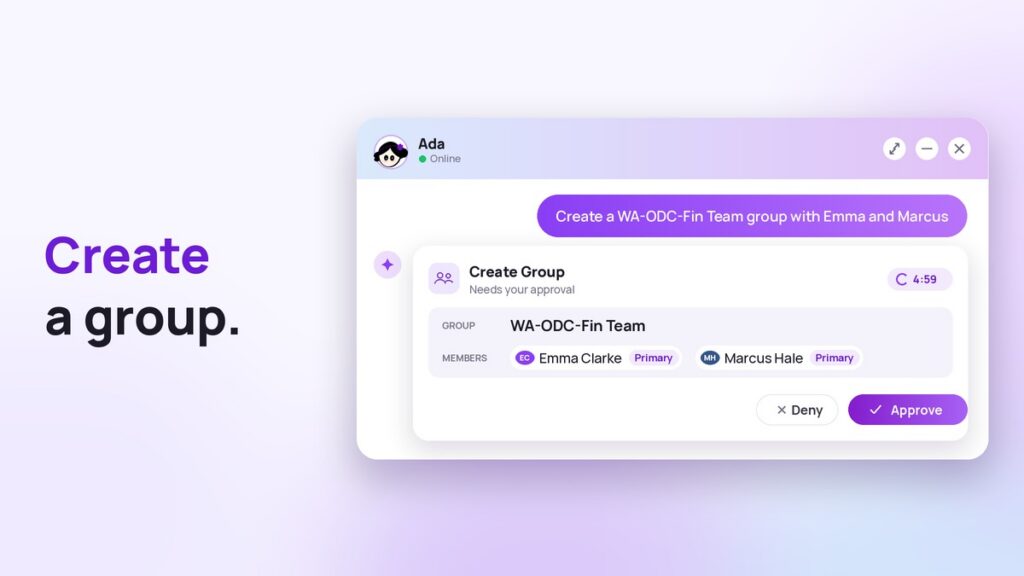
- Create a new group, add members, and attach it to the right escalation policy
- Acknowledge or escalate an alert on your behalf, mid-incident, without you leaving the conversation to go find the button
- Pull context on an active alert the moment it fires: whether it’s happened before, how it was resolved last time, and what changed recently on the service behind it
- Stand up a new integration for a service that just went live, and wire in where its alerts should route before that service ever throws its first page
- Trace an escalation chain end to end and point out exactly where a response stalled, a policy has a dead group attached, or a step has no one actually staffed behind it
- Set up a new user account and get them into the right groups and schedules
If a request doesn’t say which group or which service, she asks rather than picking one on her own. Before anything happens, she lays out exactly what she’s about to do: what it touches, who’s affected, and what it replaces, with a button to approve it and a button to turn it down. Deny it, and it disappears cleanly. Nothing gets left behind for someone to find on Monday and wonder where it came from.
“Every team we talk to loses the first few minutes of an incident just gathering context that already exists somewhere in the system. Ada closes that gap. She pulls the history the moment an alert fires, builds the integration a new service needs, and shows you exactly where a response stalled so your team fixes the actual failure point instead of guessing at it.”
Kamalesh Srikanth, VP of Product & Customer Operations at AlertOps
She’s not boxed into one corner of the platform
A lot of what looks like an “AI assistant” in other tools is really a chatbot bolted onto one feature, good for reading a schedule back to you and not much else. Ada isn’t limited that way. She connects into AlertOps through the platform’s own MCP server, which gives her visibility into configuration across every module, not just the on-call calendar.
In practice, that’s what lets her carry out a request end to end instead of handing you a half-finished task. A service ships without monitoring wired up, and instead of that gap surfacing as a missed alert three weeks later, Ada can stand up the integration, attach the right escalation policy, and get a group staffed behind it, all as one approved action. Mid-incident, instead of you tabbing between the alert, a search for prior incidents, and the deploy log, she surfaces all of it in the same place you asked the question. As infrastructure grows faster than any one person can track, that’s the part that matters: Ada’s reach grows with your configuration instead of trailing behind it, and she catches the quiet gaps before they become the reason a page went nowhere.
What she can see, and who controls that
This is usually the first question a security reviewer asks. Ada reads live data at the moment you ask her something; nothing is cached overnight. She never makes a change on her own; everything she proposes gets shown in full before it happens. And she works within the permissions already set for your role, so if you can’t see a team’s schedule or a service’s config today, asking Ada about it won’t change that.
What she doesn’t do
Correlating alerts at scale is handled by the Smart Correlation Engine, not Ada. Writing postmortems is Agent Chronicle’s job. Ada doesn’t act without approval, and she isn’t meant to replace an engineer’s judgment on a call. Her job is the configuration and context work around a response, not the response itself.
Why she’s named Ada
In 1843, Ada Lovelace wrote what historians consider the first computer program, an algorithm for Charles Babbage’s Analytical Engine, a machine that was never even built in her lifetime.
We named this assistant after her because of how she thought, not just what she wrote. Before Ada gives you an answer or proposes a change, she’s already worked through the same questions a person answers without noticing: which team, which rotation, which override, and who’s actually free, or which policy, which integration, and where the chain breaks. When she isn’t sure, she asks rather than filling in a guess.
Where she fits inside OpsIQ
OpsIQ is the intelligence layer across AlertOps. Ada joins the Smart Correlation Engine, which groups related alerts in real time; Intellifield Reasoning Agents, which bring structured reasoning to unstructured alerts; Historical Alert Insights, which surfaces resolutions that worked before, and which Ada draws on when she pulls an alert’s history for you; and Agent Chronicle, which writes postmortems automatically. AlertOps reports that OpsIQ cuts alert noise by up to 68 percent and speeds up response by 50 percent across enterprise deployments. Every one of these, Ada included, comes with the platform rather than as a separately priced module. See the full lineup on the OpsIQ page.
How to start using her
If you’re already an AlertOps customer, Ada is live now. Ask her your first question right in the platform. If you’re still evaluating AlertOps, book a demo and we’ll put her through your hardest on-call scenarios live: a badly typed question, a change you approve, one you deny, an integration she builds on the spot, an alert she pulls history and context for, and one request she should refuse outright.
Frequently Asked Questions
Does she need setup or an integration project?
She doesn’t. Ada reads what you already set up in your AlertOps account – users, groups, schedules, integrations, and escalation policies.
Can Ada see data I don’t have access to?
She can’t. Ada works within your existing permissions, and if your role can’t see a team or a service, asking her about it doesn’t change that.
Does Ada only answer questions, or can she make changes too?
Both. She can mark someone out of office and arrange cover, create shifts and groups, and stand up integrations. On an active alert, she can pull context, acknowledge, or escalate. You approve every change before she makes it.
What happens if Ada doesn’t know the answer?
She’ll say so. If a request is missing something, she’ll ask for it. If a question is outside what she covers, she’ll tell you rather than guess.