Plenty of ServiceNow incidents have a known fix. Restart the stuck service, clear the backed-up queue, fail over to the standby node. The runbook spells out every step, and a human still gets paged at three in the morning to follow it by hand.
This guide covers what’s safe to automate, how Workflows trigger runbooks and RPA on a ServiceNow condition, how the automated action stays on the record, and where to keep a person in the loop. For the incidents that do need a human, see how to automate major incident response in ServiceNow.
Table of Contents
- The Incidents That Don’t Need a Human
- Workflows Are Actions Triggered on Conditions
- Triggering the Runbooks and RPA You Already Run
- Automate the Fix, Keep the Audit
- Where Teams Get the Scope Wrong
- What to Automate and What to Leave to People
- Conclusion
- FAQ
The Incidents That Don’t Need a Human
Not every page is a problem to solve. Some are a chore to perform. A disk fills and the fix is to clear a temp directory. A worker process hangs and the fix is to restart it. A node degrades and the fix is to fail over. These are deterministic, they’re documented, and they happen often enough that a team can recite the steps. Paging a person to run them is paying for judgment the situation doesn’t require.
That toil has a cost beyond the minutes. It’s the after-hours page that didn’t need to wake anyone, the on-call fatigue that builds from being summoned for the routine, and the slower mean time to resolution while a half-asleep responder finds the runbook and works down it. It also has a quieter cost: the good engineers on a rotation start dreading on-call not because the real incidents are hard, but because most nights the phone rings for something a script could have handled in seconds. Automating the known fixes pulls that whole category off the on-call load, and what’s left is the work that actually needed a person in the first place.
Workflows Are Actions Triggered on Conditions
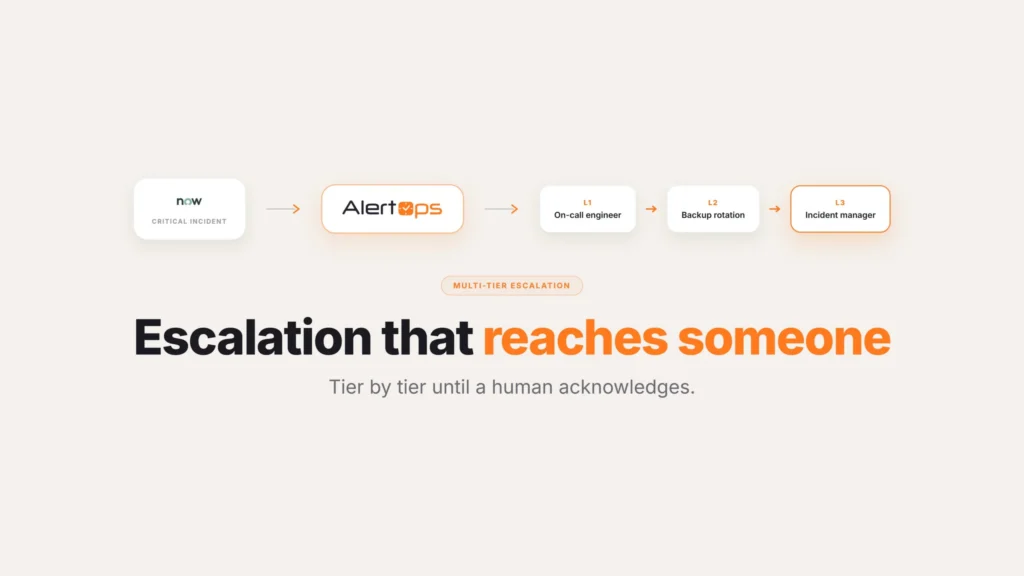
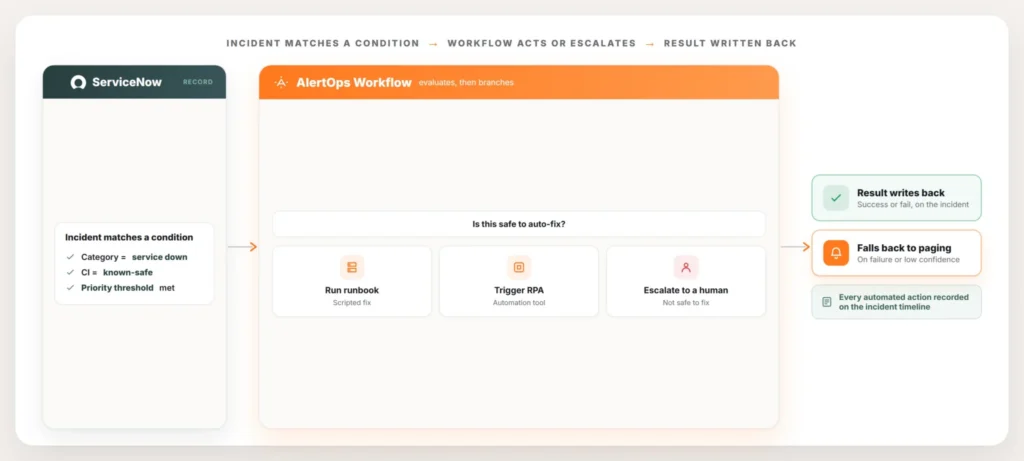
In AlertOps, a Workflow is an auxiliary action triggered by conditions you define. It runs alongside the escalation logic rather than replacing it, so the same ServiceNow incident that would page a responder can instead, or first, run an action when the conditions say it’s safe to.
The condition is the control. You scope a Workflow to fire only when the incident matches a precise pattern, a particular category, a known configuration item, a severity threshold, so automation runs on the cases you trust and never on the ones you don’t. A condition can be as narrow as you need it to be: category equals a specific value, the affected configuration item is on an approved list, priority falls below a threshold where a wrong guess costs little. The narrower the condition, the more confidently a team can let the Workflow run unattended, and it’s fine to start narrow and widen the scope later as the automation proves itself. Everything else follows the normal escalation path to a human.
Triggering the Runbooks and RPA You Already Run
You don’t have to rebuild your automation inside a new tool. Most enterprises already have the remediation logic somewhere, in a runbook, a script, an orchestration platform, or an RPA tool that handles repetitive operational work. AlertOps triggers that existing automation from the incident, so the value is in the firing, not in reinventing the fix.
When a ServiceNow incident meets the condition, the Workflow calls the runbook or the RPA tool, hands it the incident context, and lets it run. The remediation a team built and trusts now executes the moment the incident qualifies, instead of waiting for someone to wake up, read the ticket, and start the same job by hand.
Automate the Fix, Keep the Audit
Automation that happens off the record is a problem of its own. Every action an AlertOps Workflow runs is written back to the ServiceNow incident, so the record shows what fired, when, and what it returned, and Agent Chronicle keeps the same sequence on the timestamped timeline. The automated step is documented exactly like a human action, which is what an auditor or a post-incident review needs. Nobody has to reconstruct after the fact whether the automation ran or guess at what it actually did, since the incident already carries that answer.
That write-back also closes the loop cleanly. If the remediation succeeds, the incident reflects it and can resolve. If it fails or comes back uncertain, the Workflow falls through to the escalation path and pages a responder, with the record showing that automation was tried first. That last detail matters more than it sounds. A responder who gets paged after a failed automated attempt isn’t starting cold. They can see exactly what was already tried and ruled out, instead of repeating the same first step the script already attempted. Nothing happens silently.
Where Teams Get the Scope Wrong
A few patterns show up often enough when teams start automating remediation that they’re worth naming ahead of time.
Automating a fix before it’s actually stable. A runbook step that still gets tweaked every few months isn’t ready to run unattended. Let a fix sit unchanged for a while first, so automating it means encoding something proven rather than something still being figured out.
Skipping the failure path. It’s tempting to build the automation and assume it will work, but the more important design question is what happens when it doesn’t. A Workflow without a clear fallback to a human just delays the page instead of eliminating it, and delays it at the worst possible moment, after the automated attempt has already burned a few minutes.
Automating something that looks safe but touches shared state. A restart that only affects one isolated service is a good candidate. The same restart on a component several other systems depend on needs a person weighing the blast radius first, even if the restart command itself is identical.
Never revisiting what’s already automated. An environment changes, and a fix that was safe to run blind a year ago might not fit how the system behaves today. Treat the list of automated fixes as something to periodically re-check, not a one-time decision.
What to Automate and What to Leave to People
The discipline is in scope, not ambition. A good test is whether you’d let a brand-new on-call engineer run the step from the runbook with no discretion. If yes, it’s a candidate for a Workflow. If it needs judgment, automate the context around it instead: open the bridge, page the right responder, attach the diagnostics, and let a human make the call faster.
| Good fit for automation | Better left to a person |
| Restarting a hung process or stuck service | Diagnosing a root cause that isn’t yet understood |
| Clearing a backed-up queue or full temp directory | Any irreversible change to production data |
| Failing over to a healthy standby node | A genuine major incident affecting customers |
| Gathering diagnostics before a human looks | A decision that depends on business context, not just system state |
Conclusion
None of this is about removing people from incident response. It’s about not spending a person’s judgment on work that never needed judgment in the first place. The fixes that qualify are narrow and specific: repeatable, reversible, boring enough that anyone could follow the steps without thinking. Everything outside that scope still goes to a human, faster, because the routine stuff isn’t competing for their attention anymore.
Book a demo at alertops.com/demo to map which of your ServiceNow incidents can be auto-remediated against your own runbooks.
Frequently asked questions
Can AlertOps automate remediation for ServiceNow incidents?
Yes, for incidents with a known, repeatable fix. When a ServiceNow incident matches a condition you define, an AlertOps Workflow runs. It calls a runbook or an RPA tool and writes the result back to the incident. Anything that needs judgment still follows the normal escalation path.
What is an AlertOps Workflow?
A Workflow is an auxiliary action that runs on conditions you set. It works alongside escalation rather than replacing it. When the conditions say a fix is safe, the incident triggers that fix automatically. When they don’t, it moves straight to paging a responder.
Can AlertOps trigger our existing runbooks and RPA tools?
Yes. It calls the automation your team already built and trusts, rather than asking you to recreate it. Once an incident meets the condition, the Workflow hands the incident context to that runbook or RPA tool and lets it run.
Does ServiceNow record an automated remediation?
Yes. Running the fix automatically doesn’t take it off the books. AlertOps writes every Workflow action back to the incident. Agent Chronicle logs it on the timestamped timeline, alongside everything a person did. If the attempt fails, the incident moves to escalation and carries that history with it.
What should I not automate?
Anything that needs diagnosis, involves an irreversible change, or amounts to a genuine major incident belongs with a person. Automation fits the boring, repeatable, low-judgment work, restarts, queue clears, failovers, gathering diagnostics, while leaving the actual decisions to someone who can weigh context a runbook can’t capture.