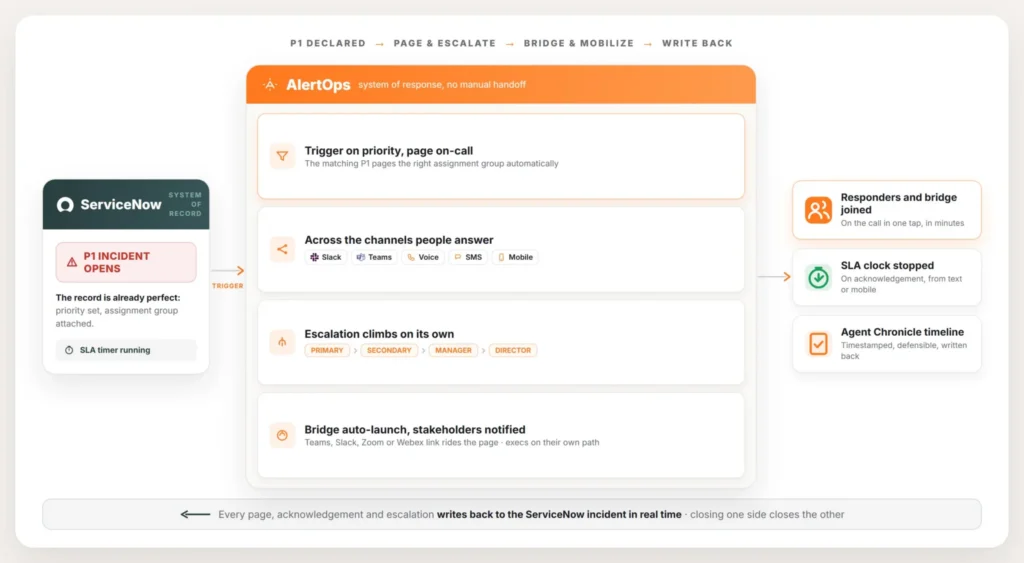
When a major incident opens in ServiceNow, the record is already in good shape. Priority is set. Assignment group attached. SLA timer running. What happens next, at most companies, is someone opens the on-call schedule and starts dialing down a list of names.
This guide covers what it takes to replace that step with automation: what actually triggers a page, how priority should drive escalation, how the bridge and stakeholders get pulled in, and how the SLA clock stays accurate through all of it. For the mechanics behind the connection itself, see the AlertOps and ServiceNow two-way integration guide.
Table of Contents
- Why the Slow Part Isn’t the Fix
- Turning an Incident Into a Page
- Escalation That Climbs on Its Own
- The Bridge Opens Itself
- Running the War Room
- Bringing in Stakeholders and Executives
- When the Incident Comes in by Phone
- Protecting the SLA Clock
- What This Looks Like End to End
- Setup Mistakes Worth Avoiding
- What Syncs Automatically vs. What Needs a Decision
- Conclusion
- FAQ
Why the Slow Part Isn’t the Fix
The slow part of a major incident is rarely the fix itself. It’s the gap between the incident opening and the right people finding out it exists. ServiceNow records the incident accurately the moment it’s created. Turning that record into a ringing phone is still a manual job at most companies, and that job sits directly on the critical path of every P1.
The cost shows up as a person doing lookup work while the clock keeps running. The opening minutes go to figuring out what’s down, who owns the failing service, and who’s on call for it, instead of actually working the problem. At higher volume it gets worse: look someone up, call, no answer, go back to the tool, find the next name, call again.
Every one of those minutes counts against the SLA. Usually on a system that’s earning revenue while it’s down. Automation takes the lookup and dial loop off the critical path completely.
Turning an Incident Into a Page
You set a condition on the ServiceNow side, usually priority or impact. The AlertOps integration turns any matching incident into a page to whoever is on call, instantly. Nobody opens a schedule. The lookup happens automatically as part of the routing.
The routing reads the incident’s assignment group and sends the page to the on-call members of that group rather than a static list someone updates every few months. AlertOps syncs assignment groups and their members from ServiceNow. That means the page lands on the person actually on call right now, across regions and overrides.
The page itself goes out on the channels people actually answer: SMS, voice, Slack, Microsoft Teams, mobile push. Incident details already attached. The responder acknowledges from wherever they are, and that acknowledgement flows straight back to the ServiceNow incident.
Escalation That Climbs on Its Own
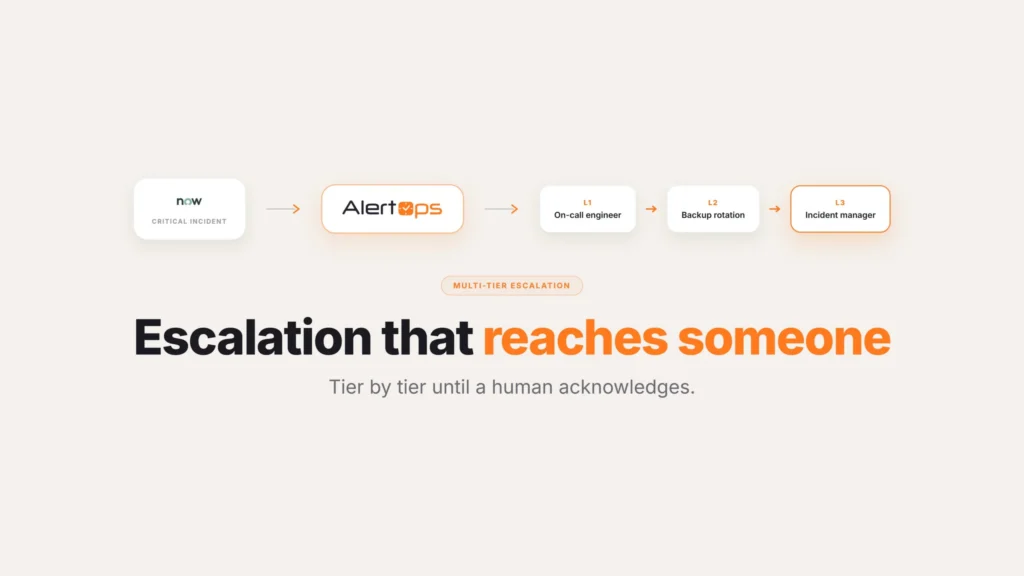
Each priority maps to its own Escalation Policy. A P1 can wake the entire chain. A P2 follows a quieter path that doesn’t pull a director out of bed. The policy decides who gets paged, in what order, and how long each tier waits before the alert moves up.
Enterprise escalation is rarely two or three steps. A real chain often runs six or seven levels: call the primary, give them a few minutes, call again to make sure they actually woke up, move to the next engineer, then the manager, then the director. An Escalation Policy encodes that whole structure, timeouts and repeat attempts included, and nobody has to run it by hand at three in the morning.
Teams that want a simpler, role-agnostic flow instead of a tier-by-tier chain can use AlertOps Response Plays, which still fire from the same ServiceNow trigger.
The Bridge Opens Itself
A major incident trigger can open the bridge automatically and put the link straight into the page. Responders join in one tap rather than hunting for it. For teams on Microsoft Teams, Slack, Zoom, or Webex, the bridge gets created the moment the incident qualifies as major.
This solves a small problem that causes a lot of friction: a fresh meeting link generated for every incident means a scramble to distribute it each time. When the bridge spins up automatically and travels with the page, that scramble goes away.
Running the War Room
Mobilizing people is the start of a major incident, not the end of it. Once responders are paged and the bridge is open, the incident still has to be run somewhere, and for most teams that somewhere is a Slack or Microsoft Teams channel. AlertOps posts the incident into that channel as the war room. Responders acknowledge, talk, and coordinate where they already work, and the channel stays tied back to the ServiceNow incident the whole time.
The bridge travels along through Connect Bridge, so once the incident qualifies as major, the link sits in both the page and the channel. As the response plays out, every page, acknowledgement, and escalation lands on a live timeline through Agent Chronicle. Anyone joining late can read what already happened rather than asking for a recap.
Bringing in Stakeholders and Executives
A major incident isn’t only a responder event. Executives need to know it’s happening and how to join, on a channel that suits them, without being pulled into the paging chain built for whoever is fixing the problem. AlertOps notifies stakeholders on their own path. A VP gets a summary and the bridge link by email or text while responders get the actual page.
There’s also a manual option for the moments that need one. From inside a ServiceNow incident, anyone can fire an AlertOps alert directly, choose the users and groups to pull in, and reach a whole team at once, without waiting for automation to catch up. Stakeholders who aren’t licensed responders can still sit in the escalation path through stakeholder access, which matters when the number of people who need updates outnumbers the people fixing the problem.
For an audience wider than any distribution list, a status page handles the broadcasting. AlertOps can post the incident to a public or internal Service Status page. Customers and internal teams can see what’s affected and when the next update is coming, rather than everyone fielding the same question over and over.
When the Incident Comes in by Phone
Not every major incident starts as a ServiceNow record. Sometimes the first signal is a phone call: a site going dark, a customer escalation, a partner calling in. AlertOps live call routing gives that path a front door, a number available around the clock that routes the caller to whoever is on call, raises the alert, and kicks off the same escalation and bridge process described above. The call becomes an incident rather than a voicemail nobody hears until the next morning, and it lands in ServiceNow like any other.
Protecting the SLA Clock
Every page, acknowledgement, and escalation gets timestamped in AlertOps and written back to the ServiceNow incident, showing when the response actually began without anyone updating the record manually. An engineer can acknowledge from a text message or the mobile app, which stops the SLA clock the moment they engage rather than whenever they get to a laptop.
The stakes here are straightforward. If the response SLA is fifteen minutes and the engineer is driving home from an appointment, acknowledging from the app or a text and having that written back to ServiceNow is the difference between a clean report and a breached one. Agent Chronicle captures the full sequence as a timestamped, defensible timeline, which becomes the post-incident review and the audit evidence at the same time. For regulated industries, that record is often the reason the whole process has to be auditable in the first place.
What This Looks Like End to End
Put together, the sequence runs without a manual handoff. A P1 opens in ServiceNow and immediately pages the on-call members of the right assignment group across their preferred channels. The bridge launches and its link travels with the page. Stakeholders get their own notification. If the primary doesn’t acknowledge inside the policy window, the alert climbs the tiers on its own, from secondary to manager to director. The first engineer to acknowledge stops the SLA clock, and from that point every action writes back to the ServiceNow incident. When the incident resolves, closing one side closes the other.
The major incident manager is still in charge of the response. They’re just running it from the start instead of spending the first ten minutes finding out who to call.
| Step | What happens | What writes back to ServiceNow |
| Incident opens | P1 or matching priority fires a page | Trigger logged |
| Page goes out | On-call members paged across channels | Delivery status |
| Acknowledgement | First responder acknowledges | SLA clock stopped, ack timestamp |
| Escalation | Unanswered pages climb the tiers | Escalation history |
| Bridge and war room | Bridge opens, channel created | Bridge link and channel reference |
| Resolution | Incident closed in either system | Synchronized close |
Setup Mistakes Worth Avoiding
A few things trip teams up when they turn this on, and none of them take long to fix once you know to check for them.
Escalation policies copied from a different team. It’s common to reuse an existing policy because it’s already there, but a policy built for a database team’s on-call rotation doesn’t necessarily fit a network team’s chain of command. Build each policy around how that specific group actually escalates.
No test run before go-live. The first real P1 is the wrong time to find out the bridge doesn’t launch or the stakeholder list is out of date. Run a test incident through the full path, page, bridge, stakeholder notification, before turning this on for a live team.
Treating stakeholder notification as an afterthought. Executives who find out about an outage from a customer instead of from the system tend to remember it. Set the stakeholder list up alongside the escalation policy, not after the first incident where nobody thought to include them.
What Syncs Automatically vs. What Needs a Decision
Turning on the trigger and the escalation engine is mechanical. Getting the response right still depends on decisions specific to each team.
| Handled by the integration | Needs a decision from your team |
| Assignment group and schedule sync | Which priority levels trigger a page |
| Multi-channel paging | Escalation timeouts and tier order per team |
| Bridge creation and link distribution | Which platform the bridge should use |
| Timeline write-back through Agent Chronicle | Who counts as a stakeholder for which incident types |
| Synchronized close | Whether a status page update goes out automatically |
Conclusion
Automating major incident response in ServiceNow doesn’t change what ServiceNow does well. The record stays exactly where it is, with the same priority, assignment group, and audit trail it always had. What changes is everything between the incident opening and the right people working it: the page goes out immediately, the escalation runs itself if nobody answers, the bridge is already open, and the whole sequence writes back to the incident it started from.
Book a demo at alertops.com/demo and walk through automating your major incident flow against your own ServiceNow instance.
Frequently asked questions
How do I automatically page on-call from a ServiceNow incident?
Set a condition in ServiceNow, usually on priority or impact, and the AlertOps integration pages the on-call members of the incident’s assignment group as soon as a matching incident is created. AlertOps syncs assignment groups and schedules from ServiceNow, so the lookup happens automatically and the page reaches whoever is on call at that moment.
Can ServiceNow auto-create a conference bridge for a major incident?
Yes. When an incident qualifies as major, AlertOps can launch a Microsoft Teams, Slack, Zoom, or Webex bridge automatically and include the link in the page, so responders join in one tap instead of waiting for someone to create and share a meeting.
How does AlertOps escalate a ServiceNow P1?
Each priority maps to its own Escalation Policy. A P1 can page the primary, retry, then climb through secondary, manager, and director with defined timeouts at each tier, while a P2 follows a quieter path. The escalation runs automatically from the ServiceNow trigger.
Does the major incident response write back to the ServiceNow incident?
Yes. Acknowledgements, escalations, notes, and status get timestamped and written back to the ServiceNow incident in real time, including synchronized close. An engineer acknowledging from a text or the mobile app can stop the SLA clock the moment they engage.
Can I trigger a major incident page manually from ServiceNow?
Yes. From inside a ServiceNow incident, a responder can fire an AlertOps alert directly, choose the users and groups to pull in, and reach a whole team at once, which is the fastest way to escalate the moment an incident is recognized as major.