
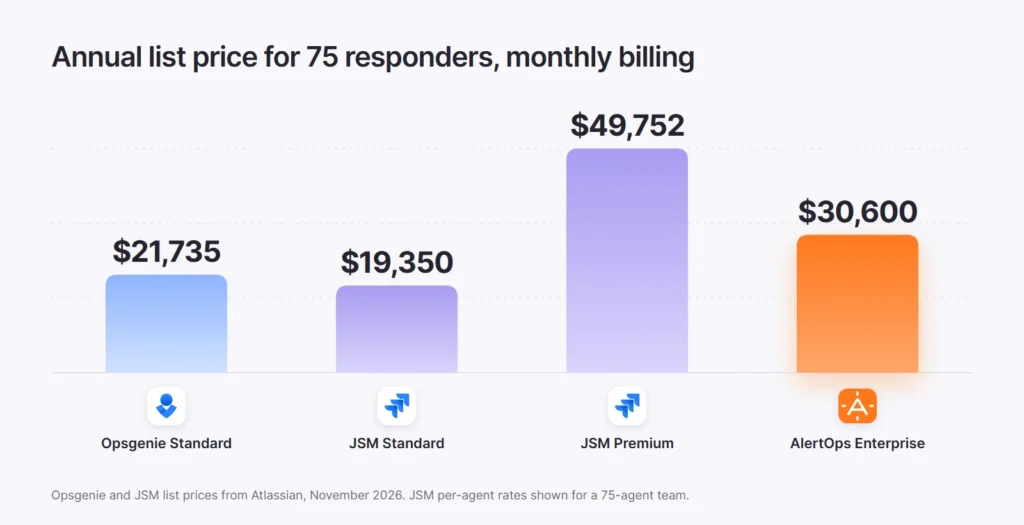
Moving from Opsgenie to Jira Service Management (JSM) costs about the same or more than double, depending on which JSM plan your team needs. For 75 responders on monthly billing, Opsgenie Standard lists at about $21,700 a year, JSM Standard at about $19,400 and JSM Premium, which carries heartbeat monitoring and advanced incident management, at about $49,800.
Key takeaways
- Opsgenie support ends on April 5, 2027, when access shuts off and data that has not been moved is deleted (Atlassian licensing).
- Once you migrate with Atlassian’s tool, Opsgenie shuts down 120 days after the migration date unless you turn it off sooner (Atlassian support).
- JSM is priced per agent: Standard at $21.50 and Premium at $55.28 per agent per month for a 75-agent team on monthly billing (Atlassian pricing).
- Heartbeat monitoring, advanced AIOps and change management sit in JSM Premium, and status pages sit in Enterprise, so feature parity often means Premium.
Most Opsgenie conversations this year start with features. The budget question usually arrives later, once someone prices the JSM plan that matches what the team uses today. Our Opsgenie vs Jira Service Management guide covers the features. This post covers the money: list prices, the plan your team will need and the costs that never appear on a pricing page.
The deadline that sets the budget
Atlassian stopped selling Opsgenie to new customers in June 2025 and ends support on April 5, 2027. On that date, access shuts off and any customer data not moved to Jira Service Management is deleted (Atlassian licensing). Existing customers can still add seats, and renewals are allowed as long as the term ends before the support date.
The deadline that matters for budgeting may come sooner. When you migrate with Atlassian’s in-app tool, Opsgenie shuts down 120 days after the migration date unless you turn it off earlier (Atlassian support). Starting a trial migration commits you to a four-month window, so the JSM contract needs to be priced and approved before that clock starts.
What you can still do with your Opsgenie contract
Opsgenie customers have fewer options than they did a year ago. Plan upgrades and downgrades are no longer available, so a team on Essentials cannot move to Standard to gain a feature before the move (Atlassian licensing). You can add seats, and you can renew as long as the new term ends before April 5, 2027. In practice, any renewal signed now is a short final term, so the real decision is which platform you move to and when.
How Opsgenie is priced today
Opsgenie charges per user. Essentials costs $9.45 per user per month on annual billing or $11.55 monthly, Standard costs $19.95 or $24.15 and Enterprise costs $31.90 or $38.50 (Opsgenie pricing). Standard is where most mid-sized teams sit, and it includes unlimited incident postmortems, which Essentials caps at 5 a month.
How Jira Service Management is priced
JSM is now sold as part of Atlassian’s Service Collection and is priced per agent (Atlassian pricing). Free covers 3 agents and includes alerts, on-call schedules and escalation policies. For a 75-agent team on monthly billing, Standard is listed at $21.50 per agent per month and Premium at $55.28. Enterprise is sold on annual terms at a quoted price. The per-agent rate drops as the team grows, so price your own agent count in Atlassian’s calculator.
Atlassian defines an agent as a licensed user who works on tickets. Customers who only raise requests are free. For an operations team, the important point is that responders who act on alerts need a license, which means the agent count follows your on-call rotation, not your service desk.
Monthly vs annual billing on JSM
Billing cycles behave differently in JSM. On monthly billing, Atlassian charges for the exact number of users you have each month, so you can add and remove agents as the team changes. On annual billing, Atlassian bills for the user tier closest to your count, and annual plans may work out cheaper depending on how many users you buy (Atlassian pricing). If your rotation is still shrinking or growing during the migration, monthly billing keeps you from paying for a tier you will not use.
Which features move up a tier in JSM
| Capability | JSM plan where it starts |
|---|---|
| Alerts, on-call schedules and escalation policies | Free and above |
| Asset and configuration management, audit logs | Standard |
| Heartbeat monitoring (real-time incident monitoring) | Premium |
| Advanced AIOps: AI alert grouping, incident creation and PIR generation | Premium |
| Advanced incident and problem management, change management | Premium |
| Public and private status pages | Enterprise |
If your Opsgenie setup uses heartbeats to catch monitoring tools that stop sending, or relies on alert grouping to keep noise down, plan for Premium. Teams that publish status pages from their incident tool need Enterprise, which has no published price.
The real cost for 75 responders
| Option | List price per user or agent per month | Per year, 75 responders |
|---|---|---|
| Opsgenie Standard (monthly) | $24.15 | $21,735 |
| JSM Standard (monthly) | $21.50 | $19,350 |
| JSM Premium (monthly) | $55.28 | $49,752 |
| AlertOps Enterprise (monthly) | $34 | $30,600 |
| AlertOps Enterprise (annual) | $28 | $25,200 |
A move to JSM Standard can cost slightly less than Opsgenie Standard on paper. A move to JSM Premium, the plan that carries heartbeat monitoring and advanced AIOps, costs about $28,000 more a year for the same 75 people. AlertOps Enterprise, which includes OpsIQ noise reduction, AI postmortems, two-way ITSM integration and a vendor-run migration, sits between the two (AlertOps pricing).
Costs that never appear on the pricing page
License price is only part of the bill. Atlassian’s own migration guidance lists work that falls on your team after the move. Admins need to reconfigure integrations in Jira Service Management and reconnect the Slack and Microsoft Teams chat integrations (Atlassian migration guide). Any incidents created after the migration have to be copied across by hand, and scripts that call Opsgenie must be moved to the Jira Operations REST API endpoints (Atlassian support).
Phone numbers need attention as well. Teams that use incoming call routing have to move their Opsgenie phone numbers, and Atlassian’s migration documentation includes a separate guide for switching those numbers to Twilio (Atlassian migration challenges). Plan that change with your telecom team early, since a support line that rings nowhere during cutover is the kind of failure clients notice first. The same page lists changes to alerts, schedules, integrations, analytics and the mobile app after migration, and it is worth reading line by line with your admins before you schedule the move.
Seat creep adds a quieter cost. People who sat on an Opsgenie rotation to receive pages may never open Jira, yet they still need licenses in JSM. Before you sign, list every person on every schedule and decide who truly needs a seat.
Want a side-by-side cost model for your own rotation? Book a demo
Questions to put to Atlassian before you sign
- Which JSM plan includes every Opsgenie feature we use today, including heartbeats and alert grouping?
- How many of our Opsgenie users will need agent licenses, and is there a lower-cost option for people who only receive pages?
- What happens to our remaining Opsgenie subscription term once we migrate?
- How will our phone numbers for incoming call routing move across?
- Can the 120-day shutdown window be extended if testing finds a routing problem?
Get the answers in writing. Each one changes either the license count, the plan or the timeline, and together they decide whether JSM is the cheaper path for your team.
When JSM is the right call
JSM makes sense when your responders already work in Jira, you want request, change and asset management in the same product and procurement prefers one Atlassian contract. For a service desk team that also carries the pager, Standard can cost less than Opsgenie did, and the migration tool moves most configuration across for you.
It is a weaker fit when the rotation reaches far beyond the Jira team, when the features you rely on sit in Premium or Enterprise, or when ServiceNow is your system of record rather than Jira.
A third option: move to AlertOps
Teams that only need alerting and on-call often look at a dedicated platform instead of an ITSM suite. AlertOps Enterprise costs $28 per user per month on annual billing and includes OpsIQ, which cuts alert noise by up to 68%, and Agent Chronicle, which drafts postmortems with up to 80% less prep time (AlertOps platform data). It also includes Heartbeat Monitoring, two-way Jira and ServiceNow integrations and a migration program run by the Solution Engineering team. Migration support is included, and it is not a DIY transition: the team copies your schedules, rules and integrations, tests routing side by side while Opsgenie keeps paging and switches over on your date. See AlertOps vs Opsgenie for the full comparison, and our Opsgenie end-of-life guide for ServiceNow shops.
How to build your own estimate
- Export every Opsgenie user and mark who responds, who only needs updates and who is inactive.
- List the Opsgenie features you use weekly, including heartbeats, alert grouping, status pages and postmortems.
- Map each feature to the JSM plan where it starts, and price that plan for your responder count.
- Add the hours for rebuilding integrations, chat connections and API scripts.
- Price one alternative with the same features and responder list, then decide before you start the 120-day clock.
Teams that finish this exercise early keep their options open. Teams that start it in early 2027 may find the 120-day window and the support end date have already made the choice for them.
Need to decide before April 2027? See how AlertOps replaces Opsgenie.
FAQ
Is Jira Service Management more expensive than Opsgenie?
It depends on the plan. For 75 responders on monthly billing, JSM Standard lists slightly below Opsgenie Standard, while JSM Premium, which includes heartbeat monitoring and advanced AIOps, costs more than twice as much.
When does Opsgenie shut down?
Atlassian ends Opsgenie support on April 5, 2027. Access stops on that date and data not moved to Jira Service Management is deleted.
What happens 120 days after an Opsgenie migration?
If you migrate with Atlassian’s tool, Opsgenie shuts down 120 days after the migration date unless you turn it off sooner.
Which JSM plan includes heartbeat monitoring?
Heartbeat monitoring is part of JSM Premium and Enterprise.
Do on-call responders need a JSM license?
Responders who act on alerts in JSM need licensed access, so plan for a seat for each person on your rotations.
Can I still upgrade my Opsgenie plan before migrating?
No. Atlassian no longer offers Opsgenie plan upgrades or downgrades. You can add seats and renew for a term that ends before April 5, 2027.
Is there an Opsgenie alternative that is not JSM?
Yes. AlertOps Enterprise replaces Opsgenie alerting and on-call, includes OpsIQ and two-way Jira and ServiceNow integration, and comes with a migration run by the Solution Engineering team.
Sources
- Atlassian: Opsgenie licensing
- Atlassian: What to expect from Opsgenie migration
- Atlassian: Opsgenie pricing
- Atlassian: Service Collection pricing
- Atlassian: How to use the migration guide and complete tasks
- Atlassian: Start moving from Opsgenie to Jira Service Management