Atlassian frames the Opsgenie shutdown as a big decision, and for some teams it is. If your ITSM lives in Jira, you’re weighing a real platform move. But if you run ServiceNow, the shutdown is smaller than it looks. You aren’t losing your system of record. You’re losing the on-call layer that was bolted next to it.
This guide walks through what’s ending and what isn’t, why JSM fits Jira shops better than ServiceNow shops, the auto-renew trap worth avoiding before April 2027, and how the Opsgenie alternative for ServiceNow shops actually cuts over.
Table of Contents
- What Is Actually Ending
- Why Atlassian Points You at JSM
- The Auto-Renew Trap
- JSM vs. AlertOps for a ServiceNow Estate
- The Cleaner Path for a ServiceNow Shop
- What You Gain on the Way Out
- How the Cutover Actually Works
- Conclusion
- FAQ
What Is Actually Ending
Opsgenie did one job well for a lot of teams. It took alerts from your monitoring stack, figured out who was on call, and made sure that person got woken up. For ServiceNow shops, that’s the part going away. The incidents, the change and problem records, the assignment groups, the years of process built into business rules: none of that was ever in Opsgenie. It’s all in ServiceNow, and ServiceNow isn’t going anywhere.
So the question is narrower than the Atlassian messaging suggests. You aren’t migrating an ITSM platform. You’re replacing one capability, the on-call and escalation layer, and connecting its replacement back to the ServiceNow you already run. That’s a smaller project with a smaller blast radius, as long as you choose a replacement that treats ServiceNow as the system of record instead of trying to become one.
Why Atlassian Points You at JSM
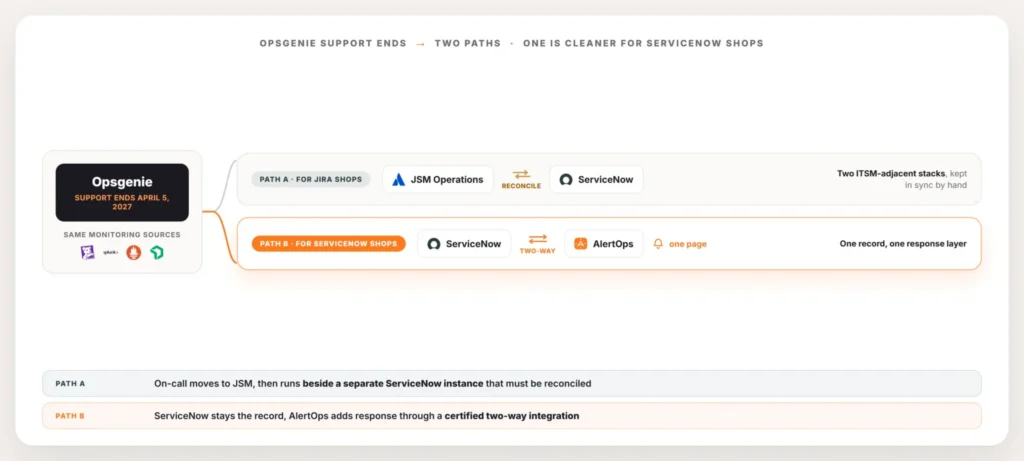
Atlassian’s recommended path is to move Opsgenie’s on-call features into Jira Service Management Operations. For an organization whose service desk is Jira, that’s a clean consolidation. The on-call layer lands inside the same platform as the tickets, billing is unified, and there’s one vendor to manage. If you’re a Jira shop, take that path seriously.
The fit changes when your ITSM is ServiceNow. JSM is Atlassian’s competitor to ServiceNow, so moving on-call into JSM puts a second ITSM-adjacent platform next to the one already running your enterprise. Now you have schedules and escalation logic living in JSM while incidents, assignment groups, and resolution live in ServiceNow, and something has to keep the two in agreement. That reconciliation is ongoing work, and JSM Operations carries its own per-agent pricing on top of it. None of this is a knock on JSM. It’s a good product in the wrong position for a ServiceNow estate.
The Auto-Renew Trap
There’s a timing detail worth flagging before anything else. Plenty of teams are still on an active Opsgenie contract, and contracts renew on their own unless someone stops them. Letting one auto-renew now buys another full cycle of a product whose support already has an end date, and that can push your renewal term past the support cliff. You’d be paying for a tool whose runway you can’t use.
Check the renewal date before it checks you. If a cycle is about to turn over, that window is the natural moment to start the replacement instead of re-upping. Moving on your own schedule, with months of runway and a parallel run to prove the new setup, is a calm project. Moving in early 2027 because a contract quietly renewed into a dead end is the version nobody wants.
JSM vs. AlertOps for a ServiceNow Estate
| JSM Operations | AlertOps | |
| Best fit | Jira is already your service desk | ServiceNow is already your ITSM |
| Where schedules and escalation live | Inside JSM, a separate platform from ServiceNow | Connected directly to ServiceNow through a two-way integration |
| What has to be reconciled | Two ITSM-adjacent stacks kept in agreement manually | Nothing extra. ServiceNow stays the single system of record |
| Pricing | Per-agent, on top of your existing ServiceNow spend | Layered on top of ServiceNow without duplicating ITSM licensing |
The Cleaner Path for a ServiceNow Shop
Keep ServiceNow as the system of record and add AlertOps as the system of response on top of it. AlertOps connects through a certified two-way integration, so this isn’t a custom build with integration users and brittle business rules. It’s a native app with one webhook, and no coding needed.
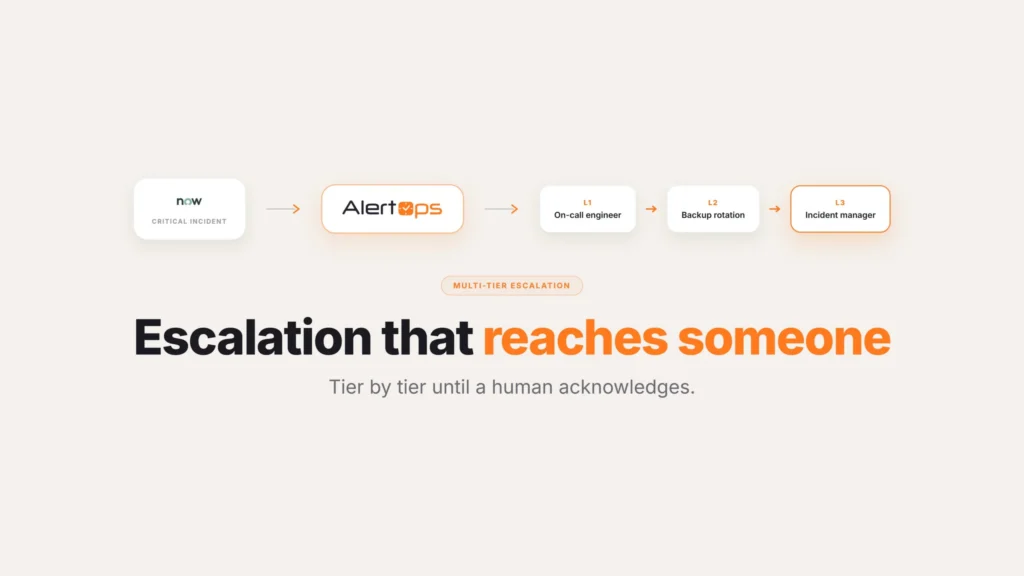
Here’s the loop it runs. When a qualifying incident opens in ServiceNow, AlertOps reads the assignment group and the on-call schedule, then routes the page to the right responder through an Escalation Policy or a Response Play. The Escalation Policy is the plotted pathway between roles, walking from primary to the next role to a manager when no one answers, which is what enterprises with six or seven escalation tiers need. A Response Play is the simpler, role-agnostic option when you just want the on-call group notified at once. Either way, the responder acknowledges from their phone, and that acknowledgement writes straight back to ServiceNow: status, notes, assignment, resolution, all synced in real time.
Two things make this fit a ServiceNow estate cleanly. First, schedules can stay in ServiceNow. Some teams have already built their on-call calendars there and want to manage rotations in one place, and AlertOps can pull that on-call information rather than forcing a parallel calendar. Second, the integration is genuinely bidirectional, so a note added during the response shows up on the ticket as it’s written instead of only at close. For more on the architecture, start with the AlertOps and ServiceNow two-way integration guide.
This is also where the “ServiceNow already does on-call” objection gets resolved honestly. ServiceNow’s native on-call covers the basics, and for some teams that’s enough. The teams replacing Opsgenie usually want more: deeper escalation chains, multi-channel notification across phone, SMS, email, and mobile, live call routing, and correlation that collapses an alert storm before it becomes a page. We cover that line in detail in is ServiceNow’s native on-call enough.
What You Gain on the Way Out
Replacing Opsgenie is a forced move, but it’s also a chance to fix things the old setup couldn’t. OpsIQ, the intelligence layer in AlertOps, runs correlation at the point signals arrive so a cascading outage groups into one enriched incident instead of dozens, cutting alert noise up to 68% in enterprise deployments (AlertOps platform data). Agent Chronicle assembles the postmortem automatically, capturing what happened, how it was resolved, and what comes next. For the major-incident pattern that lands on ServiceNow shops hardest, where a help-desk agent reads on-call during a P1 and dials people one at a time, AlertOps automates that handoff end to end. That story lives in ServiceNow major incident automation.
Book a demo at alertops.com/demo to see the two-way integration run against your own ServiceNow instance.
How the Cutover Actually Works
The migration is an assisted Solution Engineering engagement, not a DIY transition. The AlertOps Solution Engineering team replicates your Opsgenie setup in AlertOps: schedules, escalation rules, and the integrations feeding both your monitoring stack and ServiceNow. Nothing about your ServiceNow instance gets rebuilt. The on-call layer is what moves, and ServiceNow keeps doing its job underneath.
Then it runs in parallel. Alert routing and incident grouping get validated side by side with Opsgenie still live, so you confirm the right people page on the right incidents before anything depends on it. Once the parallel run holds, you cut over and retire Opsgenie. No big-bang weekend, no flying blind in 2027.
Conclusion
The Opsgenie shutdown reads like a bigger event than it actually is for a ServiceNow shop, mostly because Atlassian’s own messaging is written for Jira customers, where the stakes genuinely are bigger. Strip away the framing and what’s left is a single capability swap: on-call and escalation, reconnected to a system of record that was never at risk in the first place. Handled early, on your own schedule, it’s a routine project. Handled after a contract quietly auto-renews past the support date, it isn’t.
For how the connection itself works end to end, see the AlertOps and ServiceNow two-way integration guide.
Book a demo at alertops.com/demo to walk through your own Opsgenie-to-AlertOps cutover.
Frequently asked questions
When is Opsgenie actually shutting down?
Atlassian ended new Opsgenie sales on June 4, 2025, and full support ends April 5, 2027. Existing customers can keep using it until that support date, but no new purchases are available and the product is on a fixed end-of-life path. If your ITSM is ServiceNow, plan the replacement well before April 2027 rather than waiting for the cliff.
What is the best Opsgenie alternative if I run ServiceNow?
For a ServiceNow shop, the cleanest alternative is AlertOps, because it keeps ServiceNow as the system of record and adds the response layer on top through a certified two-way integration. It reads assignment groups and on-call schedules from ServiceNow, routes and escalates the page across phone, SMS, email, and mobile, and writes status, notes, and resolution back to the ticket in real time.
Should I just move Opsgenie on-call into JSM?
If your service desk is Jira, that’s a clean consolidation worth taking seriously. If your ITSM is ServiceNow, JSM puts a second ITSM-adjacent platform beside the one you already run, which means reconciling two stacks plus its own per-agent pricing. A response layer that sits on top of ServiceNow avoids running two systems of record in parallel.
Do I lose anything in ServiceNow when Opsgenie shuts down?
No. Your incidents, change records, assignment groups, and business rules all live in ServiceNow, not in Opsgenie. Opsgenie only held the on-call and escalation layer, and that’s the single capability you replace when it shuts down.
How does the migration from Opsgenie to AlertOps work?
It’s an assisted Solution Engineering engagement, not a DIY transition. The team replicates your schedules, escalation rules, and integrations, validates alert routing and incident grouping in parallel while Opsgenie stays live, and cuts over once that parallel run holds. Your ServiceNow instance isn’t rebuilt. Only the on-call layer moves.