Somewhere in your ServiceNow rollout, someone said it: “ServiceNow already does on-call, we don’t need another tool for that.” They aren’t wrong, exactly. ServiceNow includes on-call scheduling. It has rosters, rotations, and a way to notify whoever’s name is on the calendar. For one team running one clean weekly rotation, that’s genuinely enough.
The question is what happens once the rotation stops being simple. This post is the honest version of that trade-off: what ServiceNow on-call does well, where it runs out of room, and how to tell which side of that line you’re on. For the full picture of how the two systems connect, start with the AlertOps and ServiceNow two-way integration guide.
Table of Contents
- What ServiceNow On-Call Does Well
- Where the Schedule Gets Hard to Build
- Where Notification Stops Being Reliable
- Where Escalation Runs Deeper Than Two Tiers
- Native On-Call vs. a Dedicated Response Layer
- Signs You’ve Outgrown Native On-Call
- So, Is It Enough?
- Conclusion
- FAQ
What ServiceNow On-Call Does Well
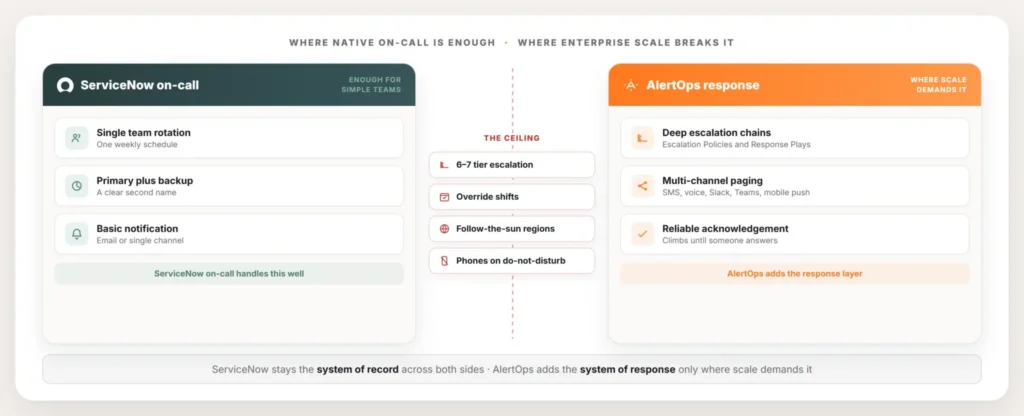
It’s worth being specific about what you already have, because the answer to “is it enough” depends on it. ServiceNow on-call management lets you build rosters, assign people to a rotation, set a cadence, and notify whoever is on call when an incident lands on their assignment group. It lives inside the platform your team already works in, the schedule sits next to the incident record, and there’s nothing else to buy or stand up. For a team running one rotation with a clear primary and a clear backup, that’s a complete answer. The on-call person gets told, they pick up the work, and the record stays in one place.
A lot of teams never need more than this. If your on-call story is one assignment group, one time zone, and an escalation that goes primary, then backup, then a manager, native on-call covers it. Reaching for a separate tool at that point adds cost and a second place to manage, for a problem you don’t have. The honest recommendation there is to use what ServiceNow already gives you.
The ceiling shows up when the shape of on-call gets more demanding, and at enterprise scale it almost always does.
Where the Schedule Gets Hard to Build
The first place teams feel the limit is in setting up the schedule itself. A simple rotation is easy. A real enterprise rotation is not, and the work scales faster than the headcount does. Building it in ServiceNow means creating layers of records and restrictions that govern who covers what and when, and those get hard to configure once the rules turn specific. Weekday versus weekend coverage, a separate holiday rotation, regional handoffs, someone who only takes the second tier: each of those adds more records and more conditions to get right.
Then the schedule has to change, because schedules always change. Someone swaps a shift. A person goes on leave and their slot needs covering without rewriting the whole rotation. A region hands off to the next region at the end of its day. Doing that cleanly, as a short-term change layered on top of the standing rotation rather than a permanent edit, gets fiddly fast in a roster built from dozens of records.
This is where AlertOps schedules tend to take over the load. Rotating and fixed schedules, Override Shifts for a temporary swap, out-of-office coverage, and a holiday feature handle these messy real-world changes as one-off actions instead of record surgery. Teams that want their schedules to keep living in ServiceNow can do that too. AlertOps syncs assignment groups and their members from ServiceNow automatically, so the rotation stays managed in one place and the response layer reads from it. The deeper version of this trade-off is covered in managing ServiceNow on-call scheduling.
Where Notification Stops Being Reliable
The harder ceiling isn’t the schedule. It’s whether the page actually wakes the person up.
Native on-call notification leans on phone calls and email. That works fine until you remember how people really live with their phones. Overnight, phones go on do not disturb. A single missed call, with no second channel and no fast fallback, is how a P1 sits unacknowledged while the SLA clock keeps running. Email is worse for anything urgent, since nobody is checking their inbox at three in the morning. The mechanism looks fine on paper and falls apart in the one moment it has to work.
Enterprises solve this with redundancy across channels. AlertOps reaches responders by phone, SMS, email, and mobile push, with Slack and Teams in the mix for teams that live there, and the mobile push is built to break through do-not-disturb settings so a real emergency isn’t silenced by a phone setting. If the first responder doesn’t acknowledge, the alert doesn’t stall on them. It moves to the next person automatically, on the next channel, without anyone having to notice the silence and step in. The goal isn’t more noise. It’s that the one alert that matters lands, on a channel the person will answer, and keeps trying until someone does.
Where Escalation Runs Deeper Than Two Tiers
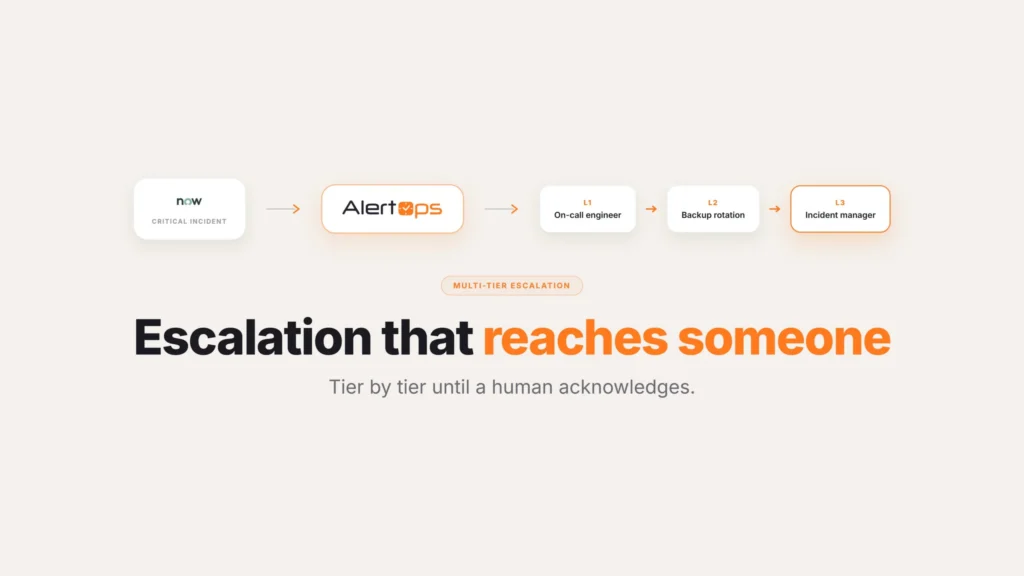
The last place the line gets crossed is escalation depth. Primary and backup is two tiers, and native on-call handles two tiers fine. Enterprises rarely stop at two. A serious incident at scale moves through six or seven levels: the first on-call engineer, then the secondary, then the group manager, then the director, climbing until someone answers. Each hop needs its own wait time, its own contact rules, and the guarantee that if a level stays silent, the chain keeps moving instead of dead-ending on one name.
Escalation Policies in AlertOps define that whole pathway between roles, with wait times between each level and a contact method sequence at every step, so the escalation runs its full depth without anyone driving it by hand. For cases where speed matters more than strict hierarchy, Response Plays notify a whole on-call group at once instead, no role sequence required. Either way, every hop gets timestamped in Agent Chronicle, so the response timeline is captured as it happens and the post-incident record shows exactly who was reached and when.
Native On-Call vs. a Dedicated Response Layer
| ServiceNow native on-call | AlertOps response layer | |
| Schedule complexity | Handles a single, simple rotation well | Handles layered overrides, follow-the-sun, holiday coverage as first-class actions |
| Notification | Phone call and email | Phone, SMS, email, Slack, Teams, mobile push with do-not-disturb bypass |
| Escalation depth | Two tiers: primary, then backup | Six or seven tiers with defined wait times per level |
| Missed page handling | Depends on someone noticing | Moves to the next responder and channel automatically |
| Response record | Basic incident log | Timestamped response timeline through Agent Chronicle |
| System of record | ServiceNow | Still ServiceNow |
Signs You’ve Outgrown Native On-Call
A few patterns tend to show up right before a team decides native on-call isn’t cutting it anymore.
Someone is manually re-paging after a missed call. If a person on the team has become the unofficial backup for “did the page actually go through,” that’s a sign the notification path itself isn’t reliable enough to trust.
The schedule needs a spreadsheet on the side. When overrides, holiday coverage, and regional handoffs get tracked outside ServiceNow because the roster can’t represent them cleanly, the schedule has outgrown the tool holding it.
Escalation stops at the backup because there’s nowhere else for it to go. If a major incident depends on someone remembering to call a director manually once the backup doesn’t answer, that step should be automatic, not a task on a checklist.
Nobody can say with confidence who was paged during a past incident. Without a timestamped record of every attempt, a post-incident review turns into people trying to remember what happened at 3 a.m.
So, Is It Enough?
The answer isn’t the same for every team, and pretending otherwise wouldn’t be honest. For a single team with one straightforward rotation, a clear primary and backup, and people who reliably answer a phone call, ServiceNow’s built-in on-call is enough, and adding a tool on top would be overhead you don’t need. The native capability is real, and for that profile, it does the job.
For enterprise response, the picture changes. Once a team is running deep escalation across many assignment groups, layering overrides onto standing rotations, covering regions with follow-the-sun handoffs, and depending on people whose phones are on silent overnight, the gaps stop being theoretical. That’s where a dedicated response layer earns its place, not by replacing ServiceNow but by sitting on top of it. ServiceNow keeps owning the incident, the schedule data, and the audit trail. AlertOps runs the response: the reliable paging, the deep escalation, and the schedule operations native on-call was never built to carry. Reducing the alert load that hits all of this connects to ServiceNow major incident automation.
The way to decide is to look at your hardest incident, not your easiest one. If native on-call handles a routine page cleanly, you may not need anything more. If it leaves you trusting a single overnight phone call to wake the right person while a major incident escalates, that’s the gap a response layer is for.
Conclusion
None of this is an argument against ServiceNow’s native on-call. It’s a real feature that does exactly what a simple rotation needs. What’s worth remembering is that on-call complexity tends to grow quietly, one extra region or one new escalation tier at a time, until an incident is what finally makes the gap obvious. Checking whether it’s still enough is worth doing on a schedule, not just once at rollout and never again.
Book a demo at alertops.com/demo to map your on-call against what ServiceNow native covers and where a response layer adds real value.
Frequently asked questions
Does ServiceNow have built-in on-call?
Yes. ServiceNow includes native on-call management with rosters, rotations, and notification to the person on call for an assignment group. For a single team running one straightforward rotation with a primary and a backup, that built-in capability is enough on its own.
Do I need a separate on-call tool if I already have ServiceNow?
It depends on the complexity of your on-call. A simple single-team rotation doesn’t need more than ServiceNow native on-call. Enterprises running deep multi-tier escalation, layered schedule overrides, follow-the-sun coverage, and reliable multi-channel paging usually add a dedicated response layer like AlertOps on top, while keeping ServiceNow as the system of record.
What are the limitations of ServiceNow native on-call?
The two most common ceilings are schedule complexity and notification reliability. Building enterprise rotations in ServiceNow takes many layered records and restrictions that are hard to configure, and native notification leans on phone calls and email, which are unreliable overnight when phones are on do not disturb. Escalation beyond a primary and backup also runs deeper than native on-call was built for.
How is AlertOps on-call different from ServiceNow on-call?
AlertOps adds a response layer rather than a separate system of record. It provides deep Escalation Policies and role-agnostic Response Plays, schedule operations like Override Shifts and follow-the-sun coverage, and paging across phone, SMS, email, Slack, Teams, and mobile push. ServiceNow stays the system of record, and AlertOps syncs assignment groups and members from it through the two-way integration.
Can I keep my on-call schedule in ServiceNow and still use AlertOps?
Yes. AlertOps automatically syncs assignment groups and their members from ServiceNow, so teams that prefer to manage rotations inside ServiceNow can do that while AlertOps reads from the schedule and runs escalation and paging on top. The schedule is managed in one place, and ServiceNow remains the system of record.