A single team on a weekly rotation is easy to run in ServiceNow. One group, one schedule, one person on call at a time, and the setup holds. The trouble starts when the org outgrows that shape: regions that need coverage around the clock, a primary on vacation whose backup is also out, and handoffs that have to follow the clock from one continent to the next.
This guide covers where schedules should live, how rotations and overrides hold up once things get messy, and how AlertOps can show who’s on call directly inside ServiceNow. For the full integration, start with the AlertOps and ServiceNow two-way integration guide.
Table of Contents
- A Single Rotation Is Fine. Enterprise Coverage Is the Problem
- Where Should the Schedules Live?
- Rotations and Overrides That Hold Up Under Load
- Schedules Only Matter Once They Drive the Page
- Seeing Who’s On Call Without Leaving ServiceNow
- Common Scheduling Mistakes
- Native ServiceNow vs. a Dedicated Scheduling Layer
- Conclusion
- FAQ
A Single Rotation Is Fine. Enterprise Coverage Is the Problem
ServiceNow can run on-call. For one assignment group with a clean weekly rotation, the native setup does the job, and there’s no reason to put anything in front of it. Plenty of teams start there and stay there for a long time.
What strains is scale, not the concept. Build coverage that has to be live at every hour across the Americas, EMEA, and APAC, and a single rotation becomes several that have to hand off cleanly as the day moves. Add the exceptions every real team carries, a primary on holiday, a backup pulled into a different priority, a one-off swap before a release, and the schedule stops being a calendar and turns into a stack of conditions. Building that in ServiceNow means creating many layered records, and getting the restrictions on each one right is the hard part.
None of this is a failing of the ITSM. It’s the difference between recording who’s responsible and resolving who to wake at 3 a.m. in Frankfurt when the named person is unreachable. The first is a system-of-record job. The second is what a purpose-built scheduling layer is for.
Where Should the Schedules Live?
This is the real decision, and it comes up early at most ServiceNow shops. Teams split into two camps, and both are right depending on the team.
Some teams have already built their rotations in ServiceNow and want one place to manage them. They don’t want to rebuild calendars somewhere else or keep two copies in sync by hand. For them, the goal is to keep schedules in ServiceNow as the single source and have the alerting layer read from it, so coverage is maintained once and routing follows. AlertOps supports that by syncing groups and users out of ServiceNow, so the rotation a team already maintains is the one that drives the page.
Other teams want scheduling tools that a record system was never built to provide: drag-and-drop rotations, fast overrides, regional layers that visibly stack into follow-the-sun coverage, an export feed so each responder sees their shifts in their own calendar. For them, managing schedules directly in AlertOps is the better fit, and ServiceNow stays the system of record for the incident itself. Neither model asks you to give up ServiceNow as the source of truth for the ticket. They differ only on where the calendar is easiest to run.
Rotations and Overrides That Hold Up Under Load
Whichever model a team picks, the schedule has to survive the messy week. AlertOps handles the predictable part with rotating schedules on daily, weekly, or monthly cycles, and fixed schedules where coverage is assigned to set people on set dates rather than a cycle.
The exceptions are where most scheduling tools get brittle. Override shifts handle short-term changes without touching the underlying rotation: a vacation week reassigned to someone else, a backup covering when the primary is out, a swap for one night before a launch. Out-of-office coverage and a holiday feature take the routine gaps off the on-call person’s plate so the rotation doesn’t silently fall to no one. The point is that an exception stays an exception. It layers on top, the base rotation stays intact underneath, and the original schedule resumes on its own once the override ends.
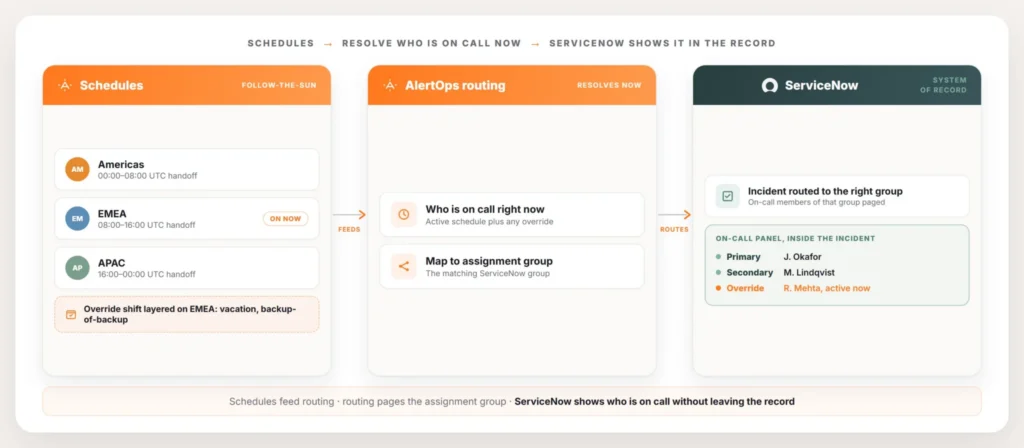
Follow-the-sun is built from these same pieces rather than a separate mode. Run a rotation per region, line up the windows so coverage passes from one to the next as the day moves around the world, and apply override shifts where a region is short a person. The result is continuous coverage assembled from parts a team can actually read, instead of one giant schedule with conditions nested so deep that nobody’s sure who’s on at a given hour.
Schedules Only Matter Once They Drive the Page
A schedule nobody routes against is just a wall calendar. The reason any of this matters is that the rotation has to decide who gets called when an incident lands, and at a ServiceNow shop the incident is tied to an assignment group.
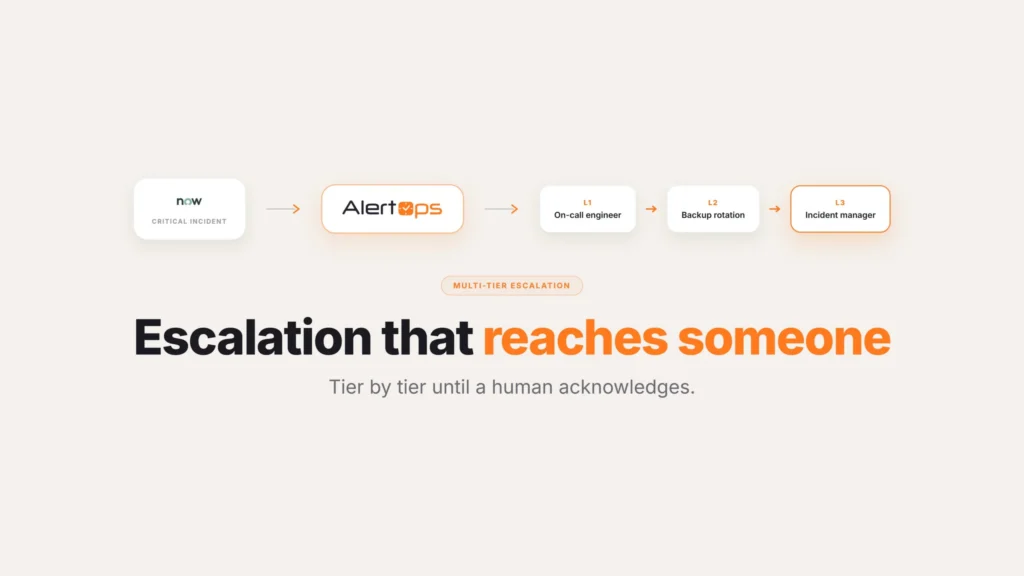
AlertOps closes that loop. It syncs assignment groups and their members from ServiceNow, then routes each incident to the people on call in the matching group right now, reading from the active schedule and honoring any override in effect. When an incident comes in for the database group, the page doesn’t go to the group in the abstract. It goes to whoever the schedule says is covering the database group at that moment, primary first, then down the escalation policy if the primary doesn’t answer. The deeper mechanics of that group-to-responder mapping are their own topic, covered in ServiceNow assignment group routing.
This is also why the “keep schedules in ServiceNow or move them to AlertOps” choice doesn’t change the outcome. Either way, the routing resolves a real person from a live schedule and pages them. The model only changes where the editing happens.
Seeing Who’s On Call Without Leaving ServiceNow
There’s a quieter problem underneath all of this. The people who work incidents at a ServiceNow shop live in ServiceNow. When they need to know who’s on call, the last thing they want is to open a second tool to find out, and a major-incident handoff that requires tab-switching to read a schedule is exactly where time gets lost.
AlertOps can surface an on-call view inside ServiceNow, so current coverage is visible right in the record where the work is already happening. The responder looks at the incident and sees who’s on call for the relevant assignment group, primary, secondary, and any override currently in effect, without leaving the page. The schedule stays wherever the team decided it should live, and the answer to “who do I call right now” shows up where they’re already looking. If you’re still weighing whether the native option covers your case, is ServiceNow’s on-call enough walks through where that line sits.
Common Scheduling Mistakes
A few patterns come up often enough during rollout that they’re worth calling out ahead of time.
Building follow-the-sun as one giant schedule instead of separate regional rotations. Trying to encode every region’s hours into a single schedule object makes it nearly impossible to read who’s covering what without opening the configuration and tracing through it. Keep each region as its own rotation and let the handoff windows connect them.
Forgetting to test the override unwind. A vacation override that starts cleanly can still leave the rotation in the wrong state when the original person returns, if nobody checks that the schedule actually reverts. Test the full cycle, not just the start of the override.
Letting the schedule and the assignment group drift apart. If someone leaves the team or joins a different rotation, the schedule needs to reflect that immediately, since routing pages whoever the schedule currently says is on call, correct or not. A stale schedule doesn’t fail loudly. It just quietly pages the wrong person.
Native ServiceNow vs. a Dedicated Scheduling Layer
| ServiceNow native scheduling | AlertOps scheduling | |
| Best fit | A single group with one clean rotation | Multiple regions, layered overrides, frequent exceptions |
| Building follow-the-sun | Many layered records and restrictions | Per-region rotations lined up by handoff window |
| Handling a temporary swap | A manual edit to the rotation | An override shift that reverts automatically |
| Where the calendar lives | Inside ServiceNow only | ServiceNow or AlertOps, either can drive routing |
| Visibility for responders | Wherever the schedule is configured | Can be surfaced directly inside the ServiceNow incident |
Conclusion
None of this is a case against running on-call in ServiceNow. For a single team with a clean rotation, it’s a complete answer, and there’s nothing to gain by adding another tool. The pressure shows up specifically at the point where coverage spans regions, backups, and constant small exceptions, and that’s a scheduling problem a record system was never designed to solve. Wherever the calendar lives, the job is the same: get the right person paged, reliably, without anyone having to hunt for who’s actually on call.
Book a demo at alertops.com/demo to map your rotations and overrides to your ServiceNow assignment groups.
Frequently asked questions
How do I manage on-call schedules when ServiceNow is my ITSM?
You have two working models. Keep your rotations in ServiceNow and let AlertOps read from them. Or manage schedules in AlertOps with rotating schedules, fixed schedules, and override shifts. Either way, ServiceNow stays the system of record. AlertOps resolves who’s on call and pages the right assignment group.
Can I sync an on-call schedule from ServiceNow into AlertOps?
Yes. AlertOps syncs assignment groups and their members out of ServiceNow. The rotation a team already maintains there is the one that drives routing. Teams who prefer ServiceNow as the single source manage coverage in one place. AlertOps handles paging and escalation on top.
How do on-call overrides work for ServiceNow shops?
Override shifts apply short-term changes on top of the base rotation. They cover an approved vacation, a stand-in while the primary is unreachable, or a quick swap before a release. The underlying schedule stays intact. The override takes effect for its window, and routing honors it automatically. The page goes to whoever is actually covering at that moment.
How does follow-the-sun scheduling work with ServiceNow?
Follow-the-sun uses one rotation per region. Line the windows up so coverage passes from one region to the next as the day moves. Add override shifts where a region is short a person. AlertOps assembles continuous coverage from those parts. It routes each incident to the region on call, and ServiceNow remains the system of record.
Can people see who is on call inside ServiceNow?
Yes. AlertOps can surface an on-call view inside ServiceNow. It shows the primary, secondary, and any active override for the relevant assignment group. Responders see current coverage without opening another tool. The team still maintains the schedule wherever they chose, and the live answer appears where the work happens.