Key takeaways
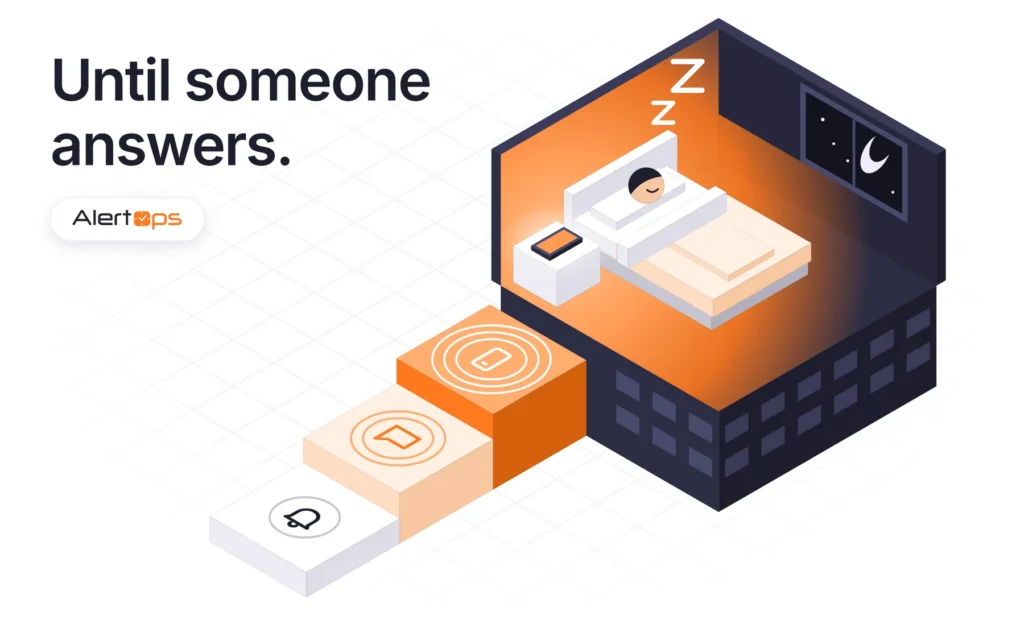
- Sleeping through an alert is a design problem before it is a discipline problem. A single message on a single channel gives the responder one chance, so reliable off-hours alerting uses a ladder of push, SMS and phone calls that keeps climbing until someone takes the alert or the chain reaches its last role.
- AlertOps, our incident orchestration platform, delivers over native phone, SMS, email and mobile app, with Slack and Microsoft Teams connected as integrations. Escalation Policy sets the order by role, and Response Plays notify a whole group at once.
- Silence can also mean the monitoring tool died. Heartbeat Monitoring in AlertOps raises an alert when a monitoring tool stops sending alerts, so a quiet night is not mistaken for a healthy one.
- Packaging differs between vendors: SMS and voice allowances vary by plan and region, so check them against your busiest rotation. Rootly and incident.io sell on-call separately, and Grafana’s OnCall open source was archived in 2026.
A buyer on one of our recent calls told us “a text message doesn’t wake me up.” Asked what happens when the responsible person doesn’t acknowledge, another answered: “If that alarm gets missed by the person, it gets missed forever.” Both point at the same weakness: one attempt on one channel.
The incident alerting tools that hold up off-hours treat voice, SMS and push as rungs on a single escalation ladder, each with its own wait, running until someone takes the alert or the chain reaches its last role. When you evaluate vendors, look for four things: a contact-method order for each role, assignment that stops the ladder, a check on the monitoring tool itself, and noise control that keeps people answering. AlertOps covers all four in one platform.
Why one message on one channel fails
Every channel fails without telling you, and the table shows how. Email is left out because nobody should count on it to wake a person.
| Channel | What it does well | How it fails off-hours | Best rung |
|---|---|---|---|
| Push (mobile app) | Fast, carries context, can be acknowledged in the app | Missed if the phone is silenced, in Do Not Disturb or offline | First attempt |
| SMS | Reaches a phone without the app; leaves a written record | Reads like any other text; delivery depends on the carrier path | Second attempt |
| Voice call | Hard to ignore; the responder has to answer | Goes to voicemail if unanswered; needs a clean caller ID; Do Not Disturb blocks it unless the number is allowed | Last resort before the next person |
What a miss costs
Uptime Institute’s 2026 outage analysis is self-reported, but its numbers are blunt: 57% of respondents put their most recent major outage above $100,000, and one in five put it above $1 million (Uptime Institute, 2026). Those figures cover whole outages, not missed pages. Your own number is simpler: multiply the cost of an hour down by the minutes your last missed page added, then check that delay against the response time in your customer SLAs.
Build the ladder: push, SMS, phone, next role
Order the rungs per role
In AlertOps, the Escalation Policy holds the ladder: sequenced roles, an order of contact methods, retries and retry intervals for each role, and the wait times between roles. A common shape runs in this order:
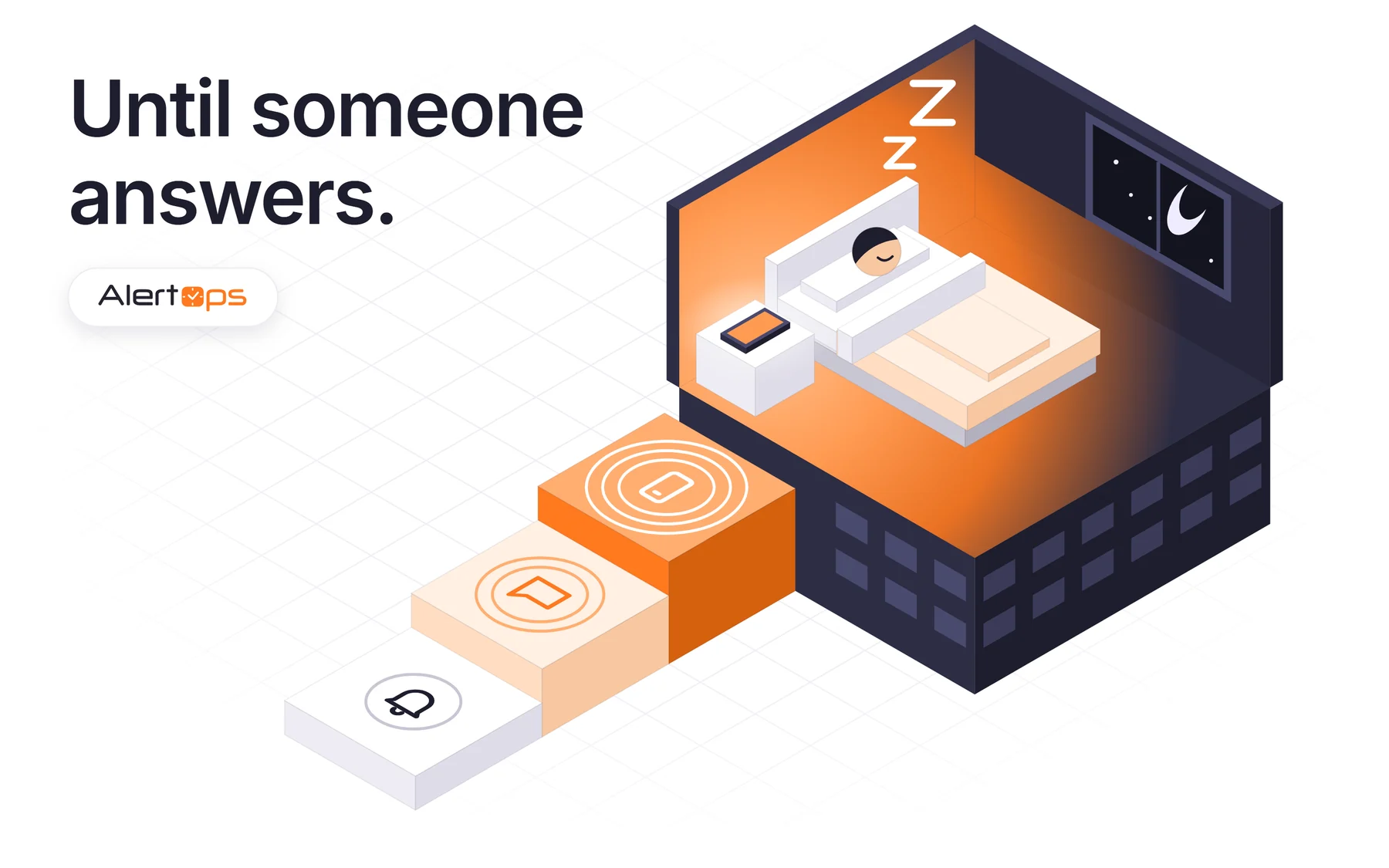
- A push notification goes out first.
- An SMS follows after a short wait.
- A phone call comes next.
- The next role in line is paged if no one has taken the alert.
For critical services, start with the phone call, since a call is what wakes someone. A disk warning can start with push and wait. Email can ride along as the written record.

The last rung needs a name. Decide who gets the call when the manager doesn’t answer, because a chain that ends in silence is the failure you bought this to prevent.
Slack and Teams connect as integrations that post the incident where the team already talks. They depend on someone reading a channel, so they should not replace the rungs that reach a phone.
Escalation Policy or Response Play
Use an Escalation Policy when the order matters: primary, then secondary, then manager. Use a Response Play when a group should hear about it together and roles do not matter. Response Plays notify all members of an active shift at once, using each person’s own contact preferences. Our guide to alert escalation covers the choice in more depth.
Book a demo and we will fire a test alert through push, SMS and phone so you can watch the ladder run.
Let taking assignment stop the ladder
Sending the page proves nothing. Escalation should stop when a named person takes the alert, from whichever channel reached them. By default in AlertOps, an acknowledgment records that someone has seen the alert and escalation continues, while taking assignment or closing the alert stops it. If you want an acknowledgment alone to stop delivery, you can add the Stop Delivery on Acknowledgement workflow.
Acknowledge where you were reached
On a phone call, the responder presses a key to acknowledge or take assignment, an SMS reply does the same, and the mobile app and email buttons work too, whichever responses the policy enables. Nobody has to find a laptop to say “I have it.”
Add actions with Workflows
A Workflow adds auxiliary actions to an Escalation Policy, triggered by start and stop conditions you define. SendMessage is the most common action, and a scheduled Workflow can loop the whole policy again if a night runs long.
Catch the silent failures
Some nights the page was never sent at all.
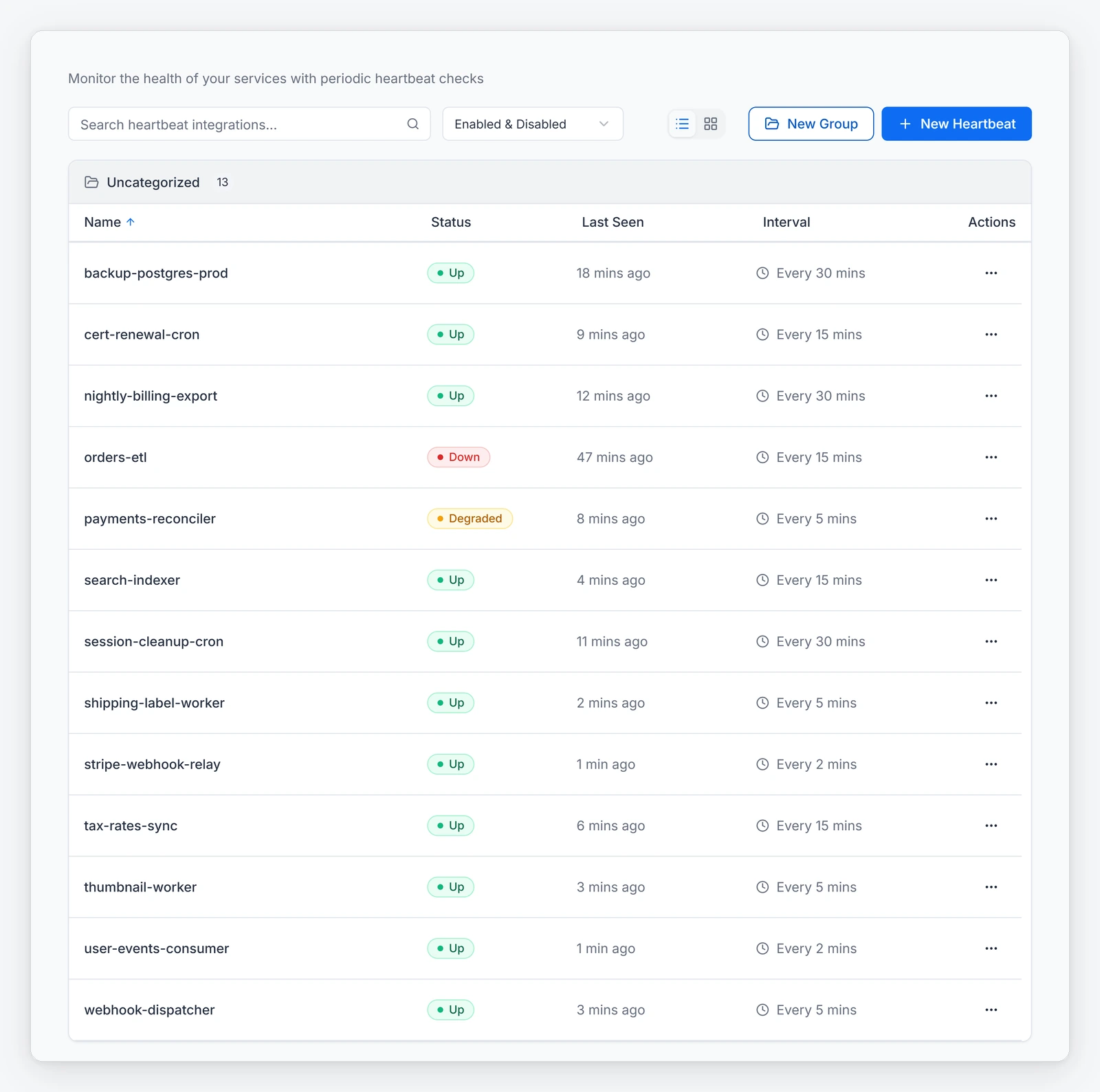
Heartbeat Monitoring
When a monitoring tool crashes, the dashboard goes calm for the wrong reason. Heartbeat Monitoring works as a dead-man’s switch, so a monitor that stops reporting becomes an incident of its own.
Schedules that leave no gap
Coverage gaps hide in the calendar. Override Shifts and Out-of-Office Coverage hand a planned absence to a named person. The Holiday Feature keeps closed sites quiet by holding notifications for anyone on shift in groups tied to that location, so name the cover for every critical service before the date. For rotation design, see our guide to on-call schedules.
Do Not Disturb
A page can also leave on time and stop at the phone. Put a test phone in Do Not Disturb overnight and see which channels get through. Add your alerting numbers to each responder’s allowed contacts before you rely on the call.
Keep the noise down so people trust the phone
People stop answering when most of what rings is junk. A responder who has been called for six alerts about the same server learns to let the seventh ring out, and that is the one that matters.
AlertOps Enterprise includes OpsIQ, a family of AI features. The Smart Correlation Engine groups related alerts in real time using similarity modeling, NLP and customizable thresholds, so a failing switch produces far fewer pages. OpsIQ cuts alert noise by roughly 68% (AlertOps platform data). Maintenance Windows pause new alerts from the integration you choose during planned work, so patching does not train your team to ignore the phone. Our guide to IT alerting covers volume at the source.
See OpsIQ group a real alert storm in a live demo at alertops.com/demo.
How the main tools package voice, SMS and push
We read each vendor’s own pricing page on October 30, 2026. This compares packaging, so run the drill below to test delivery on your own phones.
| # | Tool | How on-call and channels are packaged | Suits | What to know |
|---|---|---|---|---|
| 1 | AlertOps | Native phone, SMS, email and mobile app; Slack and Teams as integrations. Free plan for up to 5 users; Standard is $8 per user per month billed annually | Teams that want multi-channel escalation, heartbeat checks and OpsIQ noise control in one platform, with ITSM sync | Built for off-hours escalation across enterprise IT, DevOps, SRE, NOC and MSP teams, on any monitoring or ITSM stack |
| 2 | PagerDuty | On-call in every plan; Professional is $21 per user per month billed annually; AIOps is a separate purchase on Professional | Large engineering orgs that want a deep integration catalog | Noise reduction costs extra on Professional, so price AIOps in from the start; the Free plan has community support only |
| 3 | xMatters (Everbridge) | SMS and voice allowances per user per month by tier: Starter 50 SMS and 10 voice, Base 100 and 20, Advanced unlimited; Free has no SMS or voice | Enterprises in Everbridge or ServiceNow shops that want notification depth | A busy rotation can outgrow a tier’s allowance; Starter caps at 25 users |
| 4 | Rootly | On-Call is $20 per user per month, sold separately from Incident Response at $20 | Slack-centric engineering teams | Prices are additive, so both together are $40 |
| 5 | incident.io | On-call is an add-on: plus $10 per user on Team, plus $20 on Pro; Basic has single-team on-call | Product engineering teams that live in Slack | On-call adds $10 to $20 per user to the base plan, so price them together |
| 6 | Jira Service Management | Alerting and on-call are built into JSM, which is sold inside the Service Collection | Teams already on Jira | You buy the suite to get on-call |
| 7 | Grafana | OnCall open source was archived in 2026; Grafana Cloud IRM includes on-call | Teams already running Grafana | Self-run installs need their own Twilio and push providers |
| 8 | Datadog | Datadog Incident Response bundles On-Call and Incident Management; On-Call is also sold alone, from $20 per seat per month billed annually | Teams already standardised on Datadog | On-Call and Incident Management are separate seats if bought separately; AI investigation is priced through AI Credits |
If a plan caps SMS or voice, a bad night can burn the allowance when you need it, so divide the cap by your busiest rotation before you sign. Ask too how each tool sends its texts: buyers told us on recent calls that Verizon, AT&T and T-Mobile are ending email-to-SMS gateways, so any alerting on that path deserves a test.
Coming from Opsgenie? Atlassian ends support on April 5, 2027, when access shuts off and unmigrated data is deleted (Atlassian). Migration support from our Solution Engineering team is included with AlertOps Enterprise. This is not a DIY transition. Run the drill below in parallel before you cut over.
1. AlertOps: the full off-hours ladder in one platform
AlertOps is an incident orchestration platform for any enterprise IT, DevOps, SRE, NOC or MSP team that needs alerts to reach a person off-hours, whatever ITSM or monitoring tools it runs. AlertOps Enterprise carries a 99.9% SLA. It delivers by native phone, SMS, email and mobile app, escalates through Escalation Policies and Response Plays and Workflows, and watches the monitors themselves with Heartbeat Monitoring. AlertOps Enterprise is $28 per user per month billed annually or $34 monthly (AlertOps pricing) and adds OpsIQ, which cuts alert noise by roughly 68% (AlertOps platform data), and Agent Chronicle, which cuts postmortem prep time by up to 80% (AlertOps platform data). More than 200 integrations connect the monitors and ITSM tools you already run, including a certified two-way AlertOps app for ServiceNow that needs no coding. Standard is $8 per user per month billed annually, and a 14-day trial needs no card. Pricing is published per user, and Enterprise includes OpsIQ, Agent Chronicle and support.
Start a free trial, or book a demo and bring your last missed page.
2. PagerDuty: a deep integration catalog for large engineering orgs
On-call is in every plan, and Professional is $21 per user per month billed annually. AIOps is a separate purchase on Professional, so price noise reduction in from the start. The Free plan has community support only.
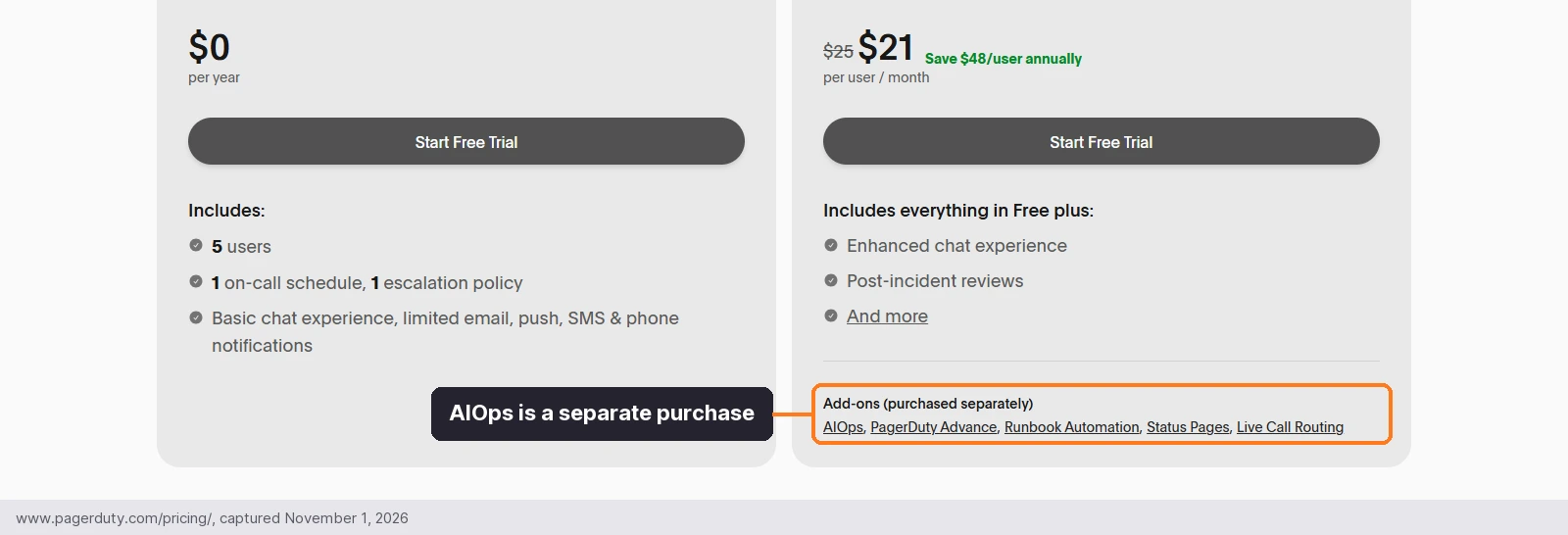
The add-ons sit under the $21 price, so the plan you compare is not the plan you pay for.
3. xMatters (Everbridge): notification depth for Everbridge and ServiceNow shops
SMS and voice allowances are set per user per month by tier: Starter 50 SMS and 10 voice, Base 100 and 20, Advanced unlimited. Free has no SMS or voice, and Starter caps at 25 users.
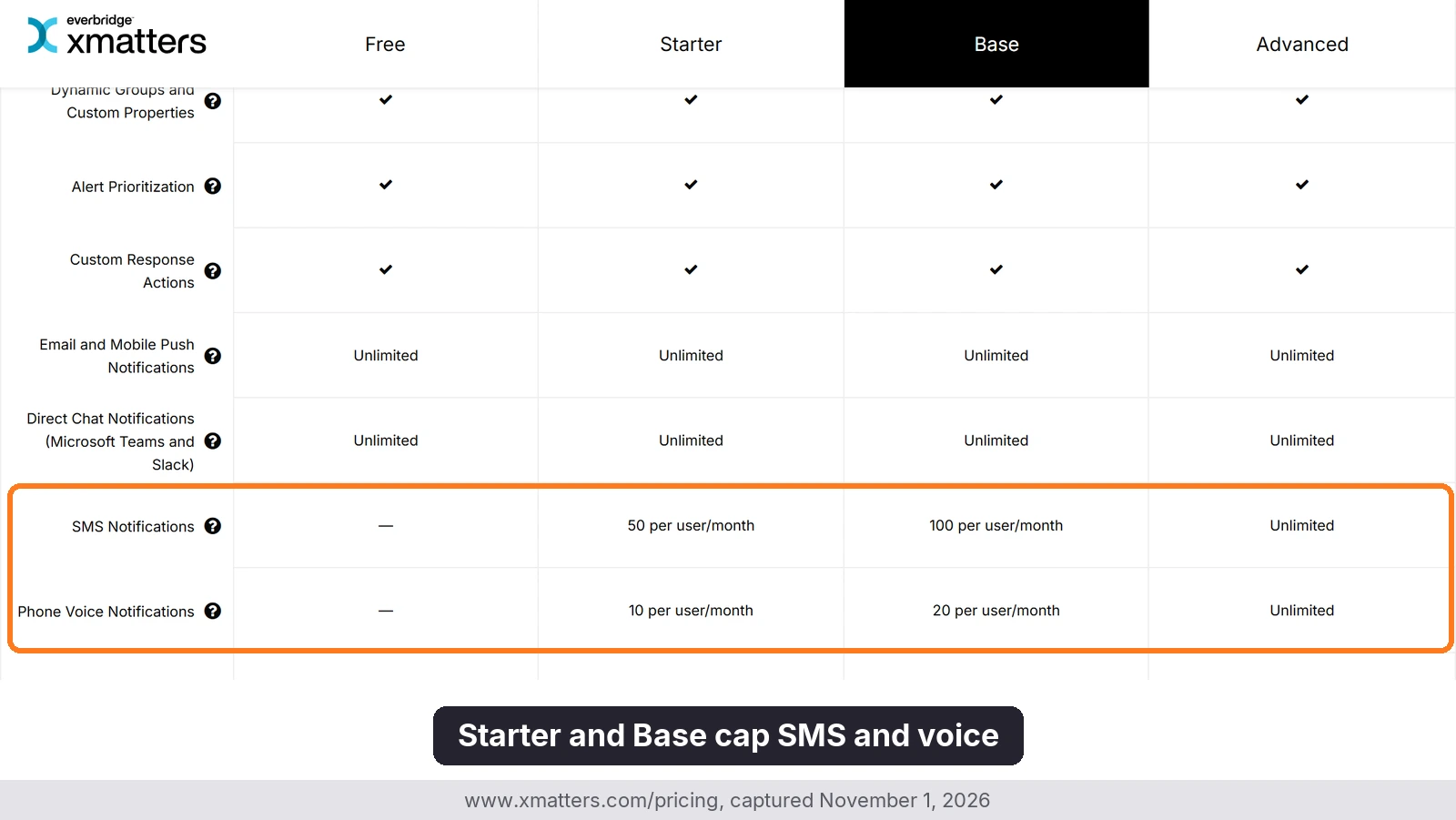
A busy night spends that allowance, so size it against your largest rotation.
4. Rootly: on-call as a second product for Slack-centric teams
On-Call is $20 per user per month, sold separately from Incident Response at $20. Prices are additive, so both together are $40.
5. incident.io: on-call as an add-on for product engineering teams in Slack
On-call adds $10 per user on Team and $20 on Pro, so price it with the base plan. Basic has single-team on-call.
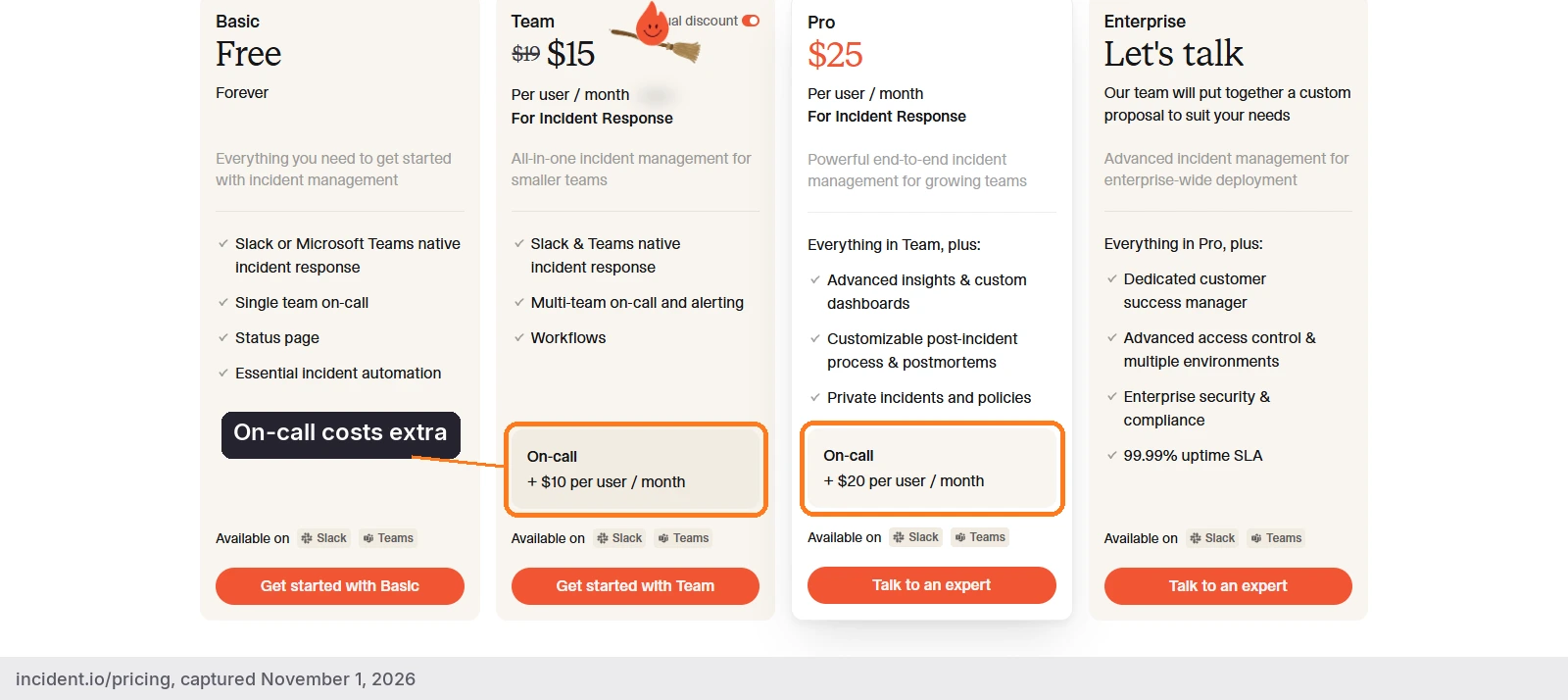
The on-call line is billed on top of the base plan for every responder.
6. Jira Service Management: on-call inside the suite for teams already on Jira
Alerting and on-call are built into JSM, which is sold inside the Service Collection, so you buy the suite to get on-call.
7. Grafana: Cloud IRM for teams already running Grafana
OnCall open source was archived in 2026, and Grafana Cloud IRM includes on-call. Self-run installs need their own Twilio and push providers.
8. Datadog Incident Response: paging next to telemetry for teams already on Datadog
Datadog Incident Response is sold as On-Call, Incident Management or a bundle of both, per seat per month and billed annually. It suits teams already standardised on Datadog, since paging and incident work can sit beside monitors, traces, logs and metrics, and Datadog is also an AlertOps integration. It does not require the wider Datadog platform, because On-Call and Incident Management each work on their own.
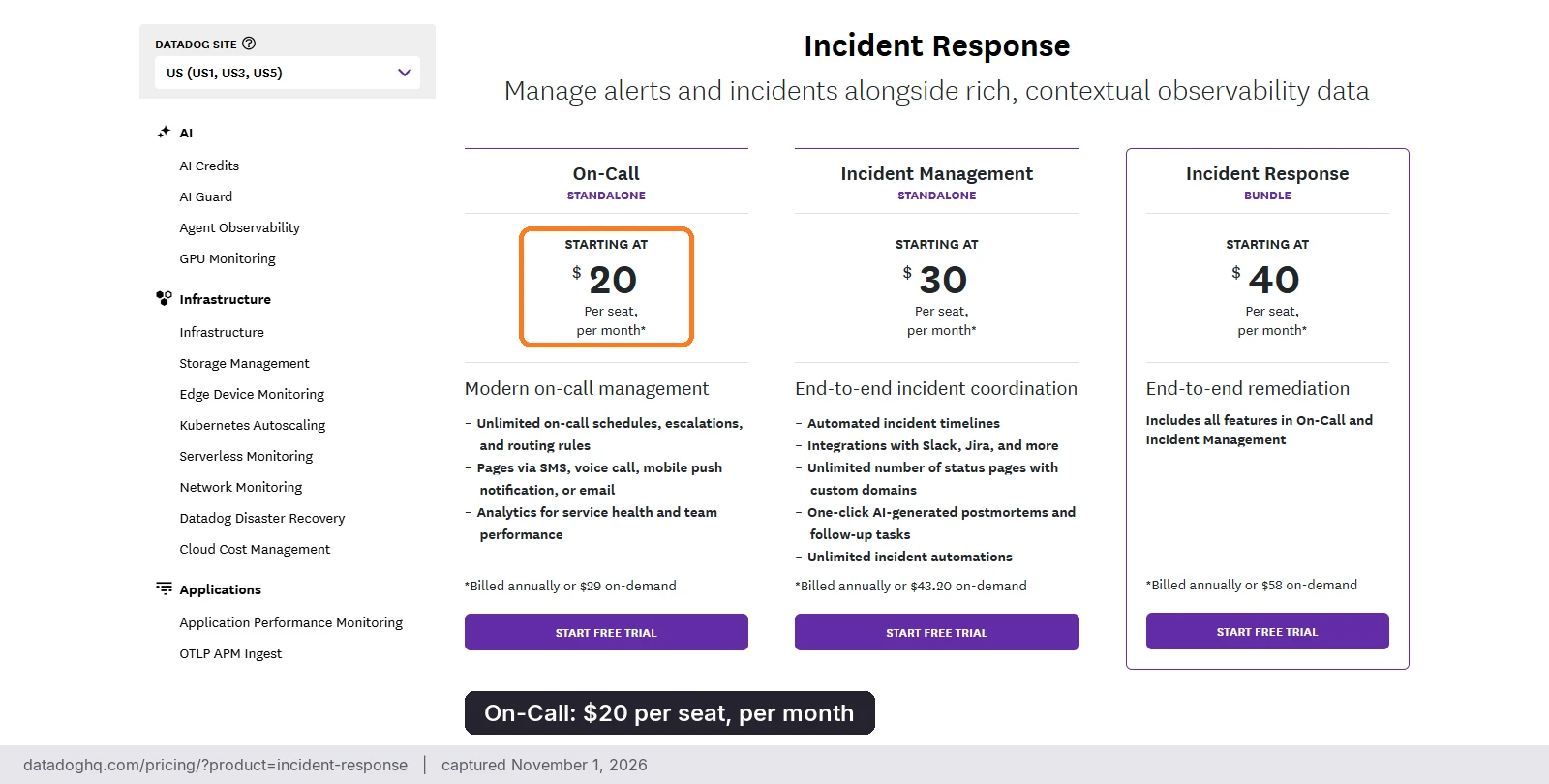
On-Call starts at $20 per seat per month billed annually, or $29 on-demand. Incident Management starts at $30 and the bundle at $40. Bought separately, the two are seated and billed independently, and you pay for the highest number of seats assigned at one time. Bits Investigation, the AI investigation product, is priced through AI Credits rather than the seat price.
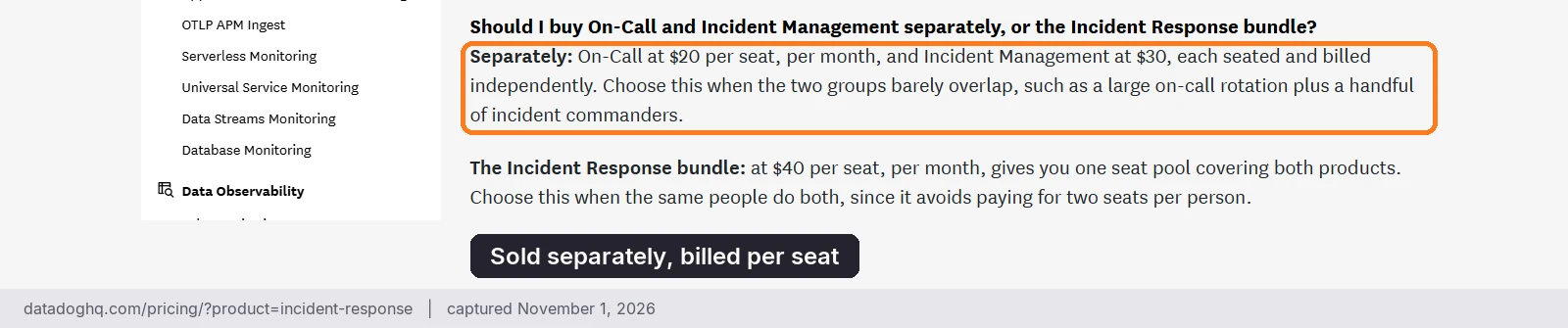
Price the seats and the AI credits together before you compare it with a flat per-user plan.
A checklist for your next off-hours drill
Run this once a quarter, and again before you cut over from any other tool.
- Each responder has push, SMS and phone set up, and the order and wait between rungs fit the severity
- Every critical service has a second role and a final fallback
- The test alert goes out on each channel, and someone confirms the call arrived with a recognizable number
- A test phone in Do Not Disturb overnight shows which channels get through, and your alerting numbers are on each responder’s allowed contacts
- Taking assignment works from the phone keypad, SMS and the app, and the ladder stops when it does
- A silenced monitor triggers a heartbeat alert
- List every alert that still reaches a phone through an email-to-SMS gateway, and move or test each one
- Your plan’s SMS and voice allowances cover your busiest rotation
- You have reviewed your last missed or late-acknowledged pages and fixed the cause
FAQ
What is the most reliable way to alert someone off-hours?
Use several channels in sequence and stop only when someone takes the alert. AlertOps sends by phone, SMS, email and mobile app in the order you configure, waits between attempts, and moves to the next role until someone takes the alert or the chain reaches its last role.
Is SMS enough for critical alerts?
Usually not alone, since a text can read like any other message. AlertOps pairs SMS with push and phone calls in a sequence you control, so a missed text triggers the next rung.
What is the difference between an Escalation Policy and a Response Play?
An Escalation Policy follows strict role order, such as primary, secondary and manager. A Response Play notifies a group at once using each member’s own contact preferences, and AlertOps offers both so you can match the routing to the incident.
How do I know if my monitoring tool has gone quiet?
Use a heartbeat check. AlertOps Heartbeat Monitoring raises an alert when a monitoring tool stops sending alerts, so a failed monitor shows up as its own incident.
How should I test channels when moving off Opsgenie?
Run both tools side by side and compare who gets paged on each channel before you switch. Atlassian ends Opsgenie support on April 5, 2027, and AlertOps Enterprise includes migration support through our Solution Engineering team.
The limits behind the headline price
A per-user price tells you little about a bad night, because the caps that matter sit in the plan tables: texts, call-routing lines, status pages and AI use. This table lists what each vendor’s public pricing page shows, and “See vendor pricing” marks a cell where the page gives no figure.
| # | Tool | SMS and voice | Live call routing | Status pages | AI |
|---|---|---|---|---|---|
| 1 | AlertOps (Enterprise, $28 per user per month) | Included with AlertOps Enterprise | Included with AlertOps Enterprise | Status Hub, included with AlertOps Enterprise | OpsIQ AI Suite included |
| 2 | PagerDuty | Free: 100 SMS and phone per month | Starter 1 line, Essential 2, Plus 3, Ultimate 3 | Free none; Professional 250 subscribers | AI actions: Starter 1,000 to Ultimate 100,000 |
| 3 | xMatters | Per user per month: Starter 50 SMS and 10 voice, Base 100 and 20, Advanced unlimited | Base 1 line, Advanced 3 | Advanced only | Incident AI Agent on Advanced only |
| 4 | Rootly | No caps shown | On-Call 1 number, Enterprise 5 | Incident Response: 1 external, 1 internal | AI SRE is a separate product |
| 5 | incident.io | No caps shown | Pro 1 number, Enterprise 5; none on Basic or Team | Public pages 1 on Basic, Team and Pro | Investigations are an add-on on Pro and Enterprise |
| 6 | Jira Service Management | Free: 100 emails a day and 200 SMS a month; paid plans unlimited | See vendor pricing | Enterprise only | Rovo credits per user per month: Standard 250, Premium 700, Enterprise 1,500 |
| 7 | Grafana IRM | See vendor pricing | See vendor pricing | See vendor pricing | Free: 3 AI users; Pro: $20 per AI user and $2 per 1M extra tokens |
| 8 | Datadog | See vendor pricing | See vendor pricing | See vendor pricing | AI investigation priced through AI Credits |
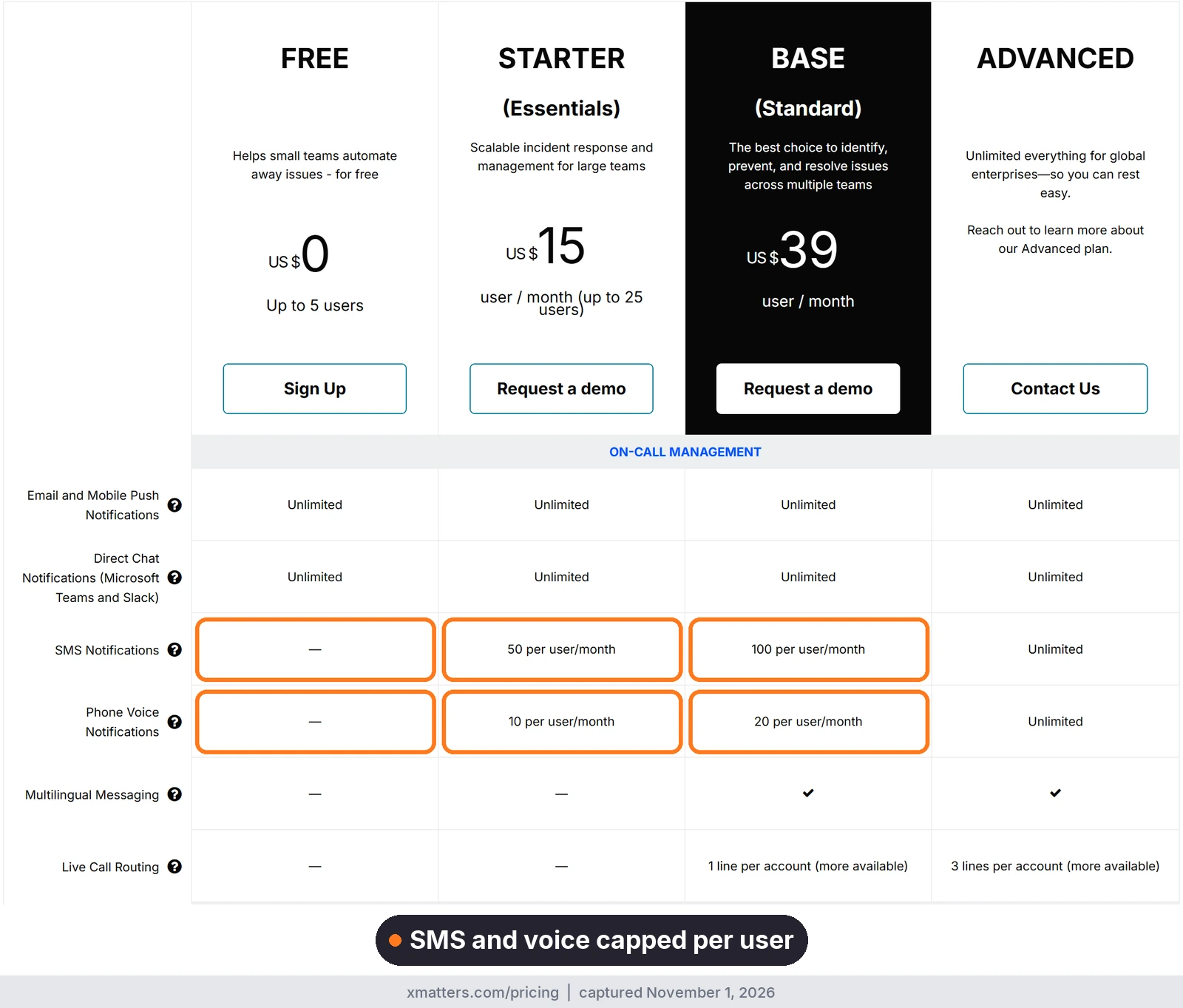
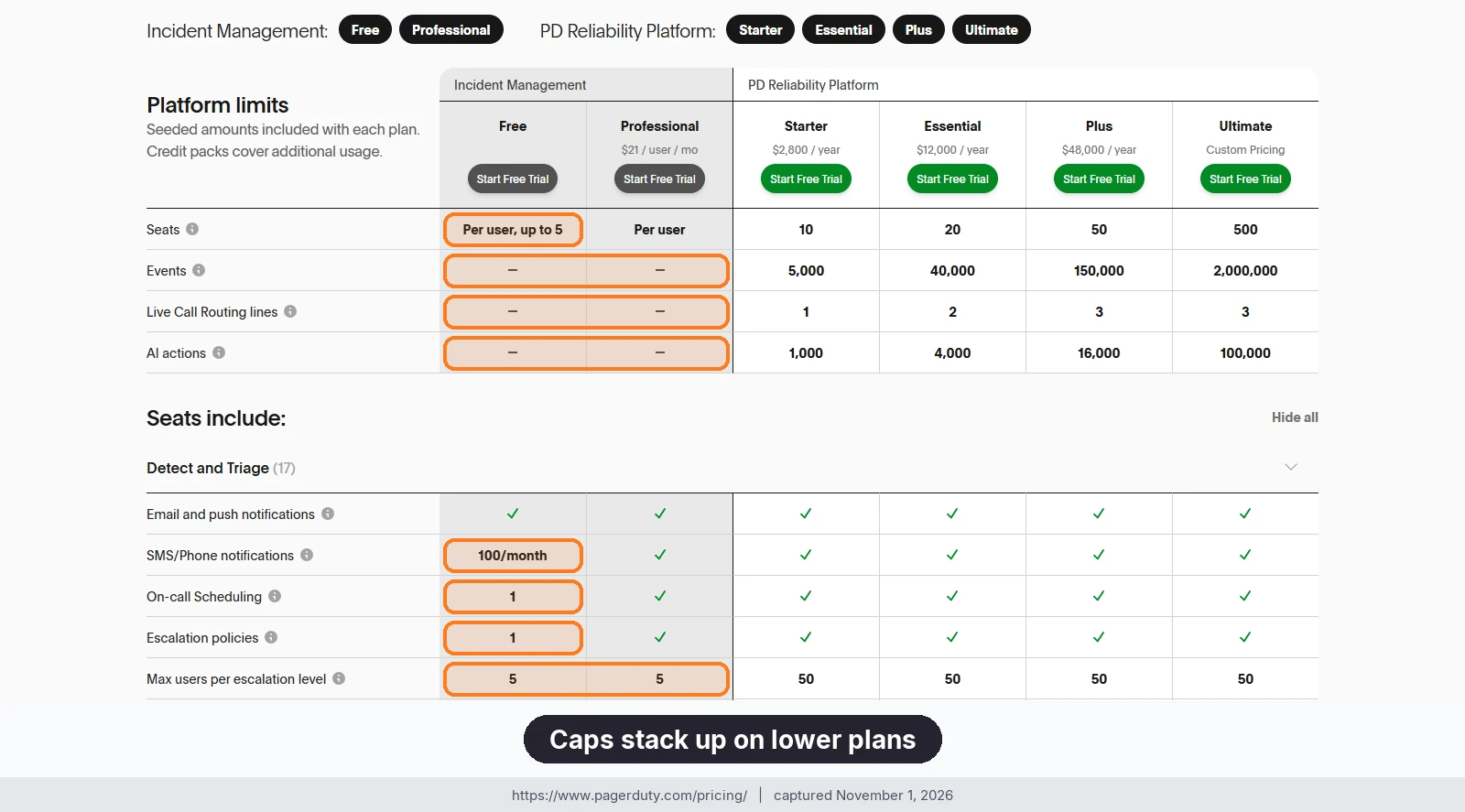
AlertOps publishes per-user pricing, and Enterprise at $28 per user per month billed annually includes OpsIQ, Agent Chronicle, a dedicated account manager, a 99.9% SLA and 24×7 critical response.
Make the alert try again
A sleeping responder is the hard case. AlertOps makes sure the alert tries again, on another channel, with another person behind it, and that someone notices when the monitor goes quiet. Start a free trial, or book a demo and we will run the drill with you.
Sources
- Uptime Institute: Annual Outage Analysis 2026
- Atlassian: Opsgenie end of sale and support
- PagerDuty: pricing
- xMatters: pricing
- Rootly: pricing
- incident.io: pricing
- Atlassian: Service Collection pricing
- Datadog: Incident Response pricing and product
- Grafana: OnCall open source documentation and pricing
- AlertOps pricing
- AlertOps platform data: roughly 68% less alert noise; up to 80% less postmortem prep time
Note: Competitor pricing, plan limits and screenshots come from each vendor’s public website as of October 30, 2026, and may change, so check the vendor’s site for current details. Product names and logos are trademarks of their respective owners and are used for identification only.