When a core switch goes down, ServiceNow doesn’t see one problem. It sees every system behind that switch reporting failure at once. If each monitoring tool is wired to open its own ticket, the queue fills with fifty incidents for what is really one outage. The on-call team gets paged fifty times for the same thing.
This guide covers why that happens, how correlating alerts before they reach ServiceNow fixes it, and how correlation is different from simple filtering. For the full picture of how AlertOps and ServiceNow connect, start with the AlertOps and ServiceNow two-way integration guide.
Table of Contents
- Why One Outage Becomes Fifty Tickets
- Correlate Before the Ticket, Not After
- What Correlation Actually Does
- What ServiceNow Gets Instead
- Correlation Versus Filtering
- What Changes for the Responder
- Common Correlation Mistakes
- How Long Tuning Takes
- What Handles Itself vs. What Needs a Decision
- Conclusion
- FAQ
Why One Outage Becomes Fifty Tickets
Modern infrastructure fails in cascades. A switch goes down, or a load balancer, or a database, or a cloud zone, and everything depending on it starts throwing errors within seconds. Each of those systems is usually watched by its own monitoring tool. At most companies, several of those tools are wired straight into ServiceNow to open an incident the moment something breaks.
ServiceNow does exactly what it’s told. It records each signal as its own incident, because it has no way of knowing that the database timeout, the API errors, and the failed synthetic check are all the same event. The result is a queue with fifty rows for one problem. People pick up related tickets without realizing they’re duplicates. The on-call phone keeps ringing until someone silences it.
The real problem is where the grouping happens, or rather where it doesn’t. When routing runs on raw alerts, every alert becomes a candidate for its own incident and its own page. Nothing earlier in the process ever decides that these all belong together.
Correlate Before the Ticket, Not After
There are two ways to deal with a flood of duplicate alerts, and they aren’t equal. You can clean it up after the fact, once fifty incidents already exist, by merging them in ServiceNow or asking responders to work out which ones overlap. Or you can stop it before any ticket gets created, by grouping the signals the moment they come in.
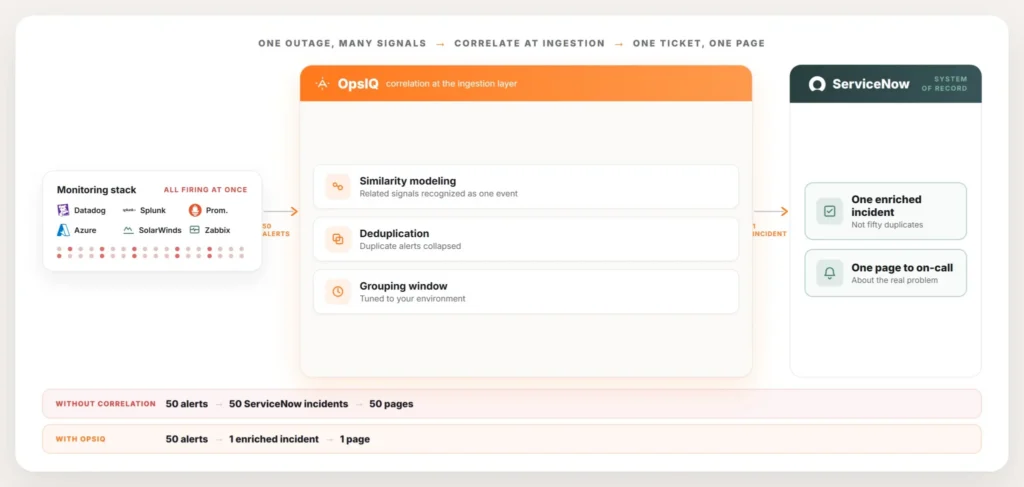
AlertOps sits in that earlier position. Signals from the monitoring stack arrive at AlertOps first, get grouped there, and only the grouped result turns into a ServiceNow incident. Cleaning up after the fact treats duplicate tickets as a sorting job the responder has to do on top of actually fixing things. Grouping them upstream means that sorting job never has to happen at all.
What Correlation Actually Does
OpsIQ, the correlation engine inside AlertOps, groups related signals using similarity modeling, natural language processing, and configurable thresholds, with field weights and grouping windows tuned to the environment. Put simply, it reads what each alert says and when it arrived, works out which ones describe the same event, and folds them into a single incident rather than a dozen separate ones.
Duplicates get suppressed outright. Related signals attach to the same incident as context. A responder can see the database error and the downstream API failures together, in one place, instead of hunting through separate tickets to piece the story together themselves. What comes out the other side is one incident that already carries the full shape of the problem.
What ServiceNow Gets Instead
Instead of fifty incidents, ServiceNow gets one. That correlated incident is created through the two-way integration, already enriched with the related signals, and routed to the on-call members of the right assignment group as a single page. The queue reflects what’s really happening. The metrics count one incident instead of fifty. A post-incident review starts from a record that already shows what was connected to what.
ServiceNow stays the system of record throughout. Correlation doesn’t change where the incident lives or who owns it. It changes how many incidents get created in the first place, and that’s the difference between a queue a team can read and one that just reads them.
Correlation Versus Filtering
These two get confused a lot, since both reduce noise, but they solve different problems. Filtering decides which alerts deserve attention at all, dropping the low-severity and the routine so they never page anyone. Correlation takes the alerts that do matter and groups the related ones into a single incident. One removes what you don’t need to see. The other assembles what you do need to see into one place.
Most companies need both. Filtering at the ServiceNow boundary is its own topic, covered in reducing ServiceNow alert noise. Correlation is what this guide is about, and it’s the half of the noise problem that stops one outage from turning into fifty tickets.
| Filtering | Correlation | |
| What it does | Drops low-value or routine alerts | Groups related alerts into one incident |
| When it runs | Before an alert is even considered | After an alert is judged worth acting on |
| Problem it solves | Too many alerts nobody needs to see | One event spread across many tickets |
| Result | Fewer alerts overall | Fewer, more complete incidents |
What Changes for the Responder
The responder feels this difference right away. One enriched incident is something a person can triage. Fifty duplicates is something a person has to survive. Correlation puts the on-call engineer in front of the real problem, with the related signals already attached, rather than a queue they have to sort through by hand while the outage is still going.
That difference is measurable. AlertOps platform data shows up to 68% noise reduction in enterprise deployments through correlation. That gap is roughly the difference between an alert volume that wears a team down and one they can keep up with. Fewer, better incidents also mean cleaner mean time to resolution, since the time that used to go into sorting duplicates now goes into the fix.
Common Correlation Mistakes
A few things trip teams up when they first turn correlation on, and most of them are easy to fix once someone notices.
Grouping windows set too wide or too narrow: A window that’s too short misses alerts that belong together but arrive a few seconds apart. One that’s too long risks merging genuinely unrelated incidents just because they happened close in time. Start with a conservative window and adjust it after watching a few real incidents run through it.
Assuming correlation replaces filtering: Some teams turn correlation on and expect their alert volume problem to disappear entirely. It handles duplicates from the same event. It doesn’t touch the constant stream of low-value alerts nobody should have been paging on in the first place. Both need to be configured.
Not reviewing what got grouped together: Correlation runs quietly in the background, and a bad grouping rule can sit unnoticed for months. Check a sample of correlated incidents now and then to confirm the right signals are ending up together.
Skipping a baseline before turning it on: Teams that don’t measure their current duplicate rate have no way to tell if correlation is working once it’s live. Pull a week or two of incident history first, count how many tickets came from the same underlying event, and use that number as the baseline to compare against after rollout.
How Long Tuning Takes
Turning correlation on is quick. Getting the grouping rules to match how a specific environment fails takes longer, and that part is easy to underestimate.
Most teams see the obvious wins in the first week. The two or three monitoring tools that always fire together during the same class of outage get grouped correctly almost immediately, because that pattern shows up in the very first incident correlation touches. The harder cases take longer: an alert from a tool that only fires during a specific kind of cascading failure, or two signals that look related but usually aren’t. Expect a few weeks of watching real incidents move through the system and adjusting field weights and grouping windows as patterns become clear.
Treat that tuning period as normal, not as a sign something is broken. A correlation rule that’s slightly too aggressive or too conservative in week one is a configuration problem, and configuration problems get fixed. They aren’t a reason to turn the whole thing off.
What Handles Itself vs. What Needs a Decision
Turning correlation on is mechanical. Getting it tuned to how your environment fails takes some judgment calls from your team.
| Handled by OpsIQ | Needs a decision from your team |
| Reading alert content and timing | How wide the grouping window should be per source |
| Suppressing duplicate signals | Which field weights matter most for your environment |
| Attaching related context to one incident | How often to review grouped incidents for accuracy |
| Creating the single ServiceNow ticket | Whether filtering rules also need updating alongside correlation |
Conclusion
Correlation is the first thing that happens to an alert, before routing, before paging, before anything reaches ServiceNow at all. OpsIQ runs at the point where signals arrive, ahead of both the responder and the incident record, so the grouping happens once and everything downstream benefits from it. The result feeds into the same two-way ServiceNow integration that handles routing, escalation, and write-back. The correlated incident gets created, paged, and tracked like any other. It just shows up without its forty-nine duplicates.
Book a demo at alertops.com/demo to see correlation run against your own alert volume and ServiceNow instance.
Frequently asked questions
How do I stop ServiceNow from creating duplicate incidents during an outage?
Correlate the alerts before they reach ServiceNow. AlertOps groups related signals as they arrive, using OpsIQ, so a cascading outage that would have opened many incidents creates a single enriched incident in ServiceNow instead. The grouping happens before incident creation, which is why the duplicates never show up in the queue.
What is alert correlation?
It’s the grouping of related alerts that describe the same underlying event into one incident. AlertOps uses similarity modeling, natural language processing, and configurable thresholds to recognize which incoming signals belong together, suppress the duplicates, and combine the result into a single incident rather than several.
Is this the same as ServiceNow Event Management?
It serves a similar goal from a different position. AlertOps correlates signals before the ServiceNow incident even gets created, and feeds the clean result into ServiceNow through the two-way integration. It can sit in front of or alongside an existing ServiceNow setup. ServiceNow remains the system of record either way.
Does correlation reduce alert noise?
Yes. AlertOps platform data shows up to 68% noise reduction in enterprise deployments through correlation. Correlation handles the noise from duplicate and related signals. Filtering handles the noise from low-value alerts. Most teams end up using both.
Where does correlation happen, before or after the ServiceNow incident is created?
Before. AlertOps groups the signals as they come in, and only the correlated result becomes a ServiceNow incident. One outage produces one ticket, not a queue full of them.