A large enterprise has already made its decision about where work happens. People log into ServiceNow in the morning and stay there, and a license that costs that much earns the right to be the only place anyone has to open. The fastest way to kill an on-call rollout is to tell those people they now need a second tab.
This guide covers why that second-tab problem sinks on-call rollouts, what running in the background actually looks like, and where the line sits between ServiceNow and AlertOps. For the full mechanics, start with the AlertOps and ServiceNow two-way integration guide.
Table of Contents
- The Second Tab Is Where On-Call Rollouts Die
- ServiceNow Incident Response Without Another Destination
- What Running in the Background Looks Like
- What Stays Visible vs. What Runs Underneath
- Why Invisibility Is the Point
- When a Background Engine Isn’t the Right Fit
- Conclusion
- FAQ
The Second Tab Is Where On-Call Rollouts Die
Most on-call tools assume they get to be a destination. They have their own console, their own login, their own way of showing who’s on call, and the implicit deal is that responders will go there to do the on-call part of their job. At a company that runs its whole operation through ServiceNow, that deal is a hard sell. The team didn’t standardize on one platform so they could bolt a second one onto the side of it.
The resistance is rational. Every extra surface is another login to provision, another place where state can drift out of sync with the ticket, another thing to train new hires on, and another tab someone forgets to check at 3 a.m. when the page that mattered was sitting in a console nobody had open. A new tool that pulls people out of ServiceNow isn’t adding capability so much as fragmenting the one they already have.
The objection arrives before the evaluation does. Long before anyone asks how good the escalation logic is, the ServiceNow team asks whether this means everybody has to live somewhere new. If the answer is yes, the conversation tends to end there, no matter how strong the paging engine is underneath.
ServiceNow Incident Response Without Another Destination
The way past that objection is to stop being a destination. AlertOps installs as a certified app inside the ServiceNow instance, the same controlled path the platform team already trusts for everything else they add, so there’s no separate environment to stand up and no custom integration to maintain by hand. From the responder’s seat, nothing new appears to log into.
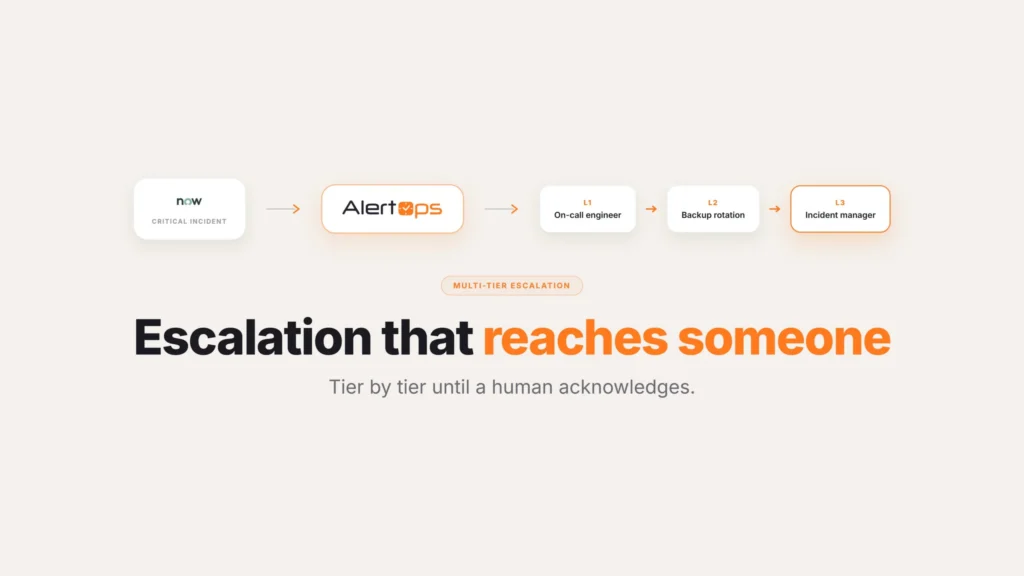
What changes is underneath, not in front. AlertOps takes over the paging, the routing, and the escalation that ServiceNow was never meant to drive, and it does that work from behind the incident record rather than from a console people have to visit. That’s the whole move: keep the surface the company already standardized on, and put a real response engine behind it.
This also reframes what adoption even means. There’s no rollout in the sense of retraining a few hundred responders on new software, because the software they touch is still ServiceNow. The people who run incidents keep their habits and their single tab. The thing that got better is invisible to them, which is exactly why it sticks.
What Running in the Background Looks Like
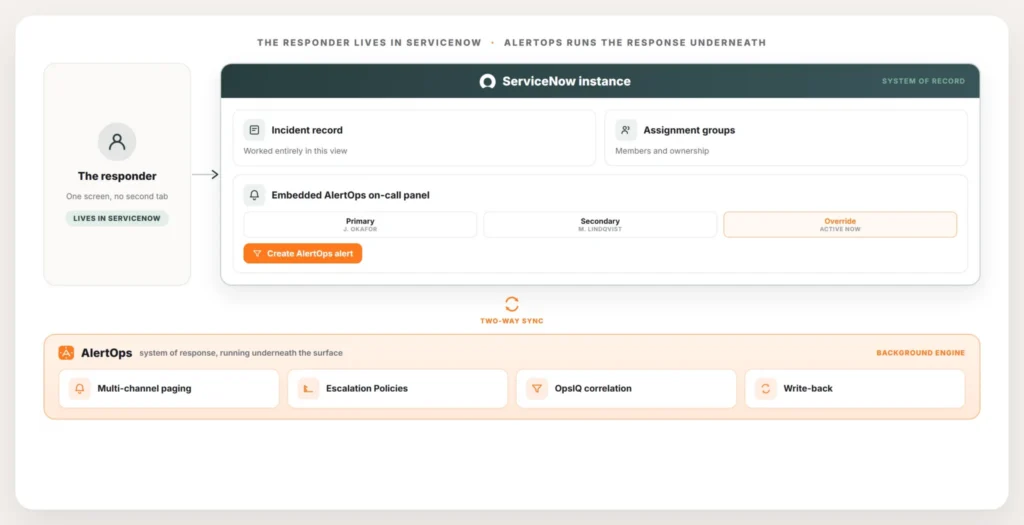
Background doesn’t mean hidden from the work. It means the on-call capability lives where the work already is. Three pieces of it surface right inside ServiceNow, and the rest runs out of sight.
The first is the on-call view. Inside the ServiceNow instance, responders and incident commanders can see who’s on call for a given assignment group right now, the primary, the secondary behind them, and any override in effect, without opening a calendar in another product.
The second is creating a page from the incident itself. During a major incident, the responder working the ticket doesn’t want to wait for an automation to notice and doesn’t want to leave to go trigger one. From inside the ServiceNow incident, they can create an AlertOps alert directly, and AlertOps takes it from there, paging the on-call members of the right group through the Escalation Policy.
The third is that the record stays honest on its own. Two-way sync keeps the ServiceNow incident and the AlertOps response in step in real time, so acknowledgements, status changes, assignment, and resolution notes move between them as they happen rather than getting copied over at the end. The full routing logic, the correlation that collapses duplicate signals through OpsIQ, the escalation timing, all of that runs underneath, and the only evidence of it on the surface is that the right people show up fast and the record stays current.
Book a demo at alertops.com/demo to watch a page fire from a ServiceNow incident and the response sync back in real time.
What Stays Visible vs. What Runs Underneath
| Visible inside ServiceNow | Runs underneath, out of sight |
| On-call view showing primary, secondary, and active override | Assignment group and member sync from the instance |
| A button to create an AlertOps alert from the incident | Escalation Policy timing and channel sequencing |
| Status, notes, and resolution updating on the ticket in real time | Multi-channel paging across SMS, voice, Slack, Teams, and mobile push |
| The incident record itself, unchanged in structure | OpsIQ correlation collapsing duplicate signals into one incident |
Why Invisibility Is the Point
For the people who live in ServiceNow, the best on-call layer is the one they never have to think about. They open an incident, the right responders are already engaged, the on-call names are right there if they need to escalate by hand, and the ticket reflects reality without anyone babysitting two systems.
That’s a different promise from “powerful on-call tool.” Plenty of tools are powerful in their own console. The harder thing, and the thing an entrenched ServiceNow shop actually needs, is power that doesn’t demand a relocation. The platform that already won the standardization stays the one everyone uses.
ServiceNow keeps its job through all of this. It remains the system of record: the incident lives there, the assignment groups are defined there, and the reporting and audit trail run from there. AlertOps reads who’s on call, drives the page, runs the escalation, and writes the result back. Two platforms, one surface, a clean division of labor.
When a Background Engine Isn’t the Right Fit
This model assumes a team that’s already committed to ServiceNow as the operational hub, and it’s worth being honest about where that assumption doesn’t hold.
A team still choosing its ITSM platform has a different decision to make first, since the background-engine approach only makes sense once ServiceNow itself is settled. Deciding between platforms is a separate conversation from deciding how the response layer should sit on top of whichever one wins.
A team that wants a dedicated on-call console with its own deep configuration screens, rather than one that mostly stays invisible, may prefer managing schedules and escalation directly in a standalone tool instead of through the embedded view. There’s a real trade-off here: the embedded view inside ServiceNow is built to answer “who’s on call right now” quickly, not to be the place where someone builds out a complex follow-the-sun rotation from scratch. Teams that spend a lot of time actively building and adjusting schedules, rather than just checking them during an incident, often still prefer doing that configuration work in AlertOps directly, even while the on-call view and paging stay visible inside ServiceNow for everyone else.
And a very small team running one simple rotation may not need either option badly enough to justify the setup, the same way native ServiceNow on-call can be enough on its own for a single group with a clean schedule and a primary and backup who reliably answer the phone.
Conclusion
The pattern shows up at every company that has standardized hard on ServiceNow. The tool is entrenched, the team is fluent in it, and any new layer gets judged on one question before anyone reads the feature list: does this change where my people work? When the answer is no, adoption stops being a fight, and the response engine gets evaluated on what it actually does instead of on how much disruption it causes to get there.
For how the connection itself works end to end, see the AlertOps and ServiceNow two-way integration guide. To see how alerts reach the right team automatically, read about routing by ServiceNow assignment group. And for the highest-stakes version of all this, the ServiceNow major incident automation guide covers what happens when a P1 hits.
Book a demo at alertops.com/demo to see AlertOps run on-call inside your own ServiceNow instance, with nobody on your team changing where they work.
Frequently asked questions
Can I run on-call inside ServiceNow without making my team use a second tool?
Yes. AlertOps installs as a certified app in your ServiceNow instance. It runs on-call as a background response engine. Responders see who’s on call and can fire a page from inside the incident. AlertOps handles routing and escalation behind the scenes.
Is there a ServiceNow Store app that adds on-call paging?
Yes. AlertOps provides a certified ServiceNow app that embeds the on-call layer in your instance. It adds an on-call view and a way to create an alert from an incident. There is no custom integration to build or maintain.
How do responders see who is on call without leaving ServiceNow?
The AlertOps app surfaces an on-call view tied to the assignment group. It shows the current primary, the secondary behind them, and any override in effect. The responder sees all of it on the record they are already looking at.
Does AlertOps keep the ServiceNow incident in sync while it runs the response?
Yes. Two-way sync keeps the incident and the response in step in real time. Status changes, assignment, and resolution notes move between the two systems as they happen. Nobody reconciles the two records afterward.
Does ServiceNow stay the system of record if AlertOps runs the paging?
Yes. The incident, the assignment groups, and the audit trail all remain in ServiceNow. AlertOps acts purely as the system of response. It reads who’s on call and writes results back, without taking ownership of the record.