In ServiceNow, the answer to “who owns this” lives in the assignment group. Every incident carries one, and at a mature shop that field is the product of years of process: clear boundaries between Network, Database, Payments, and the rest. The trouble starts one step later, when the incident has to reach an actual human who’s awake and on call right now, not just a group name sitting in a record.
This guide covers how AlertOps keeps groups and members in sync, how it routes by group and priority, the naming issue that quietly breaks routing if you miss it, and how escalation stays tied to the group that owns the work. For the full picture, start with the AlertOps and ServiceNow two-way integration guide.
Table of Contents
- The Assignment Group Is a Map, Not a Phone Call
- Sync the Groups, Not a Copy of Them
- Route by the Group, the Priority, and Whatever Else Matters
- The Naming Issue That Quietly Breaks Routing
- Escalation Belongs to the Group, Not to One Name
- Common Routing Mistakes
- Where This Leaves the Two Systems
- Conclusion
- FAQ
The Assignment Group Is a Map, Not a Phone Call
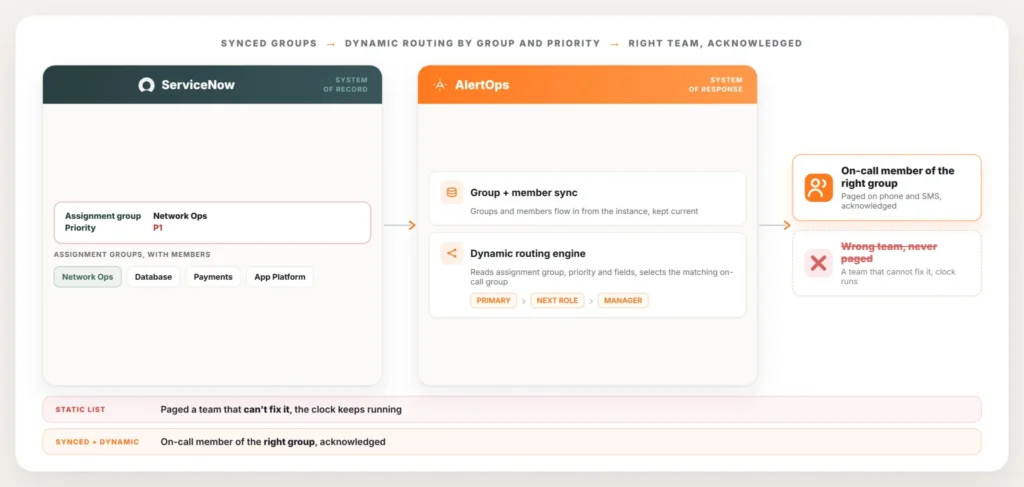
ServiceNow does a precise job of recording ownership. When an incident opens, it gets stamped with an assignment group, and the instance knows exactly which team owns the problem, down to who’s listed as a member of that group.
What the assignment group doesn’t do is reach a person. A group name in a record is a pointer, not a notification. Somebody, or something, still has to read that pointer, check who on that team is actually on call at this hour, and get them on the phone. At many companies that translation is still manual, which means the quality of the response depends on whoever’s staffing the desk and how fast they can look things up.
Routing well means closing that gap automatically. The assignment group already tells you which team owns the incident. The job is to turn that signal into a page that lands on a member of that team who’s on call right now, every time, without a person in the middle reading schedules off a screen.
Sync the Groups, Not a Copy of Them
The first thing that breaks routing is a stale list. If your alerting layer holds its own hand-built copy of every team and its members, that copy is wrong the moment someone joins, leaves, or moves between groups in ServiceNow. People get paged who left months ago. New hires who own the system never hear about the incident. The list drifts away from reality, quietly, until an outage exposes it.
AlertOps avoids this by syncing assignment groups and their members directly from the ServiceNow instance instead of asking you to rebuild them. The groups you already maintain in ServiceNow flow into AlertOps and stay current, so when a membership changes in the instance, the routing layer reflects it. There’s no second roster to keep in step with the first.
This matters most at the edges, where teams reorganize and people rotate. A new engineer added to the Database group in ServiceNow becomes reachable through AlertOps routing without anyone touching the alerting config. The instance defines ownership, and the sync keeps the response layer working from that same definition instead of an outdated snapshot.
Route by the Group, the Priority, and Whatever Else Matters
Once the groups are current, routing becomes a matter of reading the incident and sending it to the right place. AlertOps routes dynamically off the fields ServiceNow already populates: the assignment group first, then priority, then any other field that should change the path. If the assignment group is Network Ops and the priority is P1, route to the on-call members of Network Ops on the urgent path. The incident carries the answer, and AlertOps acts on it.
Priority shapes how hard the page pushes, not just where it goes. A P1 to the Database group can fan out to the full on-call shift immediately and start escalating fast, while a lower-priority incident to the same group can notify the primary responder alone and wait longer before moving on. Same group, different urgency, different behavior.
Because the routing keys off live ServiceNow data, it adapts as the incident does. If the assignment group changes mid-incident, whether a person reassigns it or a business rule does, the next routing decision follows the new owner. Nothing is hard-coded to a team that was right an hour ago.
The Naming Issue That Quietly Breaks Routing
Here’s the detail that derails more sync setups than any other: the group names have to match. AlertOps connects an incoming incident to the right on-call group by the assignment group it carries, so the group in ServiceNow and the corresponding group in AlertOps need to line up. When they do, routing is clean. When they drift apart, an incident can arrive carrying an assignment group the routing layer doesn’t recognize, and the page has nowhere obvious to land.
Most of the time this surfaces through small, human discrepancies. A group gets renamed in ServiceNow during a reorg and the change doesn’t propagate. A typo or an extra word creeps into one side. Two groups exist with names close enough that a person wouldn’t notice the difference but a routing rule treats them as unrelated. None of these are dramatic on their own, which is exactly why they slip through until an incident hits the seam.
The fix is to treat the naming as part of the integration, not an afterthought. Keep the assignment group names aligned across ServiceNow and AlertOps, let the sync carry group changes through rather than editing one side by hand, and confirm the groups you route on actually correspond to live groups in the instance.
Escalation Belongs to the Group, Not to One Name
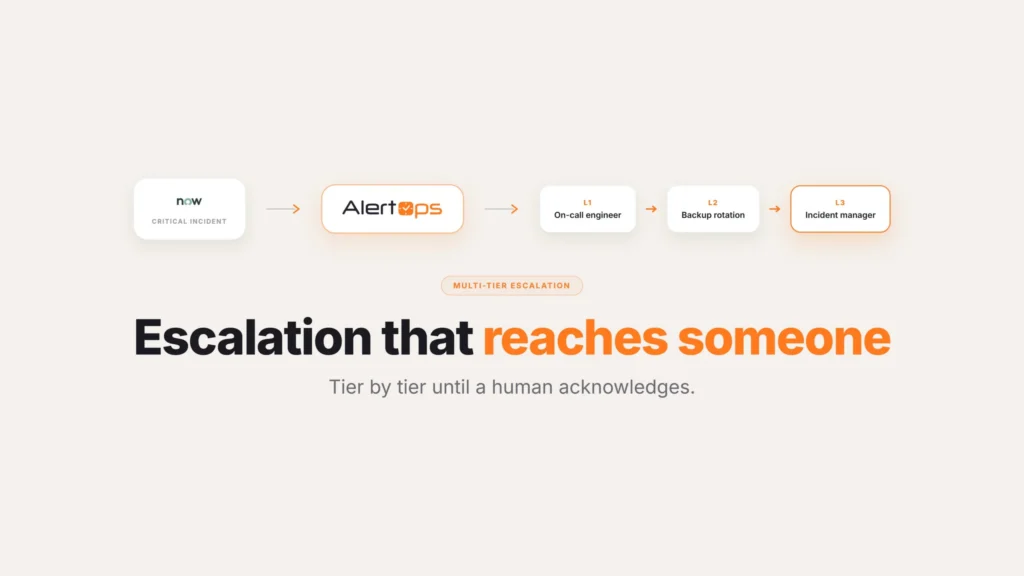
Routing to the right group is the first move. Making sure someone in that group actually responds is the second, and that’s where escalation comes in. AlertOps ties an Escalation Policy to the routing, so a page is the start of a sequence rather than a single attempt that fails silently. The on-call primary for the group gets the incident first. If they don’t acknowledge inside the window, it moves to the next responder, then up the chain, following the roles defined for that team.
This is what keeps a quiet phone from becoming a missed incident. People sleep through pages, lose signal, or step away at the worst moment, and a routing model that gives up after one try inherits all of that risk. By attaching escalation to the group, AlertOps keeps working the team until someone owns the incident, instead of leaving a critical issue stranded on a responder who never picked up. Companies with deep chains, six or seven levels from the first responder through to the director, can encode that whole ladder once and let it run.
Escalation stays anchored to the assignment group that owns the work. It’s not a global fallback that eventually wakes some on-call manager unrelated to the problem. It walks the responders for the team ServiceNow assigned, in the order that team has agreed on.
Common Routing Mistakes
A handful of patterns account for most of the routing problems teams run into after go-live.
Building one routing rule to cover every priority. Routing that ignores priority sends every incident to the same responder count and the same wait times, whether it’s a P1 or a P4. Build the escalation behavior around priority from the start, not as an afterthought once a slow P4 response causes complaints.
Not accounting for people who sit in more than one group. Someone on both the Database and Platform rotations can end up paged twice for two unrelated incidents at once, and nobody notices until that person is juggling two pages during the same overnight shift. Check for overlapping membership before assuming each responder only ever gets pulled into one incident at a time.
Leaving escalation windows at whatever the default happens to be. A wait time copied from a template rarely matches how fast a specific team actually needs to respond. A database team supporting a revenue system might need a two-minute window before escalating, while a lower-stakes internal tool can tolerate five. Set the timing to match the team, not the default.
Where This Leaves the Two Systems
The division of labor is clean. ServiceNow holds the structure: the assignment groups, their members, the business rules that decide which group an incident belongs to, and the record of everything that happened. AlertOps reads that structure live and turns it into action, routing each incident to the on-call people in the correct group, pushing harder by priority, and escalating until the team responds.
| ServiceNow | AlertOps | |
| Defines the assignment groups and who belongs to them | Yes | Reads this from ServiceNow, doesn’t redefine it |
| Decides which group an incident belongs to | Yes, through business rules | No |
| Keeps the historical record of the incident | Yes | No |
| Resolves who’s on call right now for that group | No | Yes |
| Sends the page and escalates if nobody answers | No | Yes |
That’s why the failure described earlier stops being inevitable. A misfiled group no longer means a page lands on a team that can’t help while the right team stays in the dark, because the routing follows the live assignment group and the sync keeps the members honest. The instance stays the system of record. The response runs on top of it.
This pairs closely with two related pieces: ServiceNow on-call scheduling covers how those on-call rotations are built and kept current, and ServiceNow major incident automation covers what happens once the right group is engaged on a P1.
Conclusion
Most routing failures aren’t really routing failures. They’re a stale group list, a name that drifted, or an escalation policy that never accounted for priority. None of that is a reason to distrust the assignment group itself, since it’s doing exactly what it’s supposed to do: recording who owns the incident. The job is making sure the layer reading that field stays in sync with it, matches its names exactly, and treats escalation as belonging to the team the incident was actually assigned to.
Book a demo at alertops.com/demo to see your own assignment groups sync from your instance and route to the right on-call responders.
Frequently asked questions
How do I route a ServiceNow incident to the on-call members of an assignment group?
Route on the assignment group the incident already carries. AlertOps reads that group and the priority from the ServiceNow incident. It then routes to the people on call in the matching group. If the primary doesn’t respond, an Escalation Policy takes over. ServiceNow stays the system of record while AlertOps runs the routing and paging.
How do I keep my on-call tool’s groups in sync with ServiceNow assignment groups?
Sync them from the instance instead of maintaining a separate list. AlertOps pulls assignment groups and their members directly from ServiceNow and keeps them current. Adds, departures, and moves in the instance propagate to the routing layer automatically.
Why is an incident routing to the wrong team?
The usual cause is a group name mismatch between ServiceNow and the routing layer. A rename or a typo didn’t propagate. Keep the group names aligned across both systems. Let the sync carry group changes through rather than editing one side by hand.
Can routing change based on incident priority as well as the group?
Yes. Priority sits alongside the assignment group as a routing input. The same team can see very different handling depending on severity. A P1 might pull in the whole on-call shift at once, with tight escalation timers. A P3 or P4 goes to a single responder, who has more time before anything moves up the chain.
What happens if the on-call person for a group doesn’t respond?
AlertOps ties an Escalation Policy to the group. An unacknowledged page moves to the next responder and continues up the chain defined for that team. The incident escalates within the assignment group that owns it. It never stalls on one unreachable person.