Ask a platform team what it takes to connect a new tool to their ServiceNow instance, and you’ll hear about the gate long before you hear about the feature. The instance is the system of record for the whole company, and almost nobody is willing to let an uncertified app reach into it. One of the very first questions a security or platform reviewer asks is plain: is this a certified app on the ServiceNow Store, or is it something we have to hand-build and then own forever?
This piece walks through why certification is the gate for security and platform teams, what “certified app” actually means, how install and setup change because of it, and what the certified path unlocks once it’s in place. For the full picture of the connection itself, start with the AlertOps and ServiceNow two-way integration guide.
Table of Contents
- Why Certification Is the First Question, Not the Last
- What Certified App Actually Means
- How Install and Setup Change Because of It
- Certified App vs. Hand-Built Integration
- What the Certified Path Unlocks
- Conclusion
- FAQ
Why Certification Is the First Question, Not the Last
The ServiceNow instance isn’t just another system in the stack. It holds the company’s incident, change, and problem records, its assignment groups, its business rules, and a good deal of the operational truth other teams depend on. Anything that touches it inherits that weight. A reviewer evaluating a new integration isn’t really asking whether the feature is good. They’re asking what this thing is allowed to do inside the most sensitive system they run.
That’s why “is it certified” comes up before pricing, before the demo, sometimes before the use case is even fully described. An uncertified integration means custom code living in production, written against the instance and maintained by whoever happens to still be around. It means a security review with no marketplace listing to lean on and no second party that has already looked at how the app behaves. For a lot of enterprises, that’s a non-starter on principle, no matter how well the underlying tool works.
A certified app changes the shape of the conversation. The reviewer is no longer evaluating a bespoke project from scratch. They’re evaluating a listed app that went through ServiceNow’s own review process to earn its place on the Store. The security team still does its diligence, as it should. It just starts from a much stronger position, because the app already cleared the bar ServiceNow sets for things that run against an instance.
What Certified App Actually Means
A certified app is one ServiceNow has reviewed and published on the ServiceNow Store. It’s not a marketing label a vendor applies to itself. To earn a listing, the app passes ServiceNow’s review. That includes a security review of how the app works and how it interacts with the platform. It then lands as a marketplace listing customers can find, vet, and install. Certification separates two things. A vendor can claim “we integrate with ServiceNow.” Only ServiceNow can list the app as one that meets its standards.
ServiceNow publishes AlertOps on its Store as a certified app. That listing is the artifact a security team can point to. It tells them the integration isn’t a pile of custom scripts someone wrote against the instance. It’s a reviewed app that ships through ServiceNow’s own channel. When a platform reviewer asks for proof, the Store listing is the proof. It carries the weight of ServiceNow’s process rather than the vendor’s word.
It’s worth being precise about what this claim is and isn’t. Three things are verifiable. AlertOps holds a certified app listing on the ServiceNow Store. It meets ServiceNow’s standards. It passed a security review as part of that process. Those are the facts that matter to the people guarding the instance. The point isn’t a badge for its own sake. Every enterprise puts a gate in front of its instance, and this one has a defensible answer. That answer is yes.
How Install and Setup Change Because of It
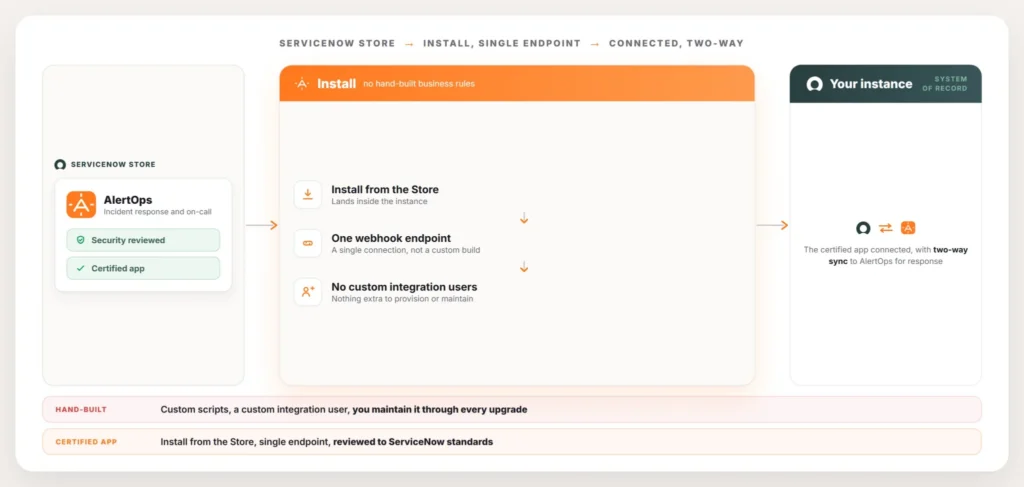
Certification isn’t only a trust signal. It changes the mechanics of getting connected, and that’s where platform teams feel it day to day. Because AlertOps is a certified app, it installs from the ServiceNow Store the way other certified apps do, rather than arriving as a set of instructions for hand-building business rules and flows inside the instance. The app is the unit of installation, so what lands in the instance is a known, reviewed package instead of bespoke code that now belongs to you.
From there, the connection runs through a single webhook endpoint. There’s no need to stand up a custom integration user, hand out broad credentials, or wire a web of business rules to move data back and forth. One endpoint carries the traffic between the instance and AlertOps, which keeps the footprint inside ServiceNow small and easy to reason about. A reviewer can see exactly what the connection is and exactly where it runs, because it’s one defined path rather than a sprawl of scripts touching multiple tables.
That smaller footprint pays off well past day one. Hand-built integrations are fragile against platform upgrades, since custom business rules and scripts can break when ServiceNow changes underneath them, and someone has to notice, diagnose, and repair them every time. A certified app installed from the Store and connected through a single endpoint gives the team far less to maintain and far less to worry about when an upgrade window comes around.
See the certified app installed against your own instance at alertops.com/demo.
Certified App vs. Hand-Built Integration
| Hand-built integration | Certified app | |
| Review | Custom security review with no marketplace listing to reference | Already reviewed by ServiceNow as part of Store listing |
| Installation | Custom scripts and business rules built inside your instance | Installed as a package from the ServiceNow Store |
| Access | Often needs a custom integration user with broad credentials | Single webhook endpoint, no custom integration user |
| Ongoing ownership | Your team maintains it through every platform upgrade | ServiceNow’s review process stands behind the listing |
| What breaks first | Custom business rules when the platform changes underneath them | A defined, single connection point that’s easier to reason about |
What the Certified Path Unlocks
Clearing the gate is the beginning, not the end. Once the certified app is installed and the endpoint is live, it carries the two-way integration that makes ServiceNow and AlertOps work as one loop. Incidents flow in both directions, assignment and priority stay in sync, and notes and status updates move between the instance and AlertOps in real time, so the record in ServiceNow and the response running in AlertOps never drift apart. ServiceNow stays the system of record through all of it. AlertOps handles the live response, including routing through Escalation Policies and Response Plays to the on-call members of the right assignment group, while the instance keeps the authoritative version of what happened.
The certified app also supports keeping people inside the tool they already live in. ServiceNow users can see who’s on call without leaving the instance, through an embedded on-call view, so the person triaging a major incident doesn’t have to switch tools to find the responder. That embedded view exists because the app is installed natively in ServiceNow, not bolted on from the outside. The full account of how the loop holds together, every field that syncs, lives in the two-way integration guide.
And because every action moves through one reviewed, defined connection, the record stays trustworthy. Each routing decision, escalation, and acknowledgement is captured against the incident, which is what makes the post-incident story hold up later. When an auditor or a review asks who was notified, when, and how the incident moved, the answer is in the record rather than in someone’s memory. That side of it, the trail the integration leaves behind, is covered in detail in the ServiceNow incident audit trail guide.
Conclusion
Certification isn’t a feature AlertOps is asking you to take on faith. It’s a review process ServiceNow itself runs, and the Store listing gives your security team something to verify independently rather than a vendor’s assurance to accept on trust. That distinction sounds small until it’s the difference between a project your team owns forever and a package you install, connect through one endpoint, and let run.
Book a demo at alertops.com/demo to see the certified app installed against your own ServiceNow instance and the two-way integration running end to end.
Frequently asked questions
Is AlertOps a certified ServiceNow app?
Yes. ServiceNow publishes AlertOps on its Store as a certified app. AlertOps built it to ServiceNow’s standards, and ServiceNow reviewed it. That security review covers how the app works and how it interacts with the platform. ServiceNow distributes it through its own marketplace, so nobody hand-builds it inside your instance.
Is AlertOps on the ServiceNow Store?
Yes. ServiceNow lists AlertOps on the ServiceNow Store as a certified app. That listing gives a security or platform team something concrete to check. They don’t have to take a vendor’s description at face value. The app cleared ServiceNow’s review process, and you install it from the Store. Nobody stitches it together from custom scripts inside your instance.
Why does ServiceNow app certification matter to a security team?
The ServiceNow instance is the system of record for incident, change, and problem data, so anything that touches it gets heavy scrutiny. A certified app has already passed ServiceNow’s review, which means the team is evaluating a reviewed marketplace listing rather than bespoke custom code in production. It doesn’t replace their diligence, but it gives them a far stronger starting point.
How is AlertOps installed in ServiceNow?
It installs from the ServiceNow Store as a certified app and connects through a single webhook endpoint. There’s no need to provision a custom integration user or wire up a web of business rules to move data, which keeps the footprint inside the instance small and easy to maintain through platform upgrades.
Does being a certified app change what the integration can do?
Not directly. Certification governs trust and installation, and the capabilities sit on top of that foundation. Once you install the ServiceNow Store app, it carries the full two-way integration. Incidents, assignment, priority, notes, and status sync in both directions. Routing runs through Escalation Policies and Response Plays. An embedded on-call view sits inside ServiceNow.