Key takeaways
- Compliance evidence from an incident platform means being able to show, after the fact, who was alerted, who acknowledged, what was escalated, what changed and how it ended. Reporting that only counts alerts does not cover that.
- Ask every vendor for three things in writing: the audit log scope for configuration changes, the exportable incident timeline, and the plan tier that includes both. Reporting, AI and support are often priced separately.
- AlertOps Enterprise includes an Audit Trail of configuration changes with PDF and CSV export, plus Agent Chronicle, which writes the postmortem automatically from the incident record. AlertOps connects to your ticketing and monitoring tools through 200+ integrations, including a certified two-way ServiceNow app that syncs the escalation timeline to the ticket, so the response, the ticket and the postmortem share one record.
Most teams find out what their incident tooling can prove on the day somebody asks for proof. An auditor, a customer security questionnaire or a board member wants to know who was paged for last quarter’s outage, how long it took someone to answer, and whether the escalation followed the written policy.
This guide covers which platforms have strong reporting, audit logs and exportable evidence for compliance, and what to verify before you trust any of them. AlertOps is the lead pick here for enterprise IT and MSP teams, because it keeps on-call, escalation and the postmortem on one incident timeline. PagerDuty, xMatters, Rootly, incident.io and Jira Service Management each list an audit log on their pricing pages, on the plans shown below, while Grafana Cloud IRM and Datadog Incident Response suit teams already on those platforms.
What compliance evidence from an incident platform actually means
Compliance teams rarely ask for a dashboard. They ask for a record that can be reconstructed: the alert that started it, the people notified and how, the acknowledgement, the escalation steps, the actions taken and the closing summary. Frameworks differ in wording, but the underlying questions are consistent, and your own auditor will tell you which controls apply to your business.
An incident handled in a chat thread is a story; the same incident recorded with timestamps, owners and status changes is evidence.
IBM’s Cost of a Data Breach Report 2026 puts the global average breach at USD 4.99 million, a 12% rise and a record high (IBM, 2026). The Uptime Institute’s 2026 outage analysis, which is self-reported, has 57% of respondents putting their latest major outage above USD 100,000 and one in five above USD 1 million (Uptime Institute, 2026). The audit is the routine case. After a major outage or a breach, the same record goes to leadership, and it decides whether anyone can show the response followed the plan.
The evidence an auditor asks for, and where it comes from
The table below separates the questions that come up most often from the part of the platform that answers them. It is a working list rather than a framework mapping, so match it to the controls your auditor names.
| Auditor question | Evidence source | What to confirm with any vendor |
|---|---|---|
| Who was on call at the time? | Schedule history and shift records | Can past schedules and overrides be viewed and exported? |
| Who was notified, by which channel, and when? | Notification and escalation log | Is each attempt timestamped, including failures and retries? |
| Who acknowledged, and how fast? | Acknowledgement record, MTTA | Is it per responder, per team and per service? |
| Did escalation follow policy? | Escalation timeline against the written policy | Can you compare what happened to what was configured? |
| Who changed routing rules or schedules? | Configuration audit log | Which actions are logged, and for how long? |
| What was the root cause and the fix? | Postmortem | Is it generated from the record or written by hand afterward? |
| Can you hand this to an auditor? | Export (PDF, link, API) | Which formats, and on which plan? |
Reporting versus audit logs versus the incident record
These three get sold under one word and they are not interchangeable.
Reporting answers how the team performed
Reporting aggregates: MTTA and MTTR by team, service or integration, SLA attainment, alert volume. It tells leadership whether response is improving. It will not satisfy an auditor alone, because an average does not show what happened on a specific night. For definitions, see our guide to MTTR.
Audit logs answer who changed what
An audit log records administrative actions such as a user added, a schedule edited or an escalation rule changed. This is the control evidence that proves the response system itself was governed. Scope can differ between vendors and plans, which is why the question belongs in writing.
The incident record answers what happened
The incident record is the per-event timeline: alert received, notifications sent, acknowledgement, escalation, resolution, notes. This is the evidence most requested after an outage, and it is the part least likely to survive if the work happens across chat, phone calls and a ticket that someone updates the next morning.
Book a demo at alertops.com/demo and we will walk a test alert through to the postmortem, so you can inspect the record it leaves.
How the main platforms compare on evidence and packaging
We read each vendor’s own pricing page on November 1, 2026. Most of them list audit features, usually on a higher plan than the headline price, but they say little about scope, so this table shows what the pages state and leaves the rest for your review.
| # | Platform | Strongest fit | Packaging that affects evidence | What to verify |
|---|---|---|---|---|
| 1 | AlertOps | Enterprise IT, DevOps, SRE, NOC and MSP teams, on any ITSM or monitoring stack, that want response, record and postmortem in one place | Enterprise ($28 per user per month billed annually) includes the Audit Trail (PDF and CSV export), OpsIQ, Agent Chronicle, Post-Mortem Reports, and MTTA/MTTR tracking with downloadable reports; data retention is custom | The retention term your control requires, set on Enterprise |
| 2 | PagerDuty | Large engineering orgs with an established ecosystem | Audit Trail Reporting (a year of records) on Reliability Platform plans from Starter, not on Free or Professional; AIOps and PagerDuty Advance are add-ons on Professional | Audit scope on the plan you would buy |
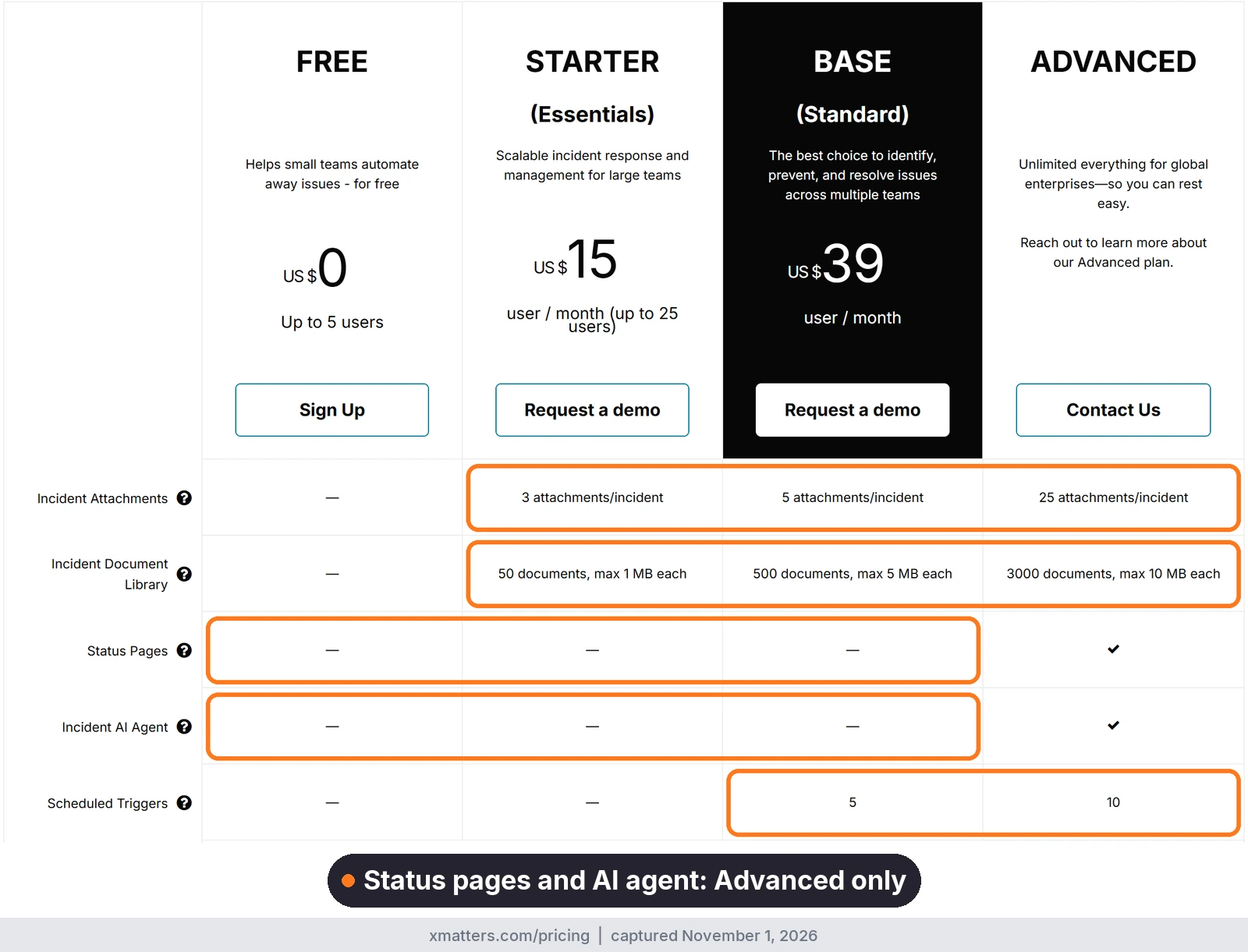
| 3 | xMatters (Everbridge) | Enterprises with notification depth and compliance-style alerting needs | Audit Reports on configuration changes, kept a year on Starter and Base and three months on Free; Post-Incident Reporting on Advanced; SMS and voice metered by tier | Advanced-tier terms, available through sales |
| 4 | Rootly | Slack-centric engineering teams with AI retrospectives | Audit logs listed on Enterprise; Incident Response and On-Call are additive ($20 plus $20 per user per month) | Which plan holds data export, and retention terms |
| 5 | incident.io | Product-engineering teams in Slack | Audit logs on Enterprise only; on-call is an add-on on Team and Pro; AI investigations gated to higher tiers | Export options and retention |
| 6 | Jira Service Management | Teams already on Jira wanting ITSM and on-call together | Audit logs from Standard ($21.50 per agent per month at 75 agents); alerts and on-call on every plan, inside Atlassian’s Service Collection | Whether the audit log covers on-call and alerting changes |
| 7 | Grafana Cloud IRM | Teams already on Grafana | Pro from $20 per active IRM user plus a $19 per month platform fee; Enterprise has a $25,000 per year minimum commit | Which plan includes audit logging and AI features |
| 8 | Datadog Incident Response | Teams already standardised on Datadog | On-Call from $20 and Incident Management from $30 per seat per month billed annually, or the Incident Response bundle from $40; Bits Investigation is priced separately through AI Credits | Audit logging scope and support terms on the plan you would buy |
Price the plan that holds your evidence, not the headline plan.
1. AlertOps: response, record and postmortem on one timeline
AlertOps is our pick for enterprise IT, DevOps, SRE, NOC and MSP teams, whatever ITSM or monitoring tools they run, that want the incident record to build itself while people respond. Enterprise ($28 per user per month billed annually) includes an Audit Trail that logs who changed what and when, with PDF and CSV export, plus OpsIQ, Agent Chronicle postmortems with up to 80% less prep time (AlertOps platform data), noise reduction of roughly 68% (AlertOps platform data), and MTTA and MTTR reporting with downloadable reports. AlertOps also connects through 200+ integrations, including a certified two-way ServiceNow app. Pricing is published per user, and Enterprise includes OpsIQ, Agent Chronicle and support, so the evidence features sit in one plan.
2. PagerDuty: large engineering organizations
PagerDuty serves large engineering organizations, with on-call included in every plan and a long-established integration ecosystem. Post-incident reviews are on Professional. Its AIOps product has to be bought separately on Professional, and email and chat support start there as well, with Free limited to community and knowledge base help. Check the plan line carefully: Audit Trail Reporting, with records for the previous year, sits on the PagerDuty Reliability Platform plans starting at Starter and is not on the Professional per-user plan, so a higher-sounding name does not mean more evidence.
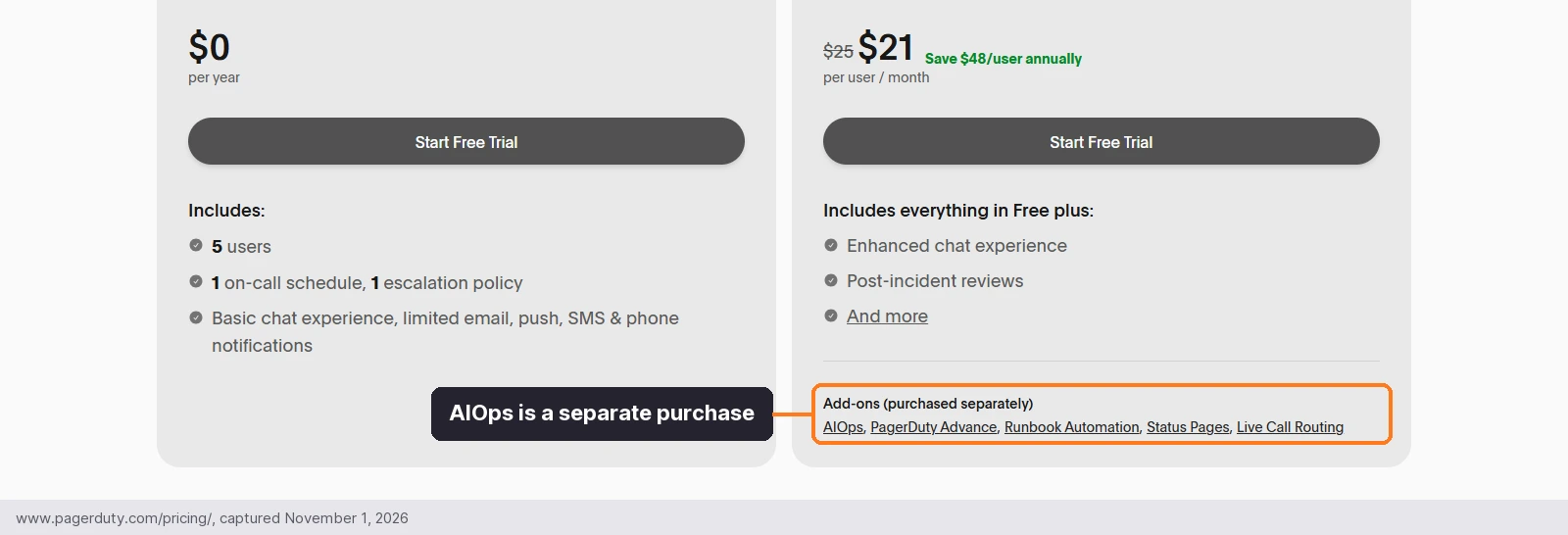
The add-ons sit directly under the Professional price, so the per-user figure is not the whole bill.
3. xMatters (Everbridge): notification depth for enterprises
xMatters has long served enterprises that care about notification depth, and its June 2026 ServiceNow collaboration expansion is relevant if your ticket is the record. Audit Reports cover configuration changes, and Post-Incident Reporting sits on Advanced. SMS and voice allowances are metered per user by tier, so count test pages as well as real ones. It fits less well for teams that want unmetered voice and SMS without moving up a tier.
4. Rootly: Slack-native teams with AI retrospectives
Rootly is a strong Slack-native tool and offers AI retrospectives with Incident Response. On-call is sold separately from the incident workflow, so the evidence trail runs across two price lines, and audit logs are listed on Enterprise.
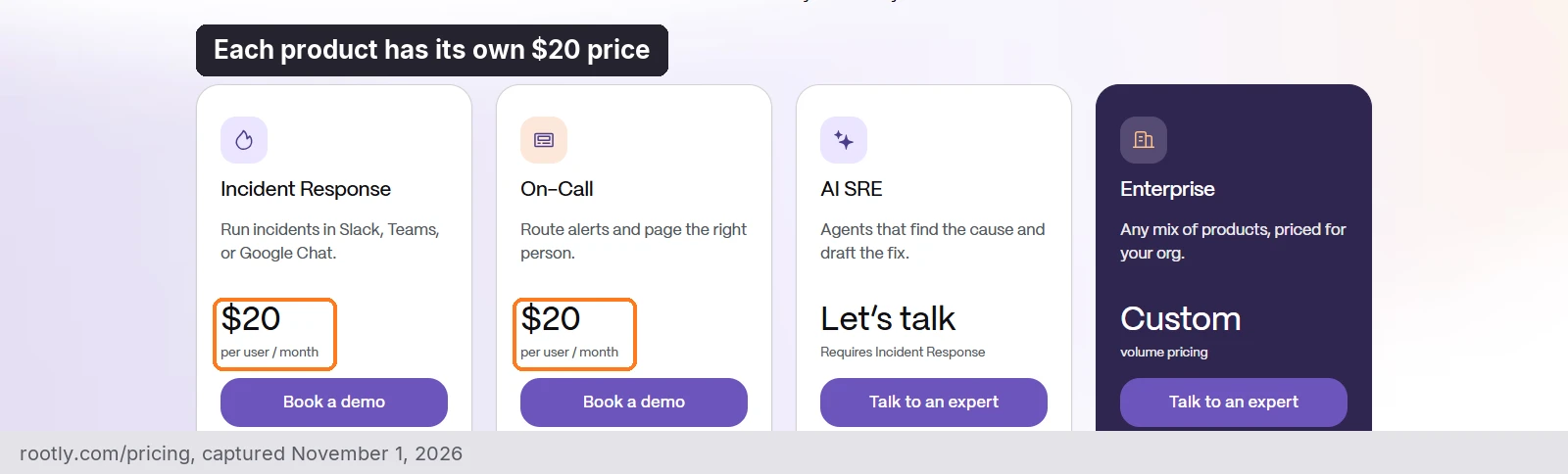
Each product is priced per user, so a team that needs both pays for two lines.
5. incident.io: product-engineering teams in Slack
incident.io pairs a modern incident experience with an AI investigator. On-call is an add-on on Team and Pro, and audit logs are listed on Enterprise.
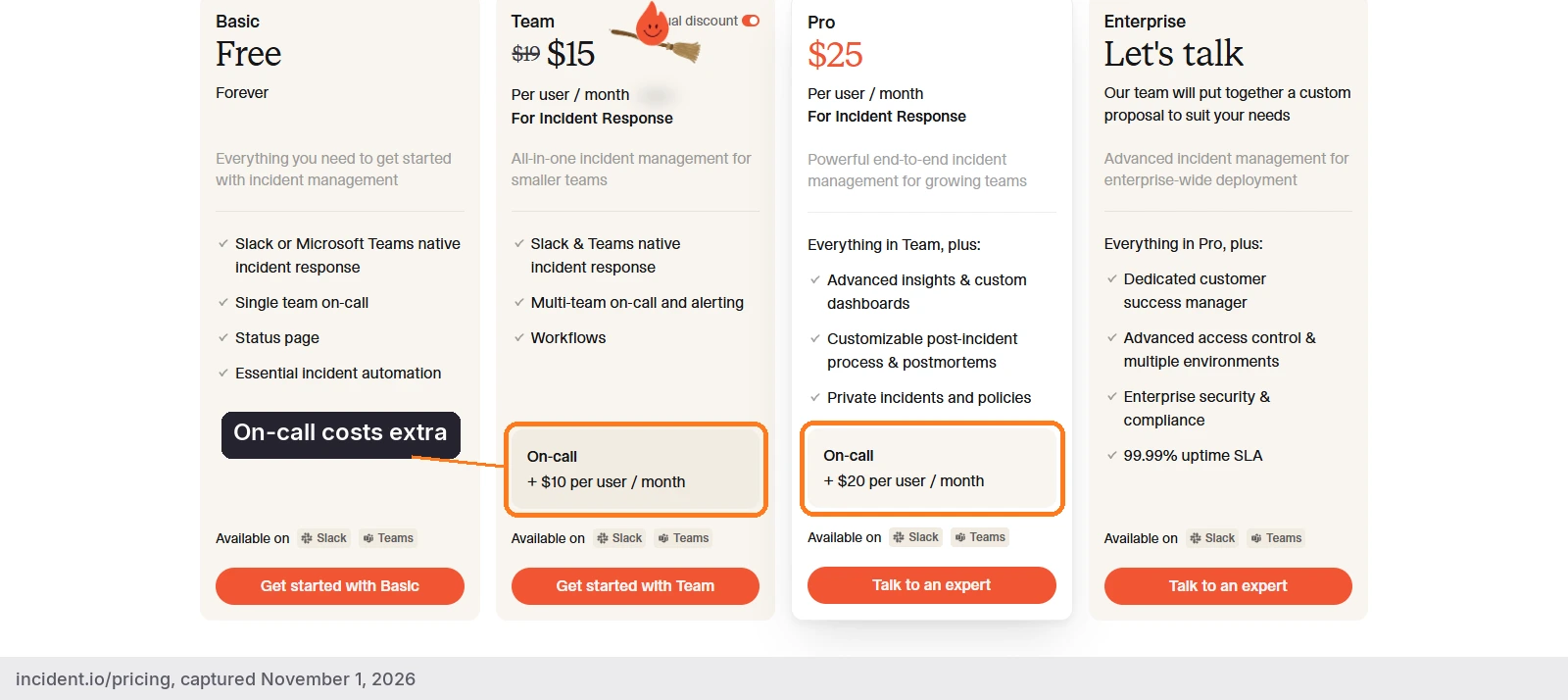
Teams that need paging pay the add-on per user on top of the plan price.
6. Jira Service Management: teams already on Jira
JSM suits teams already on Jira. Atlassian says alerting and on-call are built in after the Opsgenie transition, and audit logs start on Standard. Opsgenie end of support is April 5, 2027, when access shuts off and unmigrated data is deleted (Atlassian), so any alert history you may need as evidence should be exported before then.
7. Grafana Cloud IRM: teams already on Grafana
Grafana OnCall OSS was archived in 2026; Grafana Cloud IRM is its successor and suits teams already on Grafana.
8. Datadog Incident Response: teams already on Datadog
Datadog is a respected platform that integrates with AlertOps, and Datadog Incident Response suits teams already standardised on Datadog that want paging and incident work next to their monitors, traces and logs. Teams choose it because On-Call and Incident Management work on their own, with no other Datadog product required, and the bundle includes all features of both. It is sold per seat per month, billed annually: On-Call from $20 ($29 on-demand), Incident Management from $30 ($43.20 on-demand) and the Incident Response bundle from $40 ($58 on-demand). One bundle seat covers both products, you pay for the highest number of seats assigned at one time, and no seat is needed to create, view or join incidents or to page another team. It fits less well where you want one price line for paging, incidents and AI, because Bits Investigation is a separate AI product priced through AI Credits ($500 per 500 credits per month, billed annually).
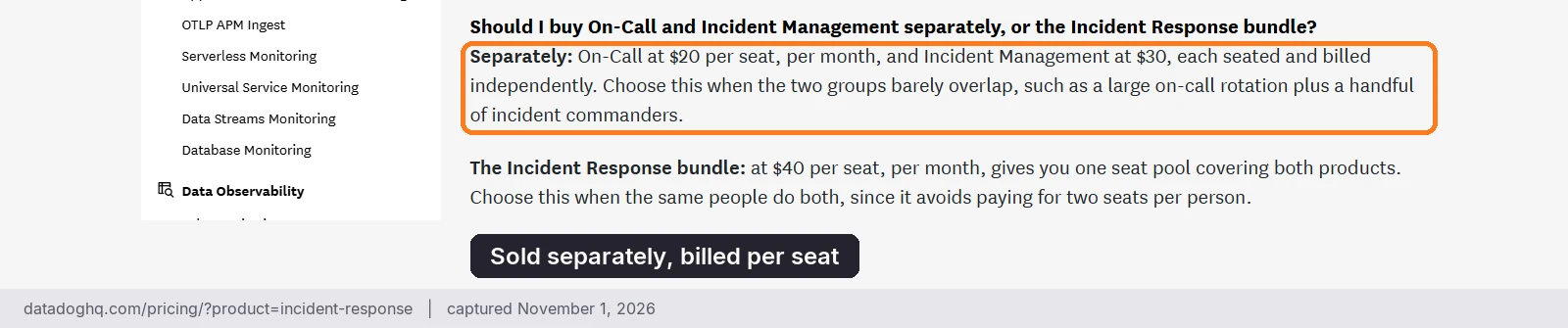
Check the audit logging scope and support terms with Datadog for the plan you would buy, since the pricing page does not state them.
The limits behind the headline price
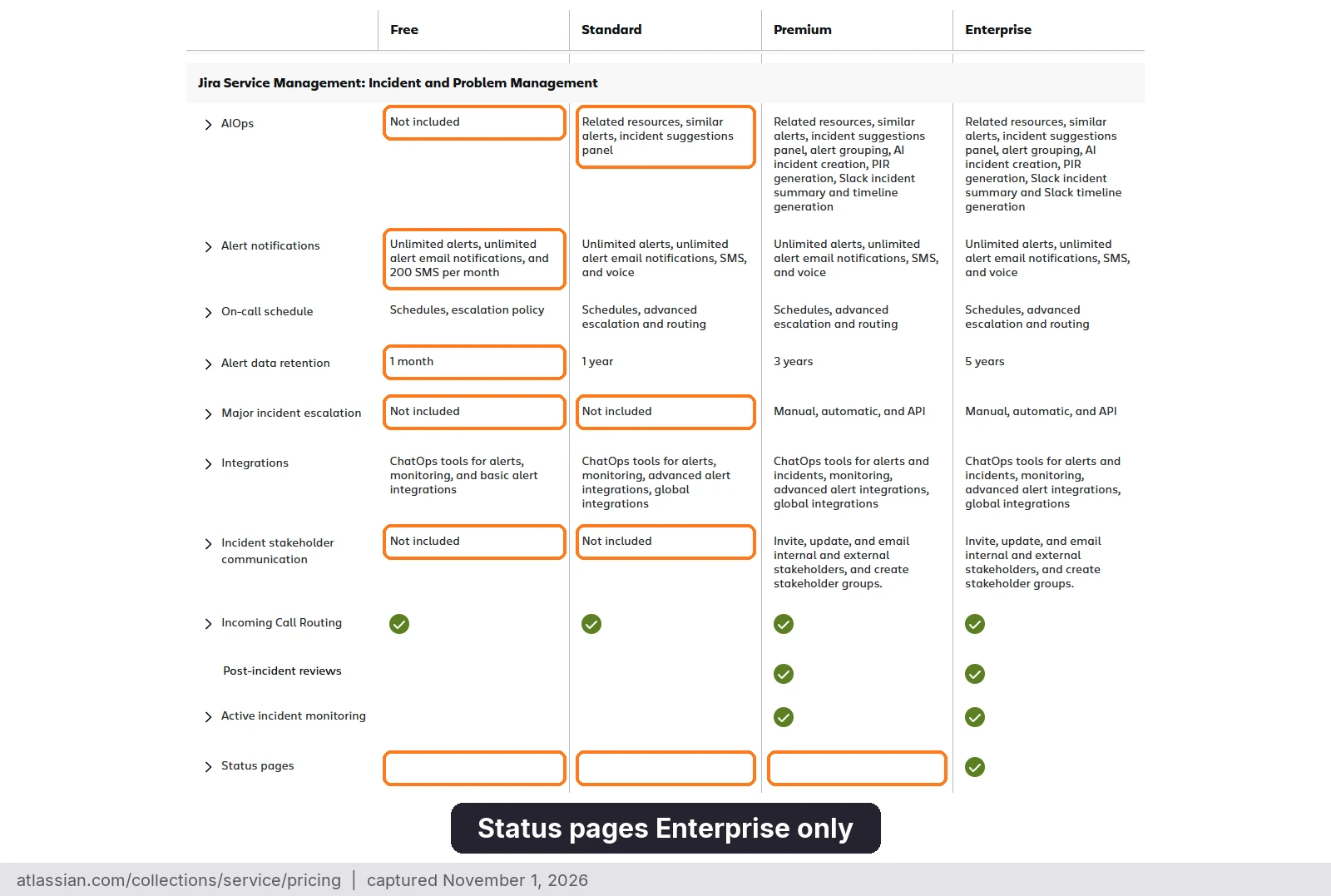
The plan that holds your audit evidence often carries other caps too, on workflows, status pages, AI and SSO, so the per-user price rarely tells you what the plan can do. We read each vendor’s pricing page on November 1, 2026 and list only what the pages state.
| # | Platform | Workflows | Status pages | AI | SSO |
|---|---|---|---|---|---|
| 1 | AlertOps | Included with AlertOps Enterprise | Status Hub included with AlertOps Enterprise | OpsIQ AI Suite included with AlertOps Enterprise | Included with AlertOps Enterprise, with custom RBAC |
| 2 | PagerDuty | Incident Workflows: none on Free, 1 on Professional, included from Starter | External: none on Free, 250 subscribers on Professional, included from Starter | AI actions: Starter 1,000, Essential 4,000, Plus 16,000, Ultimate 100,000 | Not on Free; Professional and up |
| 3 | xMatters | Flow Designer on all plans; scheduled triggers Base 5, Advanced 10 | Advanced only | Incident AI Agent on Advanced only | Starter and up |
| 4 | Rootly | Basic on the standard plans, Advanced on Enterprise | Incident Response: 1 external and 1 internal | AI SRE is a separate product | SSO and SAML on standard plans; SCIM on Enterprise |
| 5 | incident.io | Basic 1, Team 3, Pro and Enterprise Unlimited | Public pages 1 / 1 / 1 on Basic, Team and Pro; Unlimited on Enterprise | Investigations are an add-on on Pro and Enterprise | SSO on all plans; SAML on Pro; SCIM on Enterprise |
| 6 | Jira Service Management | Automation steps: Free 1,250 per subscription per month, Standard 3,000 per user, Premium 6,500, Enterprise 9,500 | Enterprise only | Rovo credits per user per month: Standard 250, Premium 700, Enterprise 1,500 | SAML SSO needs an Atlassian Guard subscription |
| 7 | Grafana Cloud IRM | See vendor pricing | See vendor pricing | Free: 3 AI users; Pro: $20 per AI user and $2 per 1M extra tokens | See vendor pricing |
| 8 | Datadog Incident Response | See Datadog pricing | Status pages with custom domains listed on the product page | Bits Investigation priced through AI Credits | See Datadog pricing |
AlertOps publishes its per-user pricing, and Enterprise is $28 per user per month billed annually. That price includes OpsIQ, Agent Chronicle, a dedicated account manager, a 99.9% SLA and 24×7 critical response.
How AlertOps produces the record
AlertOps, our incident orchestration platform, treats the timeline as a byproduct of response instead of a task someone does afterward. When a responder is paged by phone, SMS, email or the mobile app, the notification and the acknowledgement land on the alert itself, so nobody rebuilds the sequence from memory. Across 200+ integrations, alerts from your monitoring tools land on that same timeline.
Agent Chronicle writes the postmortem from the record
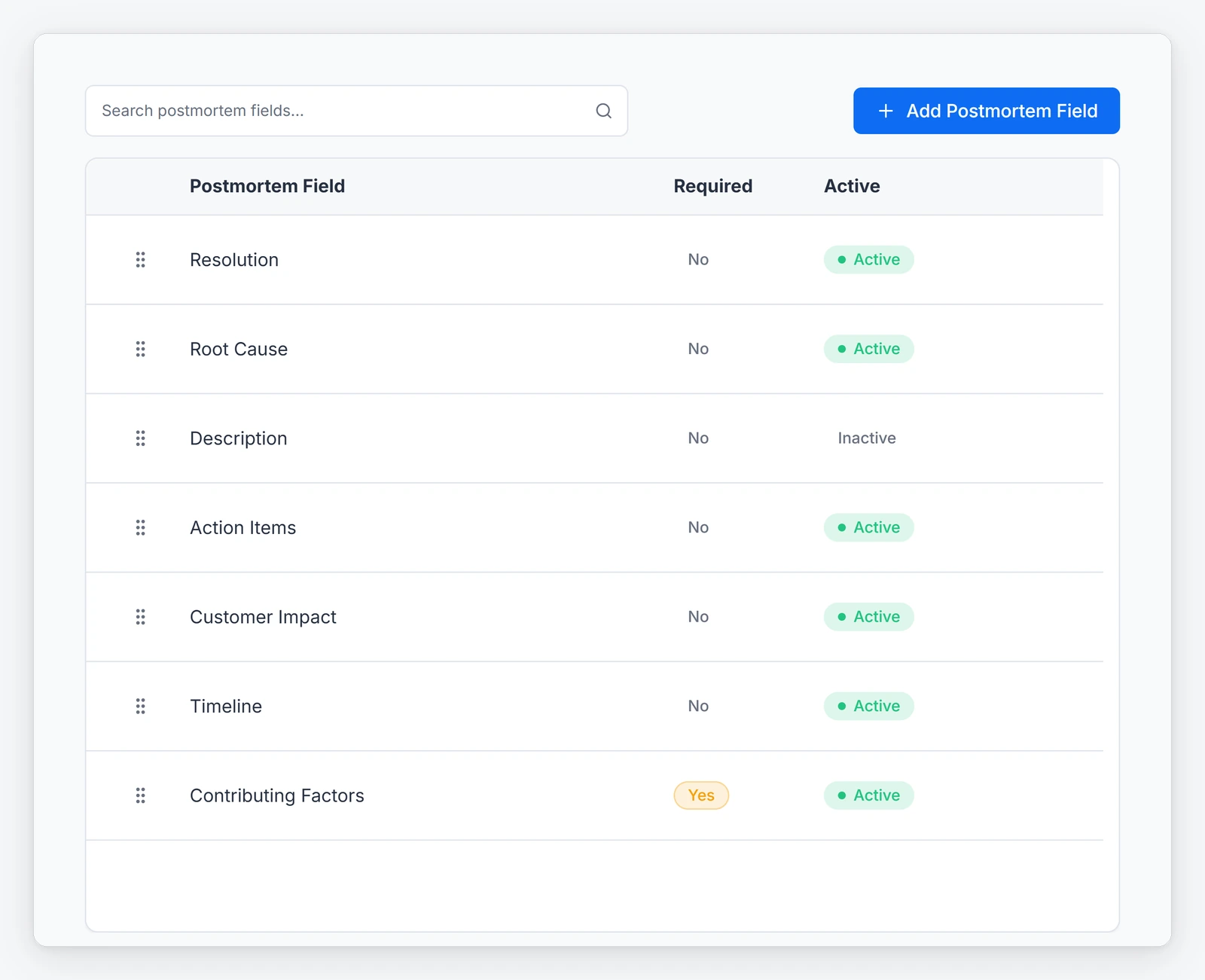
Agent Chronicle, included in AlertOps Enterprise, produces an automated postmortem with a summary, root cause, timeline, impact, recovery and recommendations, and exports it as a PDF. AlertOps platform data shows up to 80% less postmortem prep time. The primary job is faster postmortems; the written timeline is also what internal audit, compliance and leadership read afterward. For the practice behind it, see our guides to the incident post-mortem and blameless post-mortems.
The Audit Trail records who changed what
The AlertOps Audit Trail, under Administration, gives administrators a log of changes made across key modules: users, groups, schedules, escalation policies and workflows. Each entry shows when the change happened, who made it, the category, the item and the field that changed, with the old and new values. It captures updates and deletes to existing records, and it exports to PDF and CSV from the same screen. It is included in Enterprise, and a user needs the AuditTrail_View entitlement to open it. Each alert and incident also has its own audit trail tab, so the record of what happened sits next to the record of how the system was configured.
The ticket record stays accurate
AlertOps works with whatever ticketing and monitoring tools you run. If ServiceNow is your system of record, the AlertOps app for ServiceNow is certified and two-way, with no coding needed. It syncs assignment, status, resolution notes, work notes and the escalation timeline, and brings ServiceNow groups and users into AlertOps. The ticket therefore shows who responded, taken from the alert record. Setup details are in our post on the certified ServiceNow Store app.
Reporting for teams and clients
AlertOps Enterprise includes reporting that covers MTTA and MTTR tracking, alert and notification reports, alert lifecycle tracking and downloadable reports. Data retention is custom. MSPs can see how AlertOps handles multi-client response on the MSP solution page, and we will walk your own setup in a demo.
Quieter alerts mean a cleaner record
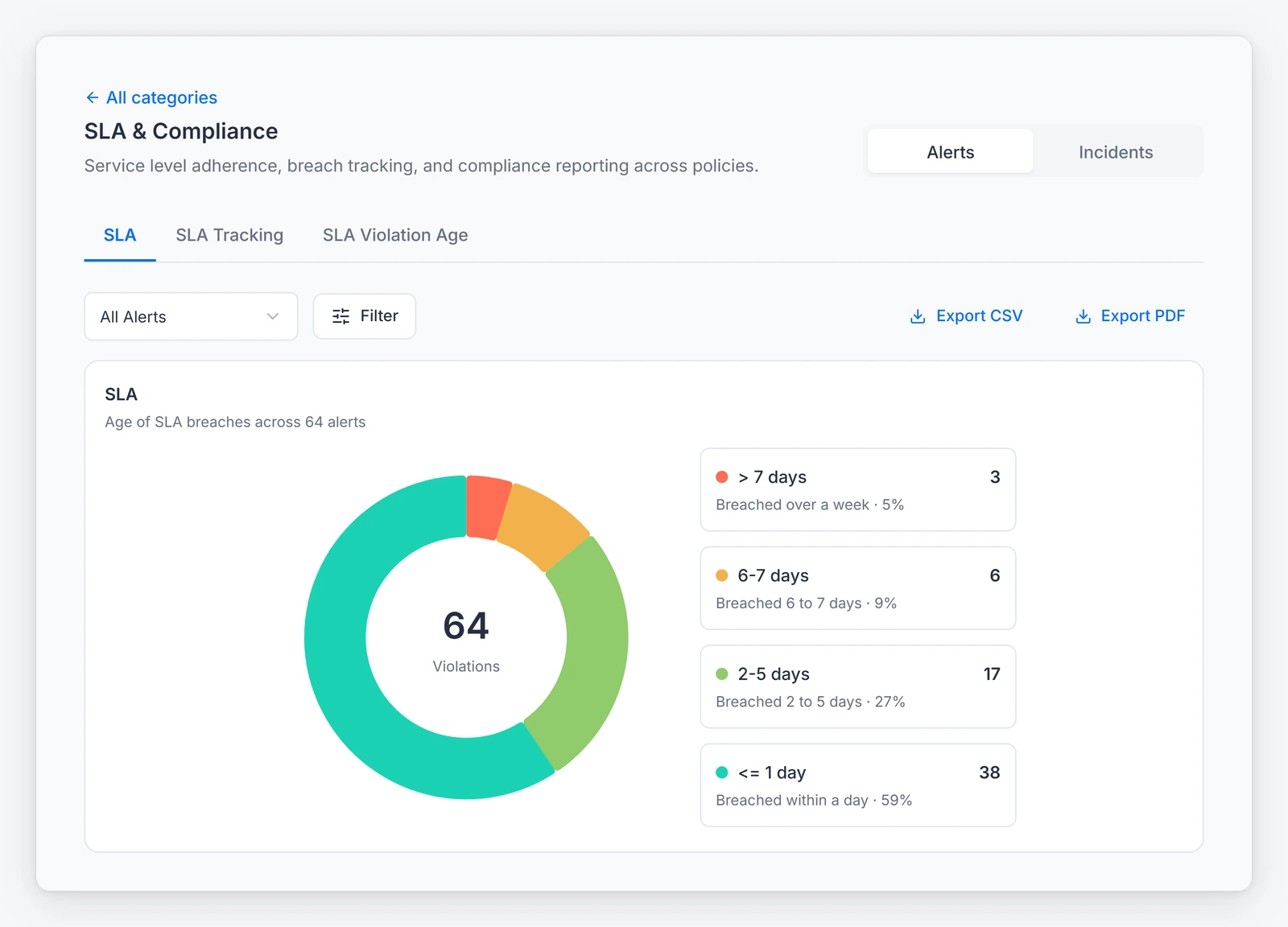
A record full of duplicate pages is hard to read. OpsIQ, included in AlertOps Enterprise, groups related alerts with the Smart Correlation Engine and cuts alert noise by roughly 68% (AlertOps platform data). For a regulated-industry view, see incident response in regulated industries.
What Enterprise costs
AlertOps Enterprise is $28 per user per month billed annually or $34 monthly, includes OpsIQ, a dedicated account manager and a 99.9% SLA, and comes with a 14-day trial without a card (AlertOps pricing).
See Agent Chronicle generate a postmortem from an incident record at alertops.com/demo.
What to ask in a vendor review
Put these in an email, because answers in a sales call are not evidence:
- Which administrative actions does the audit log record, and how long is it kept?
- How long do you keep the incident timeline, and does that meet the retention period my control requires? In what formats can I export it, and on which plan?
- When alerts are grouped, can a reviewer see what was merged and why?
- Does the postmortem build from the incident record, or is it a template someone fills in?
- Are failed notifications and retries logged?
- Which certifications or attestations can you provide, and under what NDA?
- What happens to my history if I leave?
The last question is the one Opsgenie customers are answering now.
A checklist for your next audit cycle
Gather these before the auditor does:
- The controls your auditor says touch incident response, in their words
- Your last three major incidents, with the timeline you can actually produce for each
- The current escalation policies and who approved the last change
- A sample export of the incident record and the postmortem
- The plan tier that includes each reporting and audit feature you rely on
- The retention period each control requires, set against your plan’s retention
- Written answers from each vendor to the review questions above
- Any Opsgenie data that must be exported before April 5, 2027
Take the list into a demo and we will walk escalation, the incident record and Agent Chronicle against it.
FAQ
Which incident management platforms have strong audit logs and exportable evidence?
AlertOps Enterprise leads on the record: an Audit Trail of configuration changes with PDF and CSV export, and Agent Chronicle postmortems exportable as PDF, on any stack through 200+ integrations. Pricing pages list audit features for PagerDuty (Starter and up), xMatters, Rootly and incident.io (Enterprise) and JSM (Standard and up). Compare scope, retention and plan tier in writing.
What is the difference between reporting and an audit log?
Reporting aggregates performance, such as MTTA and MTTR by team. An audit log records who changed configuration, and the AlertOps Audit Trail does that for users, groups, schedules, escalation policies and workflows. The incident record shows what happened during one event, and AlertOps keeps that record on the alert.
How do I preserve incident history when changing tools?
Export schedules, rules and history before cutover and run the new tool alongside the old one. AlertOps Enterprise includes migration support for teams moving off Opsgenie, run by Solution Engineering; this is not a DIY transition. Opsgenie data not moved by April 5, 2027 is deleted by Atlassian.
Evidence you can hand over
An audit tests what your platform recorded on the night, and nobody can add that afterward. Pick the platform whose evidence you can export without a side contract. Export one real incident now, and read it the way your auditor will. Start a free trial, or book a demo and we will walk through your own services.
Sources
- IBM: Cost of a Data Breach Report 2026
- IBM Newsroom: One in four malicious breaches are AI-enabled
- Uptime Institute: Annual Outage Analysis 2026
- Atlassian: Opsgenie end of sale and support
- PagerDuty: pricing
- xMatters: pricing
- Rootly: pricing
- incident.io: pricing
- Atlassian: Service Collection pricing
- Grafana: pricing
- Datadog: Incident Response pricing
- AlertOps: pricing
- AlertOps platform data: roughly 68% less alert noise; up to 80% less postmortem prep time
Note: Competitor pricing, plan limits and screenshots come from each vendor’s public website as of November 1, 2026, and may change, so check the vendor’s site for current details. Product names and logos are trademarks of their respective owners and are used for identification only.