Key takeaways
- Complex on-call scheduling comes down to four tests: rotations that differ by group, holiday and leave exceptions, after-hours reach by phone, and escalation that keeps going when nobody answers. Judge a tool on all four, not on how its calendar looks.
- AlertOps is an incident orchestration platform with on-call scheduling at its core: Rotating and Fixed Schedules, Override Shifts, Out-of-Office Coverage and a location-based Holiday Feature, with paging by phone, SMS, email and mobile app. It starts free for 5 users, and Standard is $8 per user per month billed annually for up to 10 users (AlertOps pricing).
- Fit differs by team. PagerDuty suits large engineering orgs that want an established ecosystem and accept add-on pricing, xMatters suits notification-heavy enterprises, Rootly and incident.io suit Slack-centric engineering teams (on-call is priced separately), Jira Service Management suits Jira shops, Grafana IRM suits teams already on Grafana, and Datadog Incident Response suits teams already standardised on Datadog.
- Atlassian ends Opsgenie support on April 5, 2027, and data not migrated by then is deleted (Atlassian), so teams on Opsgenie should pick and test a replacement well before that date.
Atlassian ends Opsgenie support on April 5, 2027, so Opsgenie teams are rebuilding their rotations this year, and other teams have already built around their tools. A small payments startup told us how it sets second- and third-line cover: a weekly meeting fills in a spreadsheet, then they “press a button and that automatically creates calendar events, support slot events, and the schedule overrides” in their paging tool. The sheet is the real schedule, and it sits outside the tool that does the paging.
The right tool depends on what makes your coverage complex. AlertOps is built for IT operations, enterprise and MSP teams running many groups with holiday calendars and phone coverage at night. PagerDuty is the established incumbent, xMatters has notification depth, and Rootly and incident.io are strong where the team lives in Slack. AlertOps leads this list because it is built around all four tests at once: rotations by group, location-based holidays, phone-first paging and escalation that keeps working through your configured contact methods and roles until someone takes assignment.
What complex on-call scheduling needs to handle
A single weekly rotation is easy in any tool; complexity starts when several rules apply to one person on the same day.
Rotations that change shape
A help desk runs fixed shift hours, an engineering group rotates weekly, a platform team rotates monthly, and one engineer is primary on one team and secondary on another. A good tool lets each group keep its own pattern without duplicating layers to fake it.
Holidays and leave
Holidays differ by country and by site, and leave is both planned and unplanned. The test is whether you can set an exception once and have every affected group follow it, so a person on three rotations does not need three swap requests for one vacation.
After-hours coverage that reaches a person
An email at 2 a.m. is a record, not a page. After-hours coverage needs phone and SMS that reach the person, not an inbox.
Escalation that keeps going when nobody answers
Paging has to continue until someone takes the alert, with a path for when the scheduled person is unreachable or the schedule has a hole. Buyers on our sales calls name the worst version of this plainly: “no one was on call.” Expired shifts that left nobody on call came up on at least nine calls we reviewed.
An unfilled shift adds unowned minutes to whatever breaks during it, and those minutes are not cheap. In Uptime Institute’s Annual Outage Analysis 2026, 57% of respondents put their most recent major outage above $100,000, and one in five put it above $1 million (self-reported).
Eight on-call scheduling tools compared
Prices are list prices from each vendor’s site on November 1, 2026; confirm on the vendor page before you buy.
| # | Tool | Best fit | How on-call is packaged | Starting list price | AI and automation |
|---|---|---|---|---|---|
| 1 | AlertOps | IT ops, enterprise and MSP teams with many groups, holidays and phone coverage | Core to the platform | Free for 5 users; Standard $8 per user per month annual ($10 monthly), up to 10 users; Enterprise $28 ($34) | OpsIQ included in AlertOps Enterprise |
| 2 | PagerDuty | Large engineering orgs wanting event-based AIOps | Included in every plan | Professional $21 per user per month annual ($25 monthly); platform plans from $2,800 per year for 10 seats | AIOps bought separately on Professional; included from the Starter platform plan up |
| 3 | xMatters (Everbridge) | Enterprises in Everbridge or ServiceNow shops | Scheduling, rotations and escalations in every tier; SMS and voice metered by tier | Starter $15 per user per month (up to 25 users); Base $39 | Incident AI Agent on Advanced only |
| 4 | Rootly | Slack-centric engineering teams | On-Call sold separately from Incident Response unless on Enterprise | Incident Response $20 plus On-Call $20 per user per month | AI SRE custom; some AI tied to On-Call |
| 5 | incident.io | Product-engineering teams in Slack | Add-on on Team and Pro; single-team on-call on Basic | Team $19 monthly ($15 annual); Pro $25; on-call adds $10 to $20 per user | Higher tiers, some add-on pricing |
| 6 | Jira Service Management | Teams already on Jira | Alerting and on-call built into JSM | Inside the Atlassian Service Collection; free for up to 3 agents; Standard $21.50 per agent per month at 75 agents | Rovo credits by tier |
| 7 | Grafana IRM | Teams already running Grafana | On-call is part of IRM | Free for 3 active users; Pro from $20 per active user plus $19 per month platform fee | Grafana Assistant priced separately |
| 8 | Datadog Incident Response (On-Call and Incident Management) | Teams already standardised on Datadog | On-Call and Incident Management sold separately, or together as the Incident Response bundle | On-Call $20 per seat per month billed annually ($29 on-demand); Incident Management $30; Incident Response bundle $40 | Bits AI for Slack and AI postmortems in the feature matrix; Bits Investigation priced separately through AI credits |
The best on-call scheduling software for complex coverage in 2026
1. AlertOps: best for multi-group, phone-first coverage
AlertOps is an incident orchestration platform with on-call scheduling at its core, suited to IT operations, enterprise and MSP teams that run many groups with holiday calendars and after-hours phone coverage. It supports Rotating Schedules (daily, weekly or monthly) and Fixed Schedules, Override Shifts, Out-of-Office Coverage and a location-based Holiday Feature, and it pages natively by phone, SMS, email and mobile app. AlertOps starts free for 5 users, with Standard at $8 per user per month billed annually for up to 10 users (AlertOps pricing). A 14-day trial needs no card. AlertOps connects to 200+ integrations, so alerts from the monitoring tools you already run feed the same schedules. OpsIQ, the AI layer included in AlertOps Enterprise, reduces alert noise by roughly 68% (AlertOps platform data), and Agent Chronicle cuts postmortem prep time by up to 80% (AlertOps platform data).

| Scheduling situation | What goes wrong | How to set it up in AlertOps |
|---|---|---|
| Normal weeks | One engineer carries the pager too long | Rotating Schedules with a daily, weekly or monthly handoff |
| Help desk hours | Gaps between day and evening staff | Fixed Schedules with set shift days and times |
| Launch week or a planned surge | Normal staffing cannot cover the extra load | Override Shifts with an end date |
| Leave | One person sits on three rotations | Out-of-Office Coverage: one entry covers every group |
| Site closures and public holidays | Locations close on different days | Holiday Feature, applied by location |
The Holiday Feature handles closures: tied to a location, it overrides the schedules of groups at that location, so closed sites stay quiet until the holiday ends. For any service that stays open that day, name its cover before the date, then send a test alert to confirm who gets paged. For routing, Escalation Policy handles strict role order (primary, then secondary, then manager), Response Plays notify a whole group at once, and Workflows add conditional actions, most often sending a message, inside an Escalation Policy. Live Call Routing (24/7) sends a late-night inbound call to whoever is on call, and Heartbeat Monitoring alerts you when a monitoring tool stops sending alerts.
AlertOps publishes per-user pricing on its pricing page, and AlertOps Enterprise includes OpsIQ, Agent Chronicle and support, so the number you see is the number you plan around.
Group and personal schedules publish as a live Webcal feed or a one-time iCal export, so shifts appear in Google Calendar or Outlook.

Ada, the AI agent in AlertOps, answers who is on call in plain English and can create on-call shifts or mark someone out of office and arrange cover. Ada proposes each change, and your team confirms it. Ada comes with OpsIQ, which AlertOps Enterprise includes.

Bring your hardest holiday week to a demo and we will walk through how it would run in AlertOps. For a primer on the basics, see our guides to on-call schedules and on-call rotations.
2. PagerDuty: best for large engineering orgs that want the broadest ecosystem
PagerDuty includes on-call in every plan. It has a mature integration ecosystem and, since its Spring 2026 release, an SRE Agent that works as a virtual responder. Professional is $21 per user per month billed annually or $25 monthly, the Free plan covers 5 users with one schedule and one escalation policy, and the larger Reliability Platform plans are sold by platform fee, from $2,800 per year for 10 seats.
It stops fitting when the budget assumes everything is included. AIOps is bought separately on Professional, Runbook Automation is an add-on on every tier, and Free has community and knowledge base support only. Price the add-ons before you compare; our PagerDuty alternative guide goes through the math.
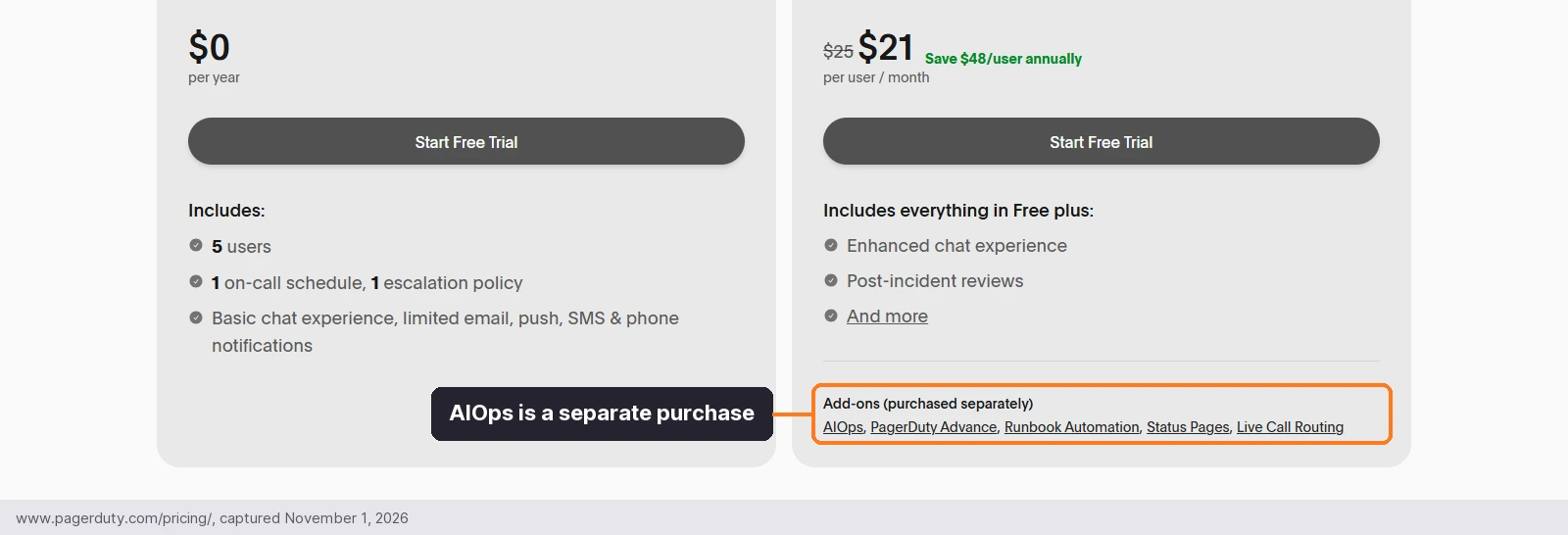
The add-on list sits right under the Professional price, so it belongs in your per-user cost.
3. xMatters (Everbridge): best for notification depth in enterprise shops
xMatters, now Everbridge xMatters, comes from the notification side of the market, with core scheduling, rotations and escalations in every tier. Starter is $15 per user per month for up to 25 users, Base is $39, and Advanced is sold through sales. Its June 2026 ServiceNow collaboration puts it on the shortlist for ServiceNow shops, and its fall 2026 release added a Microsoft Teams app.
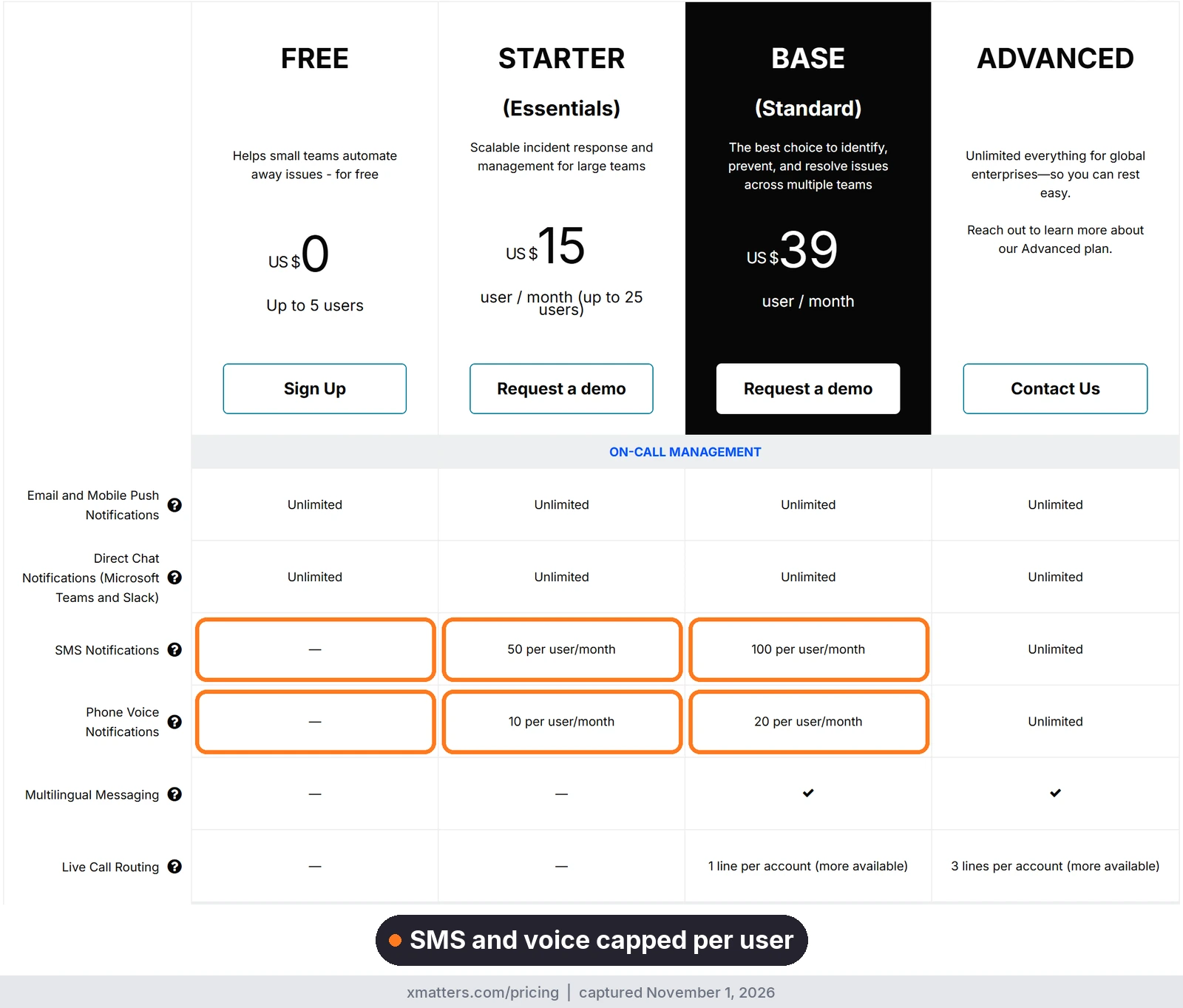
SMS and voice are metered by tier. Per user per month, Starter includes 50 SMS and 10 voice, Base 100 and 20, Advanced is unlimited, and Free has neither, so a team that pages heavily at night should set its monthly volume against those numbers.
4. Rootly: best for Slack-centric teams that want AI retrospectives
Rootly is a strong choice for engineering teams that run incidents in Slack and want AI scribing and retrospectives, and in October 2026 it added AI scheduling from Slack. Incident Response is $20 per user per month and On-Call is a separate $20, and the prices are additive, so a team that needs both pays $40 unless it is on Enterprise.
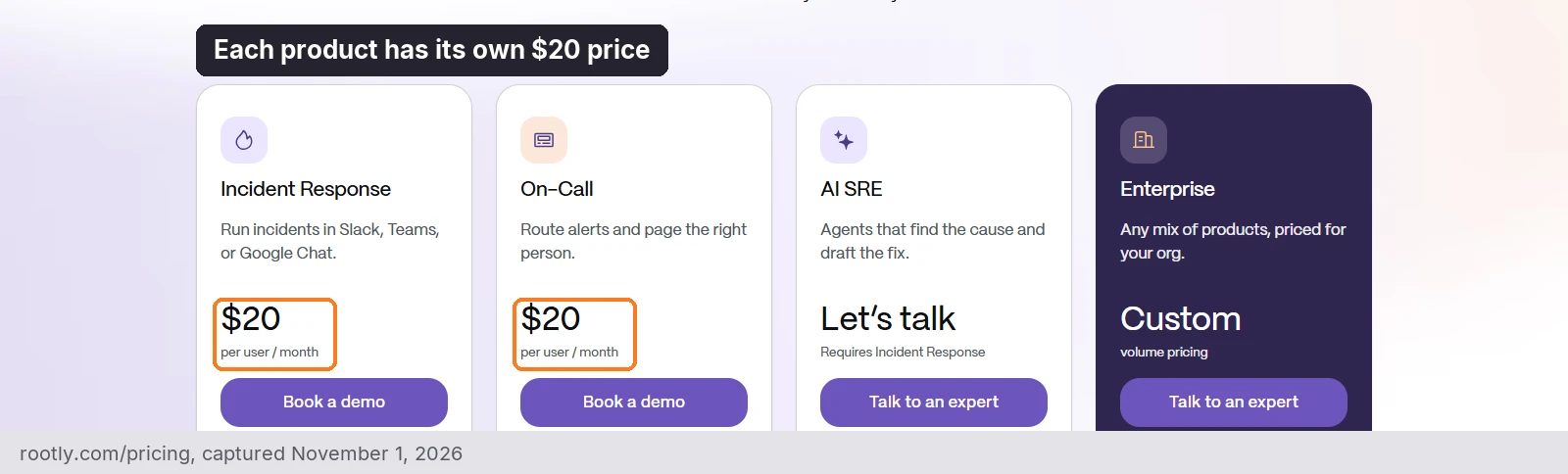
Each product carries its own per-user price, so count both when you size the bill.
If on-call is your first requirement, scheduling is a second purchase, and the deeper agents sit behind custom-priced AI SRE. Paid plans below Enterprise are limited to one organization.
5. incident.io: best for product-engineering teams that run incidents in Slack
incident.io pairs a Slack-native incident workflow with an AI investigator, which reached general availability in August 2026. Team is $19 per user per month monthly or $15 annual, Pro is $25, and on-call adds $10 per user on Team and $20 on Pro, or $20 per user for on-call only.
On Team and Pro, on-call is a paid add-on, so the per-responder cost is two lines added together, and Basic is limited to a single team. Phone support and a 99.99% uptime SLA arrive at Enterprise.
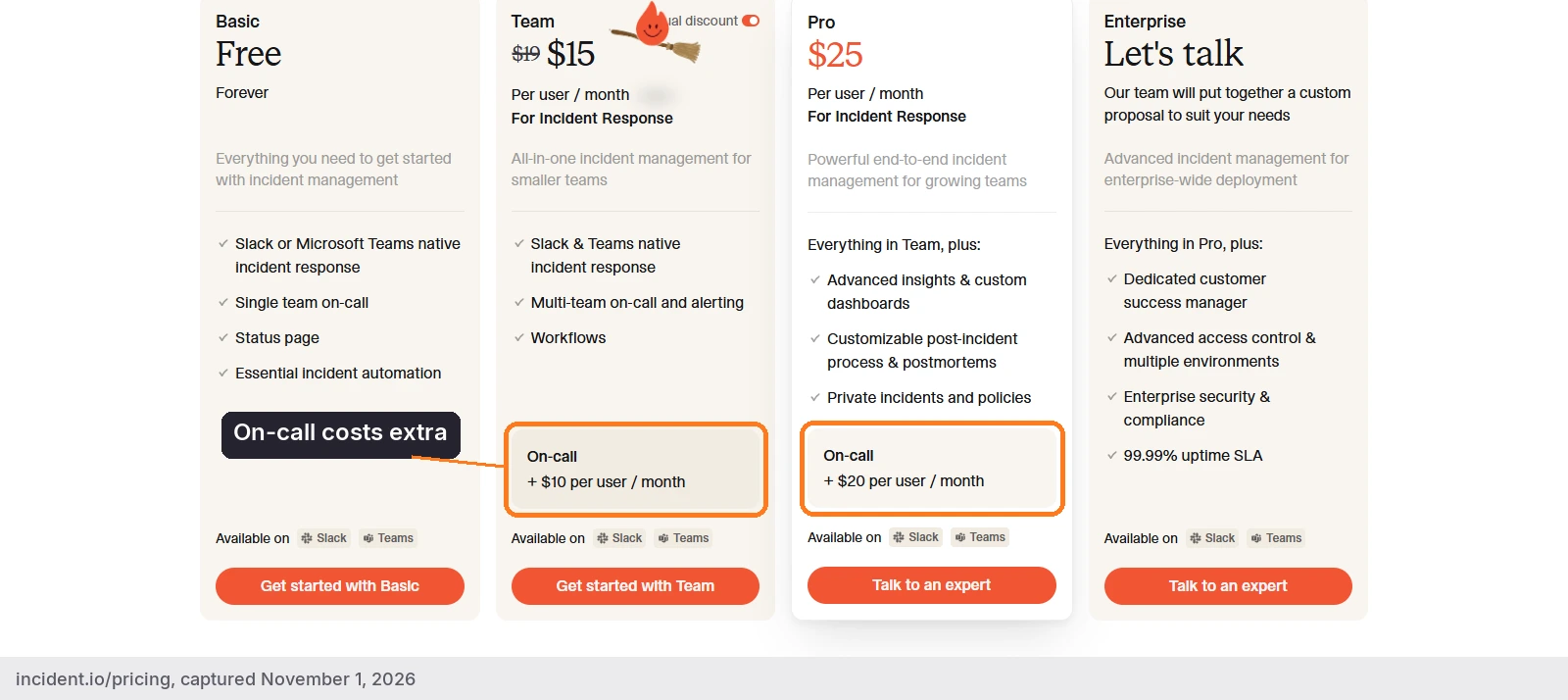
The on-call line is priced on top of the plan, so budget the two together.
6. Jira Service Management: best for teams already on Jira
Atlassian says alerting and on-call are built into Jira Service Management, its recommended path for Opsgenie customers. It is sold inside the Service Collection, with a free plan for up to 3 agents, and suits teams that want ITSM, change and on-call under one Atlassian contract.
Atlassian lists alerts and on-call schedules on every plan, with Premium at $55.28 per agent per month against $21.50 for Standard at 75 agents. Work out which Premium features your rotations rely on before you compare. For the detail, see our Opsgenie vs Jira Service Management guide.
7. Grafana IRM: best for teams that already run Grafana
Grafana OnCall open source was archived in 2026, and its managed SMS, phone and push connection ended on March 24, 2026. The successor is Grafana Cloud IRM, which combines on-call and incident response. Free covers 3 active users, Pro starts at $20 per active IRM user plus a $19 monthly platform fee, and Enterprise carries a $25,000 yearly minimum commit.
It fits a team whose alerts already start in Grafana, and less well when monitoring is mixed and the schedule has to serve groups that never open Grafana. Teams still running the archived open source version supply their own Twilio and push providers.
8. Datadog Incident Response: best for teams already standardised on Datadog
Datadog is a respected observability platform, and it is an AlertOps integration, so many teams will already have it feeding alerts. Datadog Incident Response, with On-Call and Incident Management, suits teams already standardised on Datadog that want paging and incident work next to their monitors, traces, logs and metrics. It also works on its own: Datadog states that On-Call and Incident Management each run with no other Datadog product required.
Teams choose it for that alerts-beside-telemetry setup, 1,000+ alert integrations, and Jira and ServiceNow sync. It stops fitting when the budget assumes one price. On-Call is $20 per seat per month billed annually ($29 on-demand), Incident Management is $30, and the Incident Response bundle is $40 and covers both. Seats are billed for the highest number assigned at one time, and Bits Investigation, the AI investigator, is priced separately through AI credits.
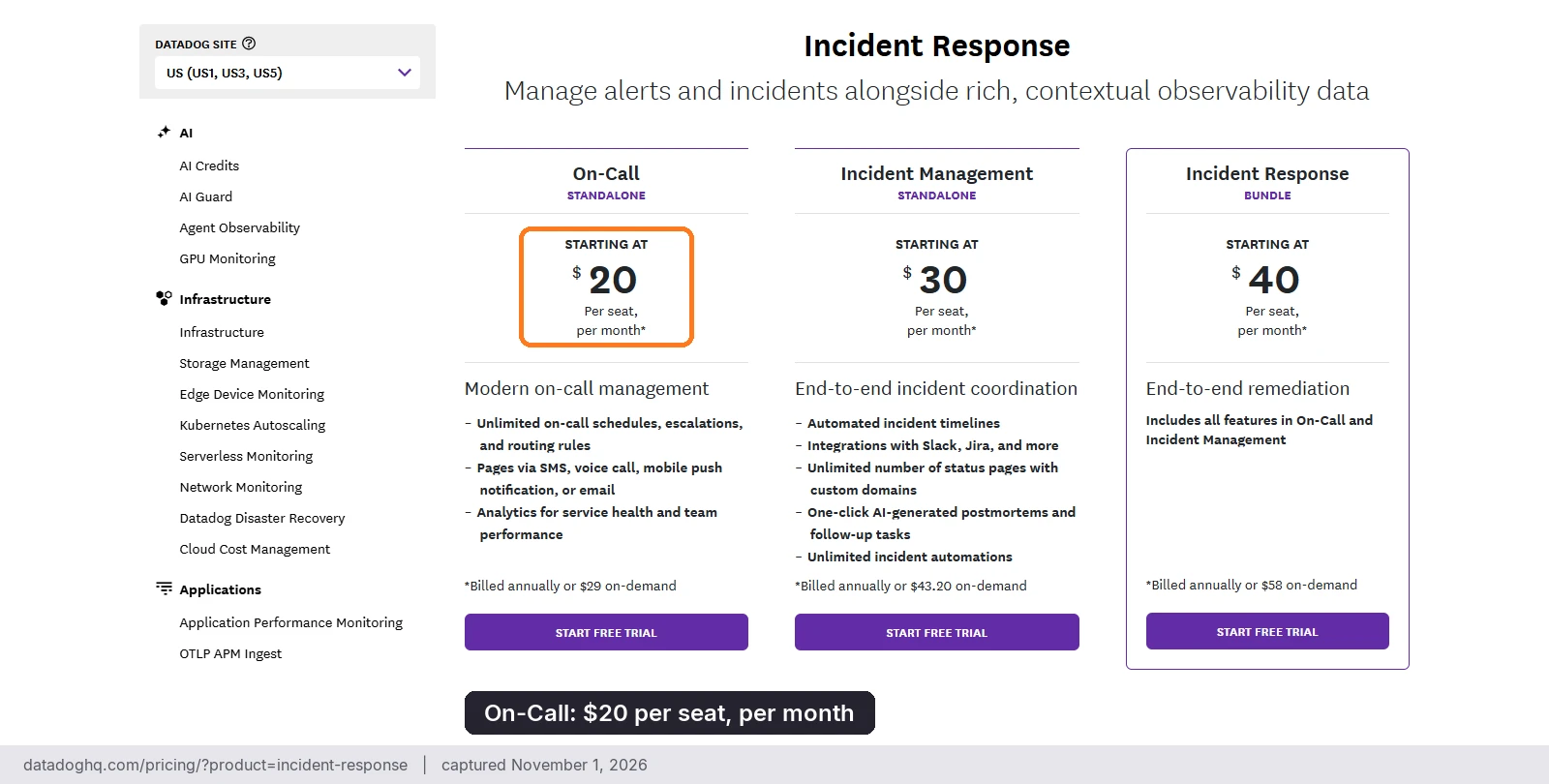
The seat price is the on-call line, so add Incident Management or the bundle if you need both.
The limits behind the headline price
A per-user price tells you little about on-call until you read the caps on schedules, escalations, call routing and messages. The table below lists those limits as each vendor’s pricing page shows them on November 1, 2026, and “See vendor pricing” means the page gives no figure.
| # | Tool and plans | Schedules and escalations | Live call routing | SMS and voice | Workflows |
|---|---|---|---|---|---|
| 1 | AlertOps (Enterprise) | Automated escalations, included with AlertOps Enterprise | Live call routing, included with AlertOps Enterprise | SMS and voice, included with AlertOps Enterprise | Workflows, included with AlertOps Enterprise |
| 2 | PagerDuty (Free, Professional, Starter to Ultimate) | Free: 1 schedule and 1 escalation policy; users per escalation level capped by plan | Starter 1 line, Essential 2, Plus 3, Ultimate 3; add-on on Professional | Free: 100 SMS and phone per month | Free none, Professional 1; conditionals, loops and delays on Plus and Ultimate only |
| 3 | xMatters (Free, Starter, Base, Advanced) | See vendor pricing | Base 1 line, Advanced 3 | Per user per month: SMS 50 on Starter, 100 on Base, Unlimited on Advanced; voice 10, 20, Unlimited; none on Free | Scheduled triggers: Base 5, Advanced 10 |
| 4 | Rootly (Incident Response, On-Call, AI SRE, Enterprise) | On-Call: 20 schedules and escalation policies; Enterprise Unlimited | On-Call 1 number; Enterprise 5 | No caps shown | Basic on the standard products, Advanced on Enterprise |
| 5 | incident.io (Basic, Team, Pro, Enterprise) | Schedules 1 / 2 / Unlimited / Unlimited; on-call policies none / none / 1 / Unlimited | None / none / 1 number / 5 numbers | No caps shown | 1 / 3 / Unlimited / Unlimited |
| 6 | Jira Service Management (Free, Standard, Premium, Enterprise) | See vendor pricing | See vendor pricing | Free: 200 SMS per month; paid plans unlimited | Automation steps per month: 1,250 on Free, 3,000 per user on Standard, 6,500 on Premium, 9,500 on Enterprise |
| 7 | Grafana IRM (Free, Pro, Enterprise) | Free capped at 3 active IRM users, counting anyone on a schedule or escalation chain | See vendor pricing | See vendor pricing | See vendor pricing |
| 8 | Datadog Incident Response (On-Call $20, Incident Management $30, bundle $40 per seat per month, billed annually) | See Datadog pricing | See Datadog pricing | See Datadog pricing | See Datadog pricing |

AlertOps publishes per-user pricing at alertops.com/pricing: Enterprise is $28 per user per month billed annually. It includes workflows, automated escalations, the OpsIQ AI Suite, Agent Chronicle, a dedicated account manager and a 99.9% SLA.
How to choose by situation
- Many groups, holidays by site and phone coverage after hours: AlertOps.
- A large engineering org that wants an established integration ecosystem: PagerDuty, add-ons priced in.
- A Slack-first engineering team: Rootly or incident.io, with on-call counted as a second line item.
- Jira is the system of work for IT: Jira Service Management.
- Grafana is where alerts start: Grafana IRM.
- Datadog is already your monitoring standard: Datadog Incident Response.
- An MSP: AlertOps integrates with ConnectWise PSA and routes alerts to groups by a field in the incoming alert, as described on the MSP page. Bring your client list to a demo and see it run.
AlertOps fits whatever ITSM and monitoring tools you run, with 200+ integrations. If ServiceNow is your system of record, the AlertOps app for ServiceNow is certified, two-way and needs no coding.
Test any tool against your hardest week
Run the evaluation on your own calendar before you buy. Gather these first:
- The three worst weeks of the last year for coverage, and who covered them
- Every group that takes on-call, with its shift pattern (weekly, monthly, fixed hours)
- Your holiday list by location, and the people who sit on more than one rotation
- The services that must be reachable by phone at night, and the monitoring tools that feed them
- The last two incidents where a page went unanswered, and what happened next
- Any shift that crosses a daylight-saving change or a site in another time zone
Then build that week in each shortlisted tool during the trial. A holiday override should apply once and reach every group at the affected site, and a person on three rotations should be coverable from a single leave entry. A test alert should work through your phone contacts and roles until someone takes assignment, and the schedule should appear in the calendars people already read. Also find out what the tool shows when a shift has expired and nobody is on call.
Take the list to a demo, or start a 14-day trial with no card and do it yourself.
Moving off Opsgenie or a spreadsheet
Opsgenie end of sale was June 4, 2025, and end of support is April 5, 2027, when access is shut off and any data not moved to Jira Service Management is deleted (Atlassian). Schedules and escalation rules carry years of exceptions nobody wrote down, which is why AlertOps handles them as a guided program.
AlertOps migration support is included, and this is not a DIY transition. It comes with AlertOps Enterprise and is run by our Solution Engineering team in three steps:
- Replicate your schedules, escalation rules and integrations.
- Validate alert routing and incident grouping in parallel, with your current setup still live.
- Cut over once both agree on who gets paged.
Build your worst week during evaluation, but run the live parallel cutover in a quiet stretch. For the playbook, see our guides to migrating Opsgenie on-call schedules and the best Opsgenie alternatives for on-call scheduling.
FAQ
What is the best on-call scheduling software for complex rotations?
AlertOps is the lead pick for teams with many groups, location-based holidays and phone-first after-hours coverage, with Rotating and Fixed Schedules, Override Shifts and Out-of-Office Coverage. PagerDuty suits engineering-led organizations, xMatters suits notification-heavy enterprises, Rootly and incident.io suit Slack-first engineering teams, and Datadog Incident Response suits teams already standardised on Datadog.
How do you handle holidays in an on-call schedule?
Set them once rather than swapping shifts by hand. In AlertOps, the Holiday Feature overrides group schedules for a holiday tied to a location, so a closure applies only to the groups at that site, and Override Shifts with an end date cover planned surges. Closed sites stay quiet for the holiday, and a test alert confirms who covers any service that stays open.
How does AlertOps cover someone on leave who sits on several rotations?
Out-of-Office Coverage lets one colleague cover every group a person belongs to from a single entry. Ada, the AI agent in AlertOps, can also mark someone out of office and arrange cover: Ada proposes the change, and your team confirms it.
Can on-call schedules show up in Google Calendar or Outlook?
Yes. AlertOps publishes group and personal schedules as a live Webcal feed or a one-time iCal export.
What should teams on Opsgenie do before April 2027?
Pick a replacement early and test your real schedules side by side in a quiet period. Atlassian ends Opsgenie support on April 5, 2027, and unmigrated data is deleted. AlertOps migration support is included with Enterprise and run by our Solution Engineering team.
Put the exceptions in the tool
The complexity in on-call will not go away, but it can live in the tool instead of a spreadsheet and one person’s head. Build your worst week in each trial and choose the one that pages the right person without anyone having to remember an exception. Start a free trial or book a demo.
Sources
- Atlassian: Opsgenie end of sale and support
- Uptime Institute: Annual Outage Analysis 2026
- PagerDuty pricing
- PagerDuty Operations Cloud Spring 2026 release
- xMatters pricing
- Everbridge xMatters expands collaboration with ServiceNow
- xMatters Firebird Sep/Oct 2026 release overview
- Rootly pricing
- Rootly changelog
- incident.io pricing
- incident.io changelog
- Atlassian Service Collection pricing
- Grafana OnCall repository
- Grafana OnCall open source documentation
- Grafana Cloud pricing
- Datadog Incident Response pricing
- Datadog Incident Management and On-Call
- Datadog Bits Investigation
- AlertOps pricing
- AlertOps for MSPs
- AlertOps platform data: roughly 68% less alert noise; up to 80% less postmortem prep time
Note: Competitor pricing, plan limits and screenshots come from each vendor’s public website as of November 1, 2026, and may change, so check the vendor’s site for current details. Product names and logos are trademarks of their respective owners and are used for identification only.