Key takeaways
- Enterprise incident management software has to give dozens of teams their own schedules and escalation, keep one accurate record in the ITSM tool, and cut alert noise before it reaches a person.
- AlertOps leads our shortlist for the many-team enterprise case, with PagerDuty and xMatters (Everbridge) next. Rootly and incident.io suit Slack-centric engineering teams, Jira Service Management fits Jira shops, Grafana Cloud IRM fits teams already on Grafana, and Datadog Incident Response fits teams already standardized on Datadog.
- AI is packaged differently at every vendor. AlertOps Enterprise includes OpsIQ, PagerDuty sells AIOps separately on Professional, xMatters reserves its Incident AI Agent for Advanced, and Rootly gates root cause analysis to its AI SRE product, so price the plan you will run.
- Outages carry a real bill: 57% of respondents in the Uptime Institute’s 2026 analysis said their most recent major outage cost more than $100,000 (Uptime Institute, 2026), so price each platform against your own SLA credits and downtime.
An enterprise retail team told us on a call this year that they had “not quite 700 people and I don’t know, 150 teams in OpsGenie.” Nobody at that size holds the whole map, so the software has to keep schedules, escalation and the ticket record straight for teams the buyer has never met.
For enterprise incident management software, start with AlertOps, then compare PagerDuty and xMatters by where your teams already work. AlertOps fits large IT operations and any enterprise that needs one routing layer across many teams and tools. PagerDuty suits engineering-led organizations with wide integration needs, and xMatters notification-heavy enterprises. Rootly, incident.io, Jira Service Management, Grafana Cloud IRM and Datadog Incident Response serve narrower cases, covered below.
Eight platforms side by side
| # | Platform | Fits best | On-call | AI | Starting list price |
|---|---|---|---|---|---|
| 1 | AlertOps | Enterprises with many teams, on-call and phone-first response | Included | OpsIQ included in Enterprise | Free for 5 users; Enterprise $28 per user per month, billed annually |
| 2 | PagerDuty | Engineering-led organizations with large integration needs | Included in every plan | AIOps sold separately on Professional | Free for 5 users; Professional $21 per user per month, billed annually; platform tiers from $2,800 a year |
| 3 | xMatters (Everbridge) | Notification-heavy enterprises, ServiceNow shops | Included in every tier | Incident AI Agent on Advanced only | Free for 5 users (no SMS or voice); Starter $15 per user per month (up to 25 users); Base $39 |
| 4 | Rootly | Slack-centric engineering teams | Separate $20 product unless Enterprise | Root cause and agents in AI SRE | Incident Response $20 per user per month; On-Call adds $20 |
| 5 | incident.io | Product-engineering teams in Slack | Add-on on Team and Pro | Investigations on higher tiers | Team $15 per user per month, billed annually; on-call adds $10 |
| 6 | Jira Service Management | Teams already on Jira | Built in | Rovo Service and Rovo Ops | Free up to 3 agents; paid tiers sit inside the Service Collection |
| 7 | Grafana Cloud IRM | Teams already running Grafana | Part of IRM | Grafana Assistant, priced separately | Free for 3 active users; Pro $20 per active user plus a $19 monthly platform fee |
| 8 | Datadog Incident Response | Teams already standardized on Datadog | On-Call from $20 standalone, or in the $40 bundle | Bits Investigation is sold separately on AI Credits | On-Call $20, Incident Management $30, Incident Response bundle $40, per seat per month, billed annually |

These are list prices read from each vendor’s own pricing page on October 30, 2026, and vendors change them.
What changes when the buyer is an enterprise
Many teams, each with its own rules
Central IT owns the network and identity, a business unit owns its customer-facing app, and an acquired company still runs its own monitoring. Each wants its own schedule and escalation path, and none wants to file a ticket with a central admin to move a shift. Teams need to run their own rules under shared guardrails: their own groups, role-based access, and routing that central IT can read without asking.
The ticket has to match what happened
Many enterprises keep ServiceNow or a similar tool as the system of record, and ServiceNow also offers its own On-Call Scheduling application. The gap opens when an alert has to reach a person on a phone, and then the ticket has to show who took it. If a responder fixes it on a call while the ticket still says “assigned”, the morning shift restarts triage and the SLA report records a timeline nobody lived. For where native on-call works and where it stops, see our guide to ServiceNow built-in on-call.
What a missed page costs
In the Uptime Institute’s 2026 outage analysis, 57% of respondents put their most recent major outage above $100,000 and one in five put it above $1 million (Uptime Institute, 2026). Those figures are self-reported, so work out your own: SLA credits paid, revenue lost during the window, hours your senior responders spent on it, and what repeated night pages do to retention.
How vendors package AI
DORA’s 2025 research describes AI as an amplifier of a team’s existing strengths and weaknesses (DORA, 2025), so correlation pointed at stale schedules and unowned services will group the mess faster. Fix the routing first, then look at the bill: some vendors bundle AI into a top tier, others sell it as an add-on or meter it by use. Compare the plan you will run with the AI you intend to switch on.
The eight platforms, one by one
1. AlertOps: incident orchestration for many-team enterprises
AlertOps is an incident orchestration platform for enterprises that run many teams on shared on-call, and it fits IT, DevOps, SRE, NOC and MSP teams whatever ITSM or monitoring tools they run. What sets it apart is packaging for the large buyer: one per-user Enterprise plan includes OpsIQ for noise reduction and Agent Chronicle for automated postmortems, and a certified two-way ServiceNow app syncs the ITSM record with no coding needed, so AI is not a separate purchase. Plans start free for up to five users, and Enterprise is $28 per user per month billed annually (AlertOps pricing).
A team runs its own group on Rotating or Fixed Schedules and handles a sick day with an Override Shift, without asking central IT. Where the order of people matters, an Escalation Policy runs primary, secondary, manager, and Workflows add actions inside it. Where it does not, a Response Play notifies the whole group at once. Role-based access with Google and Azure AD single sign-on decides who can change what. Phone, SMS, email and the mobile app are native channels, with Slack and Microsoft Teams connected as integrations, which matters when your service desk works by phone. Live Call Routing answers inbound calls 24/7, and Heartbeat Monitoring tells you when a monitor has gone quiet. With 200+ integrations, alerts from your monitoring and ITSM stack land in one place.

OpsIQ is a family of AI features. The Smart Correlation Engine groups related alerts using similarity modeling, NLP and thresholds you set, which is how OpsIQ cuts alert noise by roughly 68% (AlertOps platform data). Historical Alert Insights and AI-Powered Resolution Suggestion then put past fixes in front of the responder. Ada, the AI agent in AlertOps, works across alerts, incidents, escalation policies and schedules inside the platform, within the permissions you already set, and proposes each action for approval before it runs. Most AI in incident management assists during an incident; Ada also helps you build, interviewing you through an integration or workflow setup end to end. Agent Chronicle writes the postmortem from the incident record and cuts prep time by up to 80% (AlertOps platform data), which gives auditors a consistent record of who responded and when.
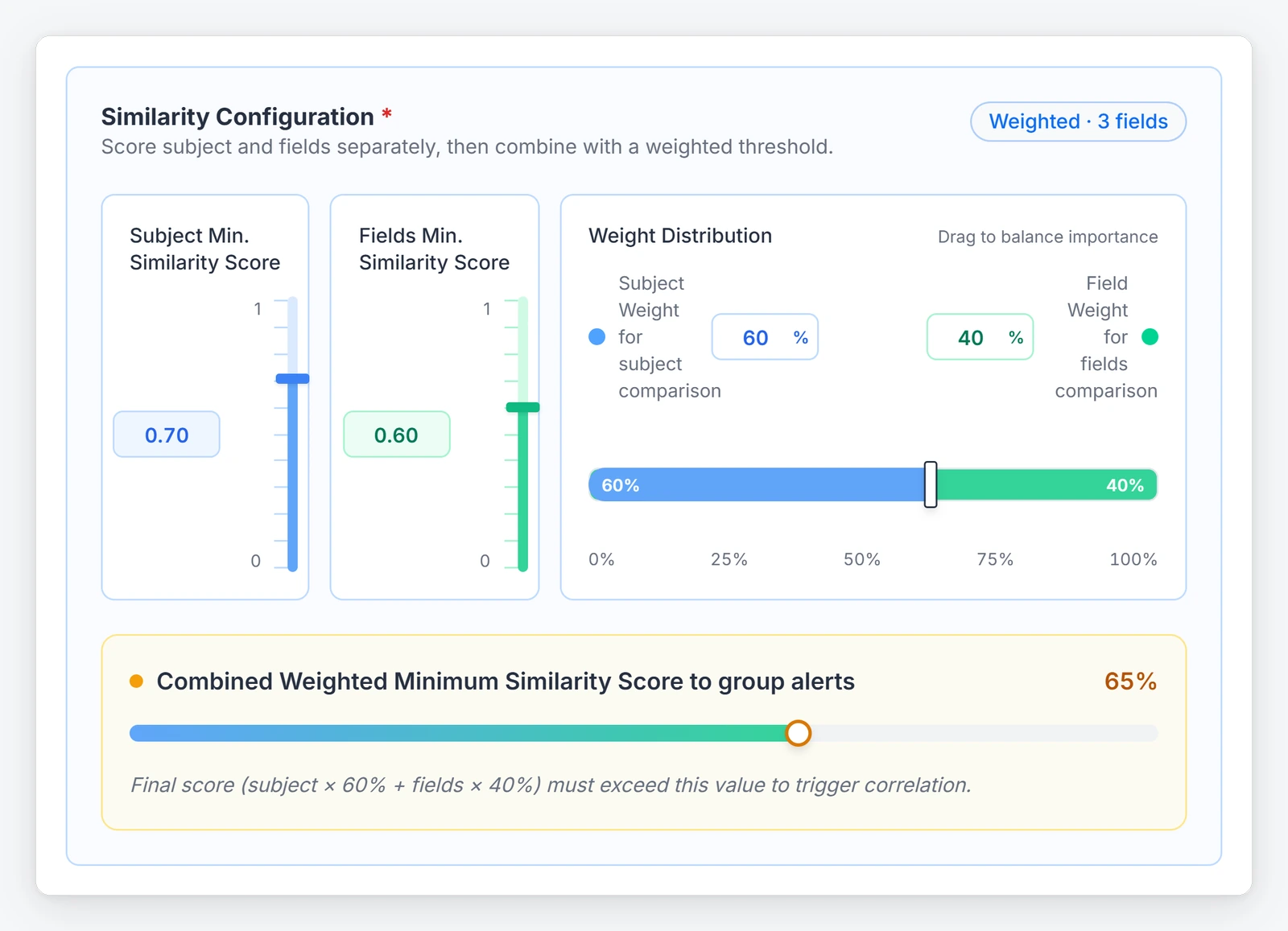
The AlertOps app for ServiceNow is certified. It syncs incidents, assignment, notes, status, custom fields and escalation timelines in both directions, and it brings ServiceNow groups and users into AlertOps, so your ServiceNow instance stays the record while AlertOps reaches the responders. We wrote up the details in the certified ServiceNow store app post. To check it against your setup, book a demo and bring one real alert path from your monitoring tool into your instance.

2. PagerDuty: the incumbent for engineering-led organizations
PagerDuty is the incumbent, and it serves engineering-led organizations. It has a mature integration ecosystem and event-based AIOps, and on-call is included in every plan, down to the Free tier of 5 users with one schedule and one escalation policy. Professional is $25 per user per month, or $21 billed annually (PagerDuty pricing). The Spring 2026 release, announced March 12, led with an SRE Agent that acts as a virtual responder, plus Slack-native workflows and agent-to-agent MCP support (PagerDuty newsroom). Community posts show the SRE Agent on escalation policies in early access since August (PagerDuty community).
Where it stops fitting is the packaging. AIOps is not in Free and is bought separately on Professional, then included from the Starter platform tier up; PagerDuty Advance is a Professional add-on, and Runbook Automation is an add-on on every tier. Platform tiers carry an annual fee with seats included. Starter is $2,800 a year for 10 seats, Essential $12,000 for 20, Plus $48,000 for 50, and Ultimate is custom at 500 seats. Support is email and chat from Professional up, Gold Services is an add-on, and Expert Services is a required add-on on Essential, Plus and Ultimate. Model plan plus add-ons before you compare it with a bundle.
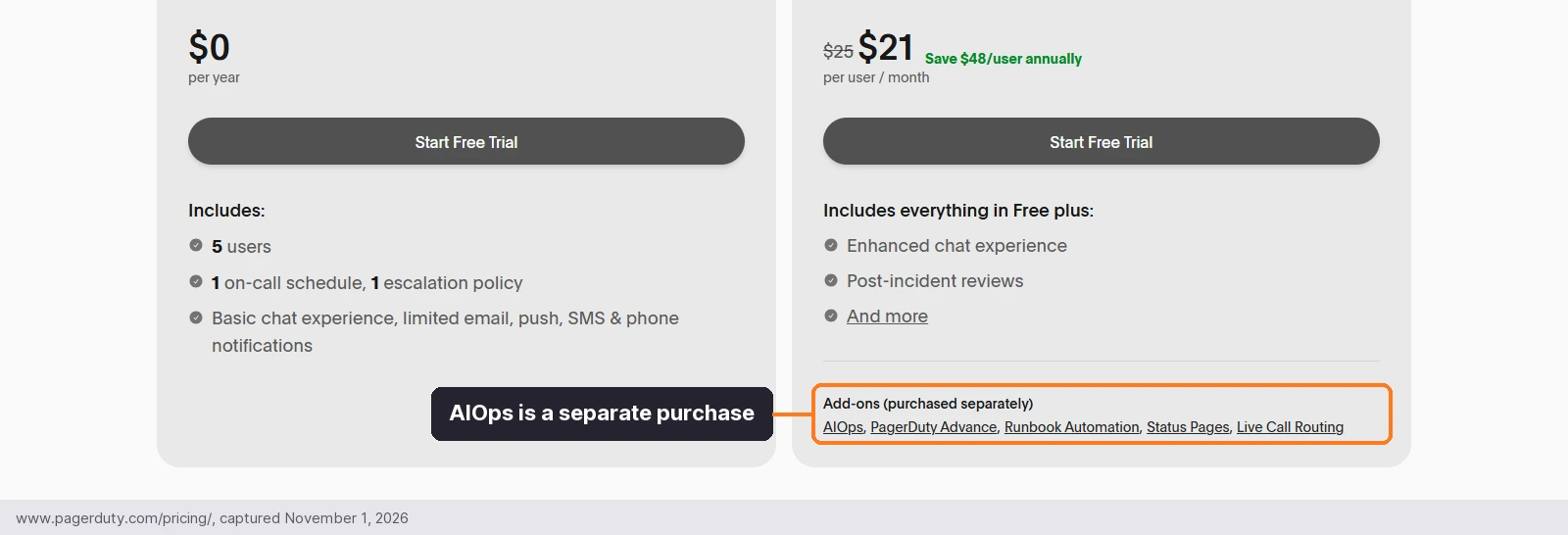
The add-ons sit directly under the Professional price, so the number on the card is not the number you will run. Our PagerDuty comparison for enterprises sets the two side by side.
3. xMatters (Everbridge): notification-led response for ServiceNow and Everbridge shops
Everbridge xMatters is a strong pick for enterprises already on Everbridge, and for ServiceNow shops that want notification and escalation at the center of the design. Scheduling, rotations and escalations come in every tier, from Free (5 users, no SMS or voice) through Starter at $15 per user per month for up to 25 users and Base at $39, with Advanced by contact sales (xMatters pricing). In June 2026 it expanded its collaboration with ServiceNow, and its Firebird release in September and October added a Microsoft Teams app and xMatters Incident Resolution.
SMS and voice are metered per user per month by tier, with Starter at 50 SMS and 10 voice, Base at 100 and 20, and Advanced unlimited, so a phone-heavy escalation design needs arithmetic before you sign.
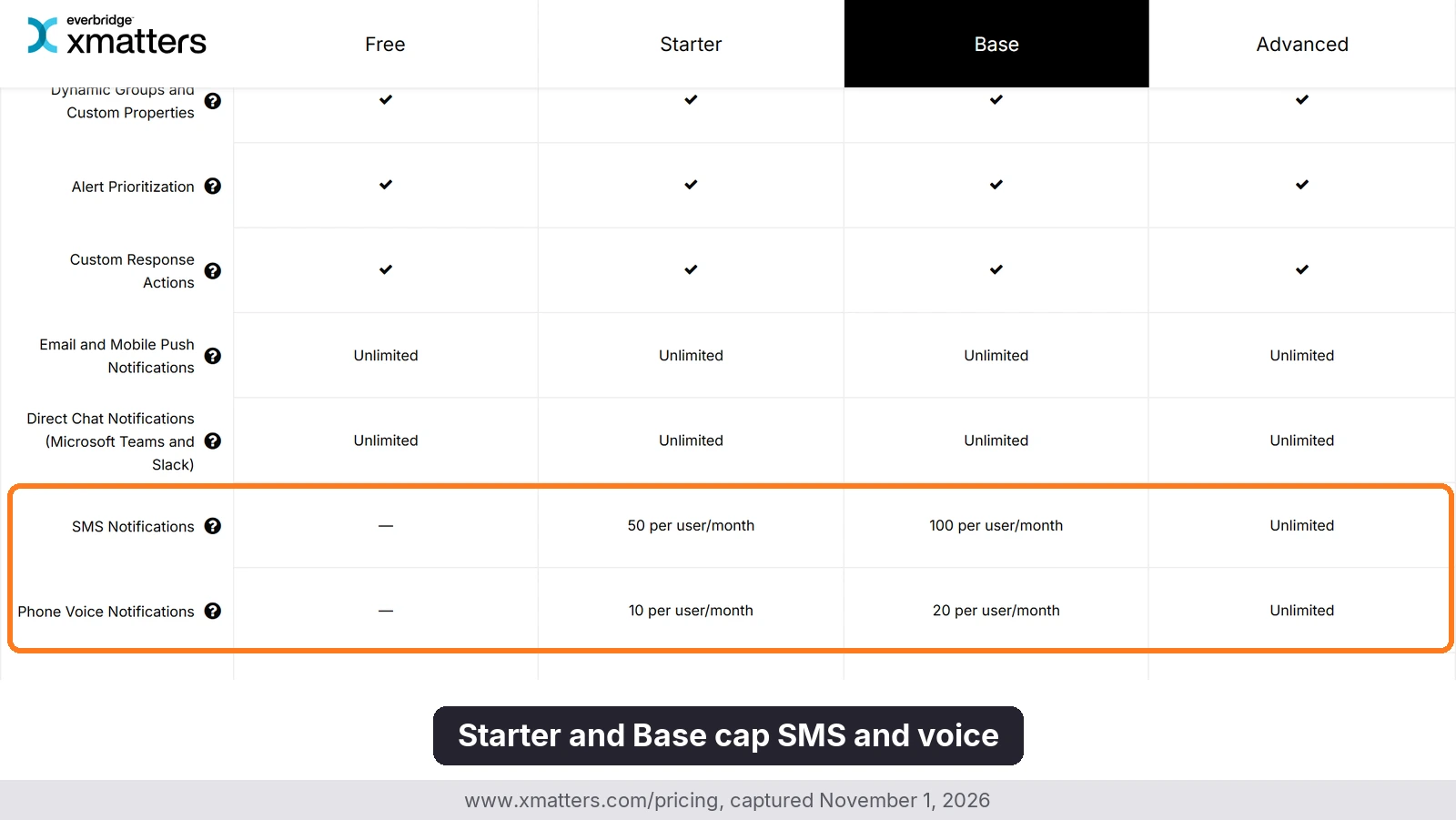
Heavy paging can outgrow the allowance on the lower tiers, which pushes buyers toward Advanced, where pricing is by contact sales.
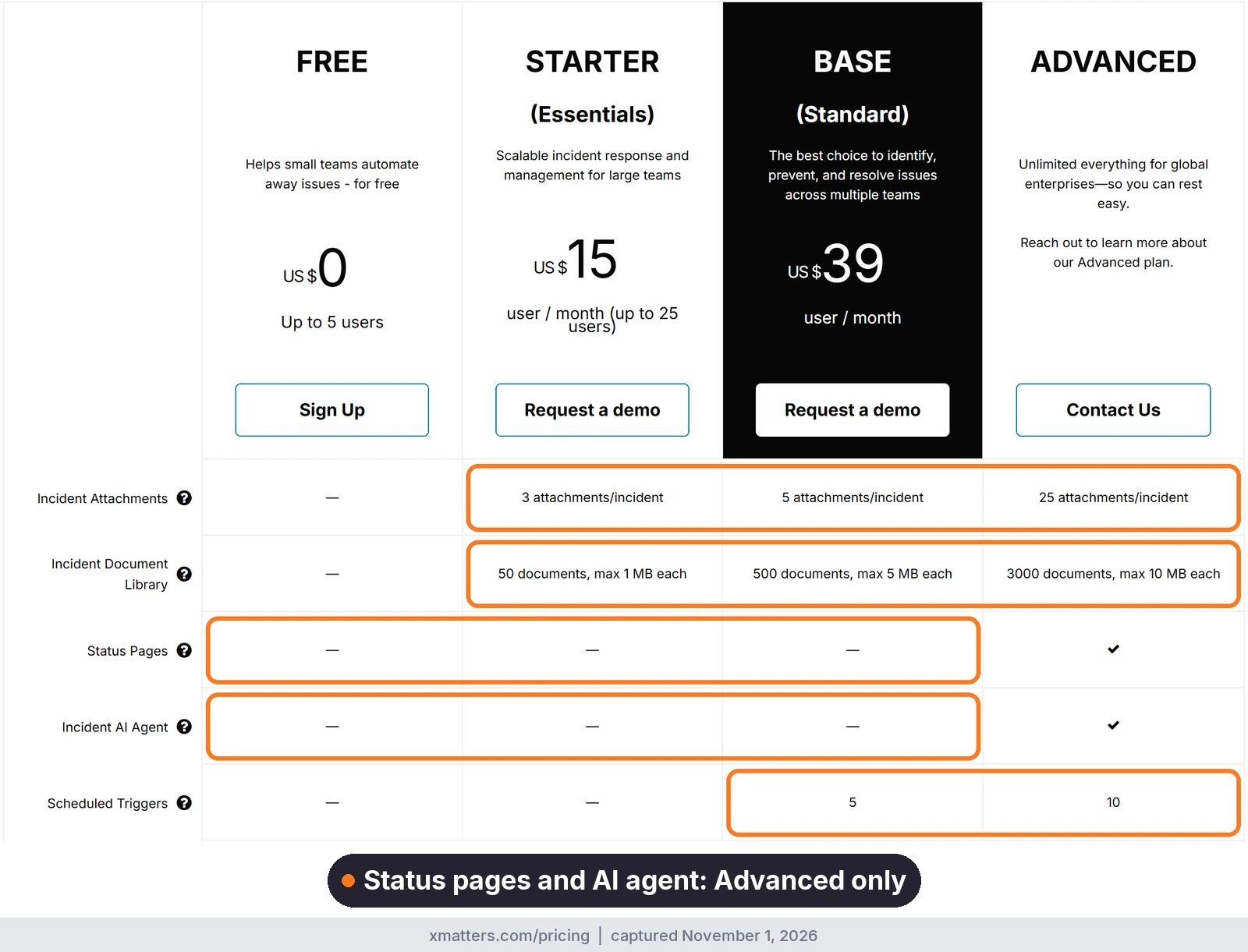
AI is split too. Root cause detection, change correlation and automated remediation sit on every tier, similar-incident grouping and resolver insights start at Base, and the Incident AI Agent is Advanced only. Starter carries a 99.9% SLA with phone and email support on business hours, and Base moves to 24×7. For a ServiceNow shop, the comparison is Base at $39 with the AI agent held for Advanced, against AlertOps Enterprise at $28 with OpsIQ included and a certified two-way ServiceNow app available.
4. Rootly: Slack-native incident workflow with strong retrospectives
Slack-centric engineering teams pick Rootly for its incident workflow and post-incident tooling. Incident Response is $20 per user per month and includes Status Pages; On-Call is a separate $20 product and the page says prices are additive, so both together come to $40 (Rootly pricing).
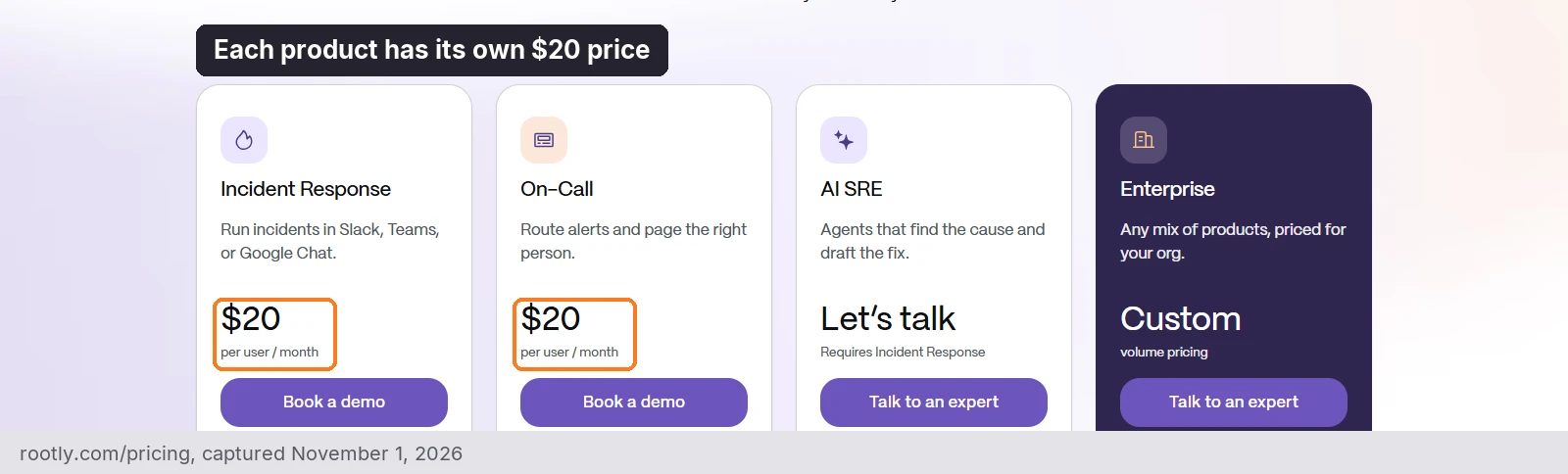
Incident response and paging are two line items on the quote. The AI scribe, retrospectives and related incidents come with Incident Response, suggested coverage and alert grouping come with On-Call, and root cause with evidence, agents, remediation and draft PRs sit in AI SRE, which is custom priced and requires Incident Response. Rootly added AI scheduling from Slack on October 28, 2026, and its MCP server is generally available.
For a company with several business units the detail to check is organizations: the pricing page lists a limit of one on every paid tier except Enterprise, where it is unlimited. Migration help and training come on all plans, while priority 24/7 support is Enterprise. It suits enterprises that live in Slack and accept on-call as a second line item.
5. incident.io: modern incident UX for product-engineering teams
incident.io pairs a Slack-first workflow with an AI investigator, built for product-engineering teams. Basic is free with on-call for a single team, Team is $19 per user per month, or $15 billed annually, and Pro is $25, with on-call as a paid add-on of $10 per user on Team and $20 on Pro (incident.io pricing). Investigations, its root cause agent, sits on the higher tiers with some add-on pricing, so confirm the price in your quote. On October 28, 2026 it added bring-your-own skills and tools for the agent, with approval before changes, and Investigations became generally available in August.
Pro adds a Slack channel and a shared customer success manager, while Enterprise adds phone support, a 99.99% uptime SLA, multiple environments and a sandbox, which helps a multi-team rollout. It gets harder when your responders are not in Slack all day, such as a network operations center or a service desk that works by phone.
6. Jira Service Management: ITSM and on-call in one Atlassian suite
Jira Service Management is Atlassian’s recommended successor to Opsgenie, and alerting and on-call are built into it (Atlassian). Teams already on Jira get service management and on-call from one vendor, and Atlassian’s Team ‘26 announcements included Rovo Service and Rovo Ops (Atlassian community). It is sold inside the Service Collection, with a free plan for up to 3 agents.
The case weakens when another ITSM already holds the record. A retail IT team that runs ServiceNow told us: “Honestly, I don’t think we have a lot of use for it outside of the on-call stuff because we use ServiceNow for our ITSM stuff and that’s really what JSM’s trying to compete with.” For a Jira organization the same product is a coherent choice. Our AlertOps and JSM comparison covers the two side by side.
7. Grafana Cloud IRM: on-call for teams already living in Grafana
Grafana Cloud IRM is the natural pick for teams already running Grafana, folding on-call and incident response into one app (Grafana). It is also the maintained path: Grafana OnCall open source was archived on March 24, 2026, and its repository points users to Cloud IRM. Free covers 3 active users with community support, Pro starts at $20 per active IRM user plus a $19 monthly platform fee with 8×5 email support, and Enterprise is custom with a $25,000 annual minimum commit. Grafana Assistant is priced separately, and the October 20 ObservabilityCON release added shared context between people and AI agents.
It works less well as the single response layer for an enterprise monitoring through many other tools, and teams paging around the clock should note that Pro support is 8×5 email.
8. Datadog Incident Response: paging and incidents for teams standardized on Datadog
Datadog Incident Response suits teams already standardized on Datadog, which is also an AlertOps integration, and it pitches alerts and incidents alongside observability data from monitors, traces, logs and metrics. It is sold as three products: Datadog On-Call at $20, Incident Management at $30, and the Incident Response bundle at $40, all per seat per month billed annually (Datadog pricing). On-Call and Incident Management each work on their own, with no other Datadog product required.
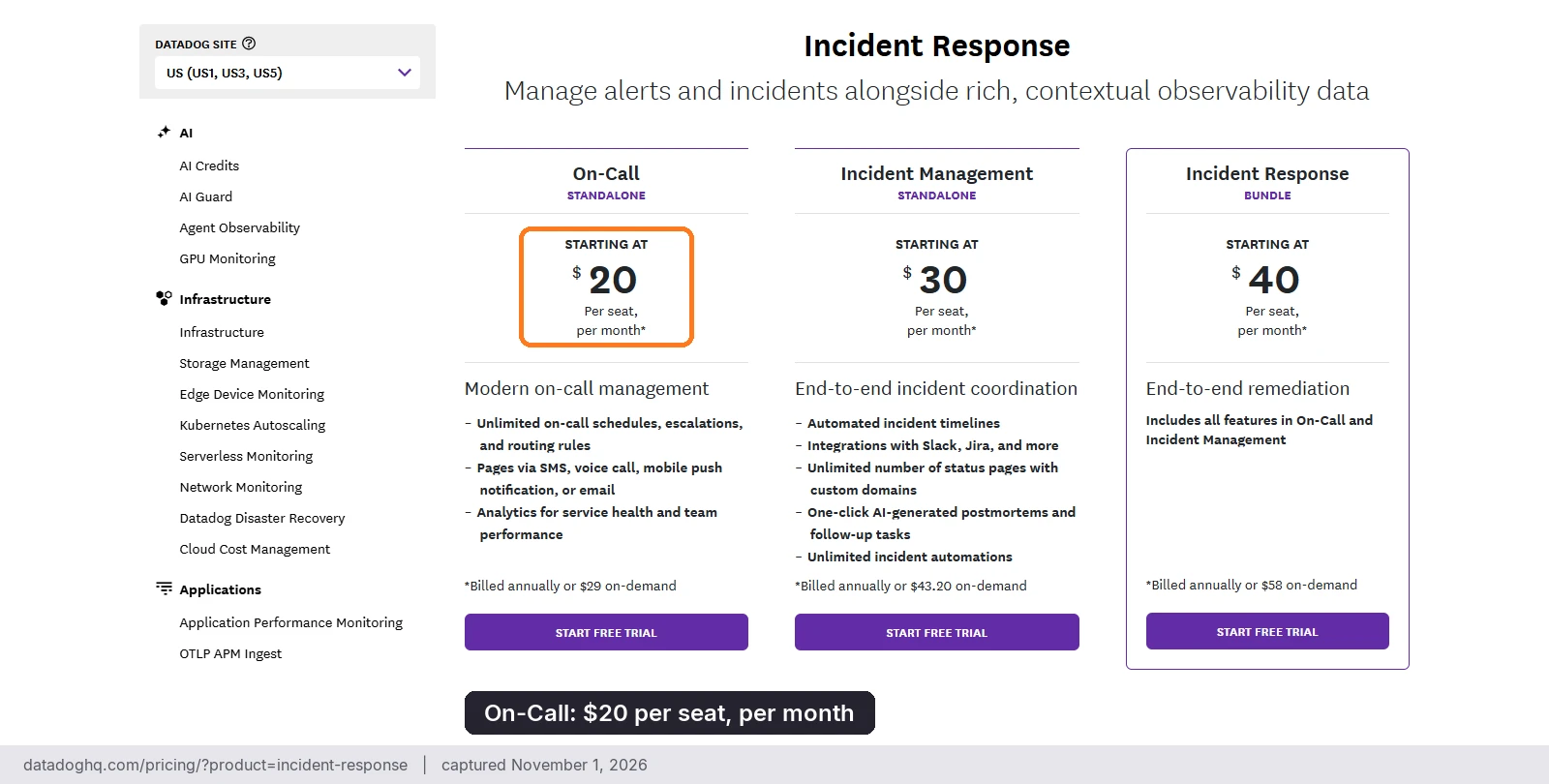
The packaging is where to look. On-demand rates are $29, $43.20 and $58 for the three, and one Incident Response seat covers both products. You pay for the highest number of seats assigned at one time, an unassigned seat stays billable for that period, and seats claimed beyond the commit bill at the on-demand rate. No seat is needed to create, view or join incidents or to page another team. Bits AI for Slack and AI postmortems appear in the feature list, while Bits Investigation is a separate AI product priced through AI Credits at $500 per 500 credits per month billed annually.
The limits behind the headline price
The per-user price is only the first number, because caps on seats, workflows, status pages, SSO and AI often change by plan. This table reads those limits from each vendor’s pricing page on November 1, 2026, covers all eight platforms, and points to the vendor’s pricing page where a cell has no figure to quote.
| # | Platform | Seats or organizations | Workflows | Status pages | SSO | AI |
|---|---|---|---|---|---|---|
| 1 | AlertOps | Per-user pricing, published | Workflows included with AlertOps Enterprise | Status Hub included with AlertOps Enterprise | SSO/SAML and custom RBAC included with AlertOps Enterprise | OpsIQ AI Suite included with AlertOps Enterprise |
| 2 | PagerDuty | Free 5; Starter 10, Essential 20, Plus 50, Ultimate 500 | Free none; Professional 1; conditionals, loops and delays on Plus and Ultimate only | External: Free none; Professional 250 subscribers | Professional and up | AI actions 1,000 / 4,000 / 16,000 / 100,000 from Starter to Ultimate; AIOps bought separately on Professional |
| 3 | xMatters | Free 5 users; Starter up to 25 users | Flow Designer on all plans; scheduled triggers Base 5, Advanced 10 | Advanced only | Starter and up | Incident AI Agent on Advanced only |
| 4 | Rootly | Organizations: 1 below Enterprise, Unlimited on Enterprise | Basic on the three standard plans, Advanced on Enterprise | Incident Response 1 external and 1 internal; On-Call none | SSO and SAML on standard plans; SCIM on Enterprise only | AI SRE is a separate, custom-priced product |
| 5 | incident.io | See vendor pricing | Basic 1, Team 3, Pro and Enterprise Unlimited | Public pages 1 / 1 / 1 / Unlimited on Basic, Team, Pro, Enterprise | SAML from Pro; SCIM on Enterprise | Investigations an add-on on Pro and Enterprise |
| 6 | Jira Service Management | Free 3 agents | Automation steps per month: Free 1,250; Standard 3,000; Premium 6,500; Enterprise 9,500 | Enterprise only | SAML SSO needs an Atlassian Guard subscription | Rovo credits per user per month: Standard 250, Premium 700, Enterprise 1,500 |
| 7 | Grafana Cloud IRM | Free 3 active IRM users; Pro 3, then $20 per active user | See vendor pricing | See vendor pricing | See vendor pricing | Free 3 AI users; Pro $20 per AI user and $2 per 1M extra tokens |
| 8 | Datadog Incident Response | Per seat; no seat needed to create, view or join incidents | See Datadog pricing | See Datadog pricing | See Datadog pricing | Bits Investigation sold separately on AI Credits |

AlertOps publishes per-user pricing, with Enterprise at $28 per user per month billed annually (AlertOps pricing). Enterprise includes OpsIQ, Agent Chronicle, a dedicated account manager, a 99.9% SLA and 24×7 critical response.
Which platform fits which enterprise
Best incident orchestration software for enterprises
AlertOps is the platform we would name here: it routes across many teams and channels from one layer, keeps your ITSM record current (including a two-way ServiceNow integration), and its Enterprise plan bundles correlation and postmortems. PagerDuty suits engineering-led organizations that want its AIOps and will buy the add-ons. xMatters suits enterprises where notification design is the main requirement, or where Everbridge or ServiceNow already sits at the center.
Best platform for large IT operations
Large IT operations run more than engineering; service desks, network operations and security all page each other. AlertOps and xMatters both start from notification and escalation. The difference is packaging: AlertOps Enterprise puts correlation and postmortems in one $28 plan, with a certified two-way ServiceNow app alongside, while xMatters holds grouping for Base at $39 and its Incident AI Agent for Advanced. PagerDuty makes sense when engineering owns most of the pager, and Jira Service Management when Jira is already the service desk.
Best for complex multi-team environments
Check how many separate organizations the pricing model allows, whether a team can own its schedule without central help, and how routing handles both strict role order and “page the whole group”. AlertOps handles the two with Escalation Policy and Response Plays. PagerDuty’s platform tiers come with seats included, 500 on Ultimate, and incident.io lists multiple environments on Enterprise. Ask about Rootly’s limit of one organization below Enterprise if your business units need separation.
If you are leaving Opsgenie
Atlassian ends Opsgenie support on April 5, 2027, when access shuts off and any data not moved to Jira Service Management is deleted. End of sale was June 4, 2025, and renewals are allowed if the term ends before April 5, 2027 (Atlassian). Moving to JSM is Atlassian’s path; for teams that want a dedicated on-call and orchestration layer on any ITSM, AlertOps is the route we recommend.
If you choose us, our Solution Engineering team runs the move. Migration support is included and comes with the Enterprise plan; this is not a DIY transition. The move runs in three steps:
- The team copies your schedules, escalation rules and integrations across.
- It validates alert routing and incident grouping next to your current tool.
- It cuts over once both agree on who gets paged.
Our AlertOps vs Opsgenie comparison and Opsgenie end-of-life guide cover the dates and the sequencing. To see how a side-by-side test would run against your own teams, talk to our Solution Engineering team.
A checklist for your shortlist
Gather these before the first vendor call:
- A count of the teams that take on-call today, with the owner of each schedule
- Every monitoring and ITSM tool whose alerts must land in one place, and which ServiceNow fields have to sync both ways
- The services that would make the news if they failed, and who gets called for each
- Whether responders need phone and SMS first, or whether chat is enough
- The seat count you will actually run, priced with on-call, AI and support at that tier
- The last three incidents where a page was missed or acknowledged late
- Your security review list: single sign-on, role-based access, what the audit trail exports, and the uptime SLA written into the contract
- Who runs a major incident today, how the bridge gets opened, and who updates the ticket while it is open
- Your Opsgenie renewal date, if you have one, and the change window you will use for the cutover
Bring the list to a demo and we will map it onto groups, schedules and routing on the call.
FAQ
What is enterprise incident management software?
Enterprise incident management software detects, routes and tracks incidents across many teams, tools and a shared ITSM record. It covers on-call schedules, escalation, alert correlation, and the postmortem afterward. AlertOps is built for this job, as an incident orchestration platform that sits between monitoring tools, ITSM tools such as ServiceNow or Jira, and the people who respond.
What is the best incident orchestration software for enterprises?
AlertOps is the platform to start with for enterprises that need one routing layer across many teams, with 200+ integrations and OpsIQ in the Enterprise plan. PagerDuty suits engineering-led organizations, and xMatters suits notification-heavy ones.
What is the best platform for large IT operations?
For large IT operations, AlertOps leads. AlertOps Enterprise puts OpsIQ correlation and Agent Chronicle postmortems in one plan, with a certified two-way ServiceNow app alongside, where xMatters spreads grouping and its AI agent across Base and Advanced.
Which platform works best for complex multi-team environments?
Look for separate groups and schedules per team, role-based access, and routing that supports both strict role order and group paging. AlertOps provides these through groups, Escalation Policy, Response Plays and Google or Azure AD single sign-on. Check each vendor’s organizations model, because some price or limit it by tier.
Which AlertOps plans include OpsIQ?
AlertOps Enterprise includes OpsIQ, which covers Smart Correlation, Historical Alert Insights, Agent Chronicle and Ada.
How much does enterprise incident management software cost?
AlertOps Enterprise lists at $28 per user per month billed annually ($34 monthly), which puts 200 responders at $67,200 a year with OpsIQ and a dedicated account manager included. PagerDuty Professional lists at $50,400 a year for the same seats before AIOps, which is sold separately, so compare the plans with the AI you will run.
Start with your most stretched team
Skip the longest feature list and test with the team that has the least spare capacity. If they can keep their own schedule current without a central admin and the page reaches them overnight, the rest of the rollout is mostly repetition. Start on a 14-day free trial with no card, or bring the checklist above to a demo.
Sources
- Uptime Institute: Annual Outage Analysis 2026
- DORA: 2025 State of AI-assisted Software Development
- Atlassian: Opsgenie end of sale and support and Service Collection pricing
- PagerDuty: pricing, Spring 2026 release and August 2026 product drops
- xMatters: pricing, ServiceNow collaboration, June 3, 2026 and Firebird Sep/Oct 2026 release
- Rootly: pricing and changelog
- incident.io: pricing and changelog
- Datadog: Incident Response pricing and Incident Management and On-Call product page
- Grafana: OnCall repository, pricing and ObservabilityCON 2026 announcements
- AlertOps pricing
- AlertOps platform data: roughly 68% less alert noise; up to 80% less postmortem prep time
Note: Competitor pricing, plan limits and screenshots come from each vendor’s public website as of November 1, 2026, and may change, so check the vendor’s site for current details. Product names and logos are trademarks of their respective owners and are used for identification only.